DataDog/KubeHound — công cụ cho lập trình viên — đang có 1.0k sao GitHub trong nhóm Developer Tools. Tool for building Kubernetes attack paths
Tóm tắt dựng từ metadata GitHub của chính dự án — chưa có bài review TopGit. Trang sẽ tự động cập nhật khi bài review đầy đủ được xuất bản.
VÌ SAO CHƯA CÓ REVIEW
TopGit viết bài đầy đủ cho repo có nhiều sao nhất và được yêu cầu nhiều nhất. Trang này là snapshot trong thời gian chờ — xem README gốc ở tab READ ME.
If downloading the releases via a browser you must run e.g xattr -d com.apple.quarantine kubehound before running to prevent MacOS blocking execution
With homebrew
KubeHound is available in homebrew-core and you can simply run
brew update && brew install kubehound
kubehound should now be in your path.
From source
If you wish to build KubeHound from source, you will need to checkout a tag before building
git clone https://github.com/DataDog/KubeHound.git
cd KubeHound
git checkout $(git describe --tags --abbrev=0)
make build
KubeHound binary will be output to ./bin/build/kubehound.
Run
Select a target Kubernetes cluster, either:
Using kubectx
Using specific kubeconfig file by exporting the env variable: export KUBECONFIG=/your/path/to/.kube/config
Then, simply run the kubehound binary:
# If you installed it from brew, it is in your path
kubehound

# If you installed it from release, it should be were you downloaded it
./kubehound

# If you installed it from source, it should be in the <repo_path>/bin/build folder
./bin/build/kubehound
For more advanced use case and configuration, see
advanced configuration: all the settings available through the configuration file.
common operations: the commands available from the KubeHound binary (dump / ingest).
common errors: troubleshooting guide.
Note:
KubeHound can be deployed as a serivce (KHaaS), for more information.
Using KubeHound Data
To query the KubeHound graph data requires using the Gremlin query language via an API call or dedicated graph query UI. A number of fully featured graph query UIs are available (both commercial and open source), but we provide an accompanying Jupyter notebook based on the AWS Graph Notebook,to quickly showcase the capabilities of KubeHound. To access the UI:
Visit http://localhost:8888/notebooks/KubeHound.ipynb in your browser
Use the default password admin to login (note: this can be changed via the Dockerfile or by setting the NOTEBOOK_PASSWORD environment variable in the .env file)
Follow the initial setup instructions in the notebook to connect to the KubeHound graph and configure the rendering
Start running the queries and exploring the graph!
Example queries
We have documented a few sample queries to execute on the database in our documentation. A specific DSL has been developped to query the Graph for the most basic use cases (KubeHound DSL).
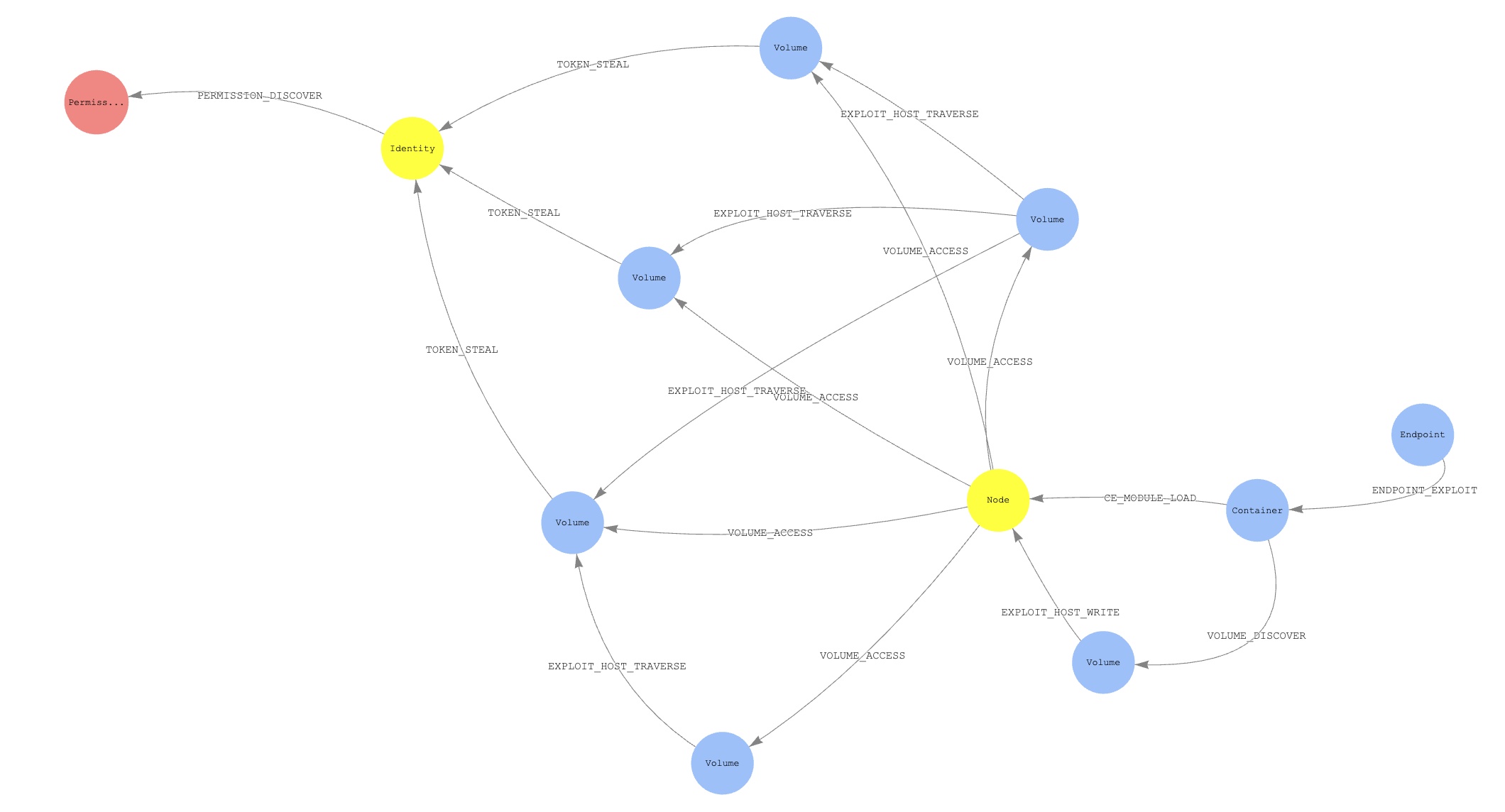
Sample Attack Path
Sample Data
To view a sample graph demonstrating attacks in a very, very vulnerable cluster you can generate data via running the app against the provided kind cluster:
make sample-graph
To view the generated graph see the Using KubeHound Data section.
Query data from your scripts
If you expose the graph endpoint you can automate some queries to gather some KPI and metadata for instance.
Python
You can query the database data in your python script by using the following snippet:
#!/usr/bin/env python
import sys
from gremlin_python.driver.client import Client

KH_QUERY = "kh.containers().count()"
c = Client("ws://127.0.0.1:8182/gremlin", "kh")
results = c.submit(KH_QUERY).all().result()
You'll need to install gremlinpython as a dependency via: pip install gremlinpython
Further information
For an overview of the application architecture see the design canvas
To see the attacks covered see the edge definitions
To contribute a new attack to the project follow the contribution guidelines
Acknowledgements
KubeHound was created by the Adversary Simulation Engineering (ASE) team at Datadog:
Jeremy Fox @0xff6a
Julien Terriac
Edouard Schweisguth @edznux
With additional support from:
Christophe Tafani-Dereeper @christophetd
We would also like to acknowledge the BloodHound team for pioneering the use of graph theory in offensive security and inspiring us to create this project.
DataDog/KubeHound thuộc nhóm Developer Tools trên TopGit, cùng 13 topic GitHub. Trang Trending và Topics liệt kê các repo cùng số sao và cùng ngôn ngữ để so sánh.
DataDog/KubeHound có bao nhiêu sao?
DataDog/KubeHound có 1.0k sao GitHub — tải lại trang để xem số mới nhất, hoặc xem trực tiếp github.com/DataDog/KubeHound. TopGit phản chiếu số sao của GitHub nhưng không cam kết đến từng phút.
DataDog/KubeHound có phải mã nguồn mở không?
Có — DataDog/KubeHound phát hành theo license Apache-2.0, nghĩa là mã nguồn mở để đọc, fork và (tùy license) tái sử dụng. Mã: github.com/DataDog/KubeHound.
DataDog/KubeHound có trang demo không?
Dự án có trang chủ ở https://kubehound.io. Tab "Readme" ở trang này thường có ảnh chụp và hướng dẫn bắt đầu nhanh.
DataDog/KubeHound là gì?
DataDog/KubeHound (DataDog/KubeHound) là dự án Go trên GitHub. Theo mô tả gốc: Tool for building Kubernetes attack paths
DataDog/KubeHound so với các dự án Developer Tools khác thế nào?
DataDog/KubeHound được TopGit xếp vào nhóm Developer Tools, với 1.0k sao GitHub và viết bằng Go. Xem trang chủ đề Developer Tools trên TopGit để so sánh với các dự án tương tự theo số sao và mức độ hoạt động.
Đọc thêm về DataDog/KubeHound ở đâu?
Trang TopGit này là một snapshot — tab "Readme" hiển thị nguyên văn README của repo (đã bỏ link, giữ ảnh). Repo GitHub ở github.com/DataDog/KubeHound là nguồn chính thức.
Đọc đầy đủ README ở tab phía trên.
Vẫn đang phân vân về KubeHound?
Một cú bấm sẽ gửi câu hỏi kèm trang này cho AI — xem AI nói gì về KubeHound.

 /KubeHound