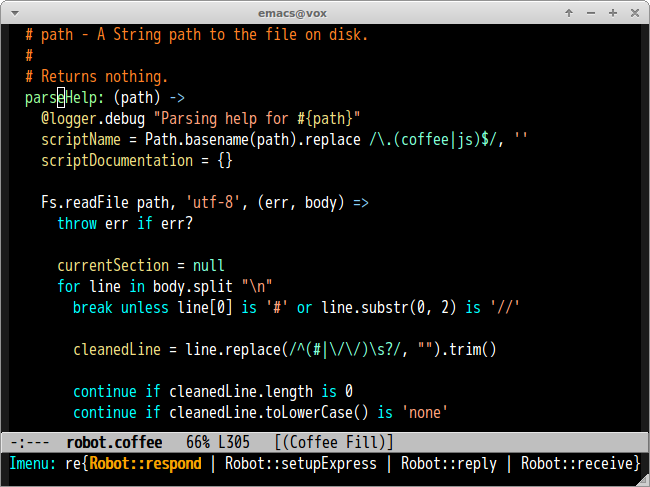
Trên GitHub, defunkt/coffee-mode đã đạt 579 sao, ngôn ngữ Emacs Lisp. Emacs Major Mode for CoffeeScript
Tóm tắt dựng từ metadata GitHub của chính dự án — chưa có bài review TopGit. Trang sẽ tự động cập nhật khi bài review đầy đủ được xuất bản.
VÌ SAO CHƯA CÓ REVIEW
TopGit viết bài đầy đủ cho repo có nhiều sao nhất và được yêu cầu nhiều nhất. Trang này là snapshot trong thời gian chờ — xem README gốc ở tab READ ME.
An Emacs major mode for CoffeeScript and IcedCoffeeScript.
Provides syntax highlighting, indentation support, imenu support,
a menu bar, and a few cute commands.
Requirement
Emacs 24.3 or higher
CoffeeScript 1.9.3 or higher
Installation via package.el
coffee-mode is available on MELPA and MELPA-STABLE.
You can install coffee-mode with the following command.
M-x package-install [RET] coffee-mode [RET]
Please do not install GNU Emacs Lisp Package Archive version.
It's too old and many features(Block string, block comment etc) are not implemented.
Whitespace
coffee-mode used to offer automatic deletion of trailing whitespace.
This is now left to whitespace-mode. See its documentation for full
details, but as a hint, configure:
;; automatically clean up bad whitespace
(setq whitespace-action '(auto-cleanup))
;; only show bad whitespace
(setq whitespace-style '(trailing space-before-tab indentation empty space-after-tab))
Then turn on whitespace-mode, or global-whitespace-mode.
Indentation
To set the number of spaces used with each additional indentation, add this to your .emacs or
init.el or other initialization file:
;; This gives you a tab of 2 spaces
(custom-set-variables '(coffee-tab-width 2))
coffee-tab-width is buffer local variable. You can set indentation size
per buffer by using File Variables.
# Local variables:
# coffee-tab-width: 4
# End:
Using TAB
Set coffee-indent-tabs-mode t if you want to use TAB instead of spaces.
Move to corresponding point in JavaScript file after compiling
You can archive this with sourcemap and
following configuration.
You can install sourcemap package from MELPA.
;; generating sourcemap by '-m' option. And you must set '--no-header' option
(setq coffee-args-compile '("-c" "--no-header" "-m"))
(add-hook 'coffee-after-compile-hook 'sourcemap-goto-corresponding-point)

;; If you want to remove sourcemap file after jumping corresponding point
(defun my/coffee-after-compile-hook (props)
  (sourcemap-goto-corresponding-point props)
  (delete-file (plist-get props :sourcemap)))
(add-hook 'coffee-after-compile-hook 'my/coffee-after-compile-hook)
imenu
If you're using imenu, coffee-mode should work just fine. This
means users of textmate.el will find that ⇧⌘T
(textmate-go-to-symbol) mostly works as expected.
If you're not using imenu check out this page or textmate.el for
a really awesome way to jump quickly to a function's definition in a
file.
Default Key Bindings
Key
Command
C-m, Return
Insert newline and indent line
C-c C-<, backtab
Indent line or region to left
C-c C->
Indent line or region to right
C-M-a
Move to beginning of defun
C-M-e
Move to end of defun
C-M-h
Mark this defun
A-r, C-c C-k
Compile buffer to JavaScript
A-R
Compile content of region to JavaScript
A-M-r, C-c C-z
Run CoffeeScript REPL
C-c C-l
Send this line to REPL buffer
C-c C-r
Send content of region to REPL buffer
C-c C-b
Send content of buffer to REPL buffer
C-c C-o C-s
Enable coffee-cos-mode
C-m and Return key insert newline and indentation. If you don't want indentation please overwrite it as below.
(define-key coffee-mode-map (kbd "C-m") 'newline)
Commands
easymenu
If you have easymenu you can get to any of these commands from the
menu bar:
coffee-repl
Launch a CoffeeScript REPL
coffee-compile-file
Compile buffer to JavaScript.
coffee-compile-buffer
Compile region to JavaScript
coffee-watch
Run coffee with the --watch flag on a directory or file.
coffee-cos-mode
Minor mode for compiling to JavaScript at save file.
coffee-live-compile-mode
Minor mode for compiling buffer in real time.
Customization
Indent like python-mode
When coffee-indent-like-python-mode is non-nil, indent command works like python-mode.
I suppose that Evil's o and O commands
works as you expect with this option.
defunkt/coffee-mode có 579 sao GitHub — tải lại trang để xem số mới nhất, hoặc xem trực tiếp github.com/defunkt/coffee-mode. TopGit phản chiếu số sao của GitHub nhưng không cam kết đến từng phút.
defunkt/coffee-mode có phải mã nguồn mở không?
TopGit chưa ghi nhận license cho defunkt/coffee-mode. Phần lớn repo public trên GitHub là mã nguồn mở, nhưng điều khoản khác nhau từng repo — mở file LICENSE để xác nhận.
defunkt/coffee-mode còn đang phát triển không?
Commit gần nhất trên defunkt/coffee-mode là 3.2 năm trước (theo timestamp GitHub). Repo có 143 fork — một chỉ báo về mức độ quan tâm của cộng đồng.
defunkt/coffee-mode là gì?
defunkt/coffee-mode (defunkt/coffee-mode) là dự án Emacs Lisp trên GitHub. Theo mô tả gốc: Emacs Major Mode for CoffeeScript
Đọc thêm về defunkt/coffee-mode ở đâu?
Trang TopGit này là một snapshot — tab "Readme" hiển thị nguyên văn README của repo (đã bỏ link, giữ ảnh). Repo GitHub ở github.com/defunkt/coffee-mode là nguồn chính thức.
Đọc đầy đủ README ở tab phía trên.
Muốn nghe thêm một ý kiến về coffee-mode?
Hỏi một AI đọc được trang này — một cú bấm là có ngay nhận định về coffee-mode.

 /coffee-mode