Dimillian/CodexMonitor

Một mục tập trung di động trong kho dữ liệu GitHub của TopGit: Dimillian/CodexMonitor, 4.2k sao, nhóm Mobile, TypeScript. An app to monitor the (Codex) situation
Tóm tắt dựng từ metadata GitHub của chính dự án — chưa có bài review TopGit. Trang sẽ tự động cập nhật khi bài review đầy đủ được xuất bản.
TopGit viết bài đầy đủ cho repo có nhiều sao nhất và được yêu cầu nhiều nhất. Trang này là snapshot trong thời gian chờ — xem README gốc ở tab READ ME.
Snapshot
Cộng tác viên hàng đầu
Xem cộng tác viên hàng đầu
CodexMonitor

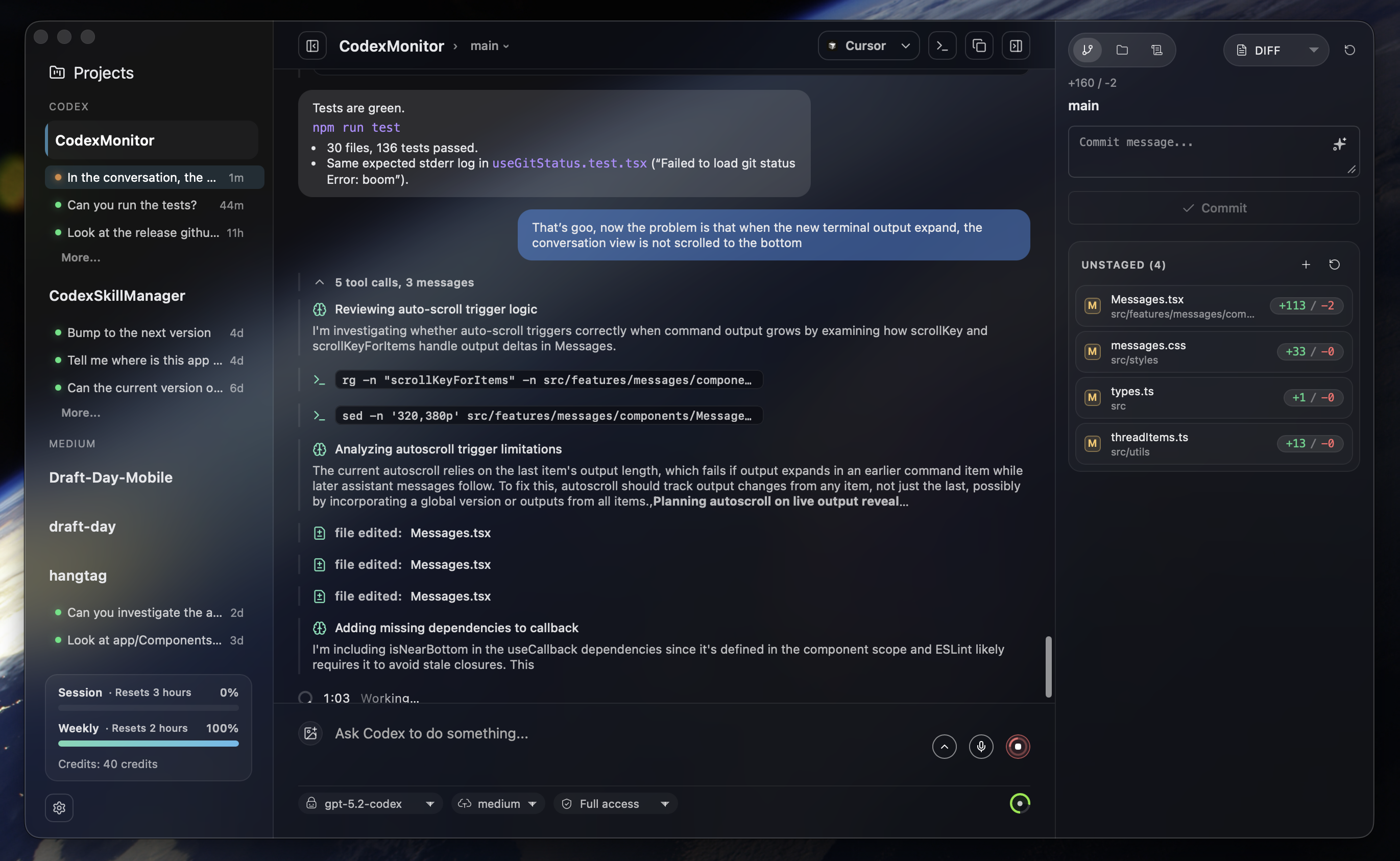
CodexMonitor is a Tauri app for orchestrating multiple Codex agents across local workspaces. It provides a sidebar to manage projects, a home screen for quick actions, and a conversation view backed by the Codex app-server protocol.
Features
Workspaces & Threads
- Add and persist workspaces, group/sort them, and jump into recent agent activity from the home dashboard.
- Spawn one
codex app-serverper workspace, resume threads, and track unread/running state. - Worktree and clone agents for isolated work; worktrees live under the app data directory (legacy
.codex-worktreessupported). - Thread management: pin/rename/archive/copy, per-thread drafts, and stop/interrupt in-flight turns.
- Optional remote backend (daemon) mode for running Codex on another machine.
- Remote setup helpers for self-hosted connectivity (Tailscale detection/host bootstrap for TCP mode).
Composer & Agent Controls
- Compose with image attachments (picker, drag/drop, paste) and configurable follow-up behavior (
QueuevsSteerwhile a run is active). - Use
Shift+Cmd+Enter(macOS) orShift+Ctrl+Enter(Windows/Linux) to send the opposite follow-up action for a single message. - Autocomplete for skills (
$), prompts (/prompts:), reviews (/review), and file paths (@). - Model picker, collaboration modes (when enabled), reasoning effort, access mode, and context usage ring.
- Dictation with hold-to-talk shortcuts and live waveform (Whisper).
- Render reasoning/tool/diff items and handle approval prompts.
Git & GitHub
- Diff stats, staged/unstaged file diffs, revert/stage controls, and commit log.
- Branch list with checkout/create plus upstream ahead/behind counts.
- GitHub Issues and Pull Requests via
gh(lists, diffs, comments) and open commits/PRs in the browser. - PR composer: "Ask PR" to send PR context into a new agent thread.
Files & Prompts
- File tree with search, file-type icons, and Reveal in Finder/Explorer.
- Prompt library for global/workspace prompts: create/edit/delete/move and run in current or new threads.
UI & Experience
- Resizable sidebar/right/plan/terminal/debug panels with persisted sizes.
- Responsive layouts (desktop/tablet/phone) with tabbed navigation.
- Sidebar usage and credits meter for account rate limits plus a home usage snapshot.
- Terminal dock with multiple tabs for background commands (experimental).
- In-app updates with toast-driven download/install, debug panel copy/clear, sound notifications, plus platform-specific window effects (macOS overlay title bar + vibrancy) and a reduced transparency toggle.
Requirements
- Node.js + npm
- Rust toolchain (stable)
- CMake (required for native dependencies; dictation/Whisper uses it)
- LLVM/Clang (required on Windows to build dictation dependencies via bindgen)
- Codex CLI installed and available as
codexinPATH(or configure a custom Codex binary in app/workspace settings) - Git CLI (used for worktree operations)
- GitHub CLI (
gh) for GitHub Issues/PR integrations (optional)
If you hit native build errors, run:
npm run doctor
Getting Started
Install dependencies:
npm install
Run in dev mode:
npm run tauri:dev
iOS Support (WIP)
iOS support is currently in progress.
- Current status: mobile layout runs, remote backend flow is wired, and iOS defaults to remote backend mode.
- Current limits: terminal and dictation remain unavailable on mobile builds.
- Desktop behavior is unchanged: macOS/Linux/Windows remain local-first unless remote mode is explicitly selected.
iOS + Tailscale Setup (TCP)
Use this when connecting the iOS app to a desktop-hosted daemon over your Tailscale tailnet.
Canonical runbook: docs/mobile-ios-tailscale-blueprint.md.
- Install and sign in to Tailscale on both desktop and iPhone (same tailnet).
- On desktop CodexMonitor, open
Settings > Server. - Set a
Remote backend token. - Start the desktop daemon with
Start daemon(inMobile access daemon). - In
Tailscale helper, useDetect Tailscaleand note the suggested host (for exampleyour-mac.your-tailnet.ts.net:4732). - On iOS CodexMonitor, open
Settings > Server. - Enter the desktop Tailscale host and the same token.
- Tap
Connect & testand confirm it succeeds.
Notes:
- The desktop daemon must stay running while iOS is connected.
- If the test fails, confirm both devices are online in Tailscale and that host/token match desktop settings.
Headless Daemon Management (No Desktop UI)
Use the standalone daemon control CLI when you want iOS remote mode without keeping the desktop app open.
Build binaries:
cd src-tauri
cargo build --bin codex_monitor_daemon --bin codex_monitor_daemonctl
Examples:
# Show current daemon status
./target/debug/codex_monitor_daemonctl status

# Start daemon using host/token from settings.json
./target/debug/codex_monitor_daemonctl start

# Stop daemon
./target/debug/codex_monitor_daemonctl stop

# Print equivalent daemon start command
./target/debug/codex_monitor_daemonctl command-preview
Useful overrides:
--data-dir <path>: app data dir containingsettings.json/workspaces.json--listen <addr>: bind address override--token <token>: token override--daemon-path <path>: explicitcodex-monitor-daemonbinary path--json: machine-readable output
iOS Prerequisites
- Xcode + Command Line Tools installed.
- Rust iOS targets installed:
rustup target add aarch64-apple-ios aarch64-apple-ios-sim
# Optional (Intel Mac simulator builds):
rustup target add x86_64-apple-ios
- Apple signing configured (development team).
- Set
bundle.iOS.developmentTeamandidentifierinsrc-tauri/tauri.ios.local.conf.json(preferred for local machine setup), or - set values in
src-tauri/tauri.ios.conf.json, or - pass
--team <TEAM_ID>to the device script. build_run_ios*.shandrelease_testflight_ios.shautomatically mergesrc-tauri/tauri.ios.local.conf.jsonwhen present.
- Set
Run on iOS Simulator
./scripts/build_run_ios.sh
Options:
--simulator "<name>"to target a specific simulator.--target aarch64-sim|x86_64-simto override architecture.--skip-buildto reuse the current app bundle.--no-cleanto preservesrc-tauri/gen/apple/buildbetween builds.
Run on USB Device
List discoverable devices:
./scripts/build_run_ios_device.sh --list-devices
Build, install, and launch on a specific device:
./scripts/build_run_ios_device.sh --device "<device name or identifier>" --team <TEAM_ID>
Additional options:
--target aarch64to override architecture.--skip-buildto reuse the current app bundle.--bundle-id <id>to launch a non-default bundle identifier.
First-time device setup usually requires:
- iPhone unlocked and trusted with this Mac.
- Developer Mode enabled on iPhone.
- Pairing/signing approved in Xcode at least once.
If signing is not ready yet, open Xcode from the script flow:
./scripts/build_run_ios_device.sh --open-xcode
iOS TestFlight Release (Scripted)
Use the end-to-end script to archive, upload, configure compliance, assign beta group, and submit for beta review.
./scripts/release_testflight_ios.sh
The script auto-loads release metadata from .testflight.local.env (gitignored).
For new setups, copy .testflight.local.env.example to .testflight.local.env and fill values.
Release Build
Build the production Tauri bundle:
npm run tauri:build
Artifacts will be in src-tauri/target/release/bundle/ (platform-specific subfolders).
Windows (opt-in)
Windows builds are opt-in and use a separate Tauri config file to avoid macOS-only window effects.
npm run tauri:build:win
Artifacts will be in:
src-tauri/target/release/bundle/nsis/(installer exe)src-tauri/target/release/bundle/msi/(msi)
Note: building from source on Windows requires LLVM/Clang (for bindgen / libclang) in addition to CMake.
Type Checking
Run the TypeScript checker (no emit):
npm run typecheck
Note: npm run build also runs tsc before bundling the frontend.
Validation
Recommended validation commands:
npm run lint
npm run test
npm run typecheck
cd src-tauri && cargo check
Codebase Navigation
For task-oriented file lookup ("if you need X, edit Y"), use:
docs/codebase-map.md
Project Structure
src/
  features/         feature-sliced UI + hooks
  features/app/bootstrap/      app bootstrap orchestration
  features/app/orchestration/  app layout/thread/workspace orchestration
  features/threads/hooks/threadReducer/  thread reducer slices
  services/         Tauri IPC wrapper
  styles/           split CSS by area
  types.ts          shared types
src-tauri/
  src/lib.rs        Tauri app backend command registry
  src/bin/codex_monitor_daemon.rs  remote daemon JSON-RPC process
  src/bin/codex_monitor_daemon/rpc/  daemon RPC domain handlers
  src/shared/       shared backend core used by app + daemon
  src/shared/git_ui_core/      git/github shared core modules
  src/shared/workspaces_core/  workspace/worktree shared core modules
  src/workspaces/   workspace/worktree adapters
  src/codex/        codex app-server adapters
  src/files/        file adapters
  tauri.conf.json   window configuration
Notes
- Workspaces persist to
workspaces.jsonunder the app data directory. - App settings persist to
settings.jsonunder the app data directory (theme, backend mode/provider, remote endpoints/tokens, Codex path, default access mode, UI scale, follow-up message behavior). - Feature settings are supported in the UI and synced to
$CODEX_HOME/config.toml(or~/.codex/config.toml) on load/save. Stable: Collaboration modes (features.collaboration_modes), personality (personality), and Background terminal (features.unified_exec). Experimental: Apps (features.apps). Steering capability still follows Codexfeatures.steer, but follow-up default behavior is controlled in Settings → Composer. - On launch and on window focus, the app reconnects and refreshes thread lists for each workspace.
- Threads are restored by filtering
thread/listresults using the workspacecwd. - Selecting a thread always calls
thread/resumeto refresh messages from disk. - CLI sessions appear if their
cwdmatches the workspace path; they are not live-streamed unless resumed. - The app uses
codex app-serverover stdio; seesrc-tauri/src/lib.rsandsrc-tauri/src/codex/. - The remote daemon entrypoint is
src-tauri/src/bin/codex_monitor_daemon.rs; RPC routing lives insrc-tauri/src/bin/codex_monitor_daemon/rpc.rsand domain handlers insrc-tauri/src/bin/codex_monitor_daemon/rpc/. - Shared domain logic lives in
src-tauri/src/shared/(notablysrc-tauri/src/shared/git_ui_core/andsrc-tauri/src/shared/workspaces_core/). - Codex home resolves from workspace settings (if set), then legacy
.codexmonitor/, then$CODEX_HOME/~/.codex. - Worktree agents live under the app data directory (
worktrees/<workspace-id>); legacy.codex-worktrees/paths remain supported, and the app no longer edits repo.gitignorefiles. - UI state (panel sizes, reduced transparency toggle, recent thread activity) is stored in
localStorage. - Custom prompts load from
$CODEX_HOME/prompts(or~/.codex/prompts) with optional frontmatter description/argument hints.
Tauri IPC Surface
Frontend calls live in src/services/tauri.ts and map to commands in src-tauri/src/lib.rs. The current surface includes:
- Settings/config/files:
get_app_settings,update_app_settings,get_codex_config_path,get_config_model,file_read,file_write,codex_doctor,menu_set_accelerators. - Workspaces/worktrees:
list_workspaces,is_workspace_path_dir,add_workspace,add_clone,add_worktree,worktree_setup_status,worktree_setup_mark_ran,rename_worktree,rename_worktree_upstream,apply_worktree_changes,update_workspace_settings,remove_workspace,remove_worktree,connect_workspace,list_workspace_files,read_workspace_file,open_workspace_in,get_open_app_icon. - Threads/turns/reviews:
start_thread,fork_thread,compact_thread,list_threads,resume_thread,archive_thread,set_thread_name,send_user_message,turn_interrupt,respond_to_server_request,start_review,remember_approval_rule,get_commit_message_prompt,generate_commit_message,generate_run_metadata. - Account/models/collaboration:
model_list,account_rate_limits,account_read,skills_list,apps_list,collaboration_mode_list,codex_login,codex_login_cancel,list_mcp_server_status. - Git/GitHub:
get_git_status,list_git_roots,get_git_diffs,get_git_log,get_git_commit_diff,get_git_remote,stage_git_file,stage_git_all,unstage_git_file,revert_git_file,revert_git_all,commit_git,push_git,pull_git,fetch_git,sync_git,list_git_branches,checkout_git_branch,create_git_branch,get_github_issues,get_github_pull_requests,get_github_pull_request_diff,get_github_pull_request_comments. - Prompts:
prompts_list,prompts_create,prompts_update,prompts_delete,prompts_move,prompts_workspace_dir,prompts_global_dir. - Terminal/dictation/notifications/usage:
terminal_open,terminal_write,terminal_resize,terminal_close,dictation_model_status,dictation_download_model,dictation_cancel_download,dictation_remove_model,dictation_request_permission,dictation_start,dictation_stop,dictation_cancel,send_notification_fallback,is_macos_debug_build,local_usage_snapshot. - Remote backend helpers:
tailscale_status,tailscale_daemon_command_preview,tailscale_daemon_start,tailscale_daemon_stop,tailscale_daemon_status.
Repo liên quan
Pake is a utility that converts any webpage into a cross-platform desktop application using a single command. It relies on Rust and Tauri, which the README states results in installer sizes typically under 10MB and lower memory usage compared to Electron-based alternatives. Users can package websites via a command-line interface, an online builder, or download pre-built applications for services like ChatGPT, YouTube, and Notion. The tool supports features such as custom window settings, ad removal, and a range of keyboard shortcuts for navigation and page control across macOS, Windows, and Linux.
Wails provides a framework for building cross-platform desktop applications by combining Go backend code with a web frontend (HTML/JS/CSS) into a single binary. It differentiates itself from traditional web server approaches by using native rendering engines instead of embedding a browser, aiming for lighter applications. Developers can use any familiar frontend technology and easily call Go methods from Javascript, with auto-generated Typescript definitions for Go structs and methods. The tool includes support for native dialogs, menus, dark/light mode, translucency effects, and a unified eventing system between Go and Javascript. A CLI tool with extensive capabilities assists with project generation and building. Wails is designed for Go programmers who want to create desktop applications or add a frontend to existing Go programs without the overhead of a separate web server, offering both a stable v2 and a beta v3.
A simple and easy-to-use library to enjoy videogames programming
Flutter is Google's open-source SDK, hosted at flutter/flutter on GitHub, for building user interfaces across mobile, web, and desktop from a single Dart codebase. The repo is licensed BSD-3-Clause, and its README documents stateful hot reload, a Skia/Impeller rendering pipeline, and Material/Cupertino widget sets as the core pieces developers work with.
Trả lời nhanh
Cùng nhóm Mobile còn repo nào?
Dimillian/CodexMonitor thuộc nhóm Mobile trên TopGit, cùng 5 topic GitHub. Trang Trending và Topics liệt kê các repo cùng số sao và cùng ngôn ngữ để so sánh.
Dimillian/CodexMonitor có bao nhiêu sao?
Dimillian/CodexMonitor có 4.2k sao GitHub — tải lại trang để xem số mới nhất, hoặc xem trực tiếp github.com/Dimillian/CodexMonitor. TopGit phản chiếu số sao của GitHub nhưng không cam kết đến từng phút.
Dimillian/CodexMonitor có những chủ đề gì?
GitHub topics của Dimillian/CodexMonitor: "ai", "codex", "linux", "macos", "tauri-app". TopGit xếp repo vào nhóm Mobile.
Dimillian/CodexMonitor có phải mã nguồn mở không?
Có — Dimillian/CodexMonitor phát hành theo license MIT, nghĩa là mã nguồn mở để đọc, fork và (tùy license) tái sử dụng. Mã: github.com/Dimillian/CodexMonitor.
Dimillian/CodexMonitor có trang demo không?
Dự án có trang chủ ở https://www.codexmonitor.app. Tab "Readme" ở trang này thường có ảnh chụp và hướng dẫn bắt đầu nhanh.
Dimillian/CodexMonitor còn đang phát triển không?
Commit gần nhất trên Dimillian/CodexMonitor là 4 tháng trước (theo timestamp GitHub). Repo có 406 fork — một chỉ báo về mức độ quan tâm của cộng đồng.
Đọc thêm về Dimillian/CodexMonitor ở đâu?
Trang TopGit này là một snapshot — tab "Readme" hiển thị nguyên văn README của repo (đã bỏ link, giữ ảnh). Repo GitHub ở github.com/Dimillian/CodexMonitor là nguồn chính thức.
Đọc đầy đủ README ở tab phía trên.
CodexMonitor có đáng để bạn bỏ thời gian?
ChatGPT, Claude và Perplexity đều đọc được trang này. Hỏi thử xem họ nghĩ gì về CodexMonitor.