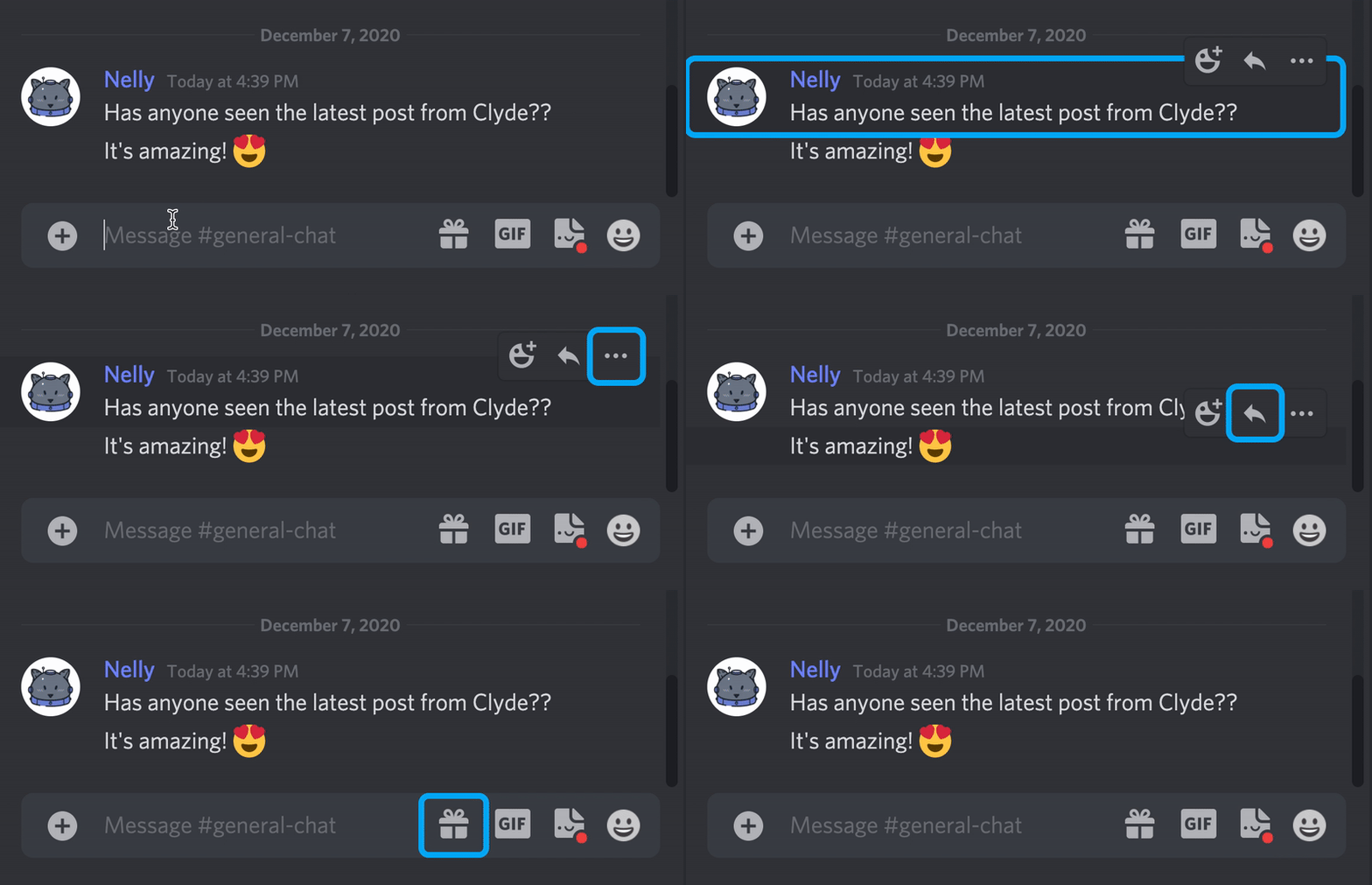
Trên GitHub, discord/focus-rings đã đạt 1.1k sao, ngôn ngữ TypeScript. A centralized system for displaying and stylizing focus indicators anywhere on a webpage.
Tóm tắt dựng từ metadata GitHub của chính dự án — chưa có bài review TopGit. Trang sẽ tự động cập nhật khi bài review đầy đủ được xuất bản.
VÌ SAO CHƯA CÓ REVIEW
TopGit viết bài đầy đủ cho repo có nhiều sao nhất và được yêu cầu nhiều nhất. Trang này là snapshot trong thời gian chờ — xem README gốc ở tab READ ME.
A centralized system for displaying and stylizing focus indicators anywhere on a webpage.
Motivation
When working on creating a complete keyboard navigation experience for Discord, we ran into a number
of problems with rendering clean and consistent focus rings and were unable to find any suitable
native alternatives. After a lot of trial and error, we landed on this system as a way to meet all
of our needs. You can read more about the process we went through in this blog post.
Installation
This package is published under react-focus-rings and can be installed with any npm-compatible package
manager.
Usage
This library is composed of two components: FocusRing and FocusRingScope.
FocusRingScope
FocusRingScope is responsible for providing a frame of reference for calculating the position of any FocusRing instances it
contains. The containerRef prop takes a React.Ref that references the DOM
element that should be used for these position calculations. You'll want to include a FocusRingScope instance at the top level
of your application. If a component creates a new scroll container, or is absolutely positioned within the viewport, you should
add a new FocusRingScope.
Keep in mind that the element provided to containerRef must be styled with position: relative or else the alignment calculations
will be incorrect. If you find that FocusRing isn't being rendered at all or its positioning is wrong, verify that you have a
FocusRingScope in the correct places and that the containerRef element has the position: relative style.
FocusRing
The FocusRing is the main show. You can wrap any focusable element with a FocusRing and it will add the required focus/blur
listeners and magically render the focus ring when the element receives focus. We recommend integrating this at the design primitive
level, in custom components like Button or Link, so you get the focus ring behavior across your application with minimal effort.
FocusRing has a few props you can use to get the right behavior and alignment. If using TypeScript the type is exported as FocusRingProps
import {FocusRingProps} from 'react-focus-rings'
within - acts like :focus-within and will render the focus ring if any descendant is focused
enabled - controls whether the FocusRing is being rendered
focused - controls the focused state
offset - lets you adjust the alignment of the focus ring, relative to the focused element. Can be a number or Offset object
focusTarget - lets you choose a different element to act as the focus target for the ring. Must be used with ringTarget.
ringTarget - lets you choose a different element to render the ring around. Must be used with focusTarget.
focusWithinClassName - lets you apply a CSS class to the focused element when a descendant is focused. Like :focus-within.
Default Styling
The focus ring also relies on some default CSS styles in order to
render properly. To make this work in your project, be sure to import the styles separately somwhere
within your app with import "react-focus-rings/src/styles.css";.
Example
A complete, minimal example might look like this:
import * as React from "react";
import ReactDOM from "react-dom";

import { FocusRing, FocusRingScope } from "react-focus-rings";
import "react-focus-rings/src/styles.css";

function App() {
  const containerRef = React.useRef<HTMLDivElement>(null);
  return (
    <div className="app-container" ref={containerRef}>
      <FocusRingScope containerRef={containerRef}>
        <div className="content">
          <p>Here's a paragraph with some text.</p>
          <FocusRing offset={-2}>
            <button onClick={console.log}>Click Me</button>
          </FocusRing>
          <p>Here's another paragraph with more text.</p>
        </div>
      </FocusRingScope>
    </div>
  );
}

ReactDOM.render(<App />, document.body);
You can find a more complete example in the examples directory of this repository. You can find a hosted version of the example application here.
discord/focus-rings có 1.1k sao GitHub — tải lại trang để xem số mới nhất, hoặc xem trực tiếp github.com/discord/focus-rings. TopGit phản chiếu số sao của GitHub nhưng không cam kết đến từng phút.
discord/focus-rings có tag gì không?
Bản đồng bộ chưa ghi nhận topic GitHub nào cho discord/focus-rings. GitHub topics hiển thị ở thanh bên phải trang repo — đó là nơi đáng kiểm tra nhất.
discord/focus-rings có website riêng không?
TopGit chưa ghi nhận URL trang chủ cho discord/focus-rings. Phần README ở tab phía trên thường có link demo, hoặc xem mô tả GitHub của repo.
discord/focus-rings còn đang phát triển không?
Commit gần nhất trên discord/focus-rings là 1 tháng trước (theo timestamp GitHub). Repo có 27 fork — một chỉ báo về mức độ quan tâm của cộng đồng.
discord/focus-rings dùng license gì?
discord/focus-rings phát hành theo license MIT. Nên mở file LICENSE trên GitHub để xác nhận — license metadata đôi khi lệch với thực tế dự án.
discord/focus-rings viết bằng ngôn ngữ gì?
discord/focus-rings chủ yếu viết bằng TypeScript. Trường "language" của GitHub dựa trên phần lớn byte ở nhánh mặc định.
Đọc thêm về discord/focus-rings ở đâu?
Trang TopGit này là một snapshot — tab "Readme" hiển thị nguyên văn README của repo (đã bỏ link, giữ ảnh). Repo GitHub ở github.com/discord/focus-rings là nguồn chính thức.
Đọc đầy đủ README ở tab phía trên.
focus-rings có đáng để bạn bỏ thời gian?
ChatGPT, Claude và Perplexity đều đọc được trang này. Hỏi thử xem họ nghĩ gì về focus-rings.

 /focus-rings