dkhamsing/ios-asset-names — 666★ trên GitHub (Swift). :triangular_ruler: Guide to name iOS assets
Tóm tắt dựng từ metadata GitHub của chính dự án — chưa có bài review TopGit. Trang sẽ tự động cập nhật khi bài review đầy đủ được xuất bản.
VÌ SAO CHƯA CÓ REVIEW
TopGit viết bài đầy đủ cho repo có nhiều sao nhất và được yêu cầu nhiều nhất. Trang này là snapshot trong thời gian chờ — xem README gốc ở tab READ ME.
This guide outlines best practices and naming conventions to help graphic designers and developers manage a large number of icons prepared for an iOS project.
Your input is welcome: pull requests or Twitter :smile:
Table Of Contents
Namespace
Asset Folder
Asset Types
PNG
PDF
Icon Font
Tools
Naming
Uniqueness
Prefixing
Conventions
Special cases
Collisions
Spelling
Abbreviations
Acknowledgment
Namespace
Naming an asset starts with breaking up the user interface of each screen into namespaces (or sections). Each namespace represents a logical grouping for the assets and can be used to create asset names.
Shorter is better (one word if possible).
Meaningful namespace name.
Use lower case.
No spaces or special characters (use dashes).
Namespaces can correspond to view controllers, typical namespaces are top, bottom, content although more specific names are better.
Examples
Twitter Profile
Tumblr Home
Instagram Explore
<img width=200 src=assets/namespace1.PNG>
<img width=200 src=assets/namespace2.PNG>
<img width=200 src=assets/namespace3.PNG>
top actions tweet tab
post tab
top photo tab
Asset Folder
Using Asset Catalogs is the preferred way to manage assets in Xcode, it eliminates keeping track of files in a project. However naming assets (image sets) remains important especially when collaborating with a designer.
If you choose to manage assets directly, use a main folder to store all assets for the app (usually named assets or images). This may seem radical but it works in conjunction with prefixing.
An alternative is to use subfolders for each namespace, be aware that subfolders can create problems with asset name uniqueness.
For extra credit, check out Structuring an iOS Project by Sebastian Rehnby and the Tools section.
Asset Types
PNG
PNG is typically used for icons (JPG is better for photos).
PNG is good for small assets.
PNG is non-lossy.
PNG supports transparency.
To use PNG assets:
Create 1x, 2x and 3x assets in the same folder.
Add @2x or @3x at the end of the appropriate asset name.
To save disk space or time, one can omit the 1x, 2x or 3x asset: the system automatically scales up or down for the appropriate resolution (in particular, you could provide only 2x/3x assets when targeting retina devices).
PDF
Xcode 6 added support for PDF / vector icons eliminating the need for multiple resolution per asset (goodbye 1x, 2x, 3x). However doing so will
re-create PNG assets at compile time, embedding the rasterized bitmaps in the final application instead of embedding the original PDF vector image.
If you add PDF files directly as resources, they can be used as vector assets which have no size restriction (like an icon font).
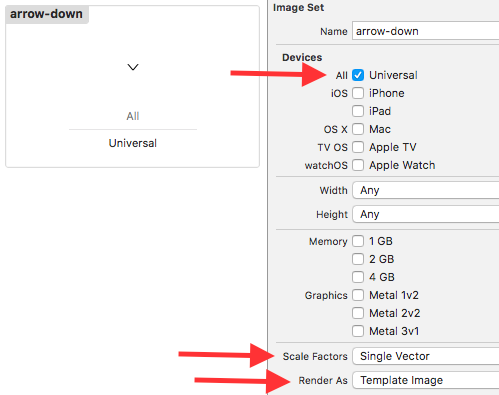
If you still want to use a PDF asset with assets catalogs, create an image set for each PDF asset in Xcode. Then in the Utility panel (right) set:
Devices: Universal
Scale Factors: Single Vector
Render As: Template Image (corresponds to setting the UIImageRenderingMode property to UIImageRenderingModeAlwaysTemplate)
This last setting allows an asset to be tinted (colored). If setting up a large number of assets sounds tedious, check out a tool appropriately called pdf_xcassets.
PDF assets still need to be sized appropriately, i.e. the designer would provide 2 assets for an arrow if the mockup required assets sized 20x20 and 40x40. For more details, read this article.
Icon Font
Another alternative for icon generation is to use icon fonts. These can be scaled without quality loss and colored just like any text. For more details, read this article.
Tools
Here are some tools to help you manage your assets.
blade: Generate Xcode image catalogs for iOS / OSX app icons, universal images, and more.
Cat2Cat: Generate a category on UIImage from asset catalogs in order to reduce typos and enable Xcode auto-completion.
OHPDFImage: A library to easily load PDF files as UIImages.
pdf_xcassets: Generate Xcode xcassets for pdf assets.
Synx: A command-line tool that reorganizes your Xcode project folder to match your Xcode groups.
Swift Enums
Misen: Script to support using Xcode Asset Catalog in Swift.
SwiftGen: A collection of Swift tools to generate Swift code (enums for your assets and more).
Naming
Uniqueness
An important attribute of an asset name is uniqueness.
This prevents confusion: for example having two different share assets (say one for iPhone and one for iPad, or one in a main view and one in a detail view).
More importantly, while it is possible in Xcode to have two files of the same names in different folders, you can only reference one of them using + (UIImage *)imageNamed:(NSString *)name.
Update: Asset catalogs support a namespace based on the asset "Group" that allows for the same name to be reused (read the documentation or summary).
"properties" : {
      "provides-namespace" : true
}
Prefixing
Prefixing is optional but it ensures that asset names are unique across the project.
Prefix the asset with the app name so you can tell which project it belongs to (use a 2 or 3 letter prefix for long app names).
Add a device prefix (especially for universal apps with device-specific assets).
Add a namespace prefix so you can quickly organize your assets.
While CamelCase is the convention in Objective-C, it does not necessarily mean it needs to be applied to asset names (by all means feel free to use it if you prefer SSRackMinus.png).
Notable
chevron for >
caret for ►
Special cases
Sometimes the name is well represented by its function (refer to Charbase for Unicode).
refresh for open circle arrow (⟳ U+21BB)
edit for pencil (✎ U+270E)
search for magnifying glass (🔍 U+1F50D)
user for bust in silhouette (👤 U+1F464)
comment for speech balloon (💬 U+1F4AC)
Collisions
Should two assets have the same name, add a qualifier at the end.
dkhamsing/ios-asset-names có 666 sao GitHub — tải lại trang để xem số mới nhất, hoặc xem trực tiếp github.com/dkhamsing/ios-asset-names. TopGit phản chiếu số sao của GitHub nhưng không cam kết đến từng phút.
dkhamsing/ios-asset-names có những chủ đề gì?
GitHub topics của dkhamsing/ios-asset-names: "guide", "ios". TopGit xếp repo vào nhóm Mobile.
dkhamsing/ios-asset-names còn đang phát triển không?
Commit gần nhất trên dkhamsing/ios-asset-names là 6.9 năm trước (theo timestamp GitHub). Repo có 46 fork — một chỉ báo về mức độ quan tâm của cộng đồng.
dkhamsing/ios-asset-names là gì?
dkhamsing/ios-asset-names (dkhamsing/ios-asset-names) là dự án Swift trên GitHub. Theo mô tả gốc: :triangular_ruler: Guide to name iOS assets
dkhamsing/ios-asset-names so với các dự án Mobile khác thế nào?
dkhamsing/ios-asset-names được TopGit xếp vào nhóm Mobile, với 666 sao GitHub và viết bằng Swift. Xem trang chủ đề Mobile trên TopGit để so sánh với các dự án tương tự theo số sao và mức độ hoạt động.
dkhamsing/ios-asset-names viết bằng ngôn ngữ gì?
dkhamsing/ios-asset-names chủ yếu viết bằng Swift. Trường "language" của GitHub dựa trên phần lớn byte ở nhánh mặc định.
Vì sao dkhamsing/ios-asset-names được xếp vào nhóm Mobile?
TopGit xếp dkhamsing/ios-asset-names vào nhóm Mobile dựa trên GitHub topics và mô tả của repo (gắn thẻ: "guide", "ios"). Việc phân loại dựa trên metadata thật của repo, không phải đoán theo cảm tính biên tập.
Đọc đầy đủ README ở tab phía trên.
ios-asset-names có đáng để bạn bỏ thời gian?
ChatGPT, Claude và Perplexity đều đọc được trang này. Hỏi thử xem họ nghĩ gì về ios-asset-names.
 /ios-asset-names