Điểm qua dmlc/minpy: 1.1k sao trên GitHub, viết chủ yếu bằng Python. NumPy interface with mixed backend execution
Tóm tắt dựng từ metadata GitHub của chính dự án — chưa có bài review TopGit. Trang sẽ tự động cập nhật khi bài review đầy đủ được xuất bản.
VÌ SAO CHƯA CÓ REVIEW
TopGit viết bài đầy đủ cho repo có nhiều sao nhất và được yêu cầu nhiều nhất. Trang này là snapshot trong thời gian chờ — xem README gốc ở tab READ ME.
Please try MXNet Gluon.
Our project has merged with MXNet Gluon which follows our vision.
This repo is being deprecated.
This repository aims at providing a high performing and flexible deep learning platform, by prototyping a pure NumPy interface above MXNet backend. In one word, you get the following automatically with your NumPy code:
import minpy.numpy as np
Operators with GPU support will be ran on GPU.
Graceful fallback for missing operations to NumPy on CPU.
Automatic gradient generation with Autograd support.
Seamless MXNet symbol integration.
Pure NumPy, purely imperative
Why obsessed with NumPy interface? First of all, NumPy is an extension to the Python programming language, with support for large, multi-dimensional arrays, matrices, and a large library of high-level mathematical functions to operate on these abstractions. If you just begin to learn deep learning, you should absolutely start from NumPy to gain a firm grasp of its concepts (see, for example, the Stanford's CS231n course). For quick prototyping of advanced deep learning algorithms, you may often start composing with NumPy as well.
Second, as an extension of Python, your implementation follows the intuitive imperative style. This is the only style, and there is no new syntax constructs to learn. To have a taste of this, let's look at some examples below.
Printing and Debugging
In symbolic programming, the control dependency before the print statement is required, otherwise the print operator will not appear on the critical dependency path and thus not being executed. In contrast, MinPy is simply NumPy, as straightforward as Python's hello world.
Data-dependent branches
In symbolic programming, the lambda is required in each branch to lazily expand the dataflow graph during runtime, which can be quite confusing. Again, MinPy is NumPy, and you freely use the if statement anyway you like.
Tensorflow is just one typical example, many other packages (e.g. Theano, or even MXNet) have similar problems. The underlying reason is the trade-off between symbolic programming and imperative programming. Codes in symbolic programs (Tensorflow and Theano) generates dataflow graph instead of performing concrete computation. This enables extensive optimizations, but requires reinventing almost all language constructs (like if and loop). Imperative programs (NumPy) generates dataflow graph along with the computation, enabling you freely query or use the value just computed.
In MinPy, we use NumPy syntax to ease your programming, while simultaneously achieving good performance.
Dynamic automatic gradient computation
Automatic gradient computation has become essential in modern deep learning systems. In MinPy, we adopt Autograd's approach to compute gradients. Since the dataflow graph is generated along with the computation, all kinds of native control flow are supported during gradient computation. For example:
import minpy
from minpy.core import grad

def foo(x):
  if x >= 0:
    return x
  else:
    return 2 * x

foo_grad = grad(foo)
print foo_grad(3)  # should print 1.0
print foo_grad(-1) # should print 2.0
Here, feel free to use native if statement. A complete tutorial about auto-gradient computation could be found here.
Elegant fallback for missing operators
You never like NotImplementedError, so do we. NumPy is a very large library. In MinPy, we automatically fallback to NumPy if some operators have not been implemented in MXNet yet. For example, the following code runs smoothly and you don't need to worry about copying arrays back and forth from GPU to CPU; MinPy handles the fallback and its side effect transparently.
import minpy.numpy as np
x = np.zeros((2, 3))     # Use MXNet GPU implementation
y = np.ones((2, 3))      # Use MXNet GPU implementation
z = np.logaddexp(x, y)   # Use NumPy CPU implementation
Seamless MXNet symbol support
Although we pick the imperative side, we understand that symbolic programming is necessary for operators like convolution. Therefore, MinPy allows you to "wrap" a symbol into a function that could be called together with other imperative calls. From a programmer's eye, these functions is just as other NumPy calls, thus we preserve the imperative style throughout:
import mxnet as mx
import minpy.numpy as np
from minpy.core import Function
# Create Function from symbol.
net = mx.sym.Variable('x')
net = mx.sym.Convolution(net, name='conv', kernel=(3, 3), num_filter=32, no_bias=True)
conv = Function(net, input_shapes={'x', (8, 3, 10, 10)}
# Call Function as normal function.
x = np.zeros((8, 3, 10, 10))
w = np.ones((32, 3, 3, 3,))
y = np.exp(conv(x=x, conv_weight=w))
Is MinPy fast?
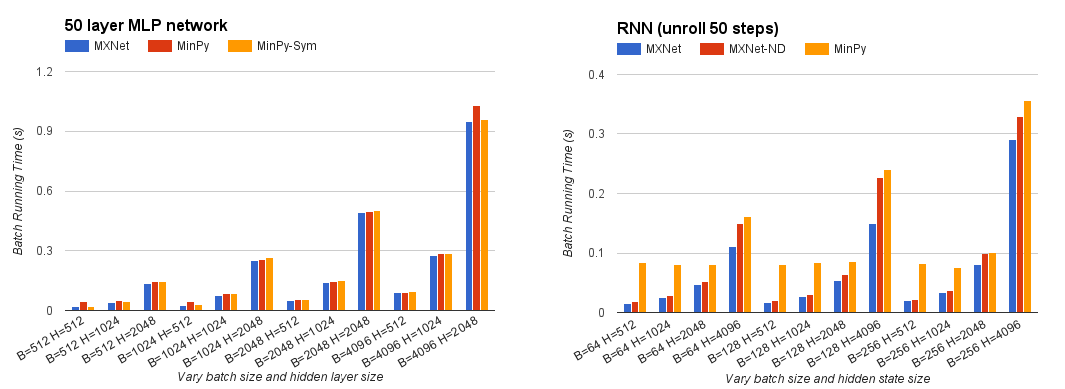
The imperative interface does raise many challenges, especially it foregoes some of the deep optimization that only (currently) embodied in symbolic programming. However, MinPy manages to retain performance, especially when the actual computation is intense. Our next target is to get back the performance with advanced system techniques.
Get Started
Installation Guide
MinPy depends on MXNet. In order to get up and running with MinPy you'll need to
Install MXNet for Python;
Install Minpy.
Please read installation guide for more details.
MXNet version
Currently both MXNet and MinPy are going through rapid development. MinPy is not guaranteed to work with all MXNet versions. The minimum version required for MXNet is 0.9.2. To achieve the best performance, we recommend you download the MXNet from engine branch and build it from source. The following command would be useful:
Then use the instructions to build MXNet with python interface.
NumPy version
Minpy prototypes a pure Numpy interface. To make the interface consistent, please make sure Numpy version >= 1.10.0 before install Minpy.
MXNet and Numpy could meet version conflicts if you are working with them on other projects. Our installation guide provides how to use virtualenv and virtualenvwrapper to resolve the issue.
Easy installation
pip install minpy
We are still actively polishing the package. You can look at this tutorial to understand its concept. Documents are hosted here.
dmlc/minpy có 1.1k sao GitHub — tải lại trang để xem số mới nhất, hoặc xem trực tiếp github.com/dmlc/minpy. TopGit phản chiếu số sao của GitHub nhưng không cam kết đến từng phút.
dmlc/minpy có phải mã nguồn mở không?
TopGit chưa ghi nhận license cho dmlc/minpy. Phần lớn repo public trên GitHub là mã nguồn mở, nhưng điều khoản khác nhau từng repo — mở file LICENSE để xác nhận.
dmlc/minpy còn đang phát triển không?
Commit gần nhất trên dmlc/minpy là 8.7 năm trước (theo timestamp GitHub). Repo có 104 fork — một chỉ báo về mức độ quan tâm của cộng đồng.
dmlc/minpy là gì?
dmlc/minpy (dmlc/minpy) là dự án Python trên GitHub. Theo mô tả gốc: NumPy interface with mixed backend execution
Đọc thêm về dmlc/minpy ở đâu?
Trang TopGit này là một snapshot — tab "Readme" hiển thị nguyên văn README của repo (đã bỏ link, giữ ảnh). Repo GitHub ở github.com/dmlc/minpy là nguồn chính thức.
Đọc đầy đủ README ở tab phía trên.
Vẫn đang phân vân về minpy?
Một cú bấm sẽ gửi câu hỏi kèm trang này cho AI — xem AI nói gì về minpy.
 /minpy

 In symbolic programming, the control dependency before the print statement is required, otherwise the print operator will not appear on the critical dependency path and thus not being executed. In contrast, MinPy is simply NumPy, as straightforward as Python's hello world.
 In symbolic programming, the