dotnetcore/CAP là dự án C# với 7.1k sao trong nhóm Data. Distributed transaction solution in micro-service base on eventually consistency, also an eventbus with Outbox pattern
Tóm tắt dựng từ metadata GitHub của chính dự án — chưa có bài review TopGit. Trang sẽ tự động cập nhật khi bài review đầy đủ được xuất bản.
VÌ SAO CHƯA CÓ REVIEW
TopGit viết bài đầy đủ cho repo có nhiều sao nhất và được yêu cầu nhiều nhất. Trang này là snapshot trong thời gian chờ — xem README gốc ở tab READ ME.
CAP is a .NET library that provides a lightweight, easy-to-use, and efficient solution for distributed transactions and event bus integration.
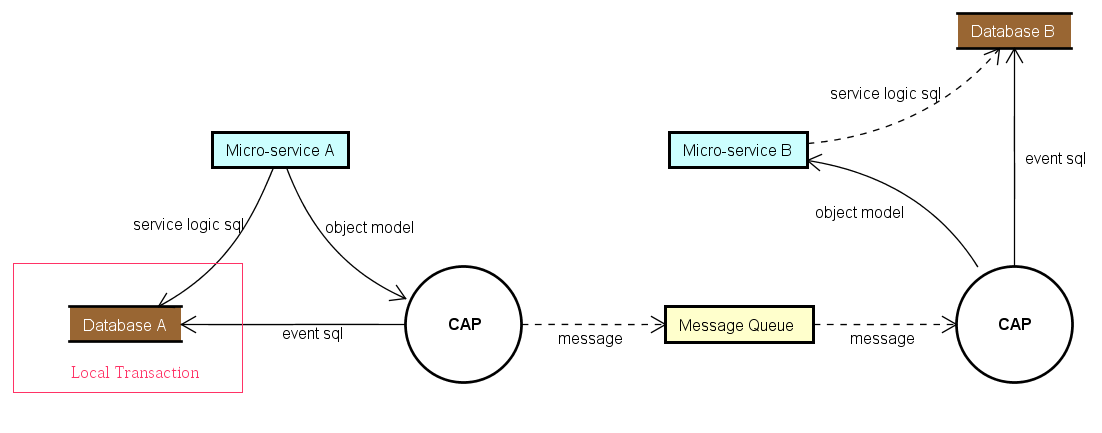
When building SOA or Microservice-based systems, services often need to be integrated via events. However, simply using a message queue cannot guarantee reliability. CAP leverages a local message table, integrated with your current database, to solve exceptions that can occur during distributed system communications. This ensures that event messages are never lost.
You can also use CAP as a standalone EventBus. It offers a simplified approach to event publishing and subscribing without requiring you to inherit or implement any specific interfaces.
Key Features
Core Functionality
Distributed Transactions: Guarantees data consistency across microservices using a local message table (Outbox Pattern).
Event Bus: High-performance, lightweight event bus for decoupled communication.
Guaranteed Delivery: Ensures messages are never lost, with automatic retries for failed messages.
Advanced Messaging
Delayed Messages: Native support for publishing messages with a delay, without relying on message queue features.
Consumer Groups & Fan-Out: Easily implement competing consumer or fan-out patterns for load balancing or broadcasting.
Parallel & Serial Processing: Configure consumers for high-throughput parallel processing or ordered sequential execution.
Backpressure Mechanism: Automatically manages processing speed to prevent memory overload (OOM) under high load.
Extensibility & Integration
Pluggable Architecture: Supports a wide range of message queues (RabbitMQ, Kafka, Azure Service Bus, etc.) and databases (SQL Server, PostgreSQL, MongoDB, etc.).
Heterogeneous Systems: Provides mechanisms to integrate with non-CAP or legacy systems.
Customizable Filters & Serialization: Intercept the processing pipeline with custom filters and support various serialization formats.
Monitoring & Observability
Real-time Dashboard: A built-in web dashboard to monitor messages, view status, and manually retry.
Service Discovery: Integrates with Consul and Kubernetes for node discovery in a distributed environment.
OpenTelemetry Support: Built-in instrumentation for distributed tracing, providing end-to-end visibility.
Architecture Overview
CAP implements the Outbox Pattern as described in the eShop on .NET ebook.
Getting Started
1. Installation
Install the main CAP package into your project using NuGet.
PM> Install-Package DotNetCore.CAP
Next, install the desired transport and storage providers.
public void ConfigureServices(IServiceCollection services)
{
    // If you are using EF as the ORM
    services.AddDbContext<AppDbContext>();

    // If you are using MongoDB
    services.AddSingleton<IMongoClient>(new MongoClient("..."));

    services.AddCap(x =>
    {
        // Using Entity Framework
        // CAP can auto-discover the connection string
        x.UseEntityFramework<AppDbContext>();

        // Using ADO.NET
        x.UseSqlServer("Your ConnectionString");
        x.UseMySql("Your ConnectionString");
        x.UsePostgreSql("Your ConnectionString");

        // Using MongoDB (requires a 4.0+ cluster)
        x.UseMongoDB("Your ConnectionString");

        // Choose your message transport
        x.UseRabbitMQ("HostName");
        x.UseKafka("ConnectionString");
        x.UseAzureServiceBus("ConnectionString");
        x.UseAmazonSQS(options => { /* ... */ });
        x.UseNATS("ConnectionString");
        x.UsePulsar("ConnectionString");
        x.UseRedisStreams("ConnectionString");
    });
}
3. Publish Messages
Inject ICapPublisher into your controller or service to publish events. As of version 7.0, you can also publish delayed messages.
public class PublishController : Controller
{
    private readonly ICapPublisher _capBus;

    public PublishController(ICapPublisher capPublisher)
    {
        _capBus = capPublisher;
    }

    [Route("~/adonet/transaction")]
    public IActionResult AdonetWithTransaction()
    {
        using (var connection = new MySqlConnection(ConnectionString))
        {
            // Start a transaction with auto-commit enabled
            using (var transaction = connection.BeginTransaction(_capBus, autoCommit: true))
            {
                // Your business logic...
                _capBus.Publish("xxx.services.show.time", DateTime.Now);
            }
        }
        return Ok();
    }

    [Route("~/ef/transaction")]
    public IActionResult EntityFrameworkWithTransaction([FromServices] AppDbContext dbContext)
    {
        using (var trans = dbContext.Database.BeginTransaction(_capBus, autoCommit: true))
        {
            // Your business logic...
            _capBus.Publish("xxx.services.show.time", DateTime.Now);
        }
        return Ok();
    }

    [Route("~/publish/delay")]
    public async Task<IActionResult> PublishWithDelay()
    {
        // Publish a message with a 30-second delay
        await _capBus.PublishDelayAsync(TimeSpan.FromSeconds(30), "xxx.services.show.time", DateTime.Now);
        return Ok();
    }
}
4. Subscribe to Messages
In a Controller Action
Add the [CapSubscribe] attribute to a controller action to subscribe to a topic.
public class SubscriptionController : Controller
{
    [CapSubscribe("xxx.services.show.time")]
    public void CheckReceivedMessage(DateTime messageTime)
    {
        Console.WriteLine($"Message received: {messageTime}");
    }
}
In a Business Logic Service
If your subscriber is not in a controller, the class must implement the ICapSubscribe interface.
namespace BusinessCode.Service
{
    public interface ISubscriberService
    {
        void CheckReceivedMessage(DateTime datetime);
    }

    public class SubscriberService : ISubscriberService, ICapSubscribe
    {
        [CapSubscribe("xxx.services.show.time")]
        public void CheckReceivedMessage(DateTime datetime)
        {
            // Handle the message
        }
    }
}
For async operations, your subscription method should return a Task and can accept a CancellationToken.
public class AsyncSubscriber : ICapSubscribe
{
    [CapSubscribe("topic.name")]
    public async Task ProcessAsync(Message message, CancellationToken cancellationToken)
    {
        await SomeOperationAsync(message, cancellationToken);
    }
}
Partial Topic Subscriptions
Group topic subscriptions by defining a partial topic on the class level. The final topic will be a combination of the class-level and method-level topics. In this example, the Create method subscribes to customers.create.
[CapSubscribe("customers")]
public class CustomersSubscriberService : ICapSubscribe
{
    [CapSubscribe("create", isPartial: true)]
    public void Create(Customer customer)
    {
        // ...
    }
}
Subscription Groups
Subscription groups are similar to consumer groups in Kafka. They allow you to load-balance message processing across multiple instances of a service.
By default, CAP uses the assembly name as the group name. If multiple subscribers in the same group subscribe to the same topic, only one will receive the message (competing consumers). If they are in different groups, all will receive the message (fan-out).
You can specify a group directly in the attribute:
[CapSubscribe("xxx.services.show.time", Group = "group1")]
public void ShowTime1(DateTime datetime)
{
    // ...
}

[CapSubscribe("xxx.services.show.time", Group = "group2")]
public void ShowTime2(DateTime datetime)
{
    // ...
}
You can also set a default group name in the configuration:
The Azure Service Bus Emulator uses separate ports for AMQP messaging (5672) and the HTTP Admin API (5300). Because CAP uses a single connection string for both the ServiceBusClient (AMQP) and the ServiceBusAdministrationClient (HTTP), it cannot target both ports simultaneously.
To work around this, set AutoProvision to false to skip automatic creation of topics, subscriptions, and rules via the Admin API. You must pre-create the required entities in the emulator's configuration instead.
Note: When AutoProvision is false, topics, subscriptions, and subscription filter rules must already exist before the application starts. This option is also useful when entities are managed externally (e.g., via Infrastructure as Code).
Dashboard
CAP provides a real-time dashboard to view sent and received messages and their status.
PM> Install-Package DotNetCore.CAP.Dashboard
The dashboard is accessible by default at http://localhost:xxx/cap. You can customize the path via options: x.UseDashboard(opt => { opt.PathMatch = "/my-cap"; });.
For distributed environments, the dashboard supports service discovery to view data from all nodes.
Consul: View Consul config docs
Kubernetes: Use the DotNetCore.CAP.Dashboard.K8s package. View Kubernetes config docs
Contribute
We welcome contributions! Participating in discussions, reporting issues, and submitting pull requests are all great ways to help. Please read our contributing guidelines (we can create this file if it doesn't exist) to get started.
dotnetcore/CAP thuộc nhóm Data trên TopGit, cùng 7 topic GitHub. Trang Trending và Topics liệt kê các repo cùng số sao và cùng ngôn ngữ để so sánh.
Đọc thêm về dotnetcore/CAP ở đâu?
Trang TopGit này là một snapshot — tab "Readme" hiển thị nguyên văn README của repo (đã bỏ link, giữ ảnh). Repo GitHub ở github.com/dotnetcore/CAP là nguồn chính thức.
dotnetcore/CAP có bao nhiêu sao?
dotnetcore/CAP có 7.1k sao GitHub — tải lại trang để xem số mới nhất, hoặc xem trực tiếp github.com/dotnetcore/CAP. TopGit phản chiếu số sao của GitHub nhưng không cam kết đến từng phút.
dotnetcore/CAP có phải mã nguồn mở không?
Có — dotnetcore/CAP phát hành theo license MIT, nghĩa là mã nguồn mở để đọc, fork và (tùy license) tái sử dụng. Mã: github.com/dotnetcore/CAP.
dotnetcore/CAP có trang demo không?
Dự án có trang chủ ở http://cap.dotnetcore.xyz. Tab "Readme" ở trang này thường có ảnh chụp và hướng dẫn bắt đầu nhanh.
dotnetcore/CAP là gì?
dotnetcore/CAP (dotnetcore/CAP) là dự án C# trên GitHub. Theo mô tả gốc: Distributed transaction solution in micro-service base on eventually consistency, also an eventbus with Outbox pattern
dotnetcore/CAP so với các dự án Data khác thế nào?
dotnetcore/CAP được TopGit xếp vào nhóm Data, với 7.1k sao GitHub và viết bằng C#. Xem trang chủ đề Data trên TopGit để so sánh với các dự án tương tự theo số sao và mức độ hoạt động.
Đọc đầy đủ README ở tab phía trên.
Chưa chắc CAP có hợp với bạn?
Để ChatGPT, Claude hoặc Perplexity tìm hiểu giúp — bấm bên dưới và xem AI nói gì về CAP.

 /CAP