duo-labs/cloudmapper là dự án Security trên GitHub, viết chủ yếu bằng JavaScript, với 6.3k sao. CloudMapper helps you analyze your Amazon Web Services (AWS) environments.
Tóm tắt dựng từ metadata GitHub của chính dự án — chưa có bài review TopGit. Trang sẽ tự động cập nhật khi bài review đầy đủ được xuất bản.
VÌ SAO CHƯA CÓ REVIEW
TopGit viết bài đầy đủ cho repo có nhiều sao nhất và được yêu cầu nhiều nhất. Trang này là snapshot trong thời gian chờ — xem README gốc ở tab READ ME.
Note the Network Visualization functionality (command prepare) is no longer maintained.
CloudMapper helps you analyze your Amazon Web Services (AWS) environments.
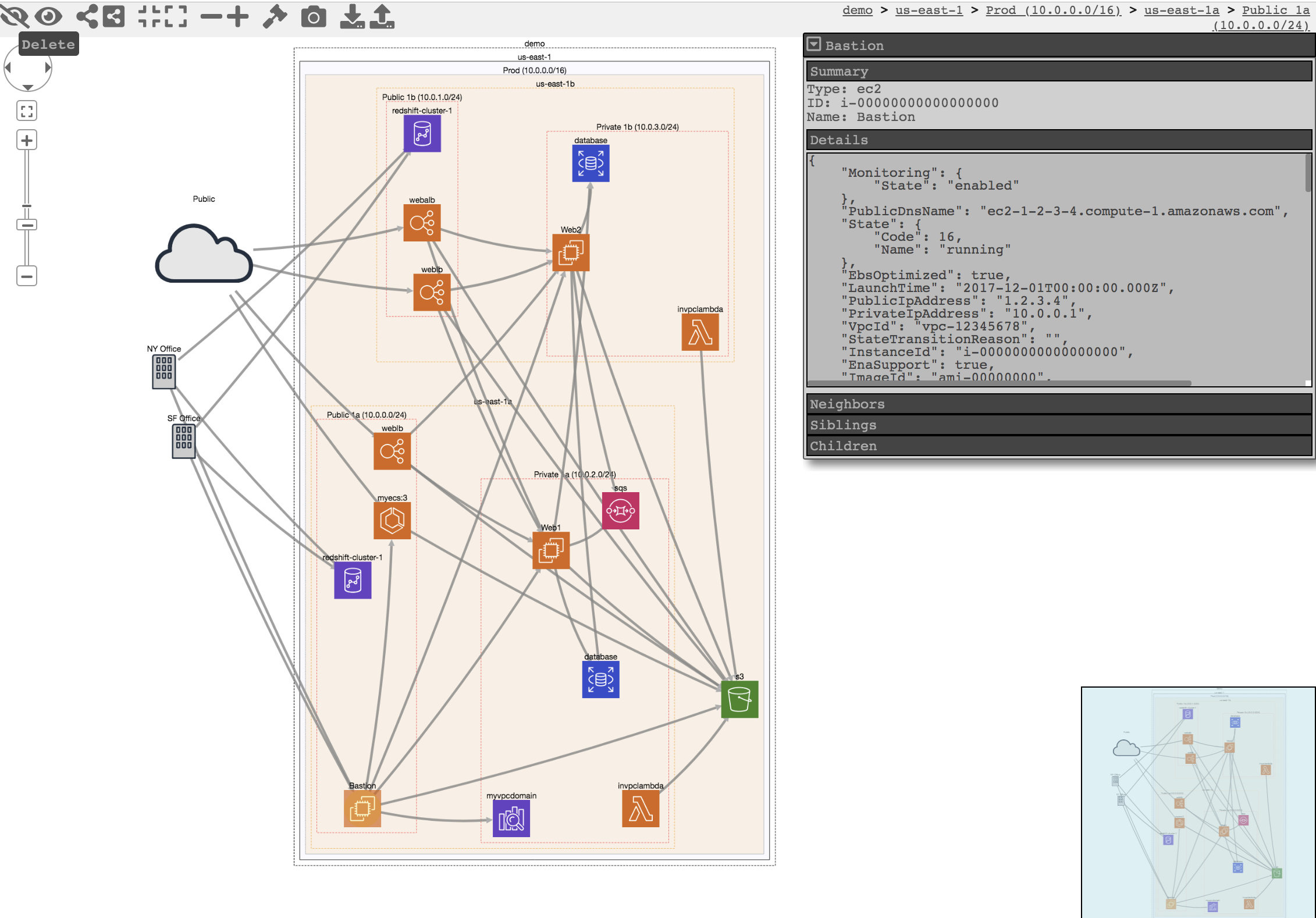
The original purpose was to generate network diagrams and display them in your browser (functionality no longer maintained).
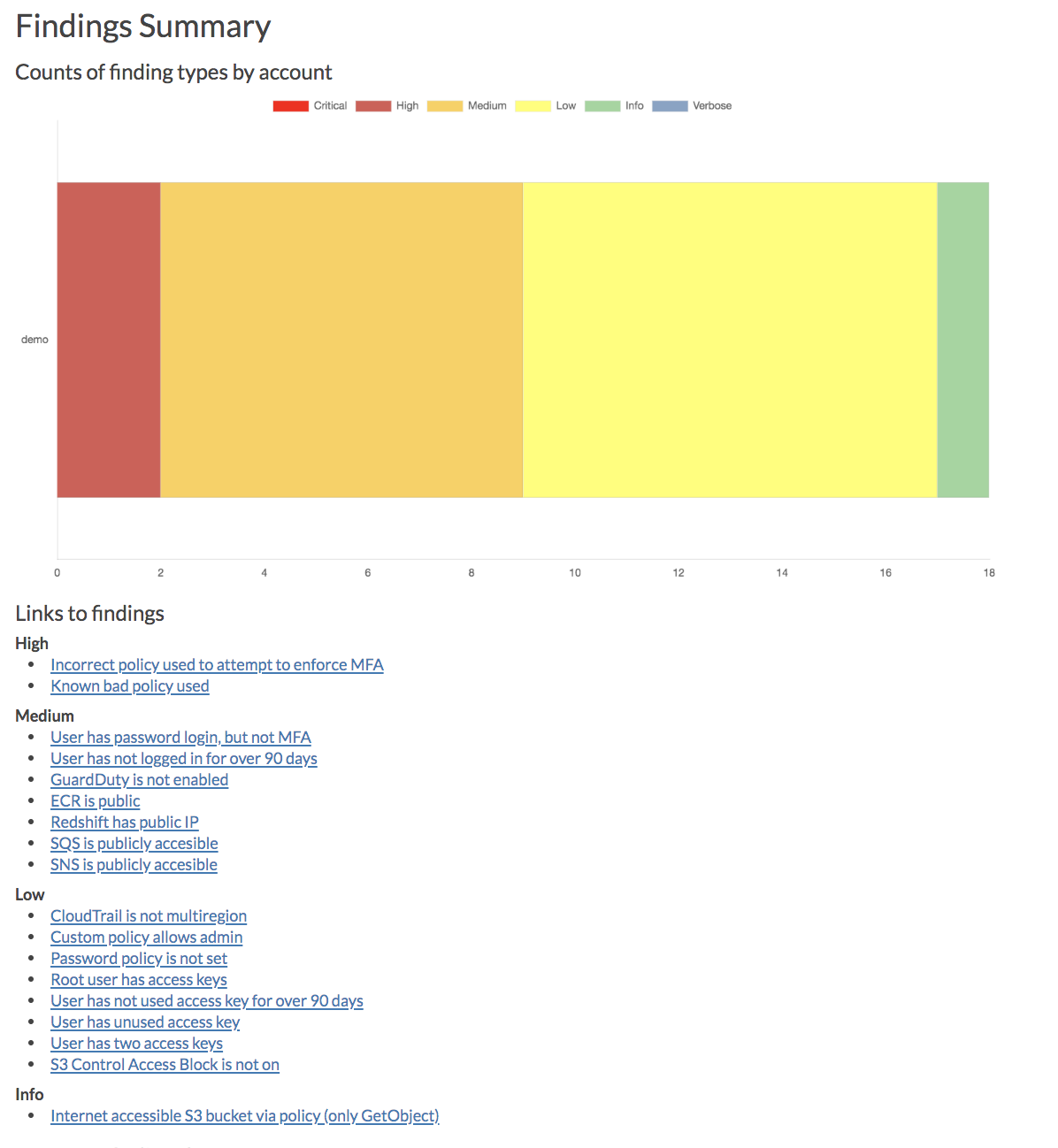
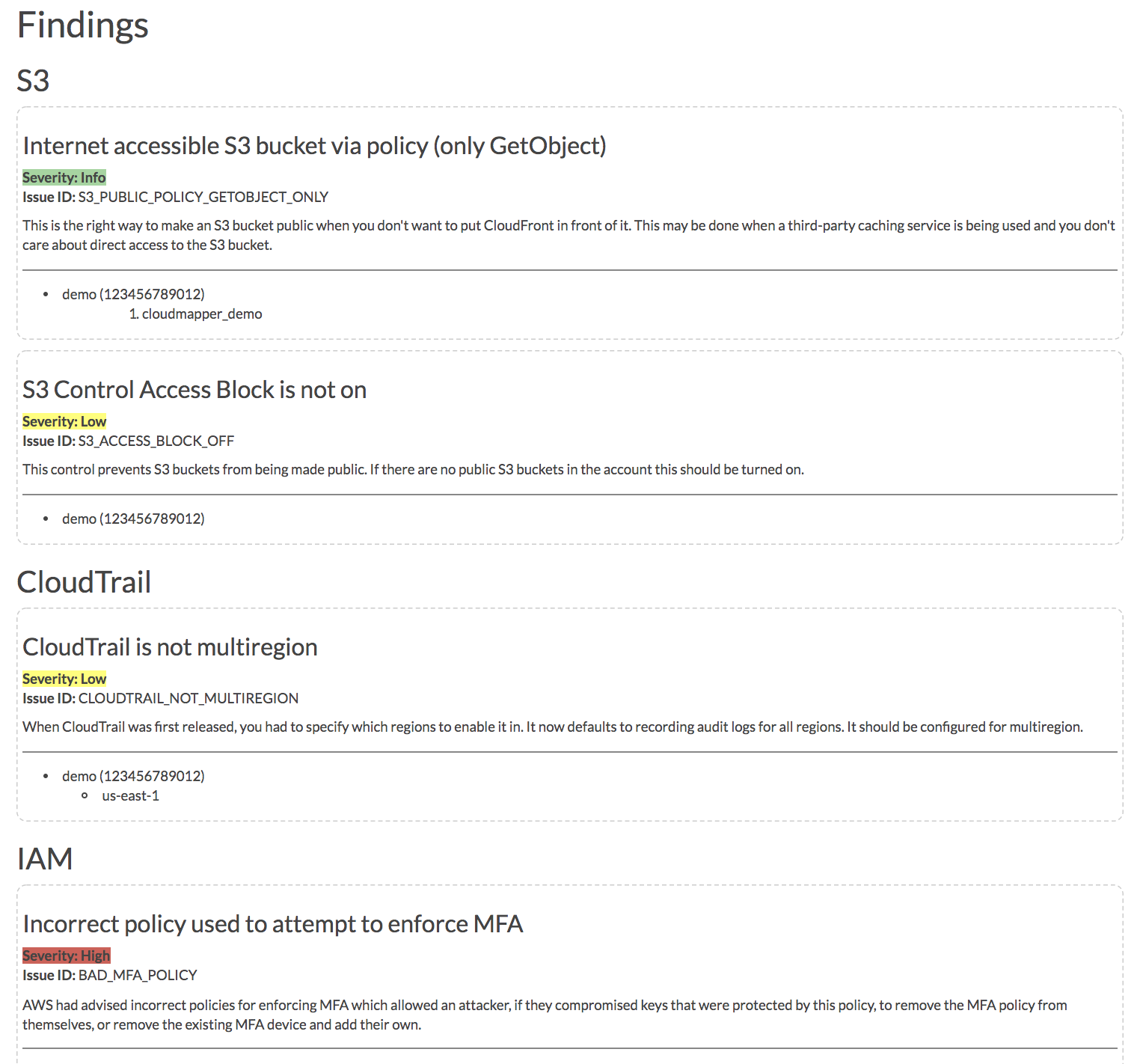
It now contains much more functionality, including auditing for security issues.
Network mapping demo
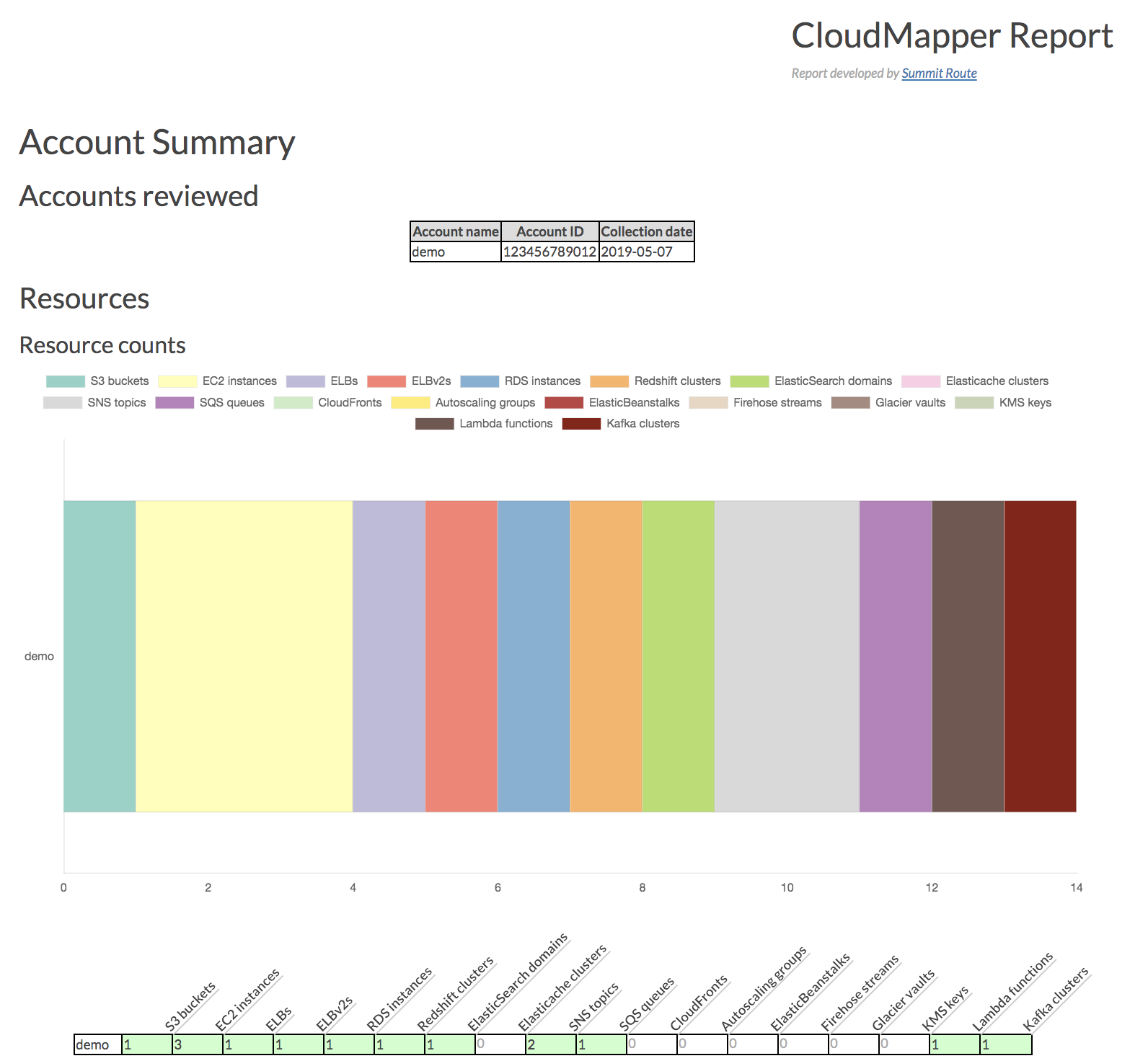
Report demo
Intro post
Post to show spotting misconfigurations in networks
Post on performing continuous auditing
Commands
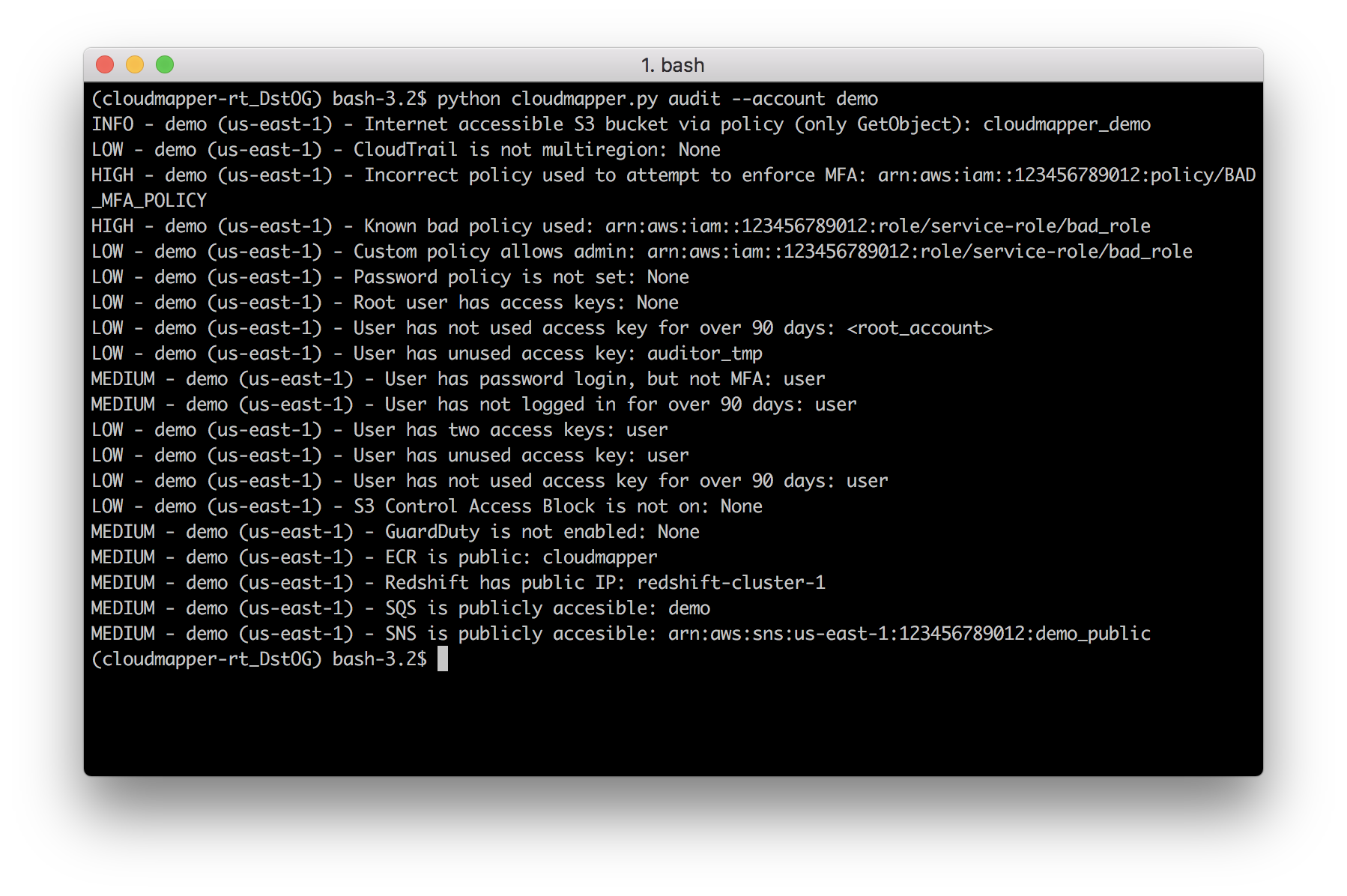
audit: Check for potential misconfigurations.
collect: Collect metadata about an account. More details here.
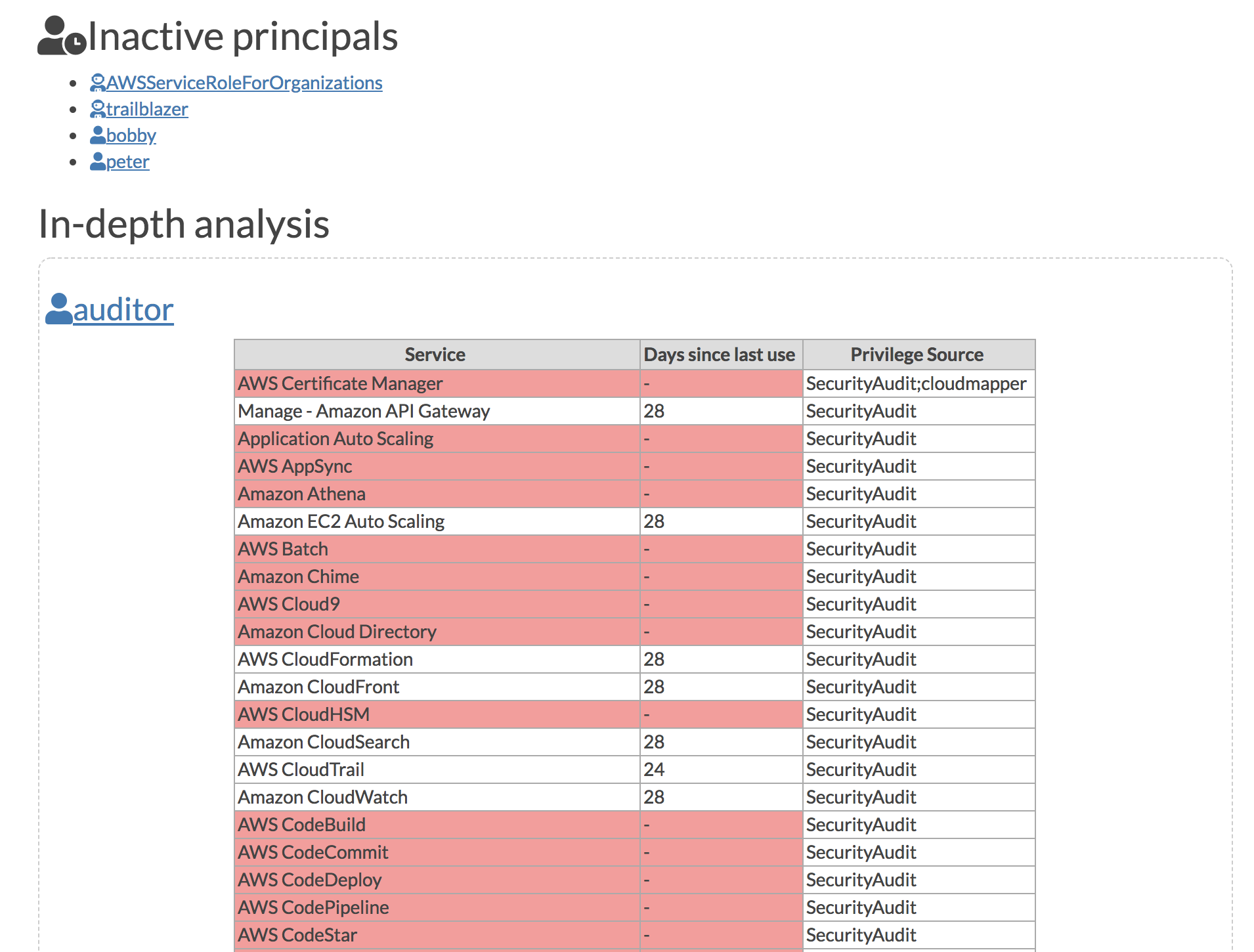
find_admins: Look at IAM policies to identify admin users and roles, or principals with specific privileges. More details here.
find_unused: Look for unused resources in the account. Finds unused Security Groups, Elastic IPs, network interfaces, volumes and elastic load balancers.
prepare/webserver: See Network Visualizations
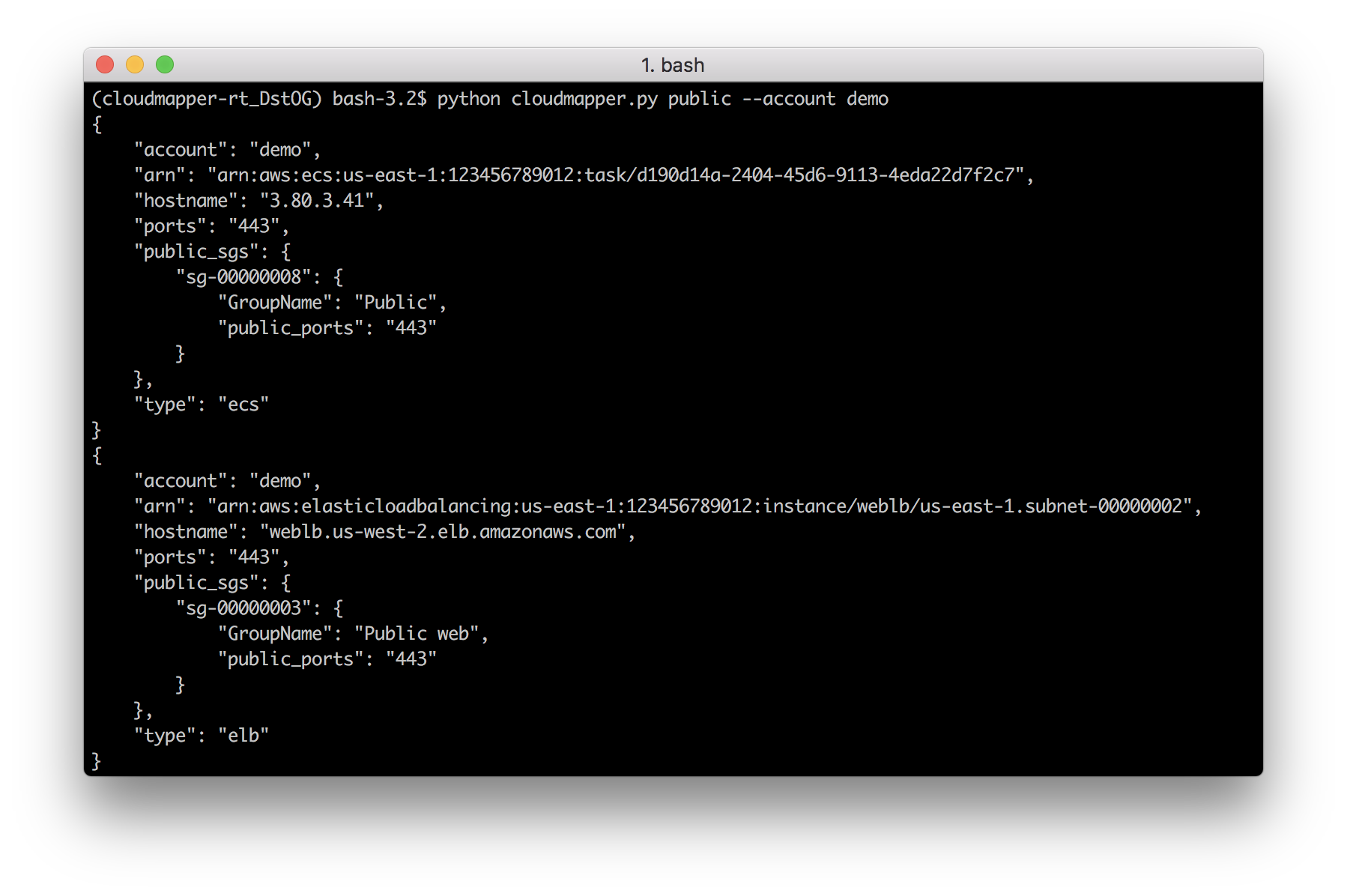
public: Find public hosts and port ranges. More details here.
sg_ips: Get geoip info on CIDRs trusted in Security Groups. More details here.
stats: Show counts of resources for accounts. More details here.
weboftrust: Show Web Of Trust. More details here.
report: Generate HTML report. Includes summary of the accounts and audit findings. More details here.
iam_report: Generate HTML report for the IAM information of an account. More details here.
If you want to add your own private commands, you can create a private_commands directory and add them there.
Screenshots
Installation
Requirements:
python 3 (3.7.0rc1 is known to work), pip, and virtualenv
You will also need jq (https://stedolan.github.io/jq/) and the library pyjq (https://github.com/doloopwhile/pyjq), which require some additional tools installed that will be shown.
A small set of demo data is provided. This will display the same environment as the demo site https://duo-labs.github.io/cloudmapper/
# Generate the data for the network map
python cloudmapper.py prepare --config config.json.demo --account demo
# Generate a report
python cloudmapper.py report --config config.json.demo --account demo
python cloudmapper.py webserver
This will run a local webserver at http://127.0.0.1:8000/
View the network map from that link, or view the report at http://127.0.0.1:8000/account-data/report.html
Setup
Configure information about your account.
Collect information about an AWS account.
1. Configure your account
Copy the config.json.demo to config.json and edit it to include your account ID and name (ex. "prod"), along with any external CIDR names. A CIDR is an IP range such as 1.2.3.4/32 which means only the IP 1.2.3.4.
2. Collect data about the account
This step uses the CLI to make describe and list calls and records the json in the folder specified by the account name under account-data.
AWS Privileges required
You must have AWS credentials configured that can be used by the CLI with read permissions for the different metadata to collect. I recommend using aws-vault. CloudMapper will collect IAM information, which means you MUST use MFA. Only the collect step requires AWS access.
You must have the following privileges (these grant various read access of metadata):
You need to be authenticated to the AWS CLI and have the permission organization:ListAccounts prior to running this command.
Using audit config overrides
You may find that you don't care about some of audit items. You may want to ignore the check entirely, or just specific resources. Copy config/audit_config_override.yaml.example to config/audit_config_override.yaml and edit the file based on the comments in there.
Using a Docker container
The docker container that is created is meant to be used interactively.
docker build -t cloudmapper .
Cloudmapper needs to make IAM calls and cannot use session credentials for collection, so you cannot use the aws-vault server if you want to collect data, and must pass role credentials in directly or configure aws credentials manually inside the container. The following code exposes your raw credentials inside the container.
This will drop you into the container. Run aws sts get-caller-identity to confirm this was setup correctly. Cloudmapper demo data is not copied into the docker container so you will need to collect live data from your system. Note docker defaults may limit the memory available to your container. For example on Mac OS the default is 2GB which may not be enough to generate the report on a medium sized account.
You should then be able to view the report by visiting http://127.0.0.1:8000/account-data/report.html
Running CloudMapper regularly to audit your environment
A CDK app for deploying CloudMapper via Fargate so that it runs nightly, sends audit findings as alerts to a Slack channel, and generating a report that is saved on S3, is described here.
Alternatives
For network diagrams, you may want to try https://github.com/lyft/cartography or https://github.com/anaynayak/aws-security-viz
For auditing and other AWS security tools see https://github.com/toniblyx/my-arsenal-of-aws-security-tools
Licenses
cytoscape.js: MIT
https://github.com/cytoscape/cytoscape.js/blob/master/LICENSE
cytoscape.js-qtip: MIT
https://github.com/cytoscape/cytoscape.js-qtip/blob/master/LICENSE
cytoscape.js-grid-guide: MIT
https://github.com/iVis-at-Bilkent/cytoscape.js-grid-guide
cytoscape.js-panzoom: MIT
https://github.com/cytoscape/cytoscape.js-panzoom/blob/master/LICENSE
jquery: JS Foundation
https://github.com/jquery/jquery/blob/master/LICENSE.txt
jquery.qtip: MIT
https://github.com/qTip2/qTip2/blob/master/LICENSE
cytoscape-navigator: MIT
https://github.com/cytoscape/cytoscape.js-navigator/blob/c249bd1551c8948613573b470b30a471def401c5/bower.json#L24
cytoscape.js-autopan-on-drag: MIT
https://github.com/iVis-at-Bilkent/cytoscape.js-autopan-on-drag
font-awesome: MIT
http://fontawesome.io/
FileSave.js: MIT
https://github.com/eligrey/FileSaver.js/blob/master/LICENSE.md
circular-json: MIT
https://github.com/WebReflection/circular-json/blob/master/LICENSE.txt
rstacruz/nprogress: MIT
https://github.com/rstacruz/nprogress/blob/master/License.md
Trang TopGit này là một snapshot — tab "Readme" hiển thị nguyên văn README của repo (đã bỏ link, giữ ảnh). Repo GitHub ở github.com/duo-labs/cloudmapper là nguồn chính thức.
duo-labs/cloudmapper có bao nhiêu sao?
duo-labs/cloudmapper có 6.3k sao GitHub — tải lại trang để xem số mới nhất, hoặc xem trực tiếp github.com/duo-labs/cloudmapper. TopGit phản chiếu số sao của GitHub nhưng không cam kết đến từng phút.
duo-labs/cloudmapper có phải mã nguồn mở không?
Có — duo-labs/cloudmapper phát hành theo license BSD-3-Clause, nghĩa là mã nguồn mở để đọc, fork và (tùy license) tái sử dụng. Mã: github.com/duo-labs/cloudmapper.
duo-labs/cloudmapper còn đang phát triển không?
Commit gần nhất trên duo-labs/cloudmapper là 2.3 năm trước (theo timestamp GitHub). Repo có 830 fork — một chỉ báo về mức độ quan tâm của cộng đồng.
duo-labs/cloudmapper là gì?
duo-labs/cloudmapper (duo-labs/cloudmapper) là dự án JavaScript trên GitHub. Theo mô tả gốc: CloudMapper helps you analyze your Amazon Web Services (AWS) environments.
duo-labs/cloudmapper so với các dự án Security khác thế nào?
duo-labs/cloudmapper được TopGit xếp vào nhóm Security, với 6.3k sao GitHub và viết bằng JavaScript. Xem trang chủ đề Security trên TopGit để so sánh với các dự án tương tự theo số sao và mức độ hoạt động.
Đọc đầy đủ README ở tab phía trên.
Vẫn đang phân vân về cloudmapper?
Một cú bấm sẽ gửi câu hỏi kèm trang này cho AI — xem AI nói gì về cloudmapper.

 /cloudmapper