dwmkerr/app-icon — 571★ trên GitHub (Java). Icon management for Mobile Apps. Create icons, generate all required sizes, label and annotate. Supports Native, Cordova, React Native, Xamarin and more. Inspired by cordova-icon.
Tóm tắt dựng từ metadata GitHub của chính dự án — chưa có bài review TopGit. Trang sẽ tự động cập nhật khi bài review đầy đủ được xuất bản.
VÌ SAO CHƯA CÓ REVIEW
TopGit viết bài đầy đủ cho repo có nhiều sao nhất và được yêu cầu nhiều nhất. Trang này là snapshot trong thời gian chờ — xem README gốc ở tab READ ME.
Icon management for Mobile Apps. Create icons, generate all required sizes, label and annotate. Supports Native, Cordova, React Native, Xamarin and more. Inspired by cordova-icon. Node 10 and onwards supported.
Introduction
Installation
Usage
Initialising
Generating Icons
Labelling Icons
Adaptive Icons
Developer Guide
Initial Setup
Running Tests
Commit Messages
Creating a Release
Builds
Debugging
The Sample Projects
React Native
Cordova
Native
Compatibility
Troubleshooting
License
Introduction
This simple tool allows you to create a single icon in your app project, then create icons of all required sizes from it. It currently works for iOS and Android. You can also add labels to your app icons.
Create a single large icon.png at least 192 pixels square, or run app-icon init to create this icon, then run:
# If you are using npm 5.2 onwards...
npx app-icon generate

# ...for older versions of npm
npm install -g app-icon
app-icon generate
You can also use the module directly in node:
/**
 * appIcon = {
 *   labelImage(inputFilePath, outputFilePath, topText, bottomText),
 *   generate({ sourceIcon, platforms, search }),
 *   templates: {
 *     'AndroidManifest.icons': {...json file...},
 *     'AppIcon.iconset': {...json file...},
 *   },
 * }
 */
import appIcon from 'app-icon';

Promise.resolve()
  .then(() => appIcon.labelImage('./inputfile.png', './out.png', 'UAT', '0.12.3'))
  .then(() => appIcon.labelImage('./inputfile.png', './out.png', 'UAT')) // Bottom text optional
  .then(() => appIcon.labelImage('./inputfile.png', './out.png', null, '0.12.3')) // Top text optional
  .then(() => appIcon.generate()) // will use all default values
  .then(() => appIcon.generate({
    sourceIcon: './icon.png', // Path of the icon to use
    platforms: 'android,ios', // The platforms to generate icons for (i.e. 'android')
    searchRoot: './',
  }));
The app-icon tool can be used to create a simple template icon, generate icons of all sizes from a template icon, or label icons.
Initialising
If you do not already have a single icon to use as the main icon for your project, you can create one with the init command:
app-icon init # generates an icon named icon.png
You can also add a simple label to the icon.
app-icon init --caption "App" # creates an icon with the text 'App'
To create template Adaptive Icons for Android include the --adaptive-icons flag.
Generating Icons
Add an icon (ideally at least 192x192 pixels) named icon.png to your project root (or run app-icon init). To automatically generate icons of all sizes for all app projects in the same folder, run:
app-icon generate
If an iOS project is present, then the icon will be copied at all required sizes to:
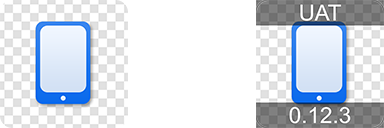
This is a useful trick when you are creating things like internal QA versions of your app, where you might want to show a version number or other label in the icon itself.
To label adaptive icons, simply run the label command against the foreground adaptive icon image.
Adaptive Icons
Support for Adaptive Icons for Android is being introduced. This will happen in stages and should be considered an 'alpha' feature until otherwise noted.
The current goals are:
Adaptive Icons are 'opt in' for now, they won't be generated by default
Creating or generating adaptive icons is done via the --adaptive-icons flag
None of the current commands support the --adaptive-icons flag. The init command will be the first to bring support, then generate. If the feature is working well for users then I will document in detail its usage, until then it is an 'experimental' feature!
There is an excellent guide on developing Adaptive Icons here.
To test how adaptive icons will look when animated, swiped, etc, the Adaptive Icons website by Marius Claret is very useful!
Note that Adaptive Icons of all supported sizes are generated. However, we also generate the res/mipmap-anydpi-v26/ adaptive icon. This is a large size icon which Android from v26 onwards will automatically rescale as needed to all other sizes. This technically makes the density specific icons redundant. The reason we generate both is to ensure that after generate is run, all icons in the project will be consistent.
Developer Guide
The only dependencies are Node 10 (or above) and Yarn.
Useful commands for development are:
Command
Usage
npm test
Runs the unit tests.
npm run test:debug
Runs the tests in a debugger. Combine with .only and debugger for ease of debugging.
npm run cov
Runs the tests, writing coverage reports to ./artifacts/coverage.
Currently the linting style is based on airbnb. Run npm run lint to lint the code.
Initial Setup
Install the dependencies (I recommend Node Version Manager):
nvm install 8
nvm use 8
git clone [email protected]:dwmkerr/app-icon.git
cd app-icon
npm install && npm test
Running Tests
Run the tests with:
npm test
Tests are executed with Mocha and coverage is handled by Istanbul. Coverage reports are written to an ./artifacts folder.
Note that best practices are to pass Mocha a quoted string with a glob pattern for cross-platform execution of tests (see Mocha Docs). However for some reason on AppVeyor this doesn't seem to work. Leaving the pattern unquoted works for cmd as well as the shell in builds for now. So please be careful if changing the quotes and test on both platforms.
Commit Messages
Conventional Commits should be used. This allows the CHANGELOG to be kept up to date automatically, and ensures that semantic versioning can be expected from the library.
Note that semantic-version is used, meaning a changelog is automatically kept up to date, and versioning is handled semantically based on the commit message.
Builds
Builds are run on CircleCI. You can run the CircleCI build locally with the following command:
make circleci
The builds use custom docker images which contain the appropriate Node.js runtime, as well as the ImageMagick binaries. These custom images are stored in the .circleci/images folder. You can use the .circleci/images/makefile makefile to build them, but permissions to push to the dwmkerr Docker Hub account are required to publish these images. In general, these should not need to be modified.
Debugging
The debug package is used to support low-level debugging. If you want to see debug messages when running the tool, just set the DEBUG environment variable to app-icon:
This project includes some sample apps in the test folder, which are used for the tests. You can also run these apps to see the icons produced in action.
React Native
To run:
cd ./test/ReactNativeIconTest/
npm install
react-native run-ios
# OR react-native run-android
Cordova
To run:
cd ./test/CordovaApp/
npm install
cordova run ios
# OR cordova run android
Native
To run the native apps, open the ./test/NativeApp directory, then open the iOS/Android projects in XCode/AndroidStudio as needed.
Compatibility
app-icon dependds on ImageMagick. ImageMagick 6 is installed by default on many Linux distributions, as well as OSX. Some platforms are regularly tested (such as Ubuntu, via CircleCI). Other platforms may work but are not tested when I make a release, so your results may vary.
The table below shows the current confirmed compatibility:
Platform
app-icon
ImageMagick
Status
OSX
0.6.x
6, 7
✅
Ubuntu 14
0.6.x
6
✅
Troubleshooting
Images labelled with app-icon label have the text slightly vertically offset
This seems to be an issue with Imagemagick 6 - try upgrading to 7.
dwmkerr/app-icon thuộc nhóm Mobile trên TopGit, cùng 7 topic GitHub. Trang Trending và Topics liệt kê các repo cùng số sao và cùng ngôn ngữ để so sánh.
Đọc thêm về dwmkerr/app-icon ở đâu?
Trang TopGit này là một snapshot — tab "Readme" hiển thị nguyên văn README của repo (đã bỏ link, giữ ảnh). Repo GitHub ở github.com/dwmkerr/app-icon là nguồn chính thức.
dwmkerr/app-icon có bao nhiêu sao?
dwmkerr/app-icon có 571 sao GitHub — tải lại trang để xem số mới nhất, hoặc xem trực tiếp github.com/dwmkerr/app-icon. TopGit phản chiếu số sao của GitHub nhưng không cam kết đến từng phút.
dwmkerr/app-icon có phải mã nguồn mở không?
Có — dwmkerr/app-icon phát hành theo license MIT, nghĩa là mã nguồn mở để đọc, fork và (tùy license) tái sử dụng. Mã: github.com/dwmkerr/app-icon.
dwmkerr/app-icon có website riêng không?
TopGit chưa ghi nhận URL trang chủ cho dwmkerr/app-icon. Phần README ở tab phía trên thường có link demo, hoặc xem mô tả GitHub của repo.
dwmkerr/app-icon là gì?
dwmkerr/app-icon (dwmkerr/app-icon) là dự án Java trên GitHub. Theo mô tả gốc: Icon management for Mobile Apps. Create icons, generate all required sizes, label and annotate. Supports Native, Cordova, React Native, Xamarin and more. Inspired by cordova-icon.
dwmkerr/app-icon so với các dự án Mobile khác thế nào?
dwmkerr/app-icon được TopGit xếp vào nhóm Mobile, với 571 sao GitHub và viết bằng Java. Xem trang chủ đề Mobile trên TopGit để so sánh với các dự án tương tự theo số sao và mức độ hoạt động.
Đọc đầy đủ README ở tab phía trên.
Muốn nghe thêm một ý kiến về app-icon?
Hỏi một AI đọc được trang này — một cú bấm là có ngay nhận định về app-icon.

 /app-icon