Snapshot của dwmkerr/docker-dynamodb: 229★ · Shell. It's DynamoDB - in Docker!
Tóm tắt dựng từ metadata GitHub của chính dự án — chưa có bài review TopGit. Trang sẽ tự động cập nhật khi bài review đầy đủ được xuất bản.
VÌ SAO CHƯA CÓ REVIEW
TopGit viết bài đầy đủ cho repo có nhiều sao nhất và được yêu cầu nhiều nhất. Trang này là snapshot trong thời gian chờ — xem README gốc ở tab READ ME.
docker run -p 8000:8000 dwmkerr/dynamodb
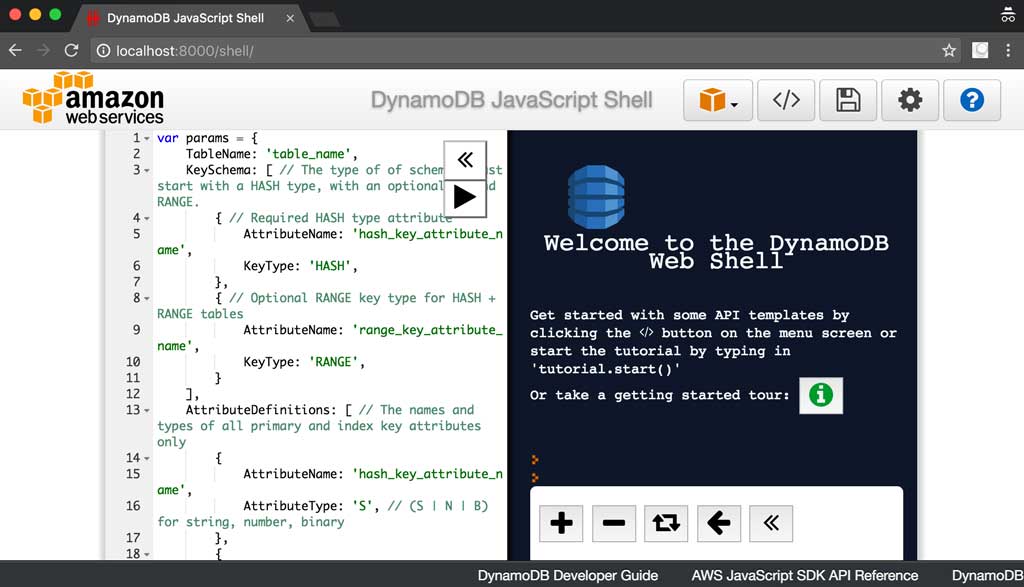
open http://localhost:8000/shell
This container has full support for all of the commandline parameters in the DynamoDB Documentation.
Note - there is now an Official AWS Docker Image for DynamoDB:
AWS Blog: Use Amazon DynamoDB Local More Easily with the New Docker Image
Docker Hub: DynamoDB
Instructions
Coding
The Dockerfile
The Makefile
The Tests
Continuous Integration
Samples
Generating an Image with Test Data
Connecting an AWS Lambda Function against a local Database
Troubleshooting
Contributing
Instructions
To run an ephemeral instance of DynamoDB:
docker run -p 8000:8000 dwmkerr/dynamodb
If you want to have persistent data, just mount a volume from your host and set it as a data directory for DynamoDB:
docker run -v /data:/data -p 8000:8000 dwmkerr/dynamodb -dbPath /data
If you want to access tables and data created by the AWS CLI through a language SDK (Node, Java, etc), you will want to use the -sharedDb option as described in this AWS forum post:
docker run -p 8000:8000 dwmkerr/dynamodb -sharedDb
Without this option, each connection will get is own database and the data will not be accessible between different clients.
Coding
The code is structured like this:
Dockerfile     # the important thing, the actual dockerfile
makefile       # commands to build, test deploy etc
tests/         # bash scripts to test how the container works
The Dockerfile
The Dockerfile is based on OpenJDK and essentially just runs a jar file in a JRSE 7 environment.
The Makefile
The makefile contains commands to build, test and deploy. Parameters can be passed as environment variables or through the commandline.
Command
Notes
make build
Builds the image dwmkerr/dynamodb:latest. If a BUILD_NUM parameter is provided, also builds dwmkerr/dynamodb:BUILD_NUM.
make test
Runs the test scripts.
make deploy
Deploys the images to the docker hub. If you are not logged in, you're gonna have a bad time.
The Tests
The tests are simple bash scripts which check for basic capabilties which relate to the image. This means they're not there to make sure DynamoDB Local works, they're there to make sure the docker features work with the image. For example, mounting a volume to provide a persistent data directory.
Continuous Integration
CI is provided currently by Circle. Ensure you provide AWS credentials as we are using the AWS CLI (they are not used, but the CLI still checks that they are present).
Samples
Generating an Image with Test Data
A basic sample showing how to build an image with custom test data is at ./samples/test-data.
Go to the sample: cd ./samples/test-data
Create some sample data: make create-test-data. This creates sample data files at ./data.
Build a new docker image called sample-test-data, with make build.
The newly created image has the test data built in. Verify with make test.
Connecting an AWS Lambda Function against a local Database
Missing required key 'ProvisionedThroughput' in params Unexpected key 'BillingMode' found in params
The issue is the underlying DynamoDB Local jar provided by AWS requires read and write capacity units to be specified (https://docs.aws.amazon.com/amazondynamodb/latest/developerguide/DynamoDBLocal.UsageNotes.html).
Provisioned throughput settings are ignored in downloadable DynamoDB, even though the CreateTable operation requires them. For CreateTable, you can specify any numbers you want for provisioned read and write throughput, even though these numbers are not used. You can call UpdateTable as many times as you want per day. However, any changes to provisioned throughput values are ignored.
Here is an example CreateTable call which will work:
// Note we have to specify ProvisionedThroughput, but it will not be used.
var params = {
    TableName: 'table',
    ProvisionedThroughput: {
        ReadCapacityUnits: 1,
        WriteCapacityUnits: 1
    },
    KeySchema: [
        {
            AttributeName: 'id',
            KeyType: 'HASH',
        }
    ],
    AttributeDefinitions: [
        {
            AttributeName: 'id',
            AttributeType: 'S',
        }
    ],
};
dynamodb.createTable(params, function(err, data) {
    if (err) ppJson(err); // an error occurred
    else ppJson(data); // successful response

});
Contributing
Please help out! Here are some areas I'd like to improve upon:
Cleaner or colourised output for the tests. Is there any simple tool to do assets in a shell script?
If you contribute, include a README.md update in your PR and I'll list your contributions here.
Trang TopGit này là một snapshot — tab "Readme" hiển thị nguyên văn README của repo (đã bỏ link, giữ ảnh). Repo GitHub ở github.com/dwmkerr/docker-dynamodb là nguồn chính thức.
dwmkerr/docker-dynamodb có bao nhiêu sao?
dwmkerr/docker-dynamodb có 229 sao GitHub — tải lại trang để xem số mới nhất, hoặc xem trực tiếp github.com/dwmkerr/docker-dynamodb. TopGit phản chiếu số sao của GitHub nhưng không cam kết đến từng phút.
dwmkerr/docker-dynamodb có phải mã nguồn mở không?
Có — dwmkerr/docker-dynamodb phát hành theo license MIT, nghĩa là mã nguồn mở để đọc, fork và (tùy license) tái sử dụng. Mã: github.com/dwmkerr/docker-dynamodb.
dwmkerr/docker-dynamodb có website riêng không?
TopGit chưa ghi nhận URL trang chủ cho dwmkerr/docker-dynamodb. Phần README ở tab phía trên thường có link demo, hoặc xem mô tả GitHub của repo.
dwmkerr/docker-dynamodb là gì?
dwmkerr/docker-dynamodb (dwmkerr/docker-dynamodb) là dự án Shell trên GitHub. Theo mô tả gốc: It's DynamoDB - in Docker!
Đọc đầy đủ README ở tab phía trên.
Chưa chắc docker-dynamodb có hợp với bạn?
Để ChatGPT, Claude hoặc Perplexity tìm hiểu giúp — bấm bên dưới và xem AI nói gì về docker-dynamodb.

 /docker-dynamodb