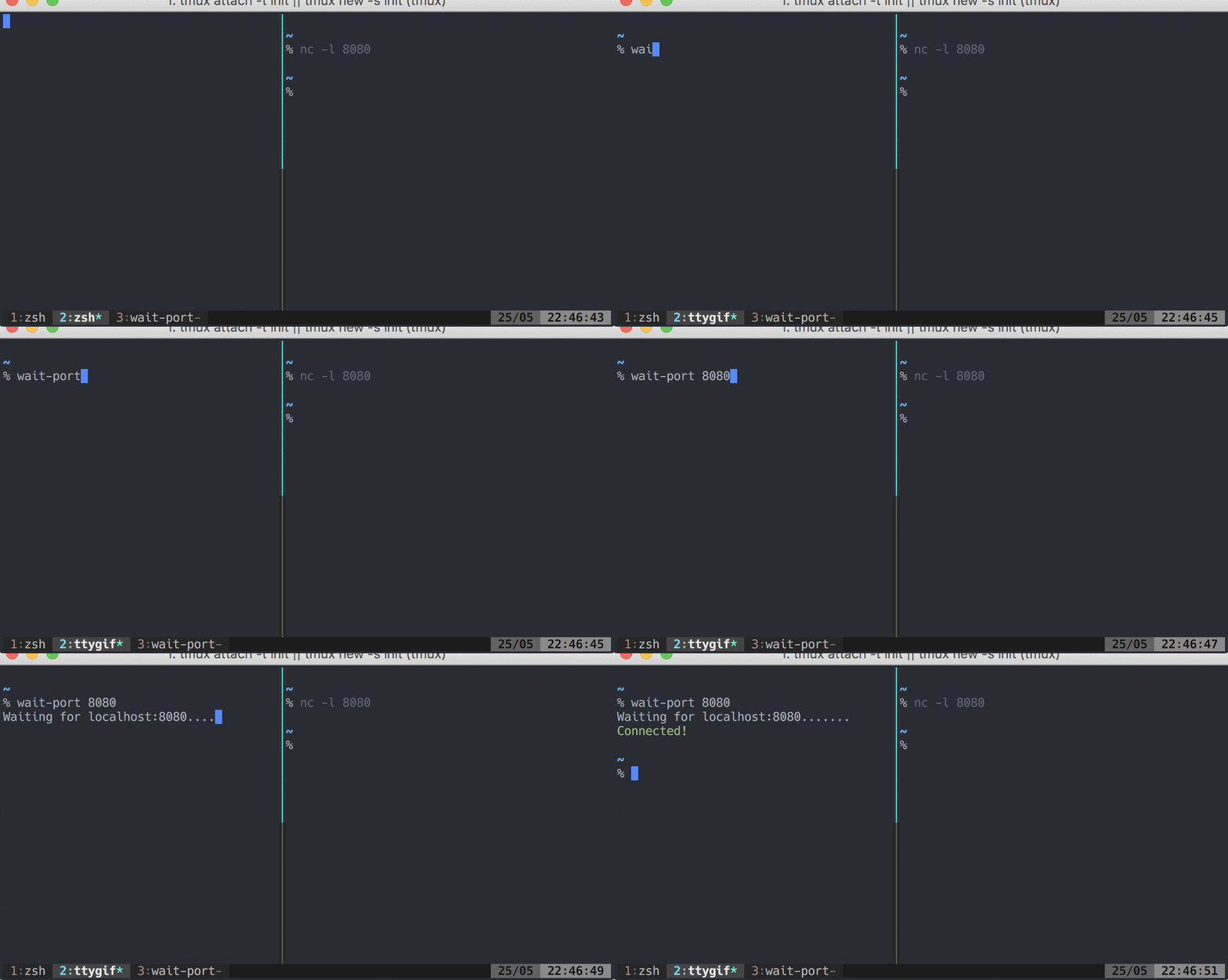
dwmkerr/wait-port là một trong những repo mã nguồn mở mà TopGit theo dõi, hiện có 345 sao, viết chủ yếu bằng JavaScript. Simple binary to wait for a port to open. Useful for docker-compose and general server side activities.
Tóm tắt dựng từ metadata GitHub của chính dự án — chưa có bài review TopGit. Trang sẽ tự động cập nhật khi bài review đầy đủ được xuất bản.
VÌ SAO CHƯA CÓ REVIEW
TopGit viết bài đầy đủ cho repo có nhiều sao nhất và được yêu cầu nhiều nhất. Trang này là snapshot trong thời gian chờ — xem README gốc ở tab READ ME.
Ideally, Node LTS should be used however this package is tested successfully with Node.js 10 and upwards.
Please avoid using version 0.2.13 - this incorrectly included a breaking change. Use 0.2.14 if you need compatibility with Node 8, or 0.3.0 or upwards otherwise.
Usage
To wait indefinitely for a port to open, just use:
$ wait-port localhost:3000
To wait for a port to open, but limit to a certain timeout, use:
$ wait-port -t 10000 localhost:3000
To wait for an HTTP endpoint to respond with a 200 class status code, include the http:// protocol:
$ wait-port http://:3000/healthcheck
Parameters
The following parameters are accepted:
Parameter
Usage
<target>
Required. The target to test for. Can be just a port, a colon and port (as one would use with httpie or host and port. Examples: 8080, :3000, 127.0.0.1:443.
--output, -o
Optional. Output style to use. Can be dots (default) or silent (no output).
--timeout, -t
Optional. Timeout (in milliseconds).
--wait-for-dns
Optional. Do not error if the response is ENOTFOUND, just keep on waiting (useful if you are waiting for a DNS record to also be created).
Error Codes
The following error codes are returned:
Code
Meaning
0
The specified port on the host is accepting connections.
1
A timeout occurred waiting for the port to open.
2
An unknown error occurred waiting for the port to open. The program cannot establish whether the port is open or not.
3
The address cannot be found (e.g. no DNS entry, or unresolvable).
4
The target (host and port) is invalid.
API
You can use wait-port programmatically:
const waitPort = require('wait-port');

const params = {
  host: 'google.com',
  port: 443,
};

waitPort(params)
  .then(({ open, ipVersion }) => {
    if (open) console.log(`The port is now open on IPv${ipVersion}!`);
    else console.log('The port did not open before the timeout...');
  })
  .catch((err) => {
    console.error(`An unknown error occured while waiting for the port: ${err}`);
  });
The CLI is a very shallow wrapper around this function. The params object takes the following parameters:
CLI Parameter
API Parameter
Notes
<target>
host
Optional. Defaults to localhost.
<target>
port
Required. Port to wait for.
--output
output
Optional. Defaults to dots. Output style to use. silent also accepted.
--timeout, -t
timeout
Optional. Defaults to 0. Timeout (in milliseconds). If 0, then the operation will never timeout.
--wait-for-dns
waitForDns
Optional. Defaults to false.
Developer Guide
This module uses:
Name
Usage
chalk
Terminal output styling.
commander.js
Utility for building commandline apps.
debug
Utility for debug output.
mocha / nyc
Test runner / coverage.
Debugging
This module use debug for debug output. Set DEBUG=wait-port to see detailed diagnostic information:
DEBUG=wait-port wait-for -t 10000 localhost:6234
This will also work for any code which uses the API.
Testing
Run unit tests with npm test. Coverage is reported to artifacts/coverage.
Debug unit tests with npm run debug. Add a debugger statement to the line you are interested in, and consider limiting scope with .only.
Run tests continuously, watching source with npm run test:watch.
Testing the CLI
Don't install the package to test the CLI. Instead, in the project folder run npm link. Now go to whatever folder you want to use the module in and run npm link wait-port. It will symlink the package and binary. See npm link for more details.
Manpage
Installing the CLI will install the manpage. The manpage is at ./man/wait-port.1. After updating the page, test it with man ./man/wait-port.1 before publishing, as the format can be tricky to work with.
Releasing
Kick out a new release with:
npm run release
git push --follow-tags
npm publish
standard-version is used to manage version numbers and the CHANGELOG.md file.
CI/CD
CI/CD runs as a set of GitHub actions. There are two pipelines:
Validate Pull Request - confirms that a PR meets the required standardsd
Release Please - prepares changelogs and release PRs, and publishes to NPM
Timeouts
The timeout option for waitPort is used terminate attempts to open the socket after a certain amount of time has passed. Please note that operations can take significantly longer than the timeout. For example:
In this case, the socket will only attempt to connect every ten seconds. So on the first iteration, the timeout is not reached, then another iteration will be scheduled for after ten seconds, meaning the timeout will happen eight seconds later than one might expect.
The waitPort promise may take up to interval milliseconds greater than timeout to resolve.
Contributors ✨
Thanks goes to these wonderful people (emoji key):
Kieran Barker 📖
This project follows the all-contributors specification. Contributions of any kind welcome!
dwmkerr/wait-port có 345 sao GitHub — tải lại trang để xem số mới nhất, hoặc xem trực tiếp github.com/dwmkerr/wait-port. TopGit phản chiếu số sao của GitHub nhưng không cam kết đến từng phút.
dwmkerr/wait-port có tag gì không?
Bản đồng bộ chưa ghi nhận topic GitHub nào cho dwmkerr/wait-port. GitHub topics hiển thị ở thanh bên phải trang repo — đó là nơi đáng kiểm tra nhất.
dwmkerr/wait-port còn đang phát triển không?
Commit gần nhất trên dwmkerr/wait-port là 1.9 năm trước (theo timestamp GitHub). Repo có 19 fork — một chỉ báo về mức độ quan tâm của cộng đồng.
dwmkerr/wait-port là gì?
dwmkerr/wait-port (dwmkerr/wait-port) là dự án JavaScript trên GitHub. Theo mô tả gốc: Simple binary to wait for a port to open. Useful for docker-compose and general server side activities.
dwmkerr/wait-port viết bằng ngôn ngữ gì?
dwmkerr/wait-port chủ yếu viết bằng JavaScript. Trường "language" của GitHub dựa trên phần lớn byte ở nhánh mặc định.
Đọc đầy đủ README ở tab phía trên.
wait-port có đáng để bạn bỏ thời gian?
ChatGPT, Claude và Perplexity đều đọc được trang này. Hỏi thử xem họ nghĩ gì về wait-port.
 /wait-port