dzhng/deep-seek — công cụ AI — đang có 521 sao GitHub trong nhóm AI Tools. LLM powered retrieval engine designed to process a ton of sources to collect a comprehensive list of entities.
Tóm tắt dựng từ metadata GitHub của chính dự án — chưa có bài review TopGit. Trang sẽ tự động cập nhật khi bài review đầy đủ được xuất bản.
VÌ SAO CHƯA CÓ REVIEW
TopGit viết bài đầy đủ cho repo có nhiều sao nhất và được yêu cầu nhiều nhất. Trang này là snapshot trong thời gian chờ — xem README gốc ở tab READ ME.
This is a new experimental architecture for a llm powered internet scale retrieval engine. This architecture is very different from current research agents, which are designed as answer engines.
You can see some example results here: https://deep-seek.vercel.app/ (Note that this won't let you do real queries, since I won't be able to afford it 😅)
The main difference between the 2 concepts breaks down to:
Answer engine: aggregate a ton of sources to find the one correct answer. This is what "research agents" have converged on recently. Examples include perplexity, gpt-researcher, or aomni.
Retrieval engine: process a ton of sources to collect a comprehensive list of entities. So far there haven't been any serious attempts to do this yet (afaik).
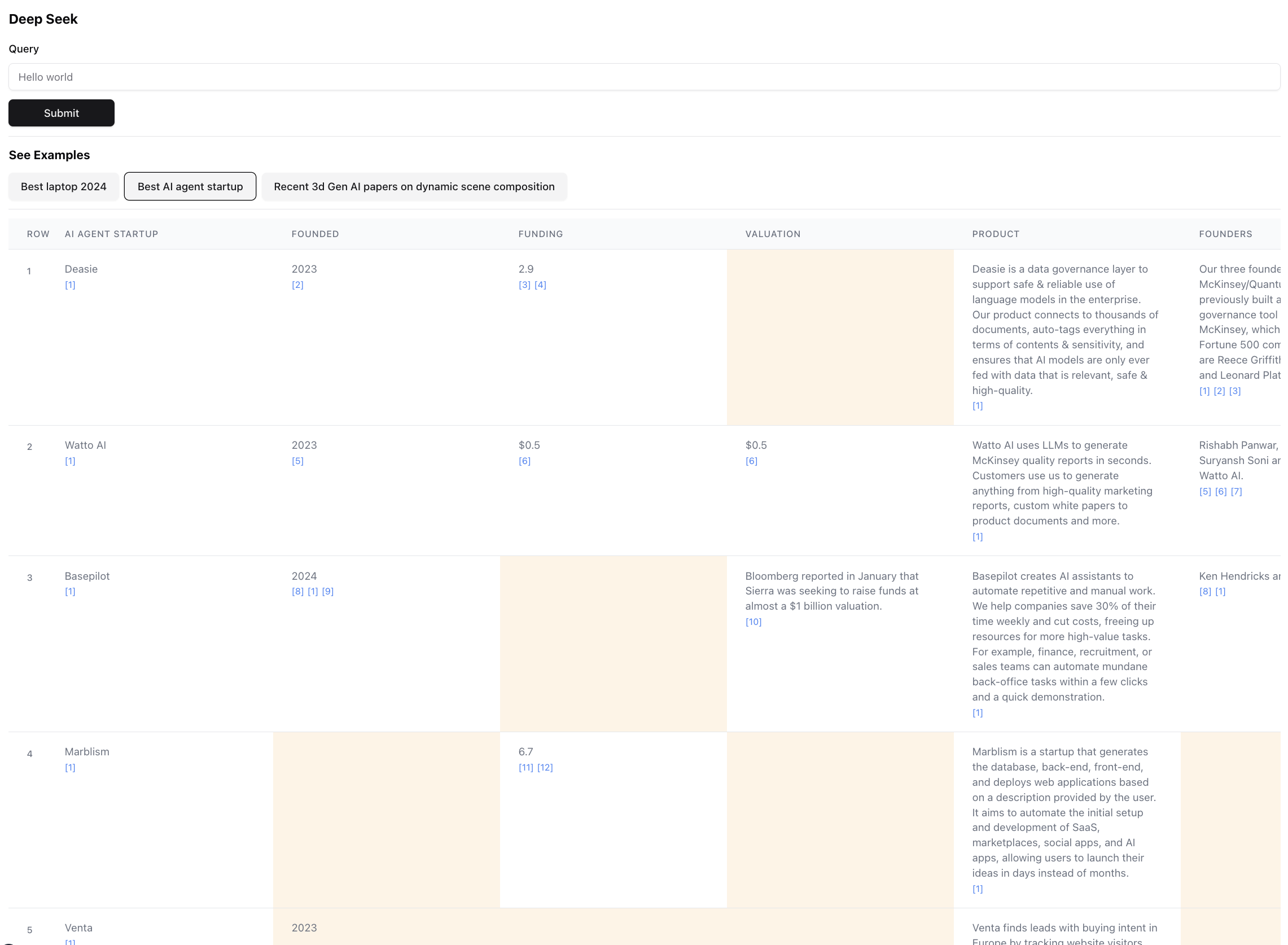
The end result for an answer engine is a research report, the end result for a retrieval engine is a table with all the retrieved entities and enriched columns.
Here's what the end result looks like (zoomed out for scale):
This is infact a small portion of the result for this query. The actual result is so large it's impossible to screenshot. There are 94 records in the final result, which the agent gathered & enriched after browsing through 356 sources.
The agent also generates a confidence score for the data in the table cells as it is enriching. Note that there are certain cells highlighted in yellow - those are cells with low confidence. Those are cases where the sources may conflict, or there are no sources at all so the agent made a best guess. This is actually a number between 0 - 1, so there can definitely be better & more creative UI to showcase the score in higher fidelity.
Getting Started
Installation
Install any one of the following package managers
npm
yarn
pnpm
bun
Follow the instructions in Install to install the package manager and the project dependencies
To run the dev server, use one of the following commands according to your package manager
npm run dev
# or
yarn dev
# or
pnpm dev
# or
bun dev
Open http://localhost:3000 with your browser to start searching or explore the pre-built examples. Note that the examples won't actually run the agent (it costs a lot of $), it's more there to show the power and the flaws of the architecture by letting you inspect the results.
If you have the environment variables set, you can run it for yourself. Note that it takes ~5 min and could cost anywhere between $0.1 - $3 worth of credits, depending on number of entities retrieved and amount of data that needs to be enriched.
When running the agent, check the terminal to see logs of what's happening behind the scenes.
Environment Variables
Make sure you have API keys for Anthropic and Exa.
Create a .env file, and put in the following environment variables:
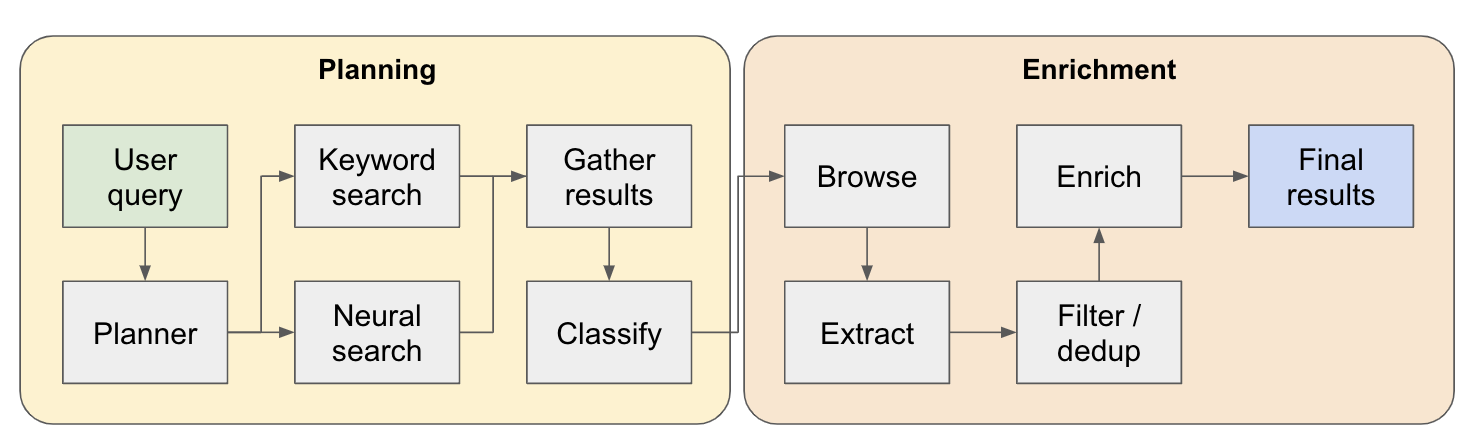
The system works as a multi-step research agent. The initial user query is broken down into a plan and the answer is constructed iterately as it flows through the system. Another name for this type of architecture is flow engineering.
The research pipeline is split into 4 main steps:
Plan - based on the user query, the planner constructs what the shape of the end result would look like. It does this by defining the type of entity to extract, as well as the different columns in the resulting table. The columns represent additional data that is relevant for the user's query relating to the entities.
Search - we use both standard keyword search and neural search to find relevant content to process (both types of search are provided by Exa). Keyword search is great at finding user generated content talking about the entities to be found (e.g. reviews, listicles.. etc). Neural search is great at finding specific entities themselves (e.g. companies, papers.. etc).
Extract - all content found in search is processed via LLM to extract specific entities and its associated contents. This is done via a new technique I'm testing out where special tokens are inserted between sentences (split via winkNLP's small language model) in the content, and the LLM is tasked with defining the range of content to extract by indicating the start & end tokens. This is super fast & token efficient.
Enrich - we do actually have a smaller answer agent within this bigger retrieval agent, whose job is to enrich all the columns defined by the planner for every entity. This is the most time consuming part of the entire process, but it is also the reason why this agent is extremely thorough.
Here's a more detailed flow of how it works:
Examples
For anyone exploring this architecture - if you find a good or interesting use case, please add it to the examples list so other people can check it out! There's an examples.ts file under app with all the raw data of the examples. You can get the raw data via browser console after a query has finished running (just copy it into the examples file).
Future Work
Sorting / ranking the retrieved entities by relevance - this is especially important for queries with qualifiers like "best" or "newest"... etc. This should be added as an additional step at the end of the pipeline.
Better entity resolution to detect duplicated entities - the agent still get stumped by things like M2 vs M3 Macbooks sometimes, there are techniques to better format entity titles that could lead to better performance here.
Related to previous point, better verification of sources when enriching to ensure that it is connected to the orginal entity.
Support for deep browsing of sources - sometimes the agent should click around the web page to really drill into the content, this will be required to do a good job on searching through research papers on arxiv, for example.
Support for streaming in the data - it would be amazing to see the list populated & cells being enriched in real-time in the UI. Right now you can only get a sense of progress by watching the logs on the terminal.
If you'd like to collaborate on this or just want to discuss ideas, feel free to email me at [email protected] or ping me on twitter.
Trang TopGit này là một snapshot — tab "Readme" hiển thị nguyên văn README của repo (đã bỏ link, giữ ảnh). Repo GitHub ở github.com/dzhng/deep-seek là nguồn chính thức.
dzhng/deep-seek có những chủ đề gì?
GitHub topics của dzhng/deep-seek: "agent", "agentic", "ai", "anthropic", "data-retrieval", "knowledge-graph", "llm", "openai", "research-age", "search". TopGit xếp repo vào nhóm AI Tools.
dzhng/deep-seek có phải mã nguồn mở không?
Có — dzhng/deep-seek phát hành theo license MIT, nghĩa là mã nguồn mở để đọc, fork và (tùy license) tái sử dụng. Mã: github.com/dzhng/deep-seek.
dzhng/deep-seek có trang demo không?
Dự án có trang chủ ở https://deep-seek.vercel.app. Tab "Readme" ở trang này thường có ảnh chụp và hướng dẫn bắt đầu nhanh.
dzhng/deep-seek còn đang phát triển không?
Commit gần nhất trên dzhng/deep-seek là 2.5 năm trước (theo timestamp GitHub). Repo có 53 fork — một chỉ báo về mức độ quan tâm của cộng đồng.
dzhng/deep-seek dùng license gì?
dzhng/deep-seek phát hành theo license MIT. Nên mở file LICENSE trên GitHub để xác nhận — license metadata đôi khi lệch với thực tế dự án.
Đọc đầy đủ README ở tab phía trên.
Muốn nghe thêm một ý kiến về deep-seek?
Hỏi một AI đọc được trang này — một cú bấm là có ngay nhận định về deep-seek.

 /deep-seek