TopGit theo dõi emqx/MQTTX trên GitHub trong nhóm Developer Tools, đã đạt 5.1k sao. A Powerful and All-in-One MQTT 5.0 client toolbox for Desktop, CLI and WebSocket.
Tóm tắt dựng từ metadata GitHub của chính dự án — chưa có bài review TopGit. Trang sẽ tự động cập nhật khi bài review đầy đủ được xuất bản.
VÌ SAO CHƯA CÓ REVIEW
TopGit viết bài đầy đủ cho repo có nhiều sao nhất và được yêu cầu nhiều nhất. Trang này là snapshot trong thời gian chờ — xem README gốc ở tab READ ME.
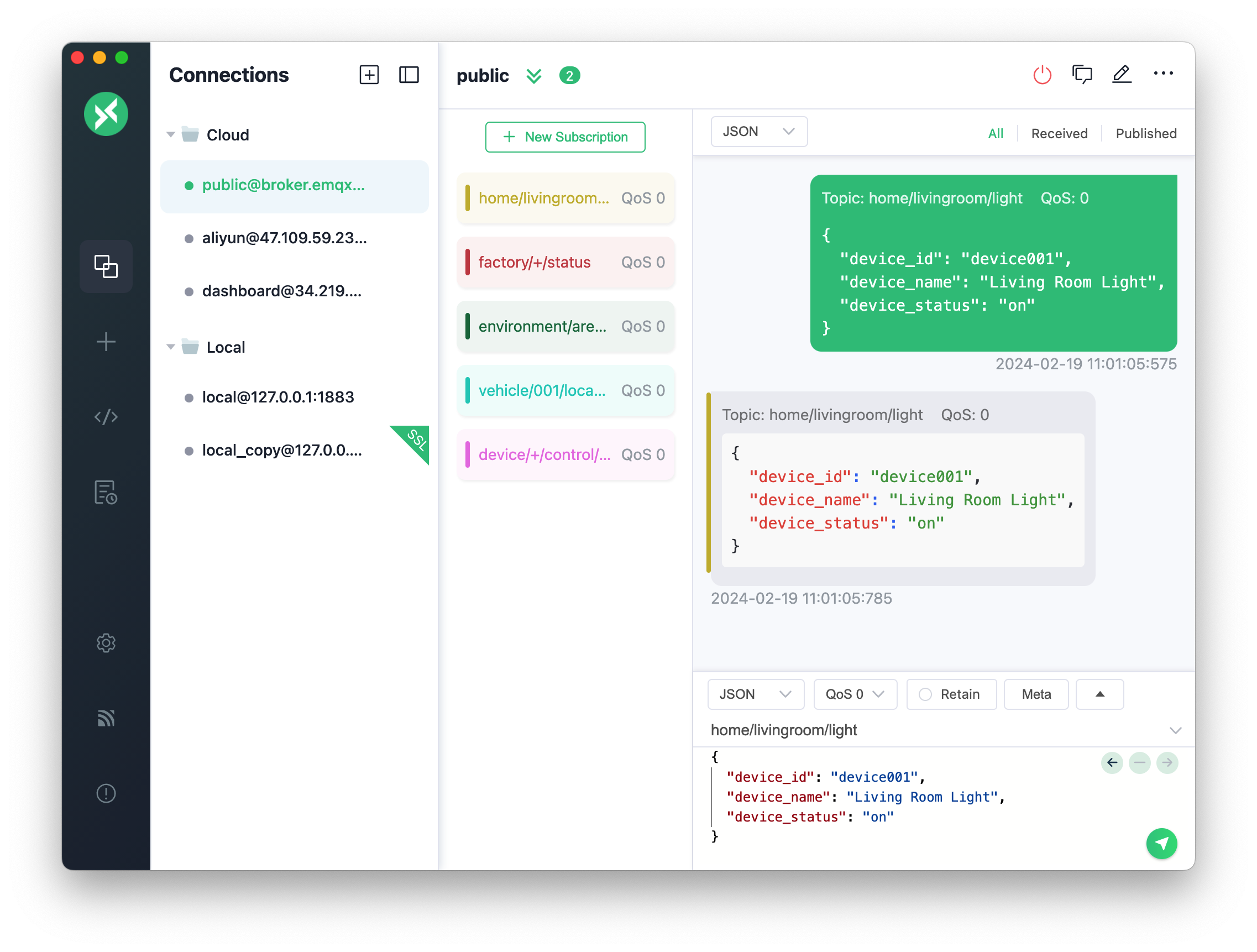
MQTTX is an open-source, cross-platform MQTT 5.0 client toolbox from EMQ for developing, testing, and troubleshooting IoT applications. MQTTX Desktop runs on macOS, Windows, and Linux, with a chat-style interface for multiple connections and subscriptions and a built-in MQTTX Agent to set up connections, exchange messages, and troubleshoot in natural language. MQTTX CLI provides messaging, benchmarks, and data simulation for terminals and automation, while MQTTX Web lets you debug MQTT over WebSocket in the browser without installation.
MQTT (MQ Telemetry Transport) is a lightweight publish/subscribe messaging protocol designed for constrained devices and for low-bandwidth, high-latency, or unreliable networks.
Features
Desktop and CLI support MQTT 3.1, 3.1.1, and 5.0 over TCP, TLS, and WebSocket.
Organize desktop connections into groups, search messages, and import or export connection settings.
Encode and decode desktop payloads with JSON, Base64, Hex, Protobuf/Avro schemas, and other codecs, and decompress GZIP messages.
Test application logic with desktop scripts and timed messages, and analyze data with the Topic Tree, Dashboard, and Payload Inspector.
Run benchmarks, simulate IoT data, and use stdin and pipes in shell scripts or CI workflows with CLI.
Use MQTT 3.1.1 and 5.0 over WebSocket in the Web client, with optional Docker self-hosting.
All features
MQTTX Desktop
A graphical client for interactive debugging and message analysis on macOS, Windows, and Linux.
Connect over TCP, TLS, WebSocket, or secure WebSocket using MQTT 3.1, 3.1.1, or 5.0.
Set MQTT 5.0 user properties on connect, publish, and subscribe, authenticate with SCRAM, and view the broker's CONNACK Response Information.
Operate MQTTX in natural language with the built-in MQTTX Agent, including Skills, MCP tools, action approval, and multiple model providers.
Encode and decode Plaintext, JSON, Base64, Hex, CBOR, and MsgPack payloads, use Protobuf and Avro schemas, and decompress incoming GZIP messages.
Transform messages with scripts and publish messages on a timer.
Inspect messages with the Topic Tree, Dashboard, Traffic Monitor, and Payload Inspector with JSON tree and diff views.
Group connections, search messages, and keep a separate publish area and history for each connection.
Import and export connections as JSON, CSV, Excel, XML, or YAML; JSON backups preserve connection groups.
Choose Light, Dark, or Night themes and use English, Simplified Chinese, Japanese, Turkish, Hungarian, or Korean.
MQTTX CLI
A command-line client for terminal debugging, shell scripts, CI automation, and performance testing.
Connect, publish, and subscribe with mqttx conn, mqttx pub, and mqttx sub, with MQTT 3.1, 3.1.1, and 5.0 over TCP, TLS, and WebSocket.
Run connection, publishing, and subscription benchmarks with mqttx bench, and generate IoT test data with mqttx simulate.
Read messages from stdin, pipe received messages to other tools, and save or load connection options as JSON or YAML.
Encode and decode JSON, Base64, Hex, CBOR, and MsgPack payloads, with Protobuf and Avro schema support.
Use the MQTTX CLI skill to let external AI agents run MQTT tests and diagnostics.
MQTTX Web
A browser client for quick tests without installing a desktop app. Open the online client to get started.
Use MQTT 3.1.1 and 5.0 over WebSocket (ws:// or wss://). HTTPS pages require wss://.
Manage multiple connections and subscriptions, and view sent and received messages in a chat-style interface.
Deploy with Docker to host the client yourself.
Quick Start
MQTTX Desktop
Download the package for your platform from GitHub Releases or the EMQ download site.
On macOS, you can also install MQTTX with Homebrew:
brew install --cask mqttx
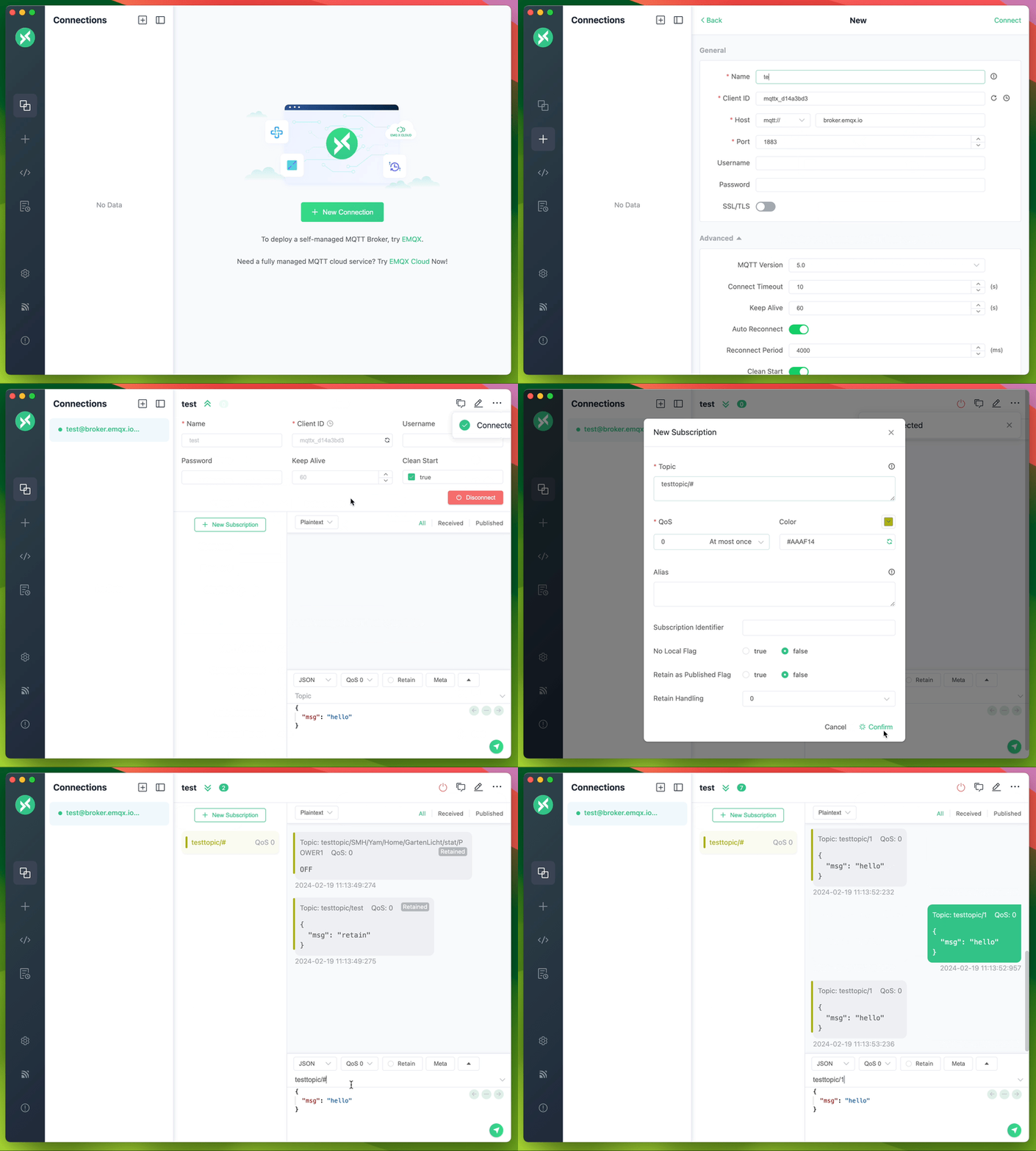
Open MQTTX, click + in the left sidebar, and fill in the required fields.
Enter your broker address and click Connect. Use your own broker or the free public MQTT 5.0 broker provided by EMQX Cloud at broker.emqx.io (TCP port 1883, TLS port 8883).
Subscribe to a topic, then publish a JSON message to the same topic. The received message appears in the message list.
MQTTX CLI
Install MQTTX CLI with the install script:
macOS / Linux:
curl -fsSL https://emqx.sh/mqttx | sh
Windows (PowerShell):
irm https://emqx.sh/mqttx.ps1 | iex
Homebrew, npm, Docker and standalone binaries: see the installation docs.
After installation, subscribe in one terminal and publish in another. The subscriber receives the JSON message:
See the CLI documentation for more commands, benchmarks, and data simulation.
MQTTX Web
Open the online client in your browser and connect to a broker over ws:// or wss://. HTTPS pages require wss://. To host the client yourself, use Docker:
docker run -d --name mqttx-web -p 80:80 emqx/mqttx-web:latest
See the Web README for deployment and usage instructions.
AI Tools
MQTTX Agent
MQTTX Agent is an AI assistant built into the desktop app. Turn it on in Settings → MQTTX Agent, fill in the API host, key, and model of your provider, then open it full screen from the left bar or as a floating window with Cmd/Ctrl + J.
It operates MQTTX through tools: create and connect connections, subscribe and publish, read messages, build the Topic Tree and dashboards, call your MCP servers, and write client code, test data, and schemas.
Ask before actions (default) asks before changes; Auto skips these prompts. Script tests always require approval.
Your conversations and tool results are sent to the model provider you configure, so avoid entering secrets in the chat.
See MQTTX Agent for setup, Skills, MCP, permissions, and limitations.
MQTTX CLI Skill
Install or update MQTTX CLI
INSTALL.md provides installation and update instructions for agents, including environment detection, package selection, and version verification. Give your agent this prompt:
Read https://raw.githubusercontent.com/emqx/MQTTX/main/INSTALL.md and follow its instructions to install or update MQTTX CLI for this environment. Verify the executable path and version.
The mqttx-cli skill helps agents use MQTTX CLI for connection checks, messaging, MQTT 5 features, TLS/authentication, payload codecs, benchmarks, data simulation, and troubleshooting.
Install it with the Skills CLI:
npx skills add emqx/MQTTX --skill mqttx-cli
To install from a local checkout, run npx skills add . --skill mqttx-cli from the repository root. You can also copy the entire skills/mqttx-cli directory (including references) into your agent's supported skills directory, or ask the agent to read its SKILL.md directly.
Once installed, try a task such as:
Use the mqttx-cli skill to verify a publish/subscribe round trip against my local broker at 127.0.0.1:1883. Use a unique topic under mqttx-test/, finish within 15 seconds, and report the result.
EMQX
MQTTX works with any MQTT broker and pairs especially well with EMQX. Connect to EMQX or EMQX Cloud in a few clicks to debug your applications and explore broker features.
Start a 14-day free trial of EMQX Cloud
Download EMQX and run it locally
Docs & Community
Guides: Desktop, CLI, Web, and the desktop manual.
MQTT Programming
A blog series on getting started with MQTT in PHP, Node.js, Python, Go, and other languages.
MQTT SDKs
A curated list of popular MQTT client SDKs for many languages, with code examples.
Public MQTT test server.
Ask questions and share ideas in GitHub Discussions or Discord.
Follow EMQTech on X and EMQX on YouTube.
Development
These steps are for the desktop app.
Use the Node.js version in .nvmrc (currently v22). If you use nvm, run nvm use in the repository root.
git clone [email protected]:emqx/MQTTX.git
cd MQTTX
nvm use
yarn install
yarn run electron:serve
Build installers for Windows, Linux, and macOS:
yarn run electron:build
Installers are written to dist_electron.
Platform builds
# For Windows
yarn run electron:build-win

# For Linux
yarn run electron:build-linux

# For macOS
yarn run electron:build-mac
For CLI and Web development, see the CLI README and Web README. Read the Contributing Guide before opening a pull request.
The desktop app is built with Electron, Vue + Element, TypeScript, TypeORM, SQLite, and MQTT.js.
emqx/MQTTX có 5.1k sao GitHub — tải lại trang để xem số mới nhất, hoặc xem trực tiếp github.com/emqx/MQTTX. TopGit phản chiếu số sao của GitHub nhưng không cam kết đến từng phút.
Commit gần nhất trên emqx/MQTTX là 6 tháng trước (theo timestamp GitHub). Repo có 557 fork — một chỉ báo về mức độ quan tâm của cộng đồng.
emqx/MQTTX là gì?
emqx/MQTTX (emqx/MQTTX) là dự án TypeScript trên GitHub. Theo mô tả gốc: A Powerful and All-in-One MQTT 5.0 client toolbox for Desktop, CLI and WebSocket.
emqx/MQTTX so với các dự án Developer Tools khác thế nào?
emqx/MQTTX được TopGit xếp vào nhóm Developer Tools, với 5.1k sao GitHub và viết bằng TypeScript. Xem trang chủ đề Developer Tools trên TopGit để so sánh với các dự án tương tự theo số sao và mức độ hoạt động.
emqx/MQTTX viết bằng ngôn ngữ gì?
emqx/MQTTX chủ yếu viết bằng TypeScript. Trường "language" của GitHub dựa trên phần lớn byte ở nhánh mặc định.
Vì sao emqx/MQTTX được xếp vào nhóm Developer Tools?
TopGit xếp emqx/MQTTX vào nhóm Developer Tools dựa trên GitHub topics và mô tả của repo (gắn thẻ: "cli", "cross-platform", "electron"). Việc phân loại dựa trên metadata thật của repo, không phải đoán theo cảm tính biên tập.
Đọc đầy đủ README ở tab phía trên.
Muốn nghe thêm một ý kiến về MQTTX?
Hỏi một AI đọc được trang này — một cú bấm là có ngay nhận định về MQTTX.

 /MQTTX