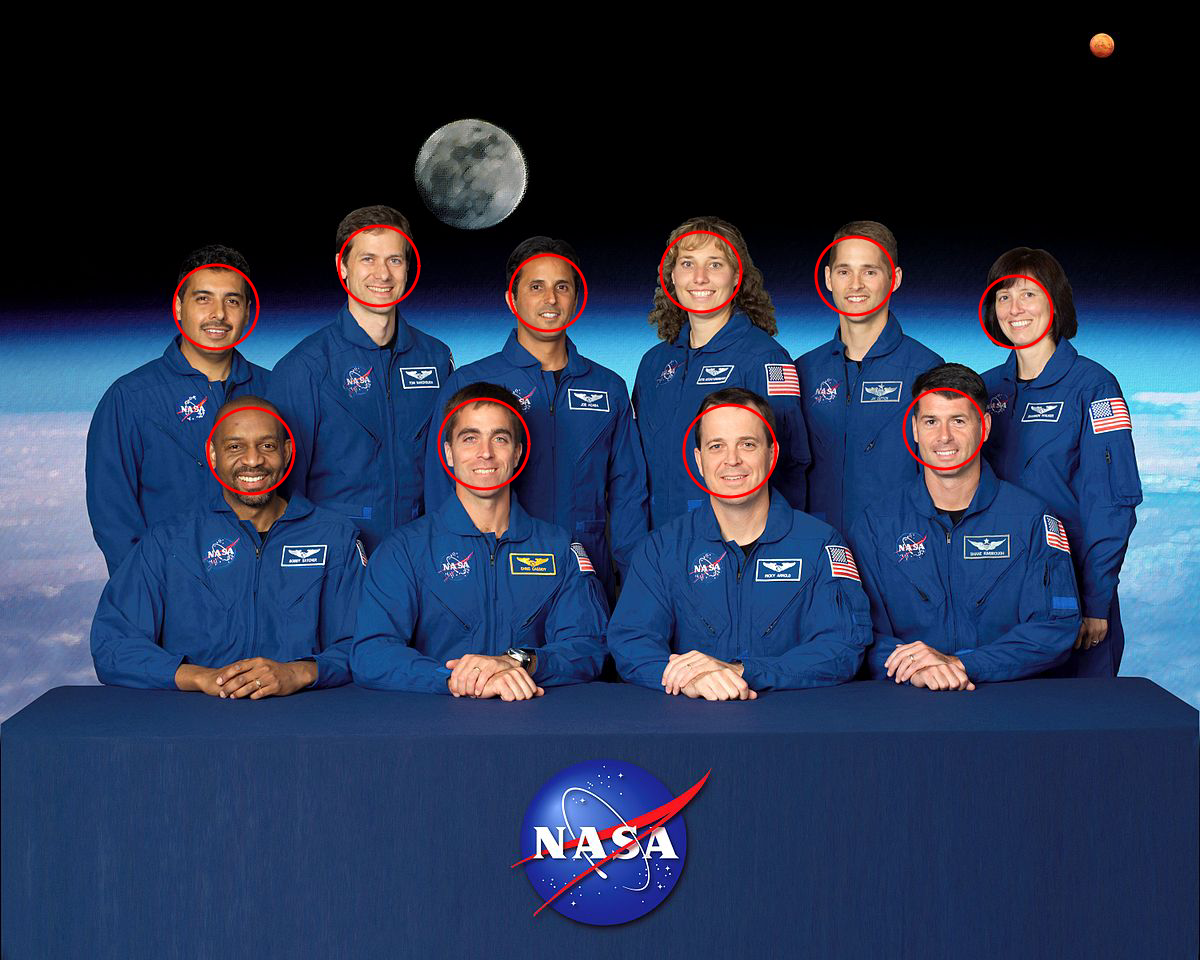
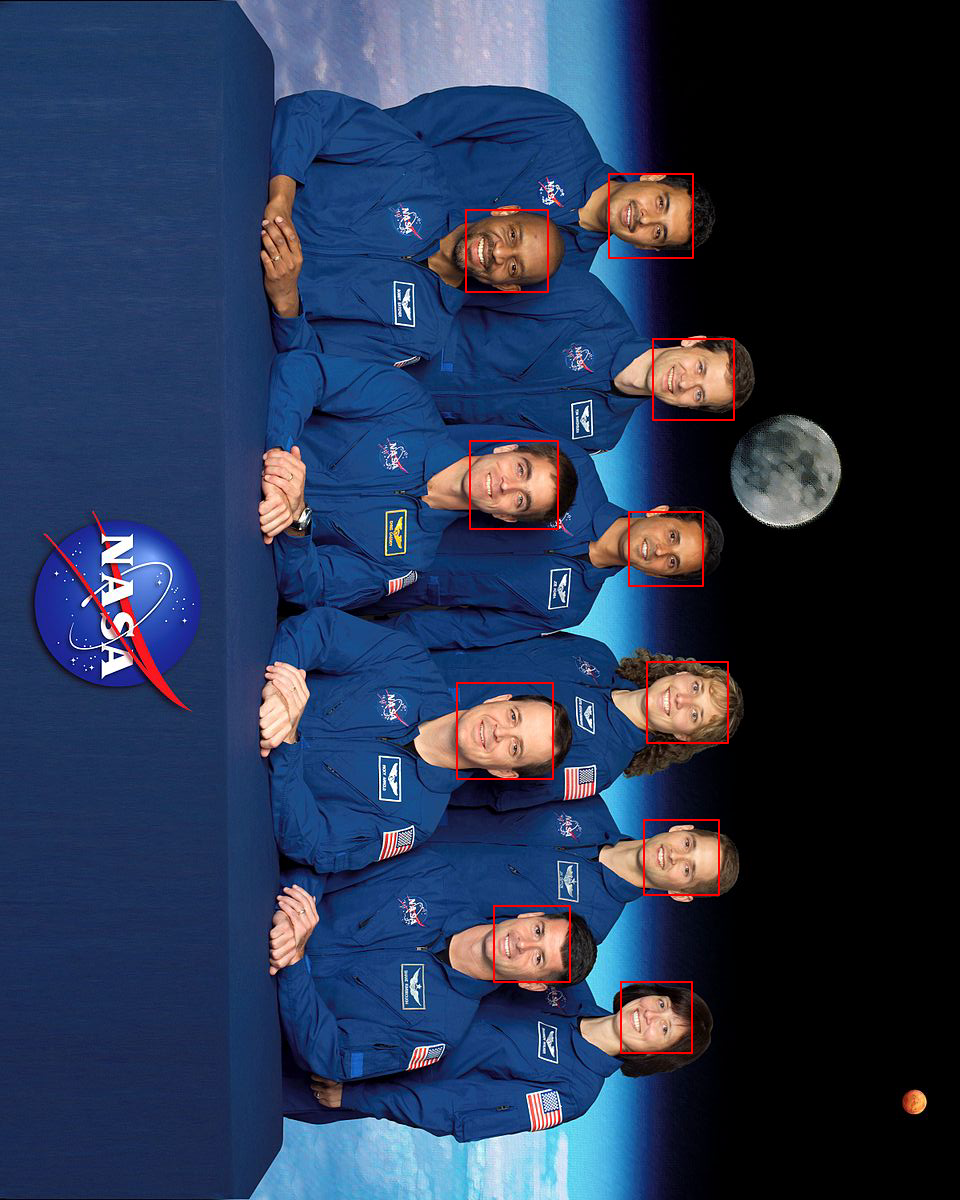
esimov/pigo được TopGit xếp vào nhóm công cụ AI, với 4.7k sao trên GitHub, viết chủ yếu bằng Go. Fast face detection, pupil/eyes localization and facial landmark points detection library in pure Go.
Tóm tắt dựng từ metadata GitHub của chính dự án — chưa có bài review TopGit. Trang sẽ tự động cập nhật khi bài review đầy đủ được xuất bản.
VÌ SAO CHƯA CÓ REVIEW
TopGit viết bài đầy đủ cho repo có nhiều sao nhất và được yêu cầu nhiều nhất. Trang này là snapshot trong thời gian chờ — xem README gốc ở tab READ ME.
Pigo is a pure Go face detection, pupil/eyes localization and facial landmark points detection library based on the Pixel Intensity Comparison-based Object detection paper.
Rectangle face marker
Circle face marker
Motivation
The reason why Pigo has been developed is because almost all of the currently existing solutions for face detection in the Go ecosystem are purely bindings to some C/C++ libraries like OpenCV or dlib, but calling a C program through cgo introduces huge latencies and implies a significant trade-off in terms of performance. Also, in many cases installing OpenCV on various platforms is cumbersome.
The Pigo library does not require any additional modules or third party applications to be installed, although you might need to install Python and OpenCV if you wish to run the library in a real time desktop application. Head over to this subtopic for more details.
Key features
Does not require OpenCV or any 3rd party modules to be installed
High processing speed
There is no need for image preprocessing prior to detection
There is no need for the computation of integral images, image pyramid, HOG pyramid or any other similar data structure
The face detection is based on pixel intensity comparison encoded in the binary file tree structure
Fast detection of in-plane rotated faces
The library can detect even faces with eyeglasses
Pupils/eyes localization
Facial landmark points detection
Webassembly support 🎉
Todo
Object detection and description
The library can also detect in plane rotated faces. For this reason a new -angle parameter has been included into the command line utility. The command below will generate the following result (see the table below for all the supported options).
Note: In case of in plane rotated faces the angle value should be adapted to the provided image.
Pupils / eyes localization
Starting from v1.2.0 Pigo offers pupils/eyes localization capabilities. The implementation is based on Eye pupil localization with an ensemble of randomized trees.
Check out this example for a realtime demo: https://github.com/esimov/pigo/tree/master/examples/puploc
Facial landmark points detection
v1.3.0 marks a new milestone in the library evolution, Pigo being able to detect facial landmark points. The implementation is based on Fast Localization of Facial Landmark Points.
Check out this example for a realtime demo: https://github.com/esimov/pigo/tree/master/examples/facial_landmark
Install
Install Go, set your GOPATH, and make sure $GOPATH/bin is on your PATH.
$ go install github.com/esimov/pigo/cmd/pigo@latest
Binary releases
In case you do not have installed or do not wish to install Go, you can obtain the binary file from the releases folder.
The library can be accessed as a snapcraft function too.
API
Below is a minimal example of using the face detection API.
First, you need to load and parse the binary classifier, then convert the image to grayscale mode,
and finally run the cascade function which returns a slice containing the row, column, scale and the detection score.
cascadeFile, err := ioutil.ReadFile("/path/to/cascade/file")
if err != nil {
	log.Fatalf("Error reading the cascade file: %v", err)
}

src, err := pigo.GetImage("/path/to/image")
if err != nil {
	log.Fatalf("Cannot open the image file: %v", err)
}

pixels := pigo.RgbToGrayscale(src)
cols, rows := src.Bounds().Max.X, src.Bounds().Max.Y

cParams := pigo.CascadeParams{
	MinSize:     20,
	MaxSize:     1000,
	ShiftFactor: 0.1,
	ScaleFactor: 1.1,

	ImageParams: pigo.ImageParams{
		Pixels: pixels,
		Rows:   rows,
		Cols:   cols,
		Dim:    cols,
	},
}

pigo := pigo.NewPigo()
// Unpack the binary file. This will return the number of cascade trees,
// the tree depth, the threshold and the prediction from tree's leaf nodes.
classifier, err := pigo.Unpack(cascadeFile)
if err != nil {
	log.Fatalf("Error reading the cascade file: %s", err)
}

angle := 0.0 // cascade rotation angle. 0.0 is 0 radians and 1.0 is 2*pi radians

// Run the classifier over the obtained leaf nodes and return the detection results.
// The result contains quadruplets representing the row, column, scale and detection score.
dets := classifier.RunCascade(cParams, angle)

// Calculate the intersection over union (IoU) of two clusters.
dets = classifier.ClusterDetections(dets, 0.2)
A note about imports: in order to decode the generated image you have to import image/jpeg or image/png (depending on the provided image type) as in the following example, otherwise you will get a "Image: Unknown format" error.
$ pigo --help

┌─┐┬┌─┐┌─┐
├─┘││ ┬│ │
┴  ┴└─┘└─┘

Go (Golang) Face detection library.
    Version: 1.4.2

  -angle float
    	0.0 is 0 radians and 1.0 is 2*pi radians
  -cf string
    	Cascade binary file
  -flpc string
    	Facial landmark points cascade directory
  -in string
    	Source image (default "-")
  -iou float
    	Intersection over union (IoU) threshold (default 0.2)
  -json string
    	Output the detection points into a json file
  -mark
    	Mark detected eyes (default true)
  -marker string
    	Detection marker: rect|circle|ellipse (default "rect")
  -max int
    	Maximum size of face (default 1000)
  -min int
    	Minimum size of face (default 20)
  -out string
    	Destination image (default "-")
  -plc string
    	Pupils/eyes localization cascade file
  -scale float
    	Scale detection window by percentage (default 1.1)
  -shift float
    	Shift detection window by percentage (default 0.1)
Important notice: In case you also wish to run the pupil/eyes localization, then you need to use the plc flag and provide a valid path to the pupil localization cascade file. The same applies for facial landmark points detection, only that this time the parameter accepted by the flpc flag is a directory pointing to the facial landmark points cascade files found under cascades/lps.
CLI command examples
You can also use the stdin and stdout pipe commands:
Using the empty string as value for the -out flag will skip the image generation part. This, combined with the -json flag will encode the detection results into the specified json file. You can also use the pipe - value combined with the -json flag to output the detection coordinates to the standard (stdout) output.
Real time face detection (running as a shared object)
If you wish to test the library's real time face detection capabilities, the examples folder contains a few demos written in Python.
But why Python you might ask? Because the Go ecosystem is (still) missing a cross platform and system independent library for accessing the webcam.
In the Python program we access the webcam and transfer the pixel data as a byte array through cgo as a shared object to the Go program where the core face detection is happening. But as you can imagine this operation is not cost effective, resulting in lower frame rates than the library is capable of.
WASM (Webassembly) support 🎉
Important note: In order to run the Webassembly demos at least Go 1.13 is required!
Starting from version v1.4.0 the library has been ported to WASM. This proves the library's real time face detection capabilities, constantly producing ~60 FPS.
WASM demo
To run the wasm demo select the wasm folder and type make.
For more details check the subpage description: https://github.com/esimov/pigo/tree/master/wasm.
For more awesome WASM demos using the Pigo library check this repo: https://github.com/esimov/pigo-wasm-demos.
Benchmark results
Below are the benchmark results obtained running Pigo against GoCV using the same conditions.
esimov/pigo thuộc nhóm AI Tools trên TopGit, cùng 11 topic GitHub. Trang Trending và Topics liệt kê các repo cùng số sao và cùng ngôn ngữ để so sánh.
Đọc thêm về esimov/pigo ở đâu?
Trang TopGit này là một snapshot — tab "Readme" hiển thị nguyên văn README của repo (đã bỏ link, giữ ảnh). Repo GitHub ở github.com/esimov/pigo là nguồn chính thức.
esimov/pigo có bao nhiêu sao?
esimov/pigo có 4.7k sao GitHub — tải lại trang để xem số mới nhất, hoặc xem trực tiếp github.com/esimov/pigo. TopGit phản chiếu số sao của GitHub nhưng không cam kết đến từng phút.
esimov/pigo có những chủ đề gì?
GitHub topics của esimov/pigo: "computer-vision", "eye-detection", "face-detection", "facial-landmarks", "golang", "machine-learning", "opencv", "pixel-intensity-comparison", "pupil-detection", "wasm", "webassembly". TopGit xếp repo vào nhóm AI Tools.
esimov/pigo có phải mã nguồn mở không?
Có — esimov/pigo phát hành theo license MIT, nghĩa là mã nguồn mở để đọc, fork và (tùy license) tái sử dụng. Mã: github.com/esimov/pigo.
esimov/pigo có website riêng không?
TopGit chưa ghi nhận URL trang chủ cho esimov/pigo. Phần README ở tab phía trên thường có link demo, hoặc xem mô tả GitHub của repo.
esimov/pigo còn đang phát triển không?
Commit gần nhất trên esimov/pigo là 1.3 năm trước (theo timestamp GitHub). Repo có 327 fork — một chỉ báo về mức độ quan tâm của cộng đồng.
Đọc đầy đủ README ở tab phía trên.
Muốn nghe thêm một ý kiến về pigo?
Hỏi một AI đọc được trang này — một cú bấm là có ngay nhận định về pigo.