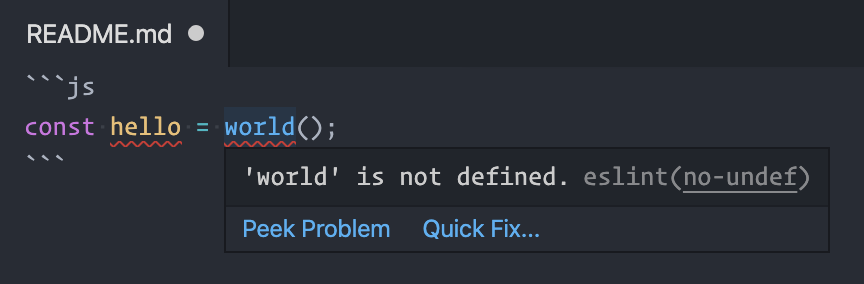
eslint/markdown là dự án tập trung tự động hoá trên GitHub với 583 sao, viết chủ yếu bằng JavaScript. Lint JavaScript code blocks in Markdown documents
Tóm tắt dựng từ metadata GitHub của chính dự án — chưa có bài review TopGit. Trang sẽ tự động cập nhật khi bài review đầy đủ được xuất bản.
VÌ SAO CHƯA CÓ REVIEW
TopGit viết bài đầy đủ cho repo có nhiều sao nhất và được yêu cầu nhiều nhất. Trang này là snapshot trong thời gian chờ — xem README gốc ở tab READ ME.
You can individually disable rules in Markdown using HTML comments, such as:
<!-- eslint-disable-next-line markdown/no-html -- I want to allow HTML here -->
<custom-element>Hello world!</custom-element>

<!-- eslint-disable markdown/no-html -- here too -->
<another-element>Goodbye world!</another-element>
<!-- eslint-enable markdown/no-html -- safe to re-enable now -->

[Object] <!-- eslint-disable-line markdown/no-missing-label-refs -- not meant to be a link ref -->
Languages
Language Name
Description
commonmark
Parse using CommonMark Markdown format
gfm
Parse using GitHub-Flavored Markdown format
In order to individually configure a language in your eslint.config.js file, import @eslint/markdown and configure a language:
By default, Markdown parsers do not support front matter. To enable front matter in both commonmark and gfm, you can use the frontmatter option in languageOptions.
@eslint/markdown internally uses micromark-extension-frontmatter and mdast-util-frontmatter to parse front matter.
Option Value
Description
false
Disables front matter parsing in Markdown files. (Default)
"yaml"
Enables YAML front matter parsing in Markdown files.
"toml"
Enables TOML front matter parsing in Markdown files.
"json"
Enables JSON front matter parsing in Markdown files.
// eslint.config.js
import { defineConfig } from "eslint/config";
import markdown from "@eslint/markdown";

export default defineConfig([
	{
		files: ["**/*.md"],
		plugins: {
			markdown,
		},
		language: "markdown/gfm",
		languageOptions: {
			frontmatter: "yaml", // Or pass `"toml"` or `"json"` to enable TOML or JSON front matter parsing.
		},
		rules: {
			"markdown/no-html": "error",
		},
	},
]);
Enabling Math (LaTeX) in both commonmark and gfm
By default, Markdown parsers do not support math (LaTeX). To enable math in both commonmark and gfm, you can use the math option in languageOptions.
@eslint/markdown internally uses micromark-extension-math and mdast-util-math to parse math.
Option Value
Description
false
Disables math parsing in Markdown files. (Default)
true
Enables math parsing in Markdown files.
// eslint.config.js
import { defineConfig } from "eslint/config";
import markdown from "@eslint/markdown";

export default defineConfig([
	{
		files: ["**/*.md"],
		plugins: {
			markdown,
		},
		language: "markdown/gfm",
		languageOptions: {
			math: true, // Or pass `false` to disable math parsing.
		},
		rules: {
			"markdown/no-html": "error",
		},
	},
]);
Processors
Processor Name
Description
markdown
Extract fenced code blocks from the Markdown code so they can be linted separately.
Important: You cannot lint a file's Markdown content and its fenced code blocks in a single ESLint run. When the markdown processor is applied, only the extracted code blocks are linted. This is a current limitation of ESLint processors. See Linting Markdown Content and Code Blocks for a way to lint both.
Migration from eslint-plugin-markdown
See Migration.
Editor Integrations
VSCode
vscode-eslint has built-in support for the Markdown processor.
File Name Details
This processor will use file names from blocks if a filename meta is present.
For example, the following block will result in a parsed file name of src/index.js:
```js filename="src/index.js"
export const value = "Hello, world!";
```
This can be useful for user configurations that include linting overrides for specific file paths. In this example, you could then target the specific code block in your configuration using "file-name.md/*src/index.js".
Contributing
$ git clone https://github.com/eslint/markdown.git
$ cd markdown
$ npm install
$ npm test
This project follows the ESLint contribution guidelines.
Sponsors
The following companies, organizations, and individuals support ESLint's ongoing maintenance and development. Become a Sponsor
to get your logo on our READMEs and website.
Gold Sponsors
Silver Sponsors
Bronze Sponsors
Technology Sponsors
Technology sponsors allow us to use their products and services for free as part of a contribution to the open source ecosystem and our work.
eslint/markdown thuộc nhóm Automation trên TopGit, cùng 7 topic GitHub. Trang Trending và Topics liệt kê các repo cùng số sao và cùng ngôn ngữ để so sánh.
Đọc thêm về eslint/markdown ở đâu?
Trang TopGit này là một snapshot — tab "Readme" hiển thị nguyên văn README của repo (đã bỏ link, giữ ảnh). Repo GitHub ở github.com/eslint/markdown là nguồn chính thức.
eslint/markdown có bao nhiêu sao?
eslint/markdown có 583 sao GitHub — tải lại trang để xem số mới nhất, hoặc xem trực tiếp github.com/eslint/markdown. TopGit phản chiếu số sao của GitHub nhưng không cam kết đến từng phút.
eslint/markdown có phải mã nguồn mở không?
Có — eslint/markdown phát hành theo license MIT, nghĩa là mã nguồn mở để đọc, fork và (tùy license) tái sử dụng. Mã: github.com/eslint/markdown.
eslint/markdown còn đang phát triển không?
Commit gần nhất trên eslint/markdown là 9 ngày trước (theo timestamp GitHub). Repo có 92 fork — một chỉ báo về mức độ quan tâm của cộng đồng.
eslint/markdown dùng license gì?
eslint/markdown phát hành theo license MIT. Nên mở file LICENSE trên GitHub để xác nhận — license metadata đôi khi lệch với thực tế dự án.
eslint/markdown là gì?
eslint/markdown (eslint/markdown) là dự án JavaScript trên GitHub. Theo mô tả gốc: Lint JavaScript code blocks in Markdown documents
eslint/markdown viết bằng ngôn ngữ gì?
eslint/markdown chủ yếu viết bằng JavaScript. Trường "language" của GitHub dựa trên phần lớn byte ở nhánh mặc định.
Đọc đầy đủ README ở tab phía trên.
markdown có đáng để bạn bỏ thời gian?
ChatGPT, Claude và Perplexity đều đọc được trang này. Hỏi thử xem họ nghĩ gì về markdown.

 /markdown