TopGit theo dõi evilsocket/arc trên GitHub, đã đạt 970 sao. A manager for your secrets.
Tóm tắt dựng từ metadata GitHub của chính dự án — chưa có bài review TopGit. Trang sẽ tự động cập nhật khi bài review đầy đủ được xuất bản.
VÌ SAO CHƯA CÓ REVIEW
TopGit viết bài đầy đủ cho repo có nhiều sao nhất và được yêu cầu nhiều nhất. Trang này là snapshot trong thời gian chờ — xem README gốc ở tab READ ME.
Arc is a manager for your secrets made of arc, a RESTful API server written in Go which exposes read and write primitives for encrypted records, and arc, the client application implemented in HTML5 and javascript, which runs in every modern browser and it is served by arc itself.
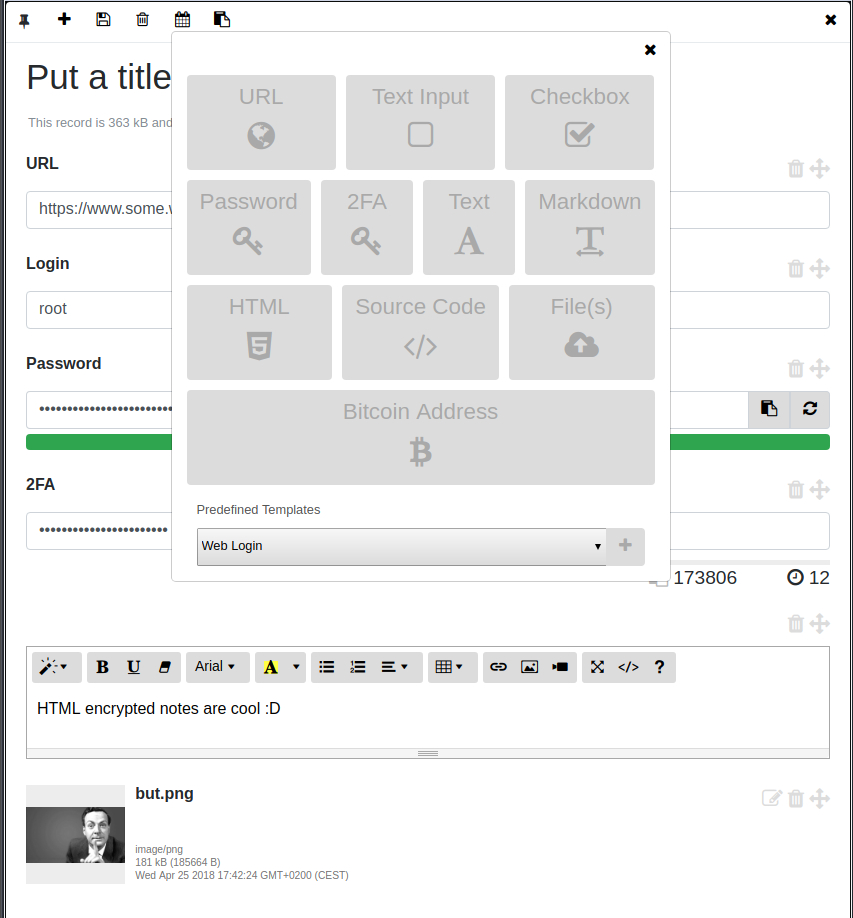
Records are generated, encrypted and decrypted client side by arc (with AES256 in GCM mode, using 10000 iterations for the PBKDF2 key derivation function, everything WebCrypto based ), which offers an intuitive management system equipped with UI widgets including:
Simple text inputs.
Simple text areas.
Custom file attachments.
A markdown editor area with preview and full screen mode.
A HTML editor with preview and full screen mode.
A password field with password strength estimation and a random password generator.
Custom lists.
Bitcoin wallet address with auto updating balance.
Manager for Time-based One-time Password Algorithm (TOTP) codes as per the TOTP RFC Draft. This component produces the same codes as the Google Authenticator app and can be used for 2FA.
Elements can be created (with optional expiration dates), arranged and edited using arc and are stored on arc as AES256 encrypted (and compressed) raw data.
Hardware?
Ideally arc should run on a dedicated portable hardware like a Raspberry Pi Zero, for instance it is possible to simply access it via Bluetooth and a modern browser once configured btnap, but precompiled versions are available for several operating systems and architectures (including ARM, ARM64 and MIPS) therefore Arc can run on pretty much everything with a CPU, from your smartphone, your router, your Mac or your Windows computer. As a rule of thumb, the more isolated the hardware is, the better.
The idea is to use Arc as a single storage and manager for your passwords, encrypted notes, files and -all the secret things here-.
Usage
The simplest way to run arc is as a Docker container. First, make sure to copy sample_config.toml into your own config.toml.
The most important fields to change are the secret ( a key used for token authentication ), the username and the password, which is the bcrypt hash of the authentication password you want to use, you can generate a new one with:
docker run -it evilsocket/arc:latest password "your-new-password" <optional-cost>
Where is an integer in the interval 4..31 determining the bcrypt cost.
NOTE
Other than the username and the password, during login you need to specify an additional encryption key. This second key is not used to login to the system itself but to encrypt and decrypt your records client side. You can specify different keys each time you login, as long as you remember which key you used to encrypt which record :)
Once everything is ready and you updated the configuration file, you can finally start the arc server:
Now browse https://localhost:8443/ ( or the address and port you configured ) and login with the configured credentials (make sure to add the generated HTTPS certificate as an exception in your browser).
Alternatively, you can find binary releases of Arc here.
If instead you want to build it from source, make sure you have Go >= 1.22.x installed and configured correctly, then clone this repository, install the dependencies and compile the arc server component:
go install github.com/evilsocket/arc/cmd/arc@latest
Tailscale / Headscale Integration
In order to run an ARC instance that's only visible on a Tailscale (WireGuard) network you can use the [tailscale] configuration block.
By setting the url field, it is possible to override the control API URL and use free alternatives such as Headscale.
# .... snippet ....
[tailscale]
# If true, will run this as a tailscale server node and won't be visible outside the tailscale network.
# In order to authenticate the node, set the TS_AUTHKEY environment variable or follow the onscreen instructions.
enabled = false
# Tailscale hostname, if left empty the system hostname will be used.
# NOTE: Make sure that HTTPS certificates are enabled for this tailscale host and that the hostname
# matches the certificate.
hostname = "stevie"
# If set, it overrides the Tailscale control URL, can be used for Headscale and alikes.
url = ''
# .... snippet ....
Realtime Notifications
Different type of events can happen during Arc lifecycle:
login_ok someone succesfully authenticated to the system.
login_ko someone tried to authenticate to the system with the wrong credentials.
token_ko an invalid JWT token has been used to access Arc API.
update a new version of Arc is available.
record_expired a record reached its expiration date.
If configured to do so, the server will create brief reports of such events and it will send to the user and client using three different channels:
A notification inside the Arc web UI itself.
A desktop notification.
An email report to the configured address.
PGP Encryption
Email reports can be optionally encrypted by the server using PGP, in this case the user has to provide his PGP public key. A private key can also be provided, if not the server will generate a new one (4096 bits RSA) during the first boot. Since email reports might include parts of valid credentials (ie. you mistyped one character of the valid password) it is highly suggested to enable this option.
Keyboard Shortcuts
n Create a new item ( store or record ).
d Delete the current item ( store or record ).
r Rename the current item ( store or record ).
a Add a new field to the current record.
p Pin / unpin the curret record.
s Save the current record.
e Set the expiration date for the current record.
ESC Close the current window.
Import / Export
You can export stores and their encrypted records to a TAR file:
Trang TopGit này là một snapshot — tab "Readme" hiển thị nguyên văn README của repo (đã bỏ link, giữ ảnh). Repo GitHub ở github.com/evilsocket/arc là nguồn chính thức.
evilsocket/arc có bao nhiêu sao?
evilsocket/arc có 970 sao GitHub — tải lại trang để xem số mới nhất, hoặc xem trực tiếp github.com/evilsocket/arc. TopGit phản chiếu số sao của GitHub nhưng không cam kết đến từng phút.
evilsocket/arc có phải mã nguồn mở không?
Có — evilsocket/arc phát hành theo license GPL-3.0, nghĩa là mã nguồn mở để đọc, fork và (tùy license) tái sử dụng. Mã: github.com/evilsocket/arc.
evilsocket/arc có website riêng không?
TopGit chưa ghi nhận URL trang chủ cho evilsocket/arc. Phần README ở tab phía trên thường có link demo, hoặc xem mô tả GitHub của repo.
evilsocket/arc là gì?
evilsocket/arc (evilsocket/arc) là dự án JavaScript trên GitHub. Theo mô tả gốc: A manager for your secrets.
Đọc đầy đủ README ở tab phía trên.
arc có đáng để bạn bỏ thời gian?
ChatGPT, Claude và Perplexity đều đọc được trang này. Hỏi thử xem họ nghĩ gì về arc.
 /arc
/arc