Một mục mã nguồn mở trong kho dữ liệu GitHub của TopGit: executeautomation/mcp-playwright, 5.7k sao, TypeScript. Playwright Model Context Protocol Server - Tool to automate Browsers and APIs in Claude Desktop, Cline, Cursor IDE and More 🔌
Tóm tắt dựng từ metadata GitHub của chính dự án — chưa có bài review TopGit. Trang sẽ tự động cập nhật khi bài review đầy đủ được xuất bản.
VÌ SAO CHƯA CÓ REVIEW
TopGit viết bài đầy đủ cho repo có nhiều sao nhất và được yêu cầu nhiều nhất. Trang này là snapshot trong thời gian chờ — xem README gốc ở tab READ ME.
A Model Context Protocol server that provides browser automation capabilities using Playwright. This server enables LLMs to interact with web pages, take screenshots, generate test code, web scrapes the page and execute JavaScript in a real browser environment.
✨ What's New in v1.0.10
🎯 Device Emulation with 143 Real Device Presets!
Test your web applications on real device profiles with a simple command:
// Test on iPhone 13 with automatic user-agent, touch support, and device pixel ratio
await playwright_resize({ device: "iPhone 13" });

// Switch to iPad with landscape orientation
await playwright_resize({ device: "iPad Pro 11", orientation: "landscape" });

// Test desktop view
await playwright_resize({ device: "Desktop Chrome" });
Natural Language Support for AI Assistants:
"Test on iPhone 13"
"Switch to iPad view"
"Rotate to landscape"
Supports 143 devices: iPhone, iPad, Pixel, Galaxy, and Desktop browsers with proper emulation of viewport, user-agent, touch events, and device pixel ratios.
📚 View Device Quick Reference | Prompt Guide
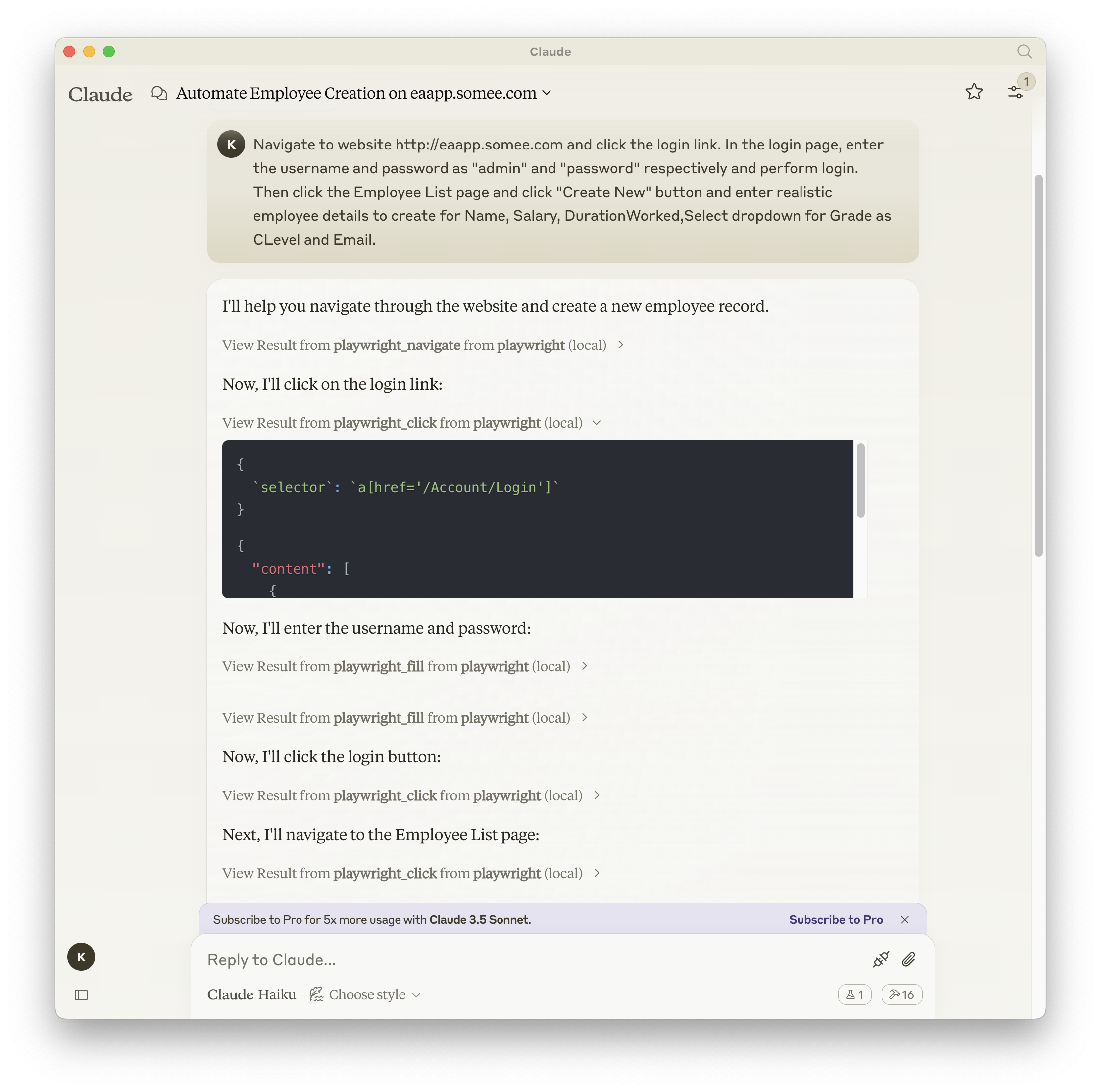
Screenshot
Documentation | API reference
Installation
You can install the package using either npm, mcp-get, or Smithery:
Note: In stdio mode, logging is automatically directed to files only (not console) to maintain clean JSON-RPC communication. Logs are written to ~/playwright-mcp-server.log.
HTTP Mode (Standalone Server)
When running headed browser on systems without display or from worker processes of IDEs, you can run the MCP server as a standalone HTTP server:
Note for Claude Desktop Users: Claude Desktop currently requires stdio mode (command/args configuration). HTTP mode is recommended for VS Code, custom clients, and remote deployments. See CLAUDE_DESKTOP_CONFIG.md for details.
Starting the HTTP Server
# Using npx
npx @executeautomation/playwright-mcp-server --port 8931

# Or after global installation
playwright-mcp-server --port 8931
The server will start and display available endpoints:
==============================================
Playwright MCP Server (HTTP Mode)
==============================================
Port: 8931

ENDPOINTS:
- SSE Stream:     GET  http://localhost:8931/sse
- Messages:       POST http://localhost:8931/messages?sessionId=<id>
- MCP (unified):  GET  http://localhost:8931/mcp
- MCP (unified):  POST http://localhost:8931/mcp?sessionId=<id>
- Health Check:   GET  http://localhost:8931/health
==============================================
Client Configuration for HTTP Mode
⚠️ CRITICAL: The "type": "http" field is REQUIRED for HTTP/SSE transport!
Important: Without "type": "http", the connection will fail.
For Claude Desktop: Use stdio mode instead (see Standard Mode above)
Use Cases for HTTP Mode
Running headed browsers on systems without display (e.g., remote servers)
Integrating with VS Code GitHub Copilot
Running the server as a background service
Accessing the server from multiple clients
Debugging with the /health endpoint
Custom MCP client integrations
Monitoring: The server includes a monitoring system that starts on a dynamically allocated port (avoiding conflicts). Check the console output for the actual port.
Note: For Claude Desktop, continue using stdio mode (Standard Mode above) for now.
Troubleshooting
"No transport found for sessionId" Error
Symptom: 400 error with message "Bad Request: No transport found for sessionId"
Solution:
Check configuration includes "type": "http"
{
  "url": "http://localhost:8931/mcp",
  "type": "http"  // ← This is REQUIRED!
}
Verify server logs show connection:
# Should see these in order:
# 1. "Incoming request" - GET /mcp
# 2. "Transport registered" - with sessionId
# 3. "POST message received" - with same sessionId
Restart both server and client
Connection Issues
Server not starting: Check if port 8931 is available
External access blocked: This is by design (security). Server binds to localhost only
For remote access: Use SSH tunneling:
ssh -L 8931:localhost:8931 user@remote-server
Testing
This project uses Jest for testing. The tests are located in the src/__tests__ directory.
Running Tests
You can run the tests using one of the following commands:
# Run tests using the custom script (with coverage)
node run-tests.cjs

# Run tests using npm scripts
npm test           # Run tests without coverage
npm run test:coverage  # Run tests with coverage
npm run test:custom    # Run tests with custom script (same as node run-tests.cjs)
The test coverage report will be generated in the coverage directory.
Running evals
The evals package loads an mcp client that then runs the index.ts file, so there is no need to rebuild between tests. You can load environment variables by prefixing the npx command. Full documentation can be found here.
When adding new tools, please be mindful of the tool name length. Some clients, like Cursor, have a 60-character limit for the combined server and tool name (server_name:tool_name).
Our server name is playwright-mcp. Please ensure your tool names are short enough to not exceed this limit.
Đọc thêm về executeautomation/mcp-playwright ở đâu?
Trang TopGit này là một snapshot — tab "Readme" hiển thị nguyên văn README của repo (đã bỏ link, giữ ảnh). Repo GitHub ở github.com/executeautomation/mcp-playwright là nguồn chính thức.
executeautomation/mcp-playwright có bao nhiêu sao?
executeautomation/mcp-playwright có 5.7k sao GitHub — tải lại trang để xem số mới nhất, hoặc xem trực tiếp github.com/executeautomation/mcp-playwright. TopGit phản chiếu số sao của GitHub nhưng không cam kết đến từng phút.
executeautomation/mcp-playwright có tag gì không?
Bản đồng bộ chưa ghi nhận topic GitHub nào cho executeautomation/mcp-playwright. GitHub topics hiển thị ở thanh bên phải trang repo — đó là nơi đáng kiểm tra nhất.
executeautomation/mcp-playwright có trang demo không?
Dự án có trang chủ ở https://executeautomation.github.io/mcp-playwright/. Tab "Readme" ở trang này thường có ảnh chụp và hướng dẫn bắt đầu nhanh.
executeautomation/mcp-playwright còn đang phát triển không?
Commit gần nhất trên executeautomation/mcp-playwright là 11 tháng trước (theo timestamp GitHub). Repo có 541 fork — một chỉ báo về mức độ quan tâm của cộng đồng.
executeautomation/mcp-playwright dùng license gì?
executeautomation/mcp-playwright phát hành theo license MIT. Nên mở file LICENSE trên GitHub để xác nhận — license metadata đôi khi lệch với thực tế dự án.
executeautomation/mcp-playwright viết bằng ngôn ngữ gì?
executeautomation/mcp-playwright chủ yếu viết bằng TypeScript. Trường "language" của GitHub dựa trên phần lớn byte ở nhánh mặc định.
Đọc đầy đủ README ở tab phía trên.
Chưa chắc mcp-playwright có hợp với bạn?
Để ChatGPT, Claude hoặc Perplexity tìm hiểu giúp — bấm bên dưới và xem AI nói gì về mcp-playwright.

 /mcp-playwright