facebook/proxygen là một trong những repo mã nguồn mở mà TopGit theo dõi, hiện có 8.4k sao, viết chủ yếu bằng C++. A collection of C++ HTTP libraries including an easy to use HTTP server.
Tóm tắt dựng từ metadata GitHub của chính dự án — chưa có bài review TopGit. Trang sẽ tự động cập nhật khi bài review đầy đủ được xuất bản.
VÌ SAO CHƯA CÓ REVIEW
TopGit viết bài đầy đủ cho repo có nhiều sao nhất và được yêu cầu nhiều nhất. Trang này là snapshot trong thời gian chờ — xem README gốc ở tab READ ME.
This project comprises the core C++ HTTP abstractions used at
Facebook. Internally, it is used as the basis for building many HTTP
servers, proxies, and clients. This release focuses on the common HTTP
abstractions and our simple HTTPServer framework. Future releases will
provide simple client APIs as well. The framework supports HTTP/1.1,
SPDY/3, SPDY/3.1, HTTP/2, and HTTP/3. The goal is to provide a simple,
performant, and modern C++ HTTP library.
We have a Google group for general discussions at https://groups.google.com/d/forum/facebook-proxygen.
The original blog post
also has more background on the project.
Learn More in This Intro Video
Installing
Note that currently this project has been tested on Ubuntu 18.04 and Mac OSX
although it likely works on many other platforms.
You will need at least 3 GiB of memory to compile proxygen and its
dependencies.
Easy Install
Just run ./build.sh from the proxygen/ directory to get and build all
the dependencies and proxygen. You can run the tests manually with cd _build/ && make test.
Then run ./install.sh to install it. You can remove the temporary build directory (_build) and ./build.sh && ./install.sh
to rebase the dependencies, and then rebuild and reinstall proxygen.
Package Managers
You can download and install proxygen using the vcpkg dependency manager:
The proxygen port in vcpkg is kept up to date by Microsoft team members and community contributors. If the version is out of date, please create an issue or pull request on the vcpkg repository.
Other Platforms
If you are running on another platform, you may need to install several
packages first. Proxygen and folly are all Autotools based projects.
Introduction
Directory structure and contents:
Directory
Purpose
proxygen/external/
Contains non-installed 3rd-party code proxygen depends on.
proxygen/lib/
Core networking abstractions.
proxygen/lib/http/
HTTP specific code. (including HTTP/2 and HTTP/3)
proxygen/lib/services/
Connection management and server code.
proxygen/lib/utils/
Miscellaneous helper code.
proxygen/httpserver/
Contains code wrapping proxygen/lib/ for building simple C++ http servers. We recommend building on top of these APIs.
Architecture
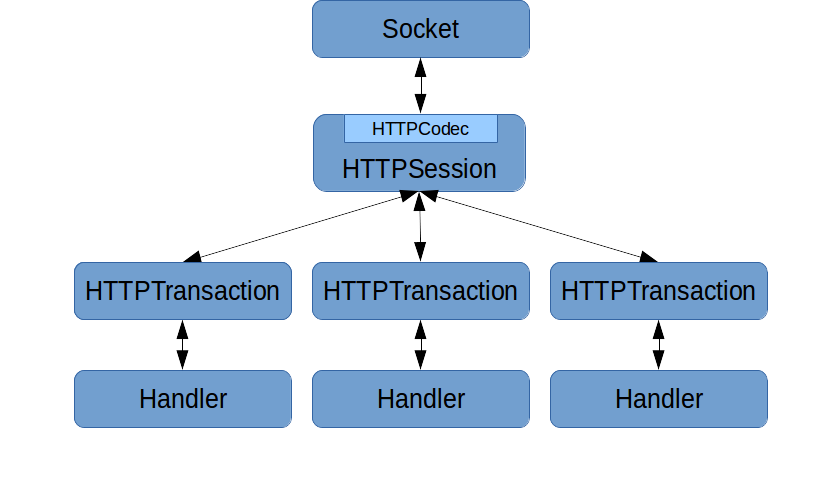
The central abstractions to understand in proxygen/lib are the session, codec,
transaction, and handler. These are the lowest level abstractions, and we
don't generally recommend building off of these directly.
When bytes are read off the wire, the HTTPCodec stored inside
HTTPSession parses these into higher-level objects and associates with
it a transaction identifier. The codec then calls into HTTPSession which
is responsible for maintaining the mapping between transaction identifier
and HTTPTransaction objects. Each HTTP request/response pair has a
separate HTTPTransaction object. Finally, HTTPTransaction forwards the
call to a handler object which implements HTTPTransaction:: Handler. The
handler is responsible for implementing business logic for the request or
response.
The handler then calls back into the transaction to generate egress
(whether the egress is a request or response). The call flows from the
transaction back to the session, which uses the codec to convert the
higher-level semantics of the particular call into the appropriate bytes
to send on the wire.
The same handler and transaction interfaces are used to both create requests
and handle responses. The API is generic enough to allow
both. HTTPSession is specialized slightly differently depending on
whether you are using the connection to issue or respond to HTTP
requests.
Moving into higher levels of abstraction, proxygen/HTTP server has a
simpler set of APIs and is the recommended way to interface with proxygen
when acting as a server if you don't need the full control of the lower
level abstractions.
The basic components here are HTTPServer, RequestHandlerFactory, and
RequestHandler. An HTTPServer takes some configuration and is given a
RequestHandlerFactory. Once the server is started, the installed
RequestHandlerFactory spawns a RequestHandler for each HTTP
request. RequestHandler is a simple interface users of the library
implement. Subclasses of RequestHandler should use the inherited
protected member ResponseHandler* downstream_ to send the response.
Using it
Proxygen is a library. After installing it, you can build your C++
server. Try cd ing to the directory containing the echo server at
proxygen/httpserver/samples/echo/.
After building proxygen you can start the echo server with _build/proxygen/httpserver/proxygen_echo
and verify it works using curl in a different terminal:
$ curl -v http://localhost:11000/
*   Trying 127.0.0.1...
* Connected to localhost (127.0.0.1) port 11000 (#0)
> GET / HTTP/1.1
> User-Agent: curl/7.35.0
> Host: localhost:11000
> Accept: */*
>
< HTTP/1.1 200 OK
< Request-Number: 1
< Date: Thu, 30 Oct 2014 17:07:36 GMT
< Connection: keep-alive
< Content-Length: 0
<
* Connection #0 to host localhost left intact
You can find other samples:
a simple server that supports HTTP/2 server push (_build/proxygen/httpserver/proxygen_push),
a simple server for static files (_build/proxygen/httpserver/proxygen_static)
a simple fwdproxy (_build/proxygen/httpserver/proxygen_proxy)
a curl-like client (_build/proxygen/httpclient/samples/curl/proxygen_curl)
QUIC and HTTP/3
Proxygen supports HTTP/3!
It depends on Facebook's mvfst
library for the IETF QUIC transport
implementation.
This comes with a handy command-line utility that can be used as an HTTP/3
server and client.
The utility supports the qlog
logging format; just start the server with the --qlogger_path option and many
knobs to tune both the quic transport and the http layer.
Documentation
We use Doxygen for Proxygen's internal documentation. You can generate a
copy of these docs by running doxygen Doxyfile from the project
root. You'll want to look at html/namespaceproxygen.html to start. This
will also generate folly documentation.
License
See LICENSE.
Contributing
Contributions to Proxygen are more than welcome. Read the guidelines in CONTRIBUTING.md.
Make sure you've signed the CLA before sending in a pull request.
Whitehat
Facebook has a bounty program for
the safe disclosure of security bugs. If you find a vulnerability, please
go through the process outlined on that page and do not file a public issue.
Trang TopGit này là một snapshot — tab "Readme" hiển thị nguyên văn README của repo (đã bỏ link, giữ ảnh). Repo GitHub ở github.com/facebook/proxygen là nguồn chính thức.
facebook/proxygen có bao nhiêu sao?
facebook/proxygen có 8.4k sao GitHub — tải lại trang để xem số mới nhất, hoặc xem trực tiếp github.com/facebook/proxygen. TopGit phản chiếu số sao của GitHub nhưng không cam kết đến từng phút.
facebook/proxygen có tag gì không?
Bản đồng bộ chưa ghi nhận topic GitHub nào cho facebook/proxygen. GitHub topics hiển thị ở thanh bên phải trang repo — đó là nơi đáng kiểm tra nhất.
facebook/proxygen còn đang phát triển không?
Commit gần nhất trên facebook/proxygen là 6 ngày trước (theo timestamp GitHub). Repo có 1.5k fork — một chỉ báo về mức độ quan tâm của cộng đồng.
facebook/proxygen viết bằng ngôn ngữ gì?
facebook/proxygen chủ yếu viết bằng C++. Trường "language" của GitHub dựa trên phần lớn byte ở nhánh mặc định.
Đọc đầy đủ README ở tab phía trên.
proxygen có đáng để bạn bỏ thời gian?
ChatGPT, Claude và Perplexity đều đọc được trang này. Hỏi thử xem họ nghĩ gì về proxygen.

 /proxygen