Snapshot của fikovnik/ShiftIt: 5.5k★ · Objective-C. Managing windows size and position in OSX
Tóm tắt dựng từ metadata GitHub của chính dự án — chưa có bài review TopGit. Trang sẽ tự động cập nhật khi bài review đầy đủ được xuất bản.
VÌ SAO CHƯA CÓ REVIEW
TopGit viết bài đầy đủ cho repo có nhiều sao nhất và được yêu cầu nhiều nhất. Trang này là snapshot trong thời gian chờ — xem README gốc ở tab READ ME.
This project is looking for a new maintainer. Until that transition is completed, there will likely not be further development on this project.
Alternatives
A highly recommended alternative to ShiftIt that can be implemented using Hammerspoon.
You can use the ShiftIt Spoon which implements the ShiftIt functionality in Hammerspoon.
Additionally there is a step-by-step guide to replicating ShiftIt's features using Hammerspoon yourself: https://github.com/fikovnik/ShiftIt/wiki/The-Hammerspoon-Alternative
About
Looking for a new maintainer #296.
ShiftIt is an application for OSX that allows you to quickly manipulate window position and size using keyboard shortcuts.
It intends to become a full featured window organizer for OSX.
It is a complete rewrite of the original ShiftIt by Aravindkumar Rajendiran which is not longer under development.
For discussing any sort of stuff about this app, please create a new issue.
License: GNU General Public License v3
Change logs: change logs are versioned in the repository as well.
Download
A binary build for OSX 10.7+ is available in releases.
Installation
Please note, because the binary is not signed, you'll have to "right click" on the application, click "Open", and subsequently click "Open" in the dialog that appears. You only have to do this the first time you launch the newly-downloaded application.
User guide
ShiftIt installs itself in the menu bar (optionally it can be completely hidden).
It provides a set of actions that manipulates windows positions and sizes.
Following is an example of list of actions available:
Normally, all Cocoa windows and X11 windows are supported.
Some applications might not work correctly or not at all.
There is a list of known problems.
If you find any problem not mentioned there, please submit an issue.
Requirements
OSX 10.7+, 64-bit
The primary development is done on OSX 10.10, but it should be running under OSX 10.7 as well.
FAQ
How do I turn on/off windows cycling sizes with multiple hotkey presses?
If this feature is on, snapping to the left side of the screen (and top, bottom, and right sides) will resize the window to half of the screen. If window is then snapped to the same side of the screen, it will resize to one third of the screen, and then two thirds of the screen.
If the feature is off, additional snappings will have no effect and the window will remain at half of the screen.
Currently, the only way to accomplish this is by running commands on the command line. To turn the feature on, run:
defaults write org.shiftitapp.ShiftIt multipleActionsCycleWindowSizes NO
I disabled the Show Icon in Menu Bar in the preferences, how can I get it back?
Launch the application again. It will open the preference dialog.
I pressed a shortcut, but nothing has happened, why?
While most of application windows should work well with ShiftIt, there are some exceptions (like the GTK+ OSX applications). There is a list of known problems. If you find any problem not mentioned in the list, please raise an issue.
I pressed a shortcut, something happened, but not what I expected, why?
ShiftIt is based on a Cocoa Accessibility API and sometimes this API can be a bit fragile and not do exactly what it should. In order to help to improve ShiftIt, please submit an issue every time you find some weird behavior. Before you do please consult the list of known problems. Thanks!
ShiftIt wants accessibility access on my Mac but my system preferences don't match the instruction, why?
For instructions on accessibility in Mac OS X 10.9.x, see this comment.
How to repair Accessibility API permissions?
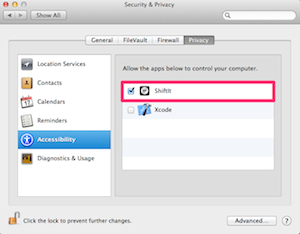
This can be done either using the GUI in System Preferences -> Security & Privacy -> Privacy -> Accessibility where it is necessary to check and uncheck the checkbox which is next to ShiftIt in the Allow the apps below to control your computer.
If ShiftIt is not in the list, just drag and drop it there from the Applications folder.
Alternatively, this can be also done in a command line, however, this is rather a hack with all potential issues hacks come with.
$ sudo sqlite3 '/Library/Application Support/com.apple.TCC/TCC.db' 'update access set allowed=1 where client like "%org.shiftitapp.ShiftIt%"'
For instructions on accessibility in Mac OS X 10.9.x, see this comment.
If you've upgraded to 10.10, just uncheck and recheck the box to make things work again.
Development
The repository is based on the git flow model. The development therefore happens in the develop branch. Any contribution is welcomed!
Local build
To build ShiftIt locally just clone the repository or get the latest snapshot and execute following command in the ShiftIt directory:
To install ShiftIt using brew you can use the cask.
$ brew install shiftit --cask
Making a release
First, update the release version in ShiftIt/ShiftIt-Info.plist. NOTE the version is in the file twice;
once under <key>CFBundleShortVersionString</key> and again under <key>CFBundleVersion</key>. Make sure you update both!
Releases are handled using fabric. There are some dependencies that can be easily obtained using pip:
fabric - the build system itself
github3 - library for GitHub 3 API
pystache - templates
NOTE: this is Python2 compatible; it will error out under Python3.
Using pipenv, a release environment
can be created with the following command:
$ pipenv install --two
$ pipenv shell
Prior to running the commands below, ensure the following environment variables are set:
export SHIFTIT_PRIVATE_KEY=~/.shiftit/dsa_priv.pem.gpg  # get this from the project contributors
export SHIFTIT_GITHUB_TOKEN=~/.shiftit/github.token.gpg  # this is your personal access token
export SHIFTIT_GITHUB_USER=fikovnik
export SHIFTIT_GITHUB_REPO=ShiftIt
Get your personal access token from Github's developer settings page.
As you see above, the private key and github token can be gpg-encrypted at rest. This is optional and they can simply be plain text; just don't suffix the files with .gpg.
The releases are fully automatic which hopefully will help to release more often.
Available commands
archive - Archives build
build - Makes a build by executing xcodebuild
info - Output all the build properties
release - Prepare the release: sign the build, generate appcast, generate release notes
release_notes - Generate release notes
After fab release instructions about how to create the actual release at github are printed.
Thanks JetBrains for kindly supporting this open source project by providing AppCode IDE.
Trang TopGit này là một snapshot — tab "Readme" hiển thị nguyên văn README của repo (đã bỏ link, giữ ảnh). Repo GitHub ở github.com/fikovnik/ShiftIt là nguồn chính thức.
fikovnik/ShiftIt có bao nhiêu sao?
fikovnik/ShiftIt có 5.5k sao GitHub — tải lại trang để xem số mới nhất, hoặc xem trực tiếp github.com/fikovnik/ShiftIt. TopGit phản chiếu số sao của GitHub nhưng không cam kết đến từng phút.
fikovnik/ShiftIt có tag gì không?
Bản đồng bộ chưa ghi nhận topic GitHub nào cho fikovnik/ShiftIt. GitHub topics hiển thị ở thanh bên phải trang repo — đó là nơi đáng kiểm tra nhất.
fikovnik/ShiftIt còn đang phát triển không?
Commit gần nhất trên fikovnik/ShiftIt là 3.0 năm trước (theo timestamp GitHub). Repo có 361 fork — một chỉ báo về mức độ quan tâm của cộng đồng.
fikovnik/ShiftIt viết bằng ngôn ngữ gì?
fikovnik/ShiftIt chủ yếu viết bằng Objective-C. Trường "language" của GitHub dựa trên phần lớn byte ở nhánh mặc định.
Đọc đầy đủ README ở tab phía trên.
Vẫn đang phân vân về ShiftIt?
Một cú bấm sẽ gửi câu hỏi kèm trang này cho AI — xem AI nói gì về ShiftIt.

 /ShiftIt
 ShiftIt

 ShiftIt Spoon which implements the ShiftIt functionality in Hammerspoon.