
fisshy/react-scroll

fisshy/react-scroll — dự án mã nguồn mở — đang có 4.4k sao GitHub. React scroll component
Tóm tắt dựng từ metadata GitHub của chính dự án — chưa có bài review TopGit. Trang sẽ tự động cập nhật khi bài review đầy đủ được xuất bản.
TopGit viết bài đầy đủ cho repo có nhiều sao nhất và được yêu cầu nhiều nhất. Trang này là snapshot trong thời gian chờ — xem README gốc ở tab READ ME.
Snapshot
Cộng tác viên hàng đầu
Xem cộng tác viên hàng đầu
React Scroll
React component for animating vertical scrolling
Table of Contents
- Introduction
- Features
- Install
- Run
- Examples
- Example of Using react-scroll with image
- Usage
- Props/Options
- Full example
- Scroll Methods
- Scroll Events
- Best Practices and Tips
- Troubleshooting and FAQs
- Contribution
- Changelog
Introduction
React-Scroll is a lightweight library for enhancing scrolling functionality in React applications. Whether you're building a single-page application, a portfolio site, or a complex web application, React Scroll provides you with an easy-to-use solution for implementing smooth scrolling behavior. This works with the latest versions of Google Chrome, Microsodt Edge, and Firefox.
React-Scroll AI Bot
React-Scroll Bot will help you understand this repository better. You can ask for code examples, installation guide, debugging help and much more.
Features
- Smooth Scrolling: Achieve seamless scrolling animations between sections of your web page.
- Customization: Customize scroll behavior to suit your application's design and user experience requirements.
- Accessibility: Ensure your scrolling functionality is accessible to all users, including those who rely on assistive technologies.
- Lightweight: Keep your bundle size small with React Scroll's minimal footprint.
Install
$ npm install react-scroll
or
$ yarn add react-scroll
Run
$ npm install
$ npm test
$ npm start
or
$ yarn
$ yarn test
$ yarn start
Examples
Checkout examples
Live example
Basic
Basic-Keydown
Container
With-hash
With-overflow
Code
Code example
Next.js
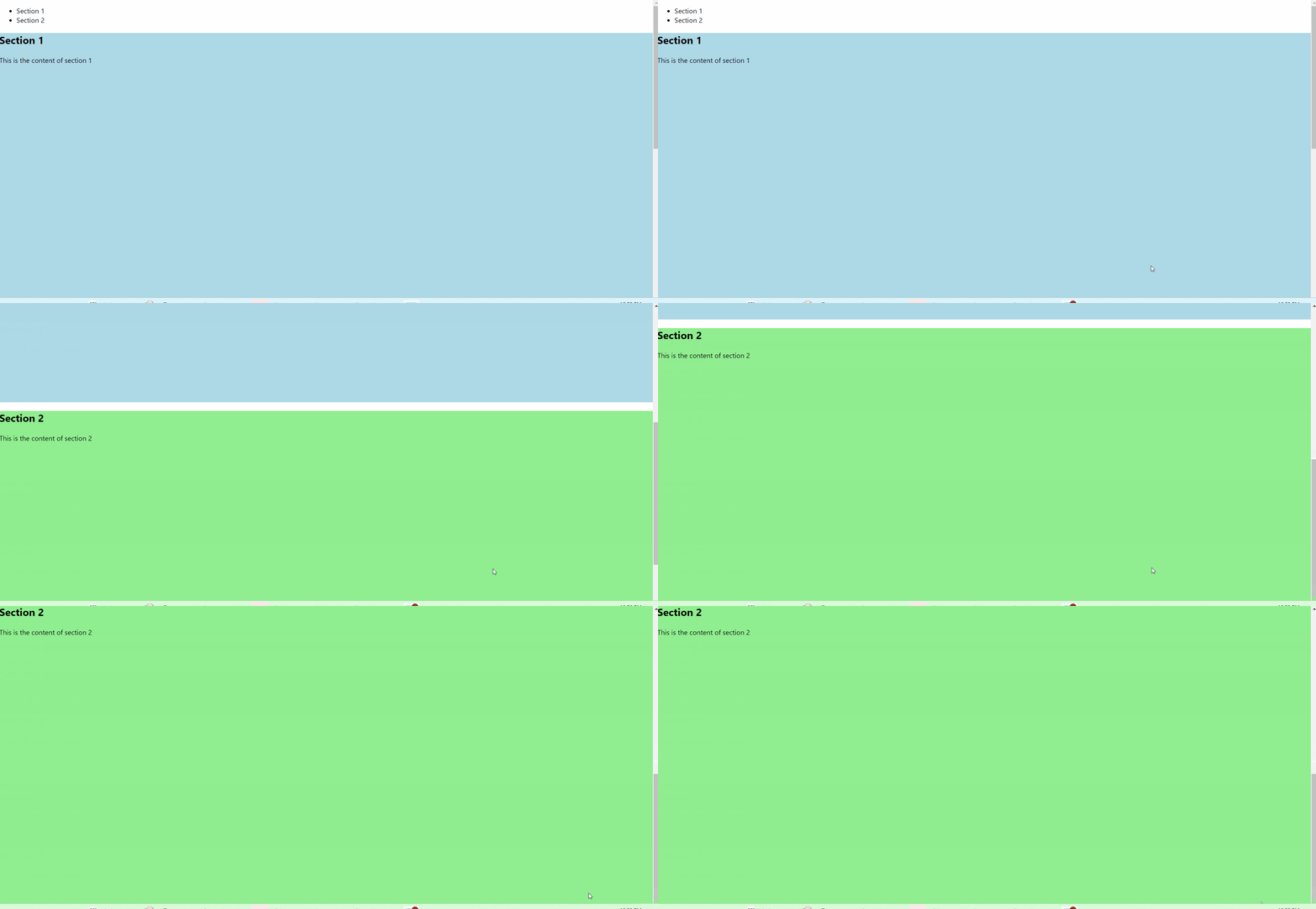
Example of Using react-scroll with image and detailed explanation!
In this example, the react-scroll library was utilized to enable smooth scrolling navigation within a single-page React application. The library provides components such as Link and Element that facilitate seamless navigation between different sections of the page. Once you start your react app, you can add this code at the bottom to experience the scroll feature!
Code:
import React from 'react';
import { Link, Element } from 'react-scroll';

function App() {
  return (
    <div>
      <nav>
        <ul>
          <li>
            <Link to="section1" smooth={true} duration={500}>Section 1</Link>
          </li>
          <li>
            <Link to="section2" smooth={true} duration={500}>Section 2</Link>
          </li>
          {/* Add more navigation links as needed */}
        </ul>
      </nav>
      <Element name="section1">
        <section style={{ height: '100vh', backgroundColor: 'lightblue' }}>
          <h1>Section 1</h1>
          <p>This is the content of section 1</p>
        </section>
      </Element>
      <Element name="section2">
        <section style={{ height: '100vh', backgroundColor: 'lightgreen' }}>
          <h1>Section 2</h1>
          <p>This is the content of section 2</p>
        </section>
      </Element>
      {/* Add more sections with Element components as needed */}
    </div>
  );
}

export default App;
Usage
import React, { useEffect } from 'react';
import { Link, Button, Element, Events, animateScroll as scroll, scrollSpy } from 'react-scroll';

const Section = () => {

  // useEffect is used to perform side effects in functional components.
  // Here, it's used to register scroll events and update scrollSpy when the component mounts.
  useEffect(() => {

    // Registering the 'begin' event and logging it to the console when triggered.
    Events.scrollEvent.register('begin', (to, element) => {
      console.log('begin', to, element);
    });

    // Registering the 'end' event and logging it to the console when triggered.
    Events.scrollEvent.register('end', (to, element) => {
      console.log('end', to, element);
    });

    // Updating scrollSpy when the component mounts.
    scrollSpy.update();

    // Returning a cleanup function to remove the registered events when the component unmounts.
    return () => {
      Events.scrollEvent.remove('begin');
      Events.scrollEvent.remove('end');
    };
  }, []);

  // Defining functions to perform different types of scrolling.
  const scrollToTop = () => {
    scroll.scrollToTop();
  };

  const scrollToBottom = () => {
    scroll.scrollToBottom();
  };

  const scrollTo = () => {
    scroll.scrollTo(100); // Scrolling to 100px from the top of the page.
  };

  const scrollMore = () => {
    scroll.scrollMore(100); // Scrolling an additional 100px from the current scroll position.
  };

  // Function to handle the activation of a link.
  const handleSetActive = (to) => {
    console.log(to);
  };

  // Rendering the component's JSX.
  return (
  <div>
    {/* Link component to scroll to "test1" element with specified properties */}
    <Link
      activeClass="active"
      to="test1"
      spy={true}
      smooth={true}
      offset={50}
      duration={500}
      onSetActive={handleSetActive}
    >
      Test 1
    </Link>

    {/* Other Link and Button components for navigation, each with their unique properties and targets */}
    {/* ... */}

    {/* Element components that act as scroll targets */}
    <Element name="test1" className="element">
      test 1
    </Element>
    <Element name="test2" className="element">
      test 2
    </Element>
    <div id="anchor" className="element">
      test 6 (anchor)
    </div>

    {/* Links to elements inside a specific container */}
    <Link to="firstInsideContainer" containerId="containerElement">
      Go to first element inside container
    </Link>
    <Link to="secondInsideContainer" containerId="containerElement">
      Go to second element inside container
    </Link>

    {/* Container with elements inside */}
    <div className="element" id="containerElement">
      <Element name="firstInsideContainer">
        first element inside container
      </Element>
      <Element name="secondInsideContainer">
        second element inside container
      </Element>
    </div>

    {/* Anchors to trigger scroll actions */}
    <a onClick={scrollToTop}>To the top!</a>
    <br/>
    <a onClick={scrollToBottom}>To the bottom!</a>
    <br/>
    <a onClick={scrollTo}>Scroll to 100px from the top</a>
    <br/>
    <a onClick={scrollMore}>Scroll 100px more from the current position!</a>
  </div>
);

};

export default Section;
Props/Options
| activeClass | class applied when element is reached |
| activeStyle | style applied when element is reached |
| to | Target to scroll to |
| containerId | Container to listen for scroll events and to perform scrolling in |
| spy | Make Link selected when scroll is at its targets position |
| hashSpy | Update hash based on spy, containerId has to be set to scroll a specific element |
| smooth | Animate the scrolling |
| offset | Scroll additional px ( like padding ) |
| duration | time of the scroll animation - can be a number or a function (`function (scrollDistanceInPx) { return duration; }`), that allows more granular control at run-time |
| delay | Wait x milliseconds before scroll |
| isDynamic | In case the distance has to be recalculated - if you have content that expands etc. |
| onSetActive | Invoke whenever link is being set to active |
| onSetInactive | Invoke whenever link is lose the active status |
| ignoreCancelEvents | Ignores events which cancel animated scrolling |
| horizontal | Whether to scroll vertically (`false`) or horizontally (`true`) - default: `false` |
| spyThrottle | Time of the spy throttle - can be a number |
Full example
<Link activeClass="active"
      to="target"
      spy={true}
      smooth={true}
      hashSpy={true}
      offset={50}
      duration={500}
      delay={1000}
      isDynamic={true}
      onSetActive={this.handleSetActive}
      onSetInactive={this.handleSetInactive}
      ignoreCancelEvents={false}
      spyThrottle={500}
>
  Your name
</Link>
Scroll Methods
Scroll To Top
import { animateScroll } from 'react-scroll';

const options = {
  // your options here, for example:
  duration: 500,
  smooth: true,
};

animateScroll.scrollToTop(options);
Scroll To Bottom
import { animateScroll } from 'react-scroll';

const options = {
  // Your options here, for example:
  duration: 500,
  smooth: true,
};

animateScroll.scrollToBottom(options);
Scroll To (position)
import { animateScroll } from 'react-scroll';

const options = {
  // Your options here, for example:
  duration: 500,
  smooth: true,
};

// Scroll to 100 pixels from the top of the page
animateScroll.scrollTo(100, options);
Scroll To (Element)
animateScroll.scrollTo(positionInPixels, props = {});
import { Element, scroller } from 'react-scroll';

<Element name="myScrollToElement"></Element>

// Somewhere else, even another file
scroller.scrollTo('myScrollToElement', {
  duration: 1500,
  delay: 100,
  smooth: true,
  containerId: 'ContainerElementID',
  offset: 50, // Scrolls to element + 50 pixels down the page
  // ... other options
});
Scroll More (px)
import { animateScroll } from 'react-scroll';

const options = {
  // Your options here, for example:
  duration: 500,
  smooth: true,
};

// Scroll an additional 10 pixels down from the current scroll position
animateScroll.scrollMore(10, options);
Scroll events
begin - start of the scrolling
import { Events } from 'react-scroll';

Events.scrollEvent.register('begin', function(to, element) {
  console.log('begin', to, element);
});
end - end of the scrolling/animation
import { Events } from 'react-scroll';

Events.scrollEvent.register('end', function(to, element) {
  console.log('end', to, element);
});
Remove events
import { Events } from 'react-scroll';

Events.scrollEvent.remove('begin');
Events.scrollEvent.remove('end');
Create your own Link/Element
Simply just pass your component to one of the high order components (Element/Scroll)
import React from 'react';
import { ScrollElement, ScrollLink } from 'react-scroll';

const Element = (props) => {
  return (
    <div {...props} ref={(el) => { props.parentBindings.domNode = el; }}>
      {props.children}
    </div>
  );
};

export const ScrollableElement = ScrollElement(Element);

const Link = (props) => {
  return (
    <a {...props}>
      {props.children}
    </a>
  );
};

export const ScrollableLink = ScrollLink(Link);
Scroll Animations
Add a custom easing animation to the smooth option. This prop will accept a Boolean if you want the default, or any of the animations listed below
import { scroller } from 'react-scroll';

scroller.scrollTo('myScrollToElement', {
  duration: 1500,
  delay: 100,
  smooth: 'easeInOutQuint',
  containerId: 'ContainerElementID',
  // ... other options
});
List of currently available animations:
linear
	- no easing, no acceleration.
easeInQuad
	- accelerating from zero velocity.
easeOutQuad
	- decelerating to zero velocity.
easeInOutQuad
	- acceleration until halfway, then deceleration.
easeInCubic
	- accelerating from zero velocity.
easeOutCubic
	- decelerating to zero velocity.
easeInOutCubic
	- acceleration until halfway, then deceleration.
easeInQuart
	- accelerating from zero velocity.
easeOutQuart
	- decelerating to zero velocity.
easeInOutQuart
	-  acceleration until halfway, then deceleration.
easeInQuint
	- accelerating from zero velocity.
easeOutQuint
	- decelerating to zero velocity.
easeInOutQuint
	- acceleration until halfway, then deceleration.
A good visual reference can be found at easings.net
Best Practices and Tips
- Optimize performance by limiting the number of elements with scroll events.
- Test your application on various devices and screen sizes to ensure accessibility.
Troubleshooting and FAQs
-
Q: How do I customize the scroll behavior?
-
A: You can customize the scroll duration, easing function, and other parameters using the duration, smooth, and offset props.
-
Q: Why is my smooth scrolling not working? This can be applied to any prop!
-
A: Ensure that the smooth prop is set to true and that your browser supports smooth scrolling.
Contributions
-
To contribute to React-Scroll, please follow these guidelines:
-
Fork the repository and create a new branch for your changes.
-
Make your changes and submit a pull request with a clear description of your work.
-
Include tests and ensure all existing tests pass before submitting your changes.
Changelog
- See the CHANGELOG
License
- React Scroll is licensed under the MIT License. Explore this to understand terms and conditions of the license- https://opensource.org/licenses/MIT
Repo liên quan
Master programming by recreating your favorite technologies from scratch.
A curated meta-list of curated lists organized by technology domain. The repository acts as a directory pointing to hundreds of specialized awesome lists covering programming languages, platforms, frameworks, and tooling. All content is community-contributed under the CC0 public domain dedication.
Public APIs is a community-curated GitHub repository listing free, publicly accessible APIs across a wide range of categories, with auth type, HTTPS, and CORS noted for each entry. It's a browsable reference, not a library to install.
REA is an MCP server and CLI that gives AI coding agents the ability to reverse engineer binaries, JavaScript apps, .NET assemblies, and websites. It hooks into Hopper, Ghidra, or IDA Pro for native binary work, or runs static JavaScript analysis with just Node.js. Every investigation returns an Evidence bundle that includes what was found, what was not, and the reasoning path. Setup registers REA with supported agents and walks you through connecting an analysis engine. The CLI also works standalone for terminal-first workflows.
Trả lời nhanh
fisshy/react-scroll có bao nhiêu sao?
fisshy/react-scroll có 4.4k sao GitHub — tải lại trang để xem số mới nhất, hoặc xem trực tiếp github.com/fisshy/react-scroll. TopGit phản chiếu số sao của GitHub nhưng không cam kết đến từng phút.
fisshy/react-scroll có tag gì không?
Bản đồng bộ chưa ghi nhận topic GitHub nào cho fisshy/react-scroll. GitHub topics hiển thị ở thanh bên phải trang repo — đó là nơi đáng kiểm tra nhất.
fisshy/react-scroll còn đang phát triển không?
Commit gần nhất trên fisshy/react-scroll là 1.7 năm trước (theo timestamp GitHub). Repo có 427 fork — một chỉ báo về mức độ quan tâm của cộng đồng.
fisshy/react-scroll là gì?
fisshy/react-scroll (fisshy/react-scroll) là dự án JavaScript trên GitHub. Theo mô tả gốc: React scroll component
fisshy/react-scroll viết bằng ngôn ngữ gì?
fisshy/react-scroll chủ yếu viết bằng JavaScript. Trường "language" của GitHub dựa trên phần lớn byte ở nhánh mặc định.
Đọc đầy đủ README ở tab phía trên.
Vẫn đang phân vân về react-scroll?
Một cú bấm sẽ gửi câu hỏi kèm trang này cho AI — xem AI nói gì về react-scroll.