gajus/table

gajus/table được TopGit xếp vào nhóm công cụ cho lập trình viên, với 974 sao trên GitHub, viết chủ yếu bằng TypeScript. Formats data into a string table.
Tóm tắt dựng từ metadata GitHub của chính dự án — chưa có bài review TopGit. Trang sẽ tự động cập nhật khi bài review đầy đủ được xuất bản.
TopGit viết bài đầy đủ cho repo có nhiều sao nhất và được yêu cầu nhiều nhất. Trang này là snapshot trong thời gian chờ — xem README gốc ở tab READ ME.
Snapshot
Cộng tác viên hàng đầu
Xem cộng tác viên hàng đầu
Table
Produces a string that represents array data in a text table.





- Table
- Features
- Install
- Usage
- API
- table
- createStream
- getBorderCharacters
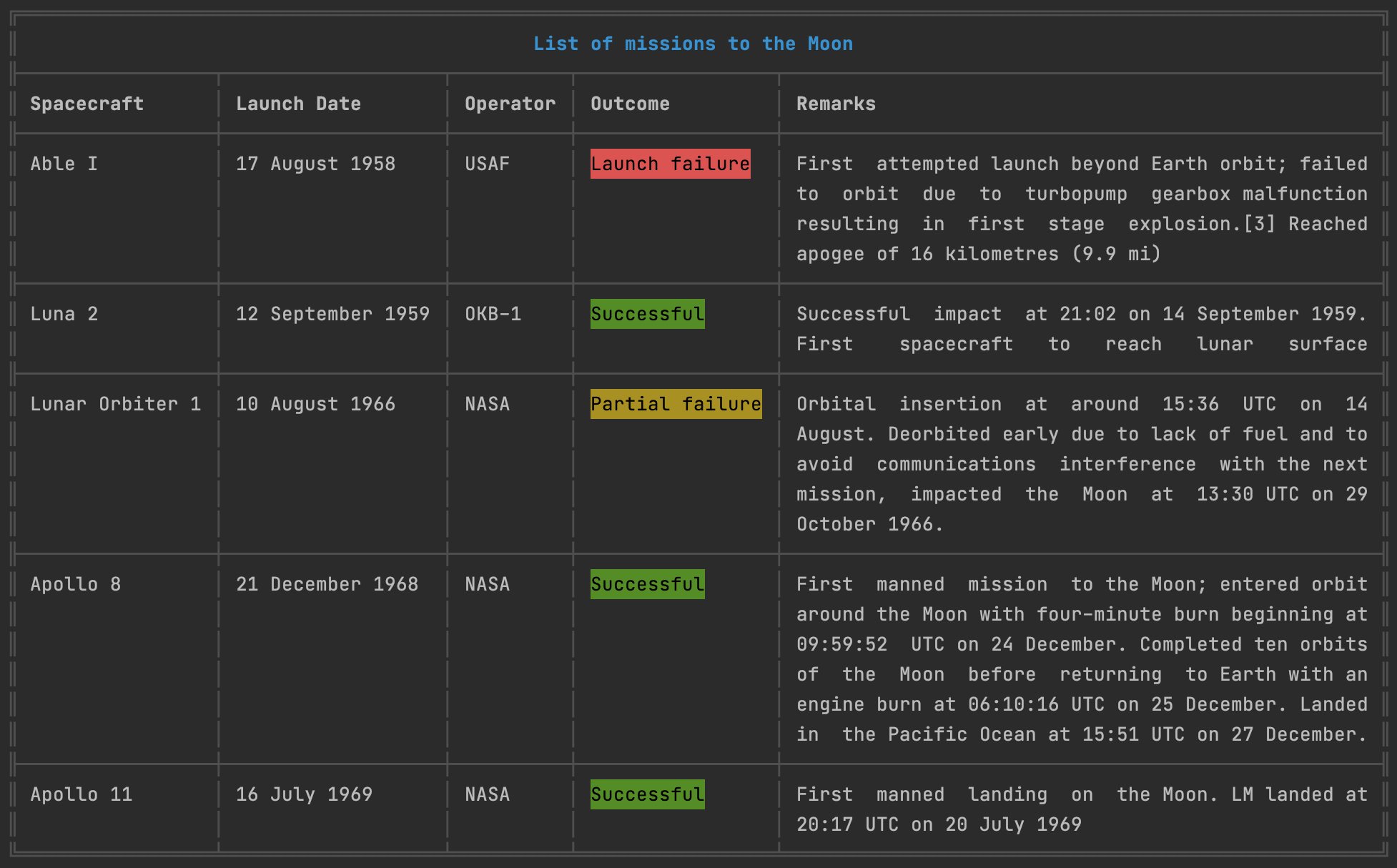
Features
- Works with strings containing fullwidth characters.
- Works with strings containing ANSI escape codes.
- Configurable border characters.
- Configurable content alignment per column.
- Configurable content padding per column.
- Configurable column width.
- Text wrapping.
Install
npm install table


Usage
import { table } from 'table';

// Using commonjs?
// const { table } = require('table');

const data = [
    ['0A', '0B', '0C'],
    ['1A', '1B', '1C'],
    ['2A', '2B', '2C']
];

console.log(table(data));
╔════╤════╤════╗
║ 0A │ 0B │ 0C ║
╟────┼────┼────╢
║ 1A │ 1B │ 1C ║
╟────┼────┼────╢
║ 2A │ 2B │ 2C ║
╚════╧════╧════╝
API
table
Returns the string in the table format
Parameters:
-
data: The data to display
- Type:
any[][] - Required:
true
- Type:
-
config: Table configuration
- Type:
object - Required:
false
- Type:
config.border
Type: { [type: string]: string }
Default: honeywell template
Custom borders. The keys are any of:
topLeft,topRight,topBody,topJoinbottomLeft,bottomRight,bottomBody,bottomJoinjoinLeft,joinRight,joinBody,joinJoinbodyLeft,bodyRight,bodyJoinheaderJoin
const data = [
  ['0A', '0B', '0C'],
  ['1A', '1B', '1C'],
  ['2A', '2B', '2C']
];

const config = {
  border: {
    topBody: `─`,
    topJoin: `┬`,
    topLeft: `┌`,
    topRight: `┐`,

    bottomBody: `─`,
    bottomJoin: `┴`,
    bottomLeft: `└`,
    bottomRight: `┘`,

    bodyLeft: `│`,
    bodyRight: `│`,
    bodyJoin: `│`,

    joinBody: `─`,
    joinLeft: `├`,
    joinRight: `┤`,
    joinJoin: `┼`
  }
};

console.log(table(data, config));
┌────┬────┬────┐
│ 0A │ 0B │ 0C │
├────┼────┼────┤
│ 1A │ 1B │ 1C │
├────┼────┼────┤
│ 2A │ 2B │ 2C │
└────┴────┴────┘
config.drawVerticalLine
Type: (lineIndex: number, columnCount: number) => boolean
Default: () => true
It is used to tell whether to draw a vertical line. This callback is called for each vertical border of the table.
If the table has n columns, then the index parameter is alternatively received all numbers in range [0, n] inclusively.
const data = [
  ['0A', '0B', '0C'],
  ['1A', '1B', '1C'],
  ['2A', '2B', '2C'],
  ['3A', '3B', '3C'],
  ['4A', '4B', '4C']
];

const config = {
  drawVerticalLine: (lineIndex, columnCount) => {
    return lineIndex === 0 || lineIndex === columnCount;
  }
};

console.log(table(data, config));
╔════════════╗
║ 0A  0B  0C ║
╟────────────╢
║ 1A  1B  1C ║
╟────────────╢
║ 2A  2B  2C ║
╟────────────╢
║ 3A  3B  3C ║
╟────────────╢
║ 4A  4B  4C ║
╚════════════╝
config.drawHorizontalLine
Type: (lineIndex: number, rowCount: number) => boolean
Default: () => true
It is used to tell whether to draw a horizontal line. This callback is called for each horizontal border of the table.
If the table has n rows, then the index parameter is alternatively received all numbers in range [0, n] inclusively.
If the table has n rows and contains the header, then the range will be [0, n+1] inclusively.
const data = [
  ['0A', '0B', '0C'],
  ['1A', '1B', '1C'],
  ['2A', '2B', '2C'],
  ['3A', '3B', '3C'],
  ['4A', '4B', '4C']
];

const config = {
  drawHorizontalLine: (lineIndex, rowCount) => {
    return lineIndex === 0 || lineIndex === 1 || lineIndex === rowCount - 1 || lineIndex === rowCount;
  }
};

console.log(table(data, config));
╔════╤════╤════╗
║ 0A │ 0B │ 0C ║
╟────┼────┼────╢
║ 1A │ 1B │ 1C ║
║ 2A │ 2B │ 2C ║
║ 3A │ 3B │ 3C ║
╟────┼────┼────╢
║ 4A │ 4B │ 4C ║
╚════╧════╧════╝
config.singleLine
Type: boolean
Default: false
If true, horizontal lines inside the table are not drawn. This option also overrides the config.drawHorizontalLine if specified.
const data = [
  ['-rw-r--r--', '1', 'pandorym', 'staff', '1529', 'May 23 11:25', 'LICENSE'],
  ['-rw-r--r--', '1', 'pandorym', 'staff', '16327', 'May 23 11:58', 'README.md'],
  ['drwxr-xr-x', '76', 'pandorym', 'staff', '2432', 'May 23 12:02', 'dist'],
  ['drwxr-xr-x', '634', 'pandorym', 'staff', '20288', 'May 23 11:54', 'node_modules'],
  ['-rw-r--r--', '1,', 'pandorym', 'staff', '525688', 'May 23 11:52', 'package-lock.json'],
  ['-rw-r--r--@', '1', 'pandorym', 'staff', '2440', 'May 23 11:25', 'package.json'],
  ['drwxr-xr-x', '27', 'pandorym', 'staff', '864', 'May 23 11:25', 'src'],
  ['drwxr-xr-x', '20', 'pandorym', 'staff', '640', 'May 23 11:25', 'test'],
];

const config = {
  singleLine: true
};

console.log(table(data, config));
╔═════════════╤═════╤══════════╤═══════╤════════╤══════════════╤═══════════════════╗
║ -rw-r--r--  │ 1   │ pandorym │ staff │ 1529   │ May 23 11:25 │ LICENSE           ║
║ -rw-r--r--  │ 1   │ pandorym │ staff │ 16327  │ May 23 11:58 │ README.md         ║
║ drwxr-xr-x  │ 76  │ pandorym │ staff │ 2432   │ May 23 12:02 │ dist              ║
║ drwxr-xr-x  │ 634 │ pandorym │ staff │ 20288  │ May 23 11:54 │ node_modules      ║
║ -rw-r--r--  │ 1,  │ pandorym │ staff │ 525688 │ May 23 11:52 │ package-lock.json ║
║ -rw-r--r--@ │ 1   │ pandorym │ staff │ 2440   │ May 23 11:25 │ package.json      ║
║ drwxr-xr-x  │ 27  │ pandorym │ staff │ 864    │ May 23 11:25 │ src               ║
║ drwxr-xr-x  │ 20  │ pandorym │ staff │ 640    │ May 23 11:25 │ test              ║
╚═════════════╧═════╧══════════╧═══════╧════════╧══════════════╧═══════════════════╝
config.columns
Type: Column[] | { [columnIndex: number]: Column }
Column specific configurations.
config.columns[*].width
Type: number
Default: the maximum cell widths of the column
Column width (excluding the paddings).
const data = [
  ['0A', '0B', '0C'],
  ['1A', '1B', '1C'],
  ['2A', '2B', '2C']
];

const config = {
  columns: {
    1: { width: 10 }
  }
};

console.log(table(data, config));
╔════╤════════════╤════╗
║ 0A │ 0B         │ 0C ║
╟────┼────────────┼────╢
║ 1A │ 1B         │ 1C ║
╟────┼────────────┼────╢
║ 2A │ 2B         │ 2C ║
╚════╧════════════╧════╝
config.columns[*].alignment
Type: 'center' | 'justify' | 'left' | 'right'
Default: 'left'
Cell content horizontal alignment
const data = [
  ['0A', '0B', '0C', '0D 0E 0F'],
  ['1A', '1B', '1C', '1D 1E 1F'],
  ['2A', '2B', '2C', '2D 2E 2F'],
];

const config = {
  columnDefault: {
    width: 10,
  },
  columns: [
    { alignment: 'left' },
    { alignment: 'center' },
    { alignment: 'right' },
    { alignment: 'justify' }
  ],
};

console.log(table(data, config));
╔════════════╤════════════╤════════════╤════════════╗
║ 0A         │     0B     │         0C │ 0D  0E  0F ║
╟────────────┼────────────┼────────────┼────────────╢
║ 1A         │     1B     │         1C │ 1D  1E  1F ║
╟────────────┼────────────┼────────────┼────────────╢
║ 2A         │     2B     │         2C │ 2D  2E  2F ║
╚════════════╧════════════╧════════════╧════════════╝
config.columns[*].verticalAlignment
Type: 'top' | 'middle' | 'bottom'
Default: 'top'
Cell content vertical alignment
const data = [
  ['A', 'B', 'C', 'DEF'],
];

const config = {
  columnDefault: {
    width: 1,
  },
  columns: [
    { verticalAlignment: 'top' },
    { verticalAlignment: 'middle' },
    { verticalAlignment: 'bottom' },
  ],
};

console.log(table(data, config));
╔═══╤═══╤═══╤═══╗
║ A │   │   │ D ║
║   │ B │   │ E ║
║   │   │ C │ F ║
╚═══╧═══╧═══╧═══╝
config.columns[*].paddingLeft
Type: number
Default: 1
The number of whitespaces used to pad the content on the left.
config.columns[*].paddingRight
Type: number
Default: 1
The number of whitespaces used to pad the content on the right.
The paddingLeft and paddingRight options do not count on the column width. So the column has width = 5, paddingLeft = 2 and paddingRight = 2 will have the total width is 9.
const data = [
  ['0A', 'AABBCC', '0C'],
  ['1A', '1B', '1C'],
  ['2A', '2B', '2C']
];

const config = {
  columns: [
    {
      paddingLeft: 3
    },
    {
      width: 2,
      paddingRight: 3
    }
  ]
};

console.log(table(data, config));
╔══════╤══════╤════╗
║   0A │ AA   │ 0C ║
║      │ BB   │    ║
║      │ CC   │    ║
╟──────┼──────┼────╢
║   1A │ 1B   │ 1C ║
╟──────┼──────┼────╢
║   2A │ 2B   │ 2C ║
╚══════╧══════╧════╝
config.columns[*].truncate
Type: number
Default: Infinity
The number of characters is which the content will be truncated.
To handle a content that overflows the container width, table package implements text wrapping. However, sometimes you may want to truncate content that is too long to be displayed in the table.
const data = [
  ['Lorem ipsum dolor sit amet, consectetur adipiscing elit. Phasellus pulvinar nibh sed mauris convallis dapibus. Nunc venenatis tempus nulla sit amet viverra.']
];

const config = {
  columns: [
    {
      width: 20,
      truncate: 100
    }
  ]
};

console.log(table(data, config));
╔══════════════════════╗
║ Lorem ipsum dolor si ║
║ t amet, consectetur  ║
║ adipiscing elit. Pha ║
║ sellus pulvinar nibh ║
║ sed mauris convall…  ║
╚══════════════════════╝
config.columns[*].wrapWord
Type: boolean
Default: false
The table package implements auto text wrapping, i.e., text that has the width greater than the container width will be separated into multiple lines at the nearest space or one of the special characters: \|/_.,;-.
When wrapWord is false:
const data = [
    ['Lorem ipsum dolor sit amet, consectetur adipiscing elit. Phasellus pulvinar nibh sed mauris convallis dapibus. Nunc venenatis tempus nulla sit amet viverra.']
];

const config = {
  columns: [ { width: 20 } ]
};

console.log(table(data, config));
╔══════════════════════╗
║ Lorem ipsum dolor si ║
║ t amet, consectetur  ║
║ adipiscing elit. Pha ║
║ sellus pulvinar nibh ║
║ sed mauris convallis ║
║ dapibus. Nunc venena ║
║ tis tempus nulla sit ║
║ amet viverra.        ║
╚══════════════════════╝
When wrapWord is true:
╔══════════════════════╗
║ Lorem ipsum dolor    ║
║ sit amet,            ║
║ consectetur          ║
║ adipiscing elit.     ║
║ Phasellus pulvinar   ║
║ nibh sed mauris      ║
║ convallis dapibus.   ║
║ Nunc venenatis       ║
║ tempus nulla sit     ║
║ amet viverra.        ║
╚══════════════════════╝
config.columnDefault
Type: Column
Default: {}
The default configuration for all columns. Column-specific settings will overwrite the default values.
config.header
Type: object
Header configuration.
Deprecated in favor of the new spanning cells API.
The header configuration inherits the most of the column's, except:
content{string}: the header content.width:calculate based on the content width automatically.alignment:centerbe default.verticalAlignment:is not supported.config.border.topJoinwill beconfig.border.topBodyfor prettier.
const data = [
      ['0A', '0B', '0C'],
      ['1A', '1B', '1C'],
      ['2A', '2B', '2C'],
    ];

const config = {
  columnDefault: {
    width: 10,
  },
  header: {
    alignment: 'center',
    content: 'THE HEADER\nThis is the table about something',
  },
}

console.log(table(data, config));
╔══════════════════════════════════════╗
║              THE HEADER              ║
║  This is the table about something   ║
╟────────────┬────────────┬────────────╢
║ 0A         │ 0B         │ 0C         ║
╟────────────┼────────────┼────────────╢
║ 1A         │ 1B         │ 1C         ║
╟────────────┼────────────┼────────────╢
║ 2A         │ 2B         │ 2C         ║
╚════════════╧════════════╧════════════╝
config.spanningCells
Type: SpanningCellConfig[]
Spanning cells configuration.
The configuration should be straightforward: just specify an array of minimal cell configurations including the position of top-left cell and the number of columns and/or rows will be expanded from it.
The content of overlap cells will be ignored to make the data shape be consistent.
By default, the configuration of column that the top-left cell belongs to will be applied to the whole spanning cell, except:
- The
widthwill be summed up of all spanning columns. - The
paddingRightwill be received from the right-most column intentionally.
Advances customized column-like styles can be configurable to each spanning cell to overwrite the default behavior.
const data = [
  ['Test Coverage Report', '', '', '', '', ''],
  ['Module', 'Component', 'Test Cases', 'Failures', 'Durations', 'Success Rate'],
  ['Services', 'User', '50', '30', '3m 7s', '60.0%'],
  ['', 'Payment', '100', '80', '7m 15s', '80.0%'],
  ['Subtotal', '', '150', '110', '10m 22s', '73.3%'],
  ['Controllers', 'User', '24', '18', '1m 30s', '75.0%'],
  ['', 'Payment', '30', '24', '50s', '80.0%'],
  ['Subtotal', '', '54', '42', '2m 20s', '77.8%'],
  ['Total', '', '204', '152', '12m 42s', '74.5%'],
];

const config = {
  columns: [
    { alignment: 'center', width: 12 },
    { alignment: 'center', width: 10 },
    { alignment: 'right' },
    { alignment: 'right' },
    { alignment: 'right' },
    { alignment: 'right' }
  ],
  spanningCells: [
    { col: 0, row: 0, colSpan: 6 },
    { col: 0, row: 2, rowSpan: 2, verticalAlignment: 'middle'},
    { col: 0, row: 4, colSpan: 2, alignment: 'right'},
    { col: 0, row: 5, rowSpan: 2, verticalAlignment: 'middle'},
    { col: 0, row: 7, colSpan: 2, alignment: 'right' },
    { col: 0, row: 8, colSpan: 2, alignment: 'right' }
  ],
};

console.log(table(data, config));
╔══════════════════════════════════════════════════════════════════════════════╗
║                             Test Coverage Report                             ║
╟──────────────┬────────────┬────────────┬──────────┬───────────┬──────────────╢
║    Module    │ Component  │ Test Cases │ Failures │ Durations │ Success Rate ║
╟──────────────┼────────────┼────────────┼──────────┼───────────┼──────────────╢
║              │    User    │         50 │       30 │     3m 7s │        60.0% ║
║   Services   ├────────────┼────────────┼──────────┼───────────┼──────────────╢
║              │  Payment   │        100 │       80 │    7m 15s │        80.0% ║
╟──────────────┴────────────┼────────────┼──────────┼───────────┼──────────────╢
║                  Subtotal │        150 │      110 │   10m 22s │        73.3% ║
╟──────────────┬────────────┼────────────┼──────────┼───────────┼──────────────╢
║              │    User    │         24 │       18 │    1m 30s │        75.0% ║
║ Controllers  ├────────────┼────────────┼──────────┼───────────┼──────────────╢
║              │  Payment   │         30 │       24 │       50s │        80.0% ║
╟──────────────┴────────────┼────────────┼──────────┼───────────┼──────────────╢
║                  Subtotal │         54 │       42 │    2m 20s │        77.8% ║
╟───────────────────────────┼────────────┼──────────┼───────────┼──────────────╢
║                     Total │        204 │      152 │   12m 42s │        74.5% ║
╚═══════════════════════════╧════════════╧══════════╧═══════════╧══════════════╝
createStream
table package exports createStream function used to draw a table and append rows.
Parameter:
- config: the same as
table's, exceptconfig.columnDefault.widthandconfig.columnCountmust be provided.
import { createStream } from 'table';

const config = {
  columnDefault: {
    width: 50
  },
  columnCount: 1
};

const stream = createStream(config);

setInterval(() => {
  stream.write([new Date()]);
}, 500);

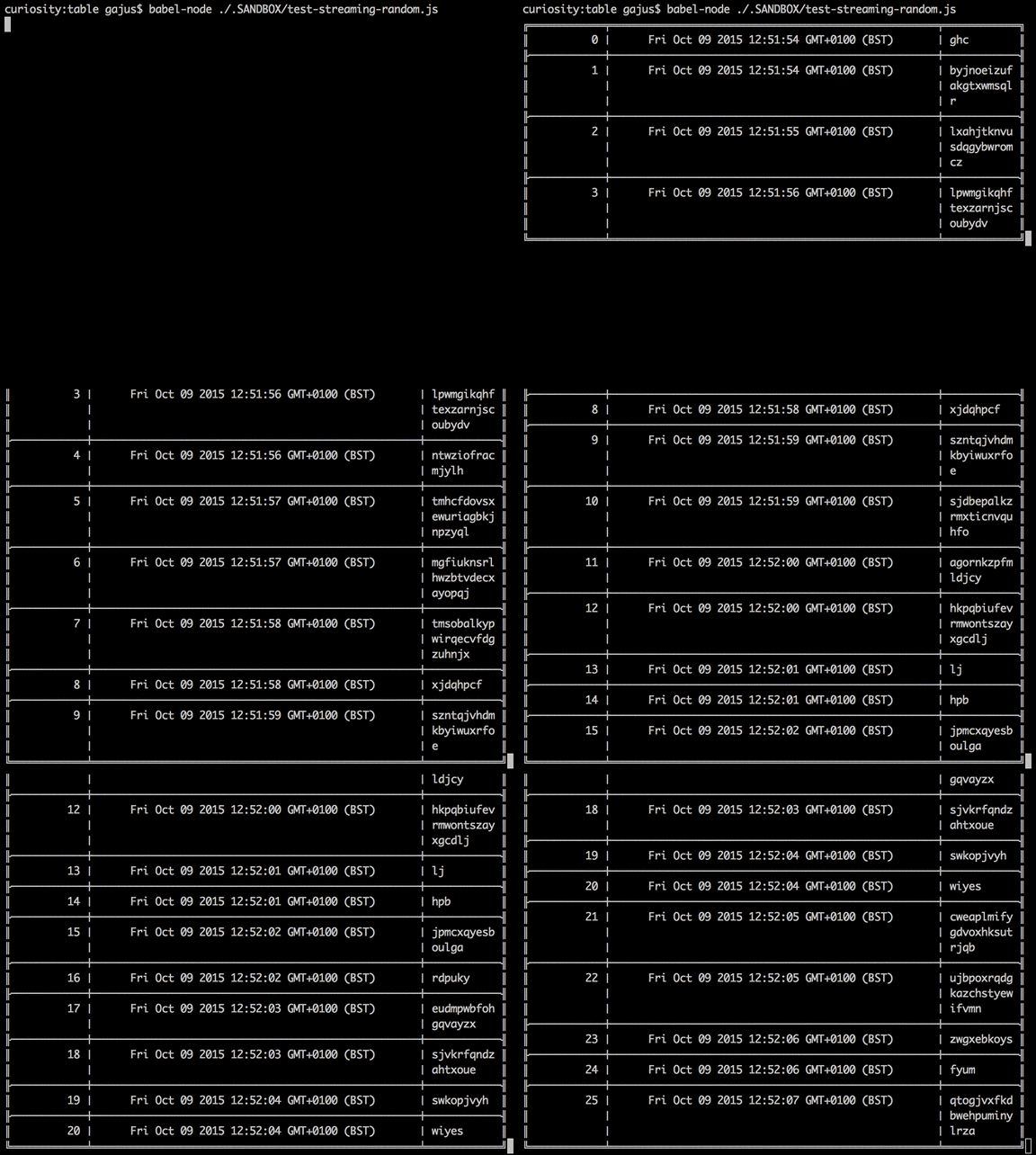
table package uses ANSI escape codes to overwrite the output of the last line when a new row is printed.
The underlying implementation is explained in this Stack Overflow answer.
Streaming supports all of the configuration properties and functionality of a static table (such as auto text wrapping, alignment and padding), e.g.
import { createStream } from 'table';

import _ from 'lodash';

const config = {
  columnDefault: {
    width: 50
  },
  columnCount: 3,
  columns: [
    {
      width: 10,
      alignment: 'right'
    },
    { alignment: 'center' },
    { width: 10 }

  ]
};

const stream = createStream(config);

let i = 0;

setInterval(() => {
  let random;

  random = _.sample('abcdefghijklmnopqrstuvwxyz', _.random(1, 30)).join('');

  stream.write([i++, new Date(), random]);
}, 500);
getBorderCharacters
Parameter:
- template
- Type:
'honeywell' | 'norc' | 'ramac' | 'void' - Required:
true
- Type:
You can load one of the predefined border templates using getBorderCharacters function.
import { table, getBorderCharacters } from 'table';

const data = [
  ['0A', '0B', '0C'],
  ['1A', '1B', '1C'],
  ['2A', '2B', '2C']
];

const config = {
  border: getBorderCharacters(`name of the template`)
};

console.log(table(data, config));
# honeywell

╔════╤════╤════╗
║ 0A │ 0B │ 0C ║
╟────┼────┼────╢
║ 1A │ 1B │ 1C ║
╟────┼────┼────╢
║ 2A │ 2B │ 2C ║
╚════╧════╧════╝

# norc

┌────┬────┬────┐
│ 0A │ 0B │ 0C │
├────┼────┼────┤
│ 1A │ 1B │ 1C │
├────┼────┼────┤
│ 2A │ 2B │ 2C │
└────┴────┴────┘

# ramac (ASCII; for use in terminals that do not support Unicode characters)

+----+----+----+
| 0A | 0B | 0C |
|----|----|----|
| 1A | 1B | 1C |
|----|----|----|
| 2A | 2B | 2C |
+----+----+----+

# void (no borders; see "borderless table" section of the documentation)

 0A  0B  0C

 1A  1B  1C

 2A  2B  2C
Raise an issue if you'd like to contribute a new border template.
Borderless Table
Simply using void border character template creates a table with a lot of unnecessary spacing.
To create a more pleasant to the eye table, reset the padding and remove the joining rows, e.g.
const output = table(data, {
    border: getBorderCharacters('void'),
    columnDefault: {
        paddingLeft: 0,
        paddingRight: 1
    },
    drawHorizontalLine: () => false
    }
);

console.log(output);
0A 0B 0C
1A 1B 1C
2A 2B 2C
Repo liên quan
yt-dlp is a Python command-line downloader that pulls audio and video from thousands of sites and hands post-processing off to ffmpeg. It's a fork of youtube-dl built for people who want fast fixes when a site breaks, not a polished app.
:cherry_blossom: A command-line fuzzy finder
Your own personal AI assistant. Any OS. Any Platform. The lobster way. 🦞
The agent harness performance optimization system. Skills, instincts, memory, security, and research-first development for Claude Code, Codex, Opencode, Cursor and beyond.
Trả lời nhanh
Đọc thêm về gajus/table ở đâu?
Trang TopGit này là một snapshot — tab "Readme" hiển thị nguyên văn README của repo (đã bỏ link, giữ ảnh). Repo GitHub ở github.com/gajus/table là nguồn chính thức.
gajus/table có bao nhiêu sao?
gajus/table có 974 sao GitHub — tải lại trang để xem số mới nhất, hoặc xem trực tiếp github.com/gajus/table. TopGit phản chiếu số sao của GitHub nhưng không cam kết đến từng phút.
gajus/table có những chủ đề gì?
GitHub topics của gajus/table: "ansi", "ascii", "cli", "text-table". TopGit xếp repo vào nhóm Developer Tools.
gajus/table có website riêng không?
TopGit chưa ghi nhận URL trang chủ cho gajus/table. Phần README ở tab phía trên thường có link demo, hoặc xem mô tả GitHub của repo.
gajus/table còn đang phát triển không?
Commit gần nhất trên gajus/table là 1.5 năm trước (theo timestamp GitHub). Repo có 81 fork — một chỉ báo về mức độ quan tâm của cộng đồng.
gajus/table viết bằng ngôn ngữ gì?
gajus/table chủ yếu viết bằng TypeScript. Trường "language" của GitHub dựa trên phần lớn byte ở nhánh mặc định.
Đọc đầy đủ README ở tab phía trên.
Chưa chắc table có hợp với bạn?
Để ChatGPT, Claude hoặc Perplexity tìm hiểu giúp — bấm bên dưới và xem AI nói gì về table.