TopGit theo dõi geerlingguy/raspberry-pi-dramble trên GitHub trong nhóm Developer Tools, đã đạt 1.7k sao. DEPRECATED - Raspberry Pi Kubernetes cluster that runs HA/HP Drupal 8
Tóm tắt dựng từ metadata GitHub của chính dự án — chưa có bài review TopGit. Trang sẽ tự động cập nhật khi bài review đầy đủ được xuất bản.
VÌ SAO CHƯA CÓ REVIEW
TopGit viết bài đầy đủ cho repo có nhiều sao nhất và được yêu cầu nhiều nhất. Trang này là snapshot trong thời gian chờ — xem README gốc ở tab READ ME.
DEPRECATED: Please see my pi-cluster project for active development.
Raspberry Pi Dramble
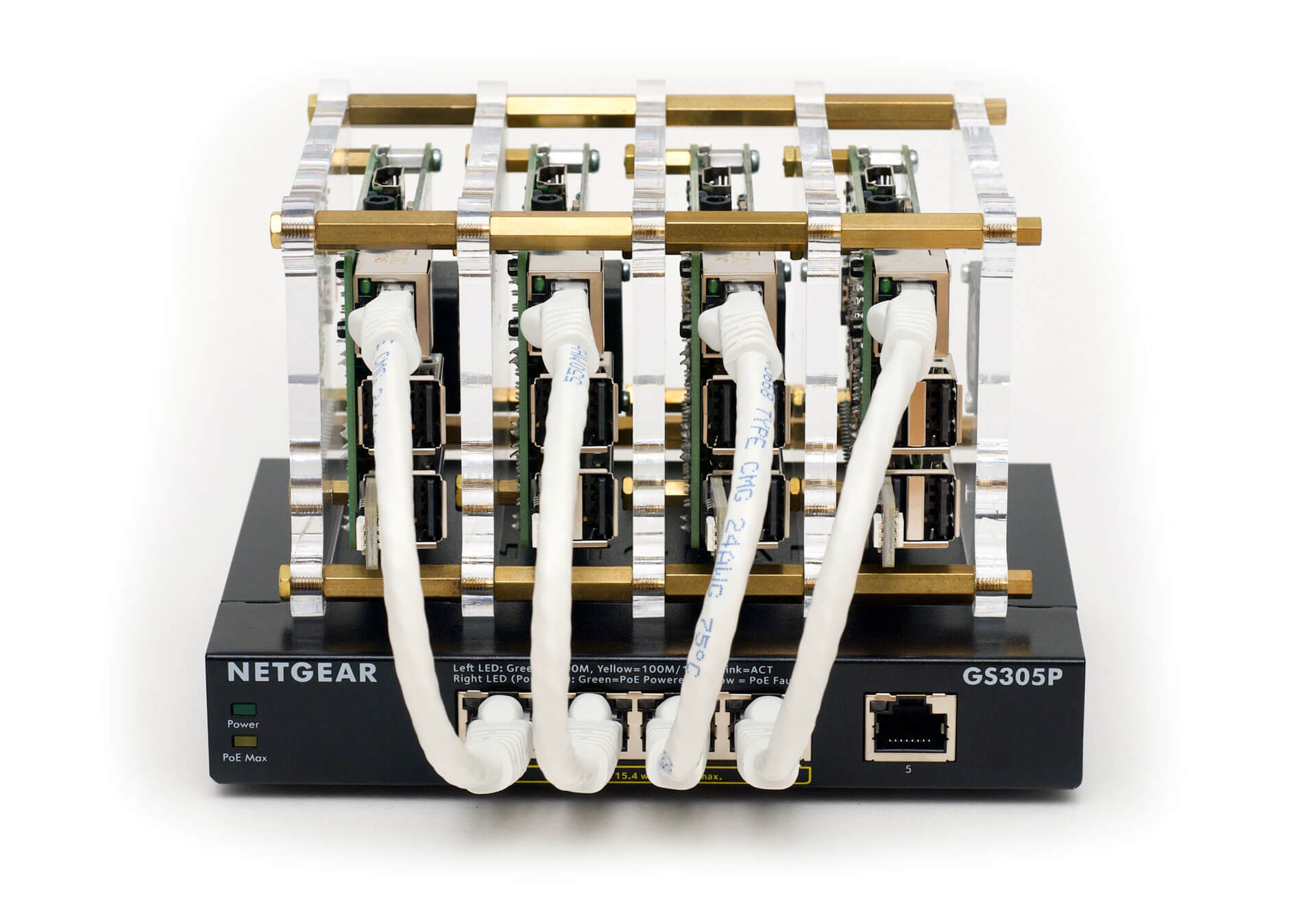
A cluster (Bramble) of Raspberry Pis on which Drupal is deployed using Ansible and Kubernetes.
Read the rest of this README and the official Pi Dramble Wiki for more information about the Dramble.
Why
I'm doing presentations on Ansible, and how easy it makes infrastructure configuration, even for high-performance/high-availability Drupal sites. WiFi/Internet access is spotty at most conferences, so deploying to AWS, DigitalOcean, or other live public cloud instances that require a stable Internet connection is a Bad Idea™.
I'm also presenting on Kubernetes, and how easy it is to have self-healing, almost-infinitely-scalable infrastructure (managed with Ansible), and it's more fun to build with Kubernetes on bare metal... at least when the RAM on the Kubernetes master isn't all eaten up!
But really, it's just plain awesome. How many people can say they carry their entire datacenter in a travel bag, and can run it from a USB battery pack?
A cluster of servers, in my hand, at the presentation. With blinking LEDs!
Official Site
You can browse more information about geerlingguy's Dramble on http://www.pidramble.com/. This website is actually running on the Rasbperry Pi Dramble cluster pictured above!
Specs
16+ ARMv7 CPU Cores
5.6 GHz combined compute power
4 GB RAM
128 GB microSD flash-based storage
1 Gbps private network with PoE
Getting the Pis (and other accessories)
Many people have asked for a basic list of components used in constructing the Dramble, or where I found particular parts. In the Wiki, I've added pages listing the following:
Raspberry Pis and Accessories
Other Necessities
Recommended Extras
Setting up the Pis
The process for setting up all the Raspberry Pis is outlined in the Wiki:
Prepare the Raspberry Pis for provisioning
Rack the Raspberry Pis
Network the Raspberry Pis
Test the Ansible configuration
Provision the Raspberry Pis
Deploy Drupal to the Raspberry Pis
It is recommended you use the 64-bit version of Raspberry Pi OS, as some of this project's dependencies require it (and may not install on 32-bit Pi OS).
Adding more nodes
You can add more than four nodes, if you desire; add additional hosts in the same sequence in the following files:
setup/networking/inventory
setup/networking/vars.yml
inventory
If you need to change the IP subnet (default is 10.0.100.x), make sure to also update hosts.j2 to use the new subnet so hostnames resolve correctly.
Private Docker Registry Usage
The Pi Dramble includes a built-in Docker registry that is used to host Drupal images for deployment to Kubernetes. To use the Docker registry manually (to push or pull images):
Edit your /etc/hosts file and add the line:
10.0.100.62 registry.pidramble.test
Follow the linked directions to get Docker to use your self-signed Docker Registry cert. For macOS, using the GUI:
Double-click on k8s-manifests/docker-registry/certs/tls.crt to add it to your Keychain
Select the certificate in Keychain Access, choose 'File' > 'Get Info'
Expand the 'Trust' section, and choose 'Always Trust' for "When using this certificate:"
Close the info dialog and enter your password to save the changes.
Restart Docker for Mac.
Tag your image for the registry and push it:
docker tag my/image:latest registry.pidramble.test/my/image:latest
docker push registry.pidramble.test/my/image:latest
Benchmarks - Testing the performance of the Dramble
See the Pi Dramble Benchmarks section of the Wiki for current benchmarks and statistics.
Local testing
A Vagrantfile is also included for local testing and debugging of the Kubernetes cluster and manifests using Vagrant. See the Vagrant README for more details.
Drupal on a Single Pi - Drupal Pi
If you have only a single Raspberry Pi, you can use the Drupal Pi project to quickly get Drupal running on the single Pi.
Using older or slower Raspberry Pi models
The Raspberry Pi 2, 3, 3 B+, and 4 have quad-core processors that make certain operations four to ten times faster than single-core Pis like the A+, B+, Zero, etc. Additionally, cluster members need as much RAM as possible, and any Pi without at least 1 GB of RAM simply can't be used as a Kubernetes master.
Therefore only the following Pi models are officially supported:
Raspberry Pi model 4 B
Raspberry Pi model 3 B+
Raspberry Pi model 3 B
Raspberry Pi model 2
Presentation Mode
The Raspberry Pi Dramble Kubernetes cluster can function entirely 'air-gapped' from the Internet, and this is in fact how the maintainer uses it in presentations.
See the README in the testing/presentation directory for instructions for operating the cluster standalone.
Author
This project was started in 2015 by Jeff Geerling, author of Ansible for DevOps and Ansible for Kubernetes.
Đọc thêm về geerlingguy/raspberry-pi-dramble ở đâu?
Trang TopGit này là một snapshot — tab "Readme" hiển thị nguyên văn README của repo (đã bỏ link, giữ ảnh). Repo GitHub ở github.com/geerlingguy/raspberry-pi-dramble là nguồn chính thức.
geerlingguy/raspberry-pi-dramble có những chủ đề gì?
geerlingguy/raspberry-pi-dramble có phải mã nguồn mở không?
Có — geerlingguy/raspberry-pi-dramble phát hành theo license MIT, nghĩa là mã nguồn mở để đọc, fork và (tùy license) tái sử dụng. Mã: github.com/geerlingguy/raspberry-pi-dramble.
geerlingguy/raspberry-pi-dramble có trang demo không?
Dự án có trang chủ ở http://www.pidramble.com/. Tab "Readme" ở trang này thường có ảnh chụp và hướng dẫn bắt đầu nhanh.
geerlingguy/raspberry-pi-dramble còn đang phát triển không?
Commit gần nhất trên geerlingguy/raspberry-pi-dramble là 3.6 năm trước (theo timestamp GitHub). Repo có 258 fork — một chỉ báo về mức độ quan tâm của cộng đồng.
geerlingguy/raspberry-pi-dramble dùng license gì?
geerlingguy/raspberry-pi-dramble phát hành theo license MIT. Nên mở file LICENSE trên GitHub để xác nhận — license metadata đôi khi lệch với thực tế dự án.
Đọc đầy đủ README ở tab phía trên.
Vẫn đang phân vân về raspberry-pi-dramble?
Một cú bấm sẽ gửi câu hỏi kèm trang này cho AI — xem AI nói gì về raspberry-pi-dramble.
 /raspberry-pi-dramble