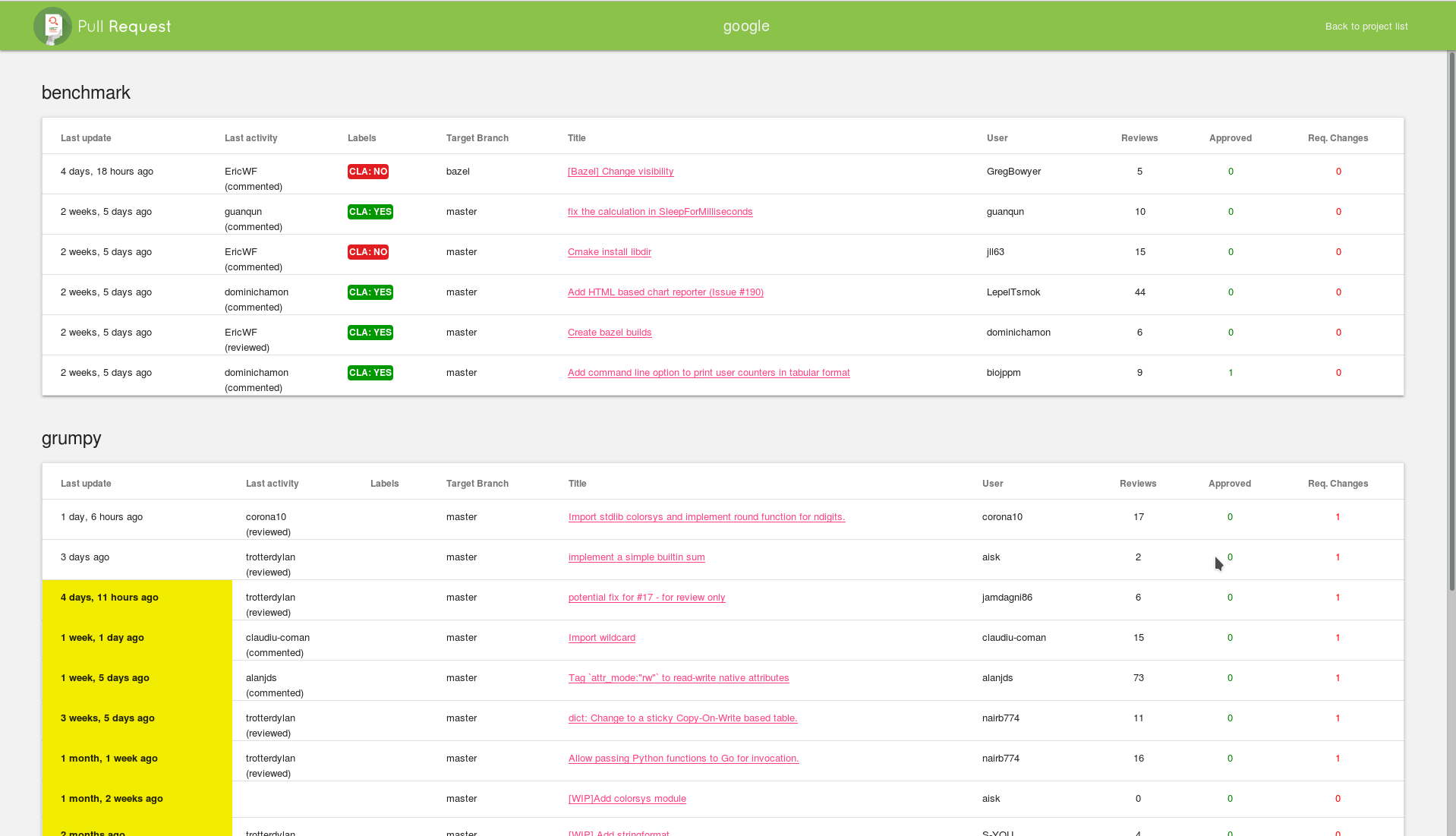
Genymobile/gm_pr được TopGit xếp vào nhóm dự án mã nguồn mở, với 47 sao trên GitHub, viết chủ yếu bằng Python. A multi project Github pull request viewer
Tóm tắt dựng từ metadata GitHub của chính dự án — chưa có bài review TopGit. Trang sẽ tự động cập nhật khi bài review đầy đủ được xuất bản.
VÌ SAO CHƯA CÓ REVIEW
TopGit viết bài đầy đủ cho repo có nhiều sao nhất và được yêu cầu nhiều nhất. Trang này là snapshot trong thời gian chờ — xem README gốc ở tab READ ME.
If your project is spread over multiple git repositories, it can be hard to
keep track of all the open pull requests.
The gm_pr project gives you a simple web page where you can see all the open
pull requests with the number of reviews, labels, milestones, etc.
As a bonus, we also have a Slack bot :-)
Installation
The recommended method to run gm_pr is to use the docker image.
A Dockerfile is available. Building and running the image
can be done in a few lines:
docker build -t gm_pr .
docker volume create --name gmpr
# mount the volume in /var/www/gm_pr/rw for log and sqlite db
docker run -v gmpr:/var/www/gm_pr/rw -e GM_PR_ORG=MyOrg -e GM_PR_GITHUB_OAUTHTOKEN=xxxx -e GM_PR_ADMIN_LOGIN="admin" -e GM_PR_ADMIN_PASSWORD="admin" --name gm_pr -p 8000:80 -d gm_pr
GM_PR_ORG: Your GitHub organisation
GM_PR_GITHUB_OAUTHTOKEN: oauth token for your GitHub account, see https://github.com/settings/tokens
GM_PR_ADMIN_LOGIN and GM_PR_ADMIN_PASSWORD configure a login/password for gm_pr administration
Now, you can simply point your browser to http://localhost:8000.
Configuration
The prefered way to configure gm_pr is to set environment variables for docker.
Alternatively, you can modify 2 files:
gm_pr/settings.py: this is the standard Django configuration file
gm_pr/settings_projects.py: configure your GitHub and Slack organization and authentication here.
Django configuration
Refer to the Django project if you want to change the configuration.
Normally you should only need to adjust a few settings:
ALLOWED_HOSTS list the hosts allowed to connect to this app.
Use "*" to allow everything.
This is the first thing to check if you see a "Bad Request (400)"
This parameter is configurable with environment variable GM_PR_ALLOWED_HOSTS
STATIC_URL Add the full URL to your static directory
Gm_pr configuration
Open gm_pr/settings_projects.py and read the comments. You should be able
to customize your installation by setting environment variables.
add projects
To add projects, visit the "admin/" page. Add a project then add all the
related GitHub repos
You can also have some initial projects when starting docker with the
environment variable GM_PR_INITIAL_PROJECTS
Trang TopGit này là một snapshot — tab "Readme" hiển thị nguyên văn README của repo (đã bỏ link, giữ ảnh). Repo GitHub ở github.com/Genymobile/gm_pr là nguồn chính thức.
Genymobile/gm_pr có những chủ đề gì?
GitHub topics của Genymobile/gm_pr: "genystate-archiving-candidate". TopGit xếp repo vào nhóm mã nguồn mở.
Genymobile/gm_pr có phải mã nguồn mở không?
Có — Genymobile/gm_pr phát hành theo license Apache-2.0, nghĩa là mã nguồn mở để đọc, fork và (tùy license) tái sử dụng. Mã: github.com/Genymobile/gm_pr.
Genymobile/gm_pr có website riêng không?
TopGit chưa ghi nhận URL trang chủ cho Genymobile/gm_pr. Phần README ở tab phía trên thường có link demo, hoặc xem mô tả GitHub của repo.
Genymobile/gm_pr còn đang phát triển không?
Commit gần nhất trên Genymobile/gm_pr là 6.1 năm trước (theo timestamp GitHub). Repo có 16 fork — một chỉ báo về mức độ quan tâm của cộng đồng.
Genymobile/gm_pr dùng license gì?
Genymobile/gm_pr phát hành theo license Apache-2.0. Nên mở file LICENSE trên GitHub để xác nhận — license metadata đôi khi lệch với thực tế dự án.
Đọc đầy đủ README ở tab phía trên.
Muốn nghe thêm một ý kiến về gm_pr?
Hỏi một AI đọc được trang này — một cú bấm là có ngay nhận định về gm_pr.

 /gm_pr