godotengine/godot-vscode-plugin — dự án mã nguồn mở — đang có 2.1k sao GitHub. Godot development tools for VSCode
Tóm tắt dựng từ metadata GitHub của chính dự án — chưa có bài review TopGit. Trang sẽ tự động cập nhật khi bài review đầy đủ được xuất bản.
VÌ SAO CHƯA CÓ REVIEW
TopGit viết bài đầy đủ cho repo có nhiều sao nhất và được yêu cầu nhiều nhất. Trang này là snapshot trong thời gian chờ — xem README gốc ở tab READ ME.
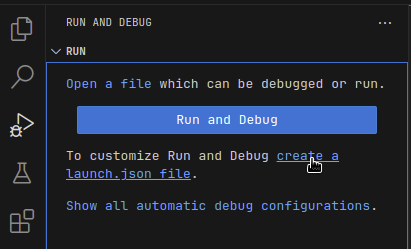
new, simple configuration (seriously, just hit F5!)
convenient launch targets: current project/current file/pinned file,
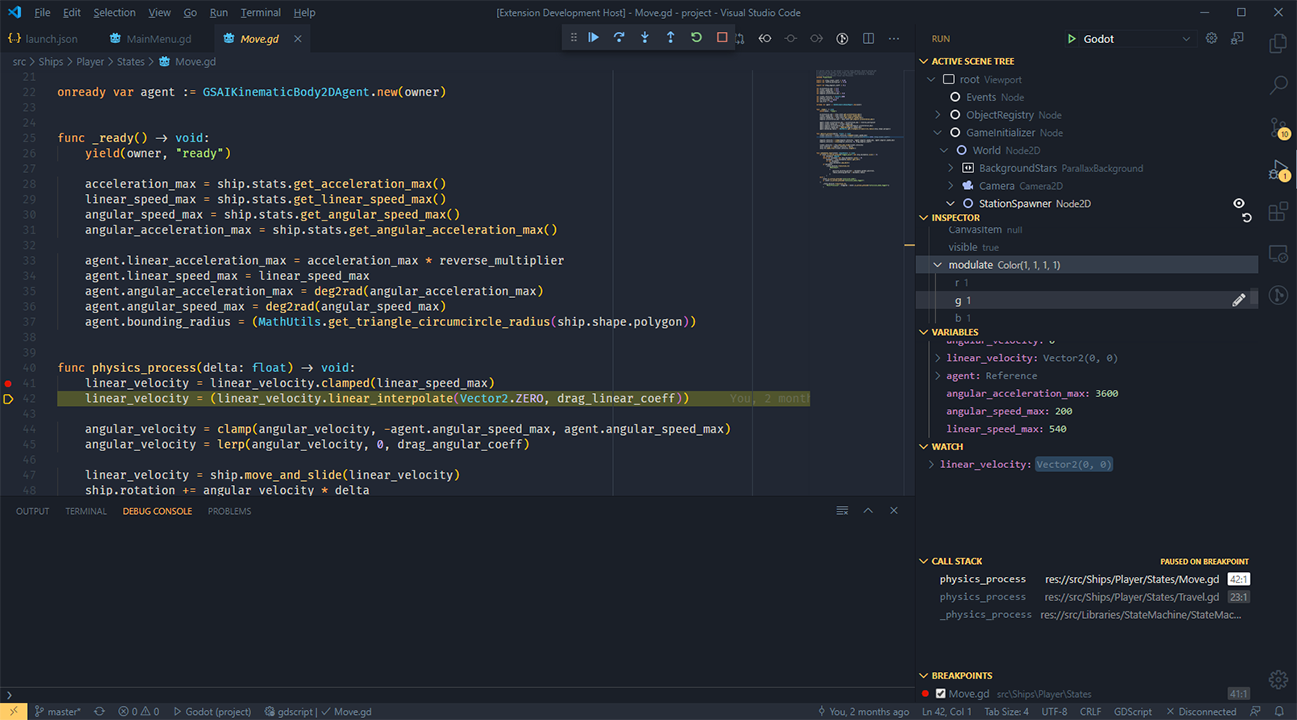
breakpoints
exceptions
step-in/out/over
variable watch
call stack
active scene tree
inspector
GDResource (.tscn and .tres) language features:
syntax highlighting
ctrl+click on res://resource/path links
ctrl+click on symbols to jump to its definition or open its documentation
hover previews show definitions of External and Sub Resources
hover previews on res://resource/path links
inlay hints to help visualize External and Sub Resources
in-editor Scene Preview
GDShader (.gdshader) language features:
syntax highlighting
Download
Visual Studio Marketplace (recommended)
Stable release, with support for automatic updates.
GitHub Releases
Stable release, but no automatic updates. Can be useful if you need to install an older version of the extension.
Development build (follows the master branch)
Development build. Contains new features and fixes not available in stable releases, but may be unstable.
Extract the ZIP archive before installing (it contains the .vsix file inside).
To install from GitHub Releases or a development build,
see Install from a VSIX
in the Visual Studio Code documentation.
Commands
The extension adds a few entries to the VS Code Command Palette under "Godot Tools":
Open workspace with Godot editor
List Godot's native classes (and open thier documentation)
Debug the current .tscn/.gd file
Debug the pinned .tscn/.gd file
Pin/Unpin the current .tscn/.gd file for debugging
Open the pinned file
Configuration
Godot Editor
You can set VS Code as your default script editor for Godot by following these steps:
Open the Editor Settings
Select Text Editor > External
Check Use External Editor
Fill Exec Path with the path to your VS Code executable
On macOS, this executable is typically located at: /Applications/Visual Studio Code.app/Contents/MacOS/Electron
Fill Exec Flags with {project} --goto {file}:{line}:{col}
You can make Godot seamlessly reload VSCode-edited scripts by changing some additional settings. More details about each are available when hovering over the description in the Settings window:
Editor Settings > Text Editor > Behavior > Files > Auto Reload Scripts on External Change
Editor Settings > Interface > Editor > Save on Focus Loss
You can use the following settings to configure Godot Tools:
godotTools.editorPath.godot3
godotTools.editorPath.godot4
The path to the Godot editor executable. Under Mac OS, this is the executable inside of Godot.app.
godotTools.lsp.headless
When using Godot >3.6 or >4.2, Headless LSP mode is available. In Headless mode, the extension will attempt to launch a windowless instance of the Godot editor to use as its Language Server.
GDScript Debugger
The debugger is for GDScript projects. To debug C# projects, use C# Tools for Godot.
Godot's command flags are documented here: https://docs.godotengine.org/en/stable/tutorials/editor/command_line_tutorial.html
Usage
Stacktrace and variable dumps are the same as any regular debugger
The active scene tree can be refreshed with the Refresh icon in the top right.
Nodes can be brought to the fore in the Inspector by clicking the Eye icon next to nodes in the active scene tree, or Objects in the inspector.
You can edit integers, floats, strings, and booleans within the inspector by clicking the pencil icon next to each.
Issues and contributions
The Godot Tools extension
is an open source project from the Godot organization. Feel free to open issues
and create pull requests anytime.
See the full changelog
for the latest changes.
Contributing
see CONTRIBUTING.md
FAQ
Why does it fail to connect to the language server?
Godot 3.2 or later is required.
Make sure the Godot editor is running
Make sure to open the project in the Godot editor first. If you opened
the editor after opening VS Code, you can click the Retry button
in the bottom-right corner in VS Code.
Reset the LSP Server port to the default values in both Godot's Editor Settings and
in VSCode.
Why isn't IntelliSense displaying script members?
GDScript is a gradually typed script language. The language server can't
infer all variable types.
To increase the number of results displayed, use static typing in your scripts.
Can Godot/VSCode load in my script changes automatically instead of showing a confirmation window?
Godot has some Editor Settings that can help you if your workflow involves changing files in both editors:
Editor Settings > Text Editor > Behavior > Files > Auto Reload Scripts on External Change
Editor Settings > Interface > Editor > Save on Focus Loss
I'm using Linux and the drag + shift drop isn't working. Why?
Most likely you're using Wayland as display server, and there's a limitation of support in VS Code.
In the exec flags, modify the snippet from {project} --goto {file}:{line}:{col} to
{project} --goto {file}:{line}:{col} --ozone-platform=x11, which will force VS Code to run
through XWayland, where it works.
Đọc thêm về godotengine/godot-vscode-plugin ở đâu?
Trang TopGit này là một snapshot — tab "Readme" hiển thị nguyên văn README của repo (đã bỏ link, giữ ảnh). Repo GitHub ở github.com/godotengine/godot-vscode-plugin là nguồn chính thức.
godotengine/godot-vscode-plugin có bao nhiêu sao?
godotengine/godot-vscode-plugin có 2.1k sao GitHub — tải lại trang để xem số mới nhất, hoặc xem trực tiếp github.com/godotengine/godot-vscode-plugin. TopGit phản chiếu số sao của GitHub nhưng không cam kết đến từng phút.
godotengine/godot-vscode-plugin có phải mã nguồn mở không?
Có — godotengine/godot-vscode-plugin phát hành theo license MIT, nghĩa là mã nguồn mở để đọc, fork và (tùy license) tái sử dụng. Mã: github.com/godotengine/godot-vscode-plugin.
godotengine/godot-vscode-plugin có website riêng không?
TopGit chưa ghi nhận URL trang chủ cho godotengine/godot-vscode-plugin. Phần README ở tab phía trên thường có link demo, hoặc xem mô tả GitHub của repo.
godotengine/godot-vscode-plugin là gì?
godotengine/godot-vscode-plugin (godotengine/godot-vscode-plugin) là dự án TypeScript trên GitHub. Theo mô tả gốc: Godot development tools for VSCode
Đọc đầy đủ README ở tab phía trên.
Chưa chắc godot-vscode-plugin có hợp với bạn?
Để ChatGPT, Claude hoặc Perplexity tìm hiểu giúp — bấm bên dưới và xem AI nói gì về godot-vscode-plugin.
 /godot-vscode-plugin