GokuMohandas/feature-store được TopGit xếp vào nhóm dự án dữ liệu, với 62 sao trên GitHub, viết chủ yếu bằng Jupyter Notebook. Using a feature store to connect the DataOps and MLOps workflows to enable collaborative teams to develop efficiently.
Tóm tắt dựng từ metadata GitHub của chính dự án — chưa có bài review TopGit. Trang sẽ tự động cập nhật khi bài review đầy đủ được xuất bản.
VÌ SAO CHƯA CÓ REVIEW
TopGit viết bài đầy đủ cho repo có nhiều sao nhất và được yêu cầu nhiều nhất. Trang này là snapshot trong thời gian chờ — xem README gốc ở tab READ ME.
Using a feature store to connect the DataOps and MLOps workflows to enable collaborative teams to develop efficiently.
👉 This repository contains the interactive notebook that complements the feature store lesson, which is a part of the MLOps course. If you haven't already, be sure to check out the lesson because all the concepts are covered extensively and tied to software engineering best practices for building ML systems.
Motivation
Feast
Data ingestion
Feature definitions
Historical features
Materialize
Online features
Over-engineering
Motivation
Let's motivate the need for a feature store by chronologically looking at what challenges developers face in their current workflows. Suppose we had a task where we needed to predict something for an entity (ex. user) using their features.
Isolation: feature development in isolation (for each unique ML application) can lead to duplication of efforts (setting up ingestion pipelines, feature engineering, etc.).
Solution: create a central feature repository where the entire team contributes maintained features that anyone can use for any application.
Skew: we may have different pipelines for generating features for training and serving which can introduce skew through the subtle differences.
Solution: create features using a unified pipeline and store them in a central location that the training and serving pipelines pull from.
Values: once we set up our data pipelines, we need to ensure that our input feature values are up-to-date so we aren't working with stale data, while maintaining point-in-time correctness so we don't introduce data leaks.
Solution: retrieve input features for the respective outcomes by pulling what's available when a prediction would be made.
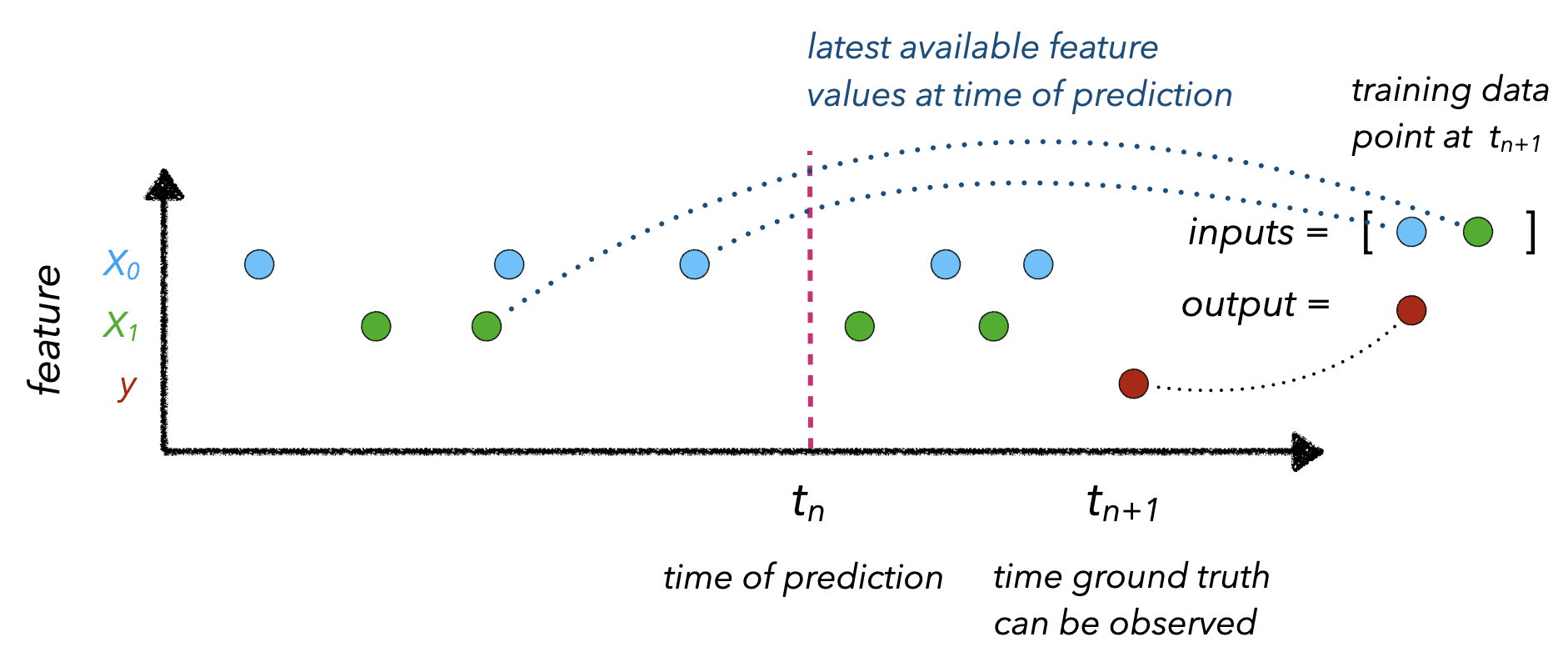
Point-in-time correctness refers to mapping the appropriately up-to-date input feature values to an observed outcome at $t_{n+1}$. This involves knowing the time ($t_n$) that a prediction is needed so we can collect feature values ($X$) at that time.
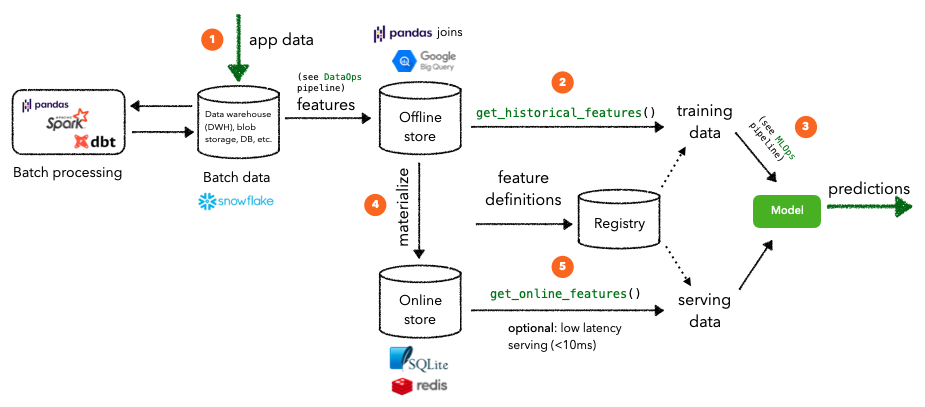
When actually constructing our feature store, there are several core components we need to have to address these challenges:
data ingestion: ability to ingest data from various sources (databases, data warehouse, etc.) and keep them updated.
feature definitions: ability to define entities and corresponding features
historical features: ability to retrieve historical features to use for training.
online features: ability to retrieve features from a low latency origin for inference.
Over-engineering: Not all machine learning tasks require a feature store. In fact, our use case is a perfect example of a test that does not benefit from a feature store. All of our data points are independent and stateless and there is no entity that has changing features over time. The real utility of a feature store shines when we need to have up-to-date features for an entity that we continually generate predictions for. For example, a user's behavior (clicks, purchases, etc.) on an e-commerce platform or the deliveries a food runner recently made today, etc.
Feast
We're going to leverage Feast as the feature store for our application for it's ease of local setup, SDK for training/serving, etc.
# Install Feast and dependencies
pip install feast==0.10.5 PyYAML==5.3.1 -q
We're going to create a feature repository at the root of our project. Feast will create a configuration file for us and we're going to add an additional features.py file to define our features.
Traditionally, the feature repository would be it's own isolated repository that other services will use to read/write features from.
%%bash
mkdir -p stores/feature
mkdir -p data
feast init --minimal --template local features
cd features
touch features.py
We're going to configure the locations for our registry and online store (SQLite) in our feature_store.yaml file.
registry: contains information about our feature repository, such as data sources, feature views, etc. Since it's in a DB, instead of a Python file, it can very quickly be accessed in production.
online store: DB (SQLite for local) that stores the (latest) features for defined entities to be used for online inference.
If all definitions look valid, Feast will sync the metadata about Feast objects to the registry. The registry is a tiny database storing most of the same information you have in the feature repository. This step is necessary because the production feature serving infrastructure won't be able to access Python files in the feature repository at run time, but it will be able to efficiently and securely read the feature definitions from the registry.
# features/feature_store.yaml
project: features
registry: ../stores/feature/registry.db
provider: local
online_store:
    path: ../stores/feature/online_store.db
When we run Feast locally, the offline store is effectively represented via Pandas point-in-time joins. Whereas, in production, the offline store can be something more robust like Google BigQuery, Amazon RedShift, etc.
Data ingestion
The first step is to establish connections with our data sources (databases, data warehouse, etc.). Feast requires it's data sources to either come from a file (Parquet), data warehouse (BigQuery) or data stream (Kafka / Kinesis). We'll convert our generated features file from the DataOps pipeline (features.json) into a Parquet file, which is a column-major data format that allows fast feature retrieval and caching benefits (contrary to row-major data formats such as CSV where we have to traverse every single row to collect feature values).
import os
import json
import pandas as pd
from pathlib import Path
from urllib.request import urlopen
Now that we have our data source prepared, we can define our features for the feature store.
from datetime import datetime
from pathlib import Path
from feast import Entity, Feature, FeatureView, ValueType
from feast.data_source import FileSource
from google.protobuf.duration_pb2 import Duration
The first step is to define the location of the features (FileSource in our case) and the timestamp column for each data point.
Next, we need to define the main entity that each data point pertains to. In our case, each project has a unique ID with features such as text and tags.
Finally, we're ready to create a FeatureView that loads specific features (features), of various value types, from a data source (input) for a specific period of time (ttl).
We need to place all of this code into our features.py file we created earlier. Once we've defined our feature views, we can apply it to push a version controlled definition of our features to the registry for fast access. It will also configure our registry and online stores that we've defined in our feature_store.yaml.
cd features
feast apply
Registered entity id
Registered feature view project_details
Deploying infrastructure for project_details
Historical features
Once we've registered our feature definition, along with the data source, entity definition, etc., we can use it to fetch historical features. This is done via joins using the provided timestamps using pandas for our local setup or BigQuery, Hive, etc. as an offline DB for production.
import pandas as pd
from feast import FeatureStore
# Get historical features
store = FeatureStore(repo_path="features")
training_df = store.get_historical_features(
    entity_df=entity_df,
    feature_refs=["project_details:text", "project_details:tag"],
).to_df()
training_df.head()
event_timestamp
id
project_details__text
project_details__tag
0
2022-06-23 00:00:00+00:00
6
Comparison between YOLO and RCNN on real world...
computer-vision
1
2022-06-23 00:00:00+00:00
7
Show, Infer & Tell: Contextual Inference for C...
computer-vision
2
2022-06-23 00:00:00+00:00
9
Awesome Graph Classification A collection of i...
graph-learning
Materialize
For online inference, we want to retrieve features very quickly via our online store, as opposed to fetching them from slow joins. However, the features are not in our online store just yet, so we'll need to materialize them first.
cd features
CURRENT_TIME=$(date -u +"%Y-%m-%dT%H:%M:%S")
feast materialize-incremental $CURRENT_TIME
Materializing 1 feature views to 2022-06-23 19:16:05+00:00 into the sqlite online store.
This has moved the features for all of our projects into the online store since this was first time materializing to the online store. When we subsequently run the materialize-incremental command, Feast keeps track of previous materializations and so we'll only materialize the new data since the last attempt.
Online features
# Get online features
store = FeatureStore(repo_path="features")
feature_vector = store.get_online_features(
    feature_refs=["project_details:text", "project_details:tag"],
    entity_rows=[{"id": 6}],
).to_dict()
feature_vector
{"id": [6],
 "project_details__tag": ["computer-vision"],
 "project_details__text": ["Comparison between YOLO and RCNN on real world videos Bringing theory to experiment is cool. We can easily train models in colab and find the results in minutes."]}
Over-engineering
Not all machine learning tasks require a feature store. In fact, our use case is a perfect example of a test that does not benefit from a feature store. All of our inputs are stateless and there is no entity that has changing features over time. The real utility of a feature store shines when we need to have up-to-date features for an entity that we continually generate predictions for. For example, a user's behavior (clicks, purchases, etc.) on an e-commerce platform or the deliveries a food runner recently made today, etc.
GokuMohandas/feature-store thuộc nhóm Data trên TopGit, cùng 4 topic GitHub. Trang Trending và Topics liệt kê các repo cùng số sao và cùng ngôn ngữ để so sánh.
Đọc thêm về GokuMohandas/feature-store ở đâu?
Trang TopGit này là một snapshot — tab "Readme" hiển thị nguyên văn README của repo (đã bỏ link, giữ ảnh). Repo GitHub ở github.com/GokuMohandas/feature-store là nguồn chính thức.
GokuMohandas/feature-store có phải mã nguồn mở không?
TopGit chưa ghi nhận license cho GokuMohandas/feature-store. Phần lớn repo public trên GitHub là mã nguồn mở, nhưng điều khoản khác nhau từng repo — mở file LICENSE để xác nhận.
GokuMohandas/feature-store có website riêng không?
TopGit chưa ghi nhận URL trang chủ cho GokuMohandas/feature-store. Phần README ở tab phía trên thường có link demo, hoặc xem mô tả GitHub của repo.
GokuMohandas/feature-store là gì?
GokuMohandas/feature-store (GokuMohandas/feature-store) là dự án Jupyter Notebook trên GitHub. Theo mô tả gốc: Using a feature store to connect the DataOps and MLOps workflows to enable collaborative teams to develop efficiently.
Vì sao GokuMohandas/feature-store được xếp vào nhóm Data?
TopGit xếp GokuMohandas/feature-store vào nhóm Data dựa trên GitHub topics và mô tả của repo (gắn thẻ: "data-engineering", "feast", "feature-store"). Việc phân loại dựa trên metadata thật của repo, không phải đoán theo cảm tính biên tập.
Đọc đầy đủ README ở tab phía trên.
feature-store có đáng để bạn bỏ thời gian?
ChatGPT, Claude và Perplexity đều đọc được trang này. Hỏi thử xem họ nghĩ gì về feature-store.
 /feature-store