Trên GitHub, googleapis/release-please đã đạt 7.6k sao, ngôn ngữ TypeScript. generate release PRs based on the conventionalcommits.org spec
Tóm tắt dựng từ metadata GitHub của chính dự án — chưa có bài review TopGit. Trang sẽ tự động cập nhật khi bài review đầy đủ được xuất bản.
VÌ SAO CHƯA CÓ REVIEW
TopGit viết bài đầy đủ cho repo có nhiều sao nhất và được yêu cầu nhiều nhất. Trang này là snapshot trong thời gian chờ — xem README gốc ở tab READ ME.
Release Please automates CHANGELOG generation, the creation of GitHub releases,
and version bumps for your projects.
It does so by parsing your
git history, looking for Conventional Commit messages,
and creating release PRs.
It does not handle publication to package managers or handle complex branch
management.
What's a Release PR?
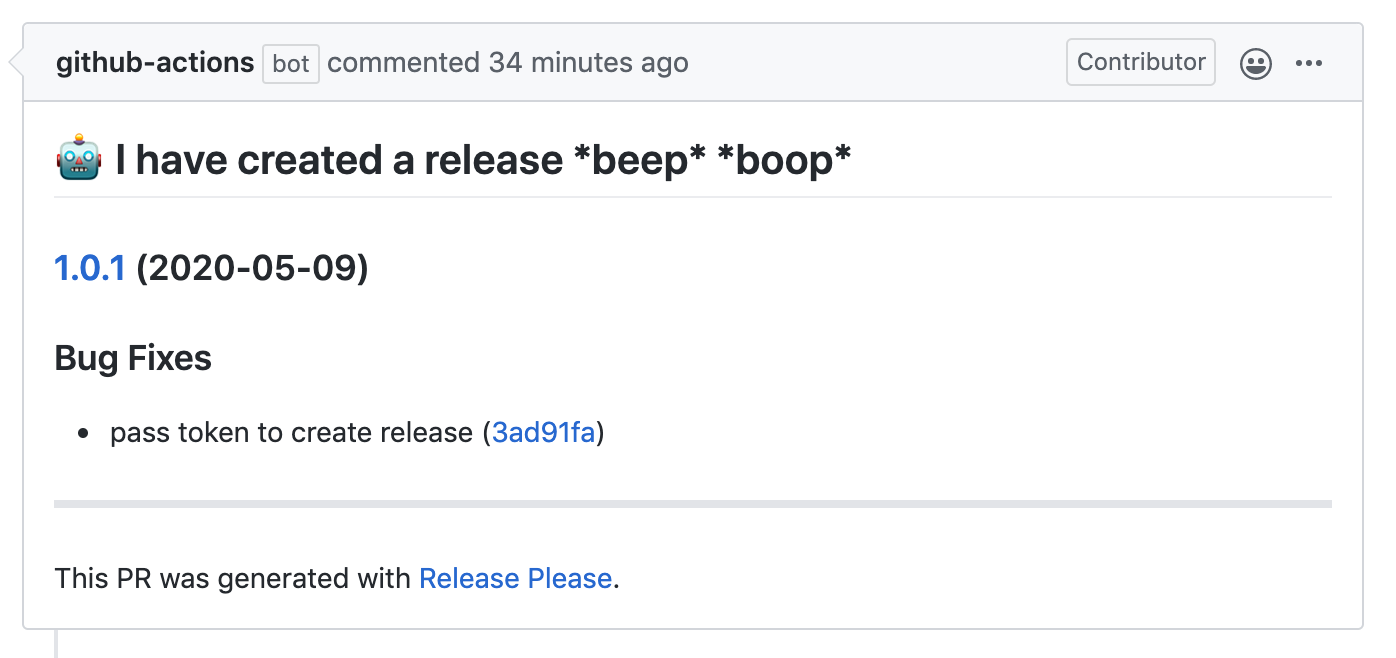
Rather than continuously releasing what's landed to your default branch,
release-please maintains Release PRs:
These Release PRs are kept up-to-date as additional work is merged. When you're
ready to tag a release, simply merge the release PR. Both squash-merge and
merge commits work with Release PRs.
When the Release PR is merged, release-please takes the following steps:
Updates your changelog file (for example CHANGELOG.md), along with other language specific files (for example package.json).
Tags the commit with the version number
Creates a GitHub Release based on the tag
You can tell where the Release PR is in its lifecycle by the status label on the
PR itself:
autorelease: pending is the initial state of the Release PR before it is merged
autorelease: tagged means that the Release PR has been merged and the release has been tagged in GitHub
autorelease: snapshot is a special state for snapshot version bumps
autorelease: published means that a GitHub release has been published based on the Release PR (release-please does not automatically add this tag, but we recommend it as a convention for publication tooling).
How should I write my commits?
Release Please assumes you are using Conventional Commit messages.
The most important prefixes you should have in mind are:
fix: which represents bug fixes, and correlates to a SemVer
patch.
feat: which represents a new feature, and correlates to a SemVer minor.
feat!:, or fix!:, refactor!:, etc., which represent a breaking change
(indicated by the !) and will result in a SemVer major.
Linear git commit history (use squash-merge)
We highly recommend that you use squash-merges when merging pull requests.
A linear git history makes it much easier to:
Follow history - commits are sorted by merge date and are not mixed between
pull requests
Find and revert bugs - git bisect is helpful for tracking down which
change introduced a bug
Control the release-please changelog - when you merge a PR, you may have
commit messages that make sense within the scope of the PR, but don't
make sense when merged in the main branch. For example, you may have
feat: introduce feature A and then fix: some bugfix introduced in the first commit. The fix commit is actually irrelevant to the release
notes as there was never a bug experienced in the main branch.
Keep a clean main branch - if you use something like red/green development
(create a failing test in commit A, then fix in commit B) and merge (or
rebase-merge), then there will be points in time in your main branch where
tests do not pass.
What if my PR contains multiple fixes or features?
Release Please allows you to represent multiple changes in a single commit,
using footers:
feat: adds v4 UUID to crypto

This adds support for v4 UUIDs to the library.

fix(utils): unicode no longer throws exception
  PiperOrigin-RevId: 345559154
  BREAKING-CHANGE: encode method no longer throws.
  Source-Link: googleapis/googleapis@5e0dcb2

feat(utils): update encode to support unicode
  PiperOrigin-RevId: 345559182
  Source-Link: googleapis/googleapis@e5eef86
The above commit message will contain:
an entry for the "adds v4 UUID to crypto" feature.
an entry for the fix "unicode no longer throws exception", along with a note
that it's a breaking change.
an entry for the feature "update encode to support unicode".
:warning: Important: The additional messages must be added to the bottom of the commit.
How do I change the version number?
When a commit to the main branch has Release-As: x.x.x (case insensitive) in the commit body, Release Please will open a new pull request for the specified version.
Empty commit example:
git commit --allow-empty -m "chore: release 2.0.0" -m "Release-As: 2.0.0" results in the following commit message:
chore: release 2.0.0

Release-As: 2.0.0
How can I fix release notes?
If you have merged a pull request and would like to amend the commit message
used to generate the release notes for that commit, you can edit the body of
the merged pull requests and add a section like:
BEGIN_COMMIT_OVERRIDE
feat: add ability to override merged commit message

fix: another message
chore: a third message
END_COMMIT_OVERRIDE
The next time Release Please runs, it will use that override section as the
commit message instead of the merged commit message.
:warning: Important: This feature will not work with plain merges because
release-please does not know which commit(s) to apply the override to. We
recommend using squash-merge instead.
Release Please bot does not create a release PR. Why?
Step 1: Ensure releasable units are merged
Release Please creates a release pull request after it notices the default branch
contains "releasable units" since the last release.
A releasable unit is a commit to the branch with one of the following
prefixes: "feat", "fix", and "deps".
(A "chore" or "build" commit is not a releasable unit.)
Some languages have their specific releasable unit configuration. For example,
"docs" is a prefix for releasable units in Java and Python.
Step 2: Ensure no autorelease: pending or autorelease: triggered label in an old PR
Check existing pull requests labelled with autorelease: pending or
autorelease: triggered label.
Due to GitHub API failures, it's possible that the tag was not removed
correctly upon a previous release and Release Please thinks that the previous release is
still pending.
If you're certain that there's no pending release, remove the
autorelease: pending or autorelease: triggered label.
For the GitHub application users, Release Please will not create a new pull request
if there's an existing pull request labeled as autorelease: pending.
To confirm this case, search for a pull request with the label.
(It's very likely it's the latest release pull request.)
If you find a release pull request with the label and it is not going to be released
(or already released), then remove the autorelease: pending label and re-run Release
Please.
Step 3: Rerun Release Please
If you think Release Please missed creating a release PR after a pull request
with a releasable unit has been merged, please re-run release-please. If you are using
the GitHub application, add release-please:force-run label to the merged pull request. If
you are using the action, look for the failed invocation and retry the workflow run.
Release Please will process the pull request immediately to find releasable units.
Strategy (Language) types supported
Release Please automates releases for the following flavors of repositories:
release type
description
bazel
A Bazel module, with a MODULE.bazel and a CHANGELOG.md
dart
A repository with a pubspec.yaml and a CHANGELOG.md
elixir
A repository with a mix.exs and a CHANGELOG.md
go
A repository with a CHANGELOG.md
helm
A repository with a Chart.yaml and a CHANGELOG.md
java
A strategy that generates SNAPSHOT version after each release
krm-blueprint
A kpt package, with 1 or more KRM files and a CHANGELOG.md
maven
Strategy for Maven projects, generates SNAPSHOT version after each release and updates pom.xml automatically
node
A Node.js repository, with a package.json and CHANGELOG.md
expo
An Expo based React Native repository, with a package.json, app.json and CHANGELOG.md
ocaml
An OCaml repository, containing 1 or more opam or esy files and a CHANGELOG.md
php
A repository with a composer.json and a CHANGELOG.md
python
A Python repository with a pyproject.toml, <project>/__init__.py, CHANGELOG.md or optionally a setup.py, setup.cfg
R
A repository with a DESCRIPTION and a NEWS.md
ruby
A repository with a version.rb and a CHANGELOG.md
rust
A Rust repository, with a Cargo.toml (either as a crate or workspace, although note that workspaces require a manifest driven release and the "cargo-workspace" plugin) and a CHANGELOG.md
sfdx
A repository with a sfdx-project.json and a CHANGELOG.md
simple
A repository with a version.txt and a CHANGELOG.md
terraform-module
A terraform module, with a version in the README.md, and a CHANGELOG.md
Setting up Release Please
There are a variety of ways you can deploy release-please:
GitHub Action (recommended)
The easiest way to run Release Please is as a GitHub action. Please see googleapis/release-please-action for installation and configuration instructions.
Running as CLI
Please see Running release-please CLI for all the configuration options.
Bootstrapping your Repository
Release Please looks at commits since your last release tag. It may or may not be able to find
your previous releases. The easiest way to onboard your repository is to
bootstrap a manifest config.
Customizing Release Please
Release Please provides several configuration options to allow customizing
your release process. Please see customizing.md for more details.
Supporting Monorepos via Manifest Configuration
Release Please also supports releasing multiple artifacts from the same repository.
See more at manifest-releaser.md.
Supported Node.js Versions
Our client libraries follow the Node.js release schedule.
Libraries are compatible with all current active and maintenance versions of
Node.js.
Client libraries targeting some end-of-life versions of Node.js are available, and
can be installed via npm dist-tags.
The dist-tags follow the naming convention legacy-(version).
Legacy Node.js versions are supported as a best effort:
Legacy versions will not be tested in continuous integration.
Some security patches may not be able to be backported.
Dependencies will not be kept up-to-date, and features will not be backported.
Legacy tags available
legacy-8: install client libraries from this dist-tag for versions
compatible with Node.js 8.
Versioning
This library follows Semantic Versioning.
Contributing
Contributions welcome! See the Contributing Guide.
For more information on the design of the library, see design.
Troubleshooting
For common issues and help troubleshooting your configuration, see Troubleshooting.
Trang TopGit này là một snapshot — tab "Readme" hiển thị nguyên văn README của repo (đã bỏ link, giữ ảnh). Repo GitHub ở github.com/googleapis/release-please là nguồn chính thức.
googleapis/release-please có bao nhiêu sao?
googleapis/release-please có 7.6k sao GitHub — tải lại trang để xem số mới nhất, hoặc xem trực tiếp github.com/googleapis/release-please. TopGit phản chiếu số sao của GitHub nhưng không cam kết đến từng phút.
googleapis/release-please có phải mã nguồn mở không?
Có — googleapis/release-please phát hành theo license Apache-2.0, nghĩa là mã nguồn mở để đọc, fork và (tùy license) tái sử dụng. Mã: github.com/googleapis/release-please.
googleapis/release-please có tag gì không?
Bản đồng bộ chưa ghi nhận topic GitHub nào cho googleapis/release-please. GitHub topics hiển thị ở thanh bên phải trang repo — đó là nơi đáng kiểm tra nhất.
googleapis/release-please có trang demo không?
Dự án có trang chủ ở https://www.conventionalcommits.org. Tab "Readme" ở trang này thường có ảnh chụp và hướng dẫn bắt đầu nhanh.
googleapis/release-please còn đang phát triển không?
Commit gần nhất trên googleapis/release-please là 9 ngày trước (theo timestamp GitHub). Repo có 611 fork — một chỉ báo về mức độ quan tâm của cộng đồng.
Đọc đầy đủ README ở tab phía trên.
Vẫn đang phân vân về release-please?
Một cú bấm sẽ gửi câu hỏi kèm trang này cho AI — xem AI nói gì về release-please.
 /release-please