Một mục mã nguồn mở trong kho dữ liệu GitHub của TopGit: googleworkspace/md2googleslides, 4.7k sao, TypeScript. Generate Google Slides from markdown
Tóm tắt dựng từ metadata GitHub của chính dự án — chưa có bài review TopGit. Trang sẽ tự động cập nhật khi bài review đầy đủ được xuất bản.
VÌ SAO CHƯA CÓ REVIEW
TopGit viết bài đầy đủ cho repo có nhiều sao nhất và được yêu cầu nhiều nhất. Trang này là snapshot trong thời gian chờ — xem README gốc ở tab READ ME.
Choose type "Computer Application" and give it some name.
Download client credentials file.
Copy it to client_id.json (name has to match) and save to ~/.md2googleslides.
After installing, import your slides by running:
md2gslides slides.md --title "Talk Title"
This will generate new Google Slides in your account with title Talk Title.
NOTE: The first time the command is run you will be prompted for authorization. OAuth token
credentials are stored locally in a file named ~/.md2googleslides/credentials.json.
Each time you will run the above comment, new slide deck will be generated. In order to work on exactly the same
deck, just get the ID of the already generated slides. For example, you can use following command:
# To reuse deck available at: https://docs.google.com/presentation/d/<some id>/edit#
md2gslides slides.md --title "Talk Title" --append <some id> --erase
Supported markdown rules
md2gslides uses a subset of the CommonMark and
Github Flavored Markdown rules for
markdown.
Slides
Each slide is typically represented by a header, followed by zero or more block elements.
Begin a new slide with a horizontal rule (---). The separator
may be omitted for the first slide.
The following examples show how to create slides of various layouts:
Title slide
    ---

    # This is a title slide
    ## Your name here
Section title slides
    ---

    # This is a section title
Section title & body slides
    ---

    # Section title & body slide

    ## This is a subtitle

    This is the body
Title & body slides
    ---

    # Title & body slide

    This is the slide body.
Main point slide
Add {.big} to the title to make a slide with one big point
    ---

    # This is the main point {.big}
Big number slide
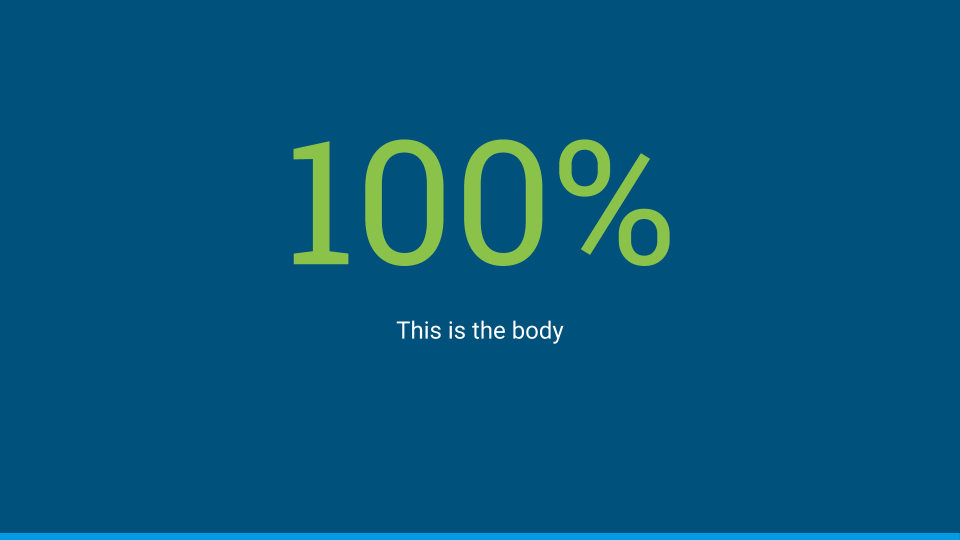
Use {.big} on a header in combination with a body too.
    ---

    # 100% {.big}

    This is the body
Two column slides
Separate columns with {.column}. The marker must appear
on its own line with a blank both before and after.
    ---

    # Two column layout

    This is the left column

    {.column}

    This is the right column
Themes
md2googleslides does not edit or control any theme related options. Just set a base theme you want on Google Slides directly.
Even if you will use --append option for deck reuse, theme will be not changed.
Images
Inline images
Images can be placed on slides using image tags. Multiple images
can be included. Mulitple images in a single paragraph are arranged in columns,
mutiple paragraphs arranged as rows.
Note: Images are currently scaled and centered to fit the
slide template.
---
# Slides can have images

Background images
Set the background image of a slide by adding {.background} to
the end of an image URL.
---
# Slides can have background images
{.background}
Videos
Include YouTube videos with a modified image tag.
    ---

    # Slides can have videos

    @[youtube](MG8KADiRbOU)
Speaker notes
Include speaker notes for a slide using HTML comments. Text inside
the comments may include markdown for formatting, though only text
formatting is allowed. Videos, images, and tables are ignored inside
speaker notes.
---
# Slide title
{.background}
<!--
These are speaker notes.
-->
Formatting
Basic formatting rules are allowed, including:
Bold
Italics
Code
Strikethrough
Hyperlinks
Ordered lists
Unordered lists
The following markdown illustrates a few common styles.
**Bold**, *italics*, and ~~strikethrough~~ may be used.

Ordered lists:
1. Item 1
1. Item 2
  1. Item 2.1

Unordered lists:
* Item 1
* Item 2
  * Item 2.1
Additionally, a subset of inline HTML tags are supported for styling.
<span>
<sup>
<sub>
<em>
<i>
<strong>
<b>
Supported CSS styles for use with <span> elements:
color
background-color
font-weight: bold
font-style: italic
text-decoration: underline
text-decoration: line-through
font-family
font-variant: small-caps
font-size (must use points for units)
You may also use {style="..."} attributes
after markdown elements to apply styles. This can be used on headers, inline
elements, code blocks, etc.
Emoji
Use Github style emoji in your text using
the :emoji:.
The following example inserts emoji in the header and body of the slide.
### I :heart: cats

:heart_eyes_cat:
Code blocks
Both indented and fenced code blocks are supported, with syntax highlighting.
The following example renders highlighted code.
### Hello World

```javascript
console.log('Hello world');
```
To change the syntax highlight theme specify the --style <theme> option on the
command line. All highlight.js themes
are supported. For example, to use the github theme
md2gslides slides.md --style github
You can also apply additional style changes to the entire block, such as changing
the font size:
### Hello World

```javascript
console.log('Hello world');
```{style="font-size: 36pt"}
Tables
Tables are supported via
GFM syntax.
Note: Including tables and other block elements on the same slide may produce poor results with
overlapping elements. Either avoid or manually adjust the layout after generating the slides.
The following generates a 2x5 table on the slide.
### Top pets in the United States

Animal | Number
-------|--------
Fish   | 142 million
Cats   | 88 million
Dogs   | 75 million
Birds  | 16 million
Local images
Images referencing local paths temporarily uploaded and hosted to file.io. File.io
is an emphemeral file serving service that generates short-lived random URLs to the upload file and deletes
content shortly after use.
Since local images are uploaded to a thrid party, explicit opt-in is required to use this feature.
Include the --use-fileio option to opt-in to uploading images. This applies to file-based images as well
as automatically rasterized content like math expressions and SVGs.
Image rasterization
Slides can also include generated images, using $$$ fenced blocks
for the data. Currently supported generated images are math expression (TeX
and MathML) as well as SVG. Rasterized images are treated like local images are require
opt-in to uploading images to a 3rd party service via the --use-fileio option.
Using TeX:
# How about some math?

$$$ math
\cos (2\theta) = \cos^2 \theta - \sin^2 \theta
$$$
Đọc thêm về googleworkspace/md2googleslides ở đâu?
Trang TopGit này là một snapshot — tab "Readme" hiển thị nguyên văn README của repo (đã bỏ link, giữ ảnh). Repo GitHub ở github.com/googleworkspace/md2googleslides là nguồn chính thức.
googleworkspace/md2googleslides có bao nhiêu sao?
googleworkspace/md2googleslides có 4.7k sao GitHub — tải lại trang để xem số mới nhất, hoặc xem trực tiếp github.com/googleworkspace/md2googleslides. TopGit phản chiếu số sao của GitHub nhưng không cam kết đến từng phút.
googleworkspace/md2googleslides có phải mã nguồn mở không?
Có — googleworkspace/md2googleslides phát hành theo license Apache-2.0, nghĩa là mã nguồn mở để đọc, fork và (tùy license) tái sử dụng. Mã: github.com/googleworkspace/md2googleslides.
googleworkspace/md2googleslides còn đang phát triển không?
Commit gần nhất trên googleworkspace/md2googleslides là 11 tháng trước (theo timestamp GitHub). Repo có 326 fork — một chỉ báo về mức độ quan tâm của cộng đồng.
googleworkspace/md2googleslides dùng license gì?
googleworkspace/md2googleslides phát hành theo license Apache-2.0. Nên mở file LICENSE trên GitHub để xác nhận — license metadata đôi khi lệch với thực tế dự án.
googleworkspace/md2googleslides là gì?
googleworkspace/md2googleslides (googleworkspace/md2googleslides) là dự án TypeScript trên GitHub. Theo mô tả gốc: Generate Google Slides from markdown
googleworkspace/md2googleslides viết bằng ngôn ngữ gì?
googleworkspace/md2googleslides chủ yếu viết bằng TypeScript. Trường "language" của GitHub dựa trên phần lớn byte ở nhánh mặc định.
Đọc đầy đủ README ở tab phía trên.
Vẫn đang phân vân về md2googleslides?
Một cú bấm sẽ gửi câu hỏi kèm trang này cho AI — xem AI nói gì về md2googleslides.
 /md2googleslides