Trên GitHub, haotian-liu/CLIP_vlp đã đạt 4 sao, ngôn ngữ Jupyter Notebook.
Tóm tắt dựng từ metadata GitHub của chính dự án — chưa có bài review TopGit. Trang sẽ tự động cập nhật khi bài review đầy đủ được xuất bản.
VÌ SAO CHƯA CÓ REVIEW
TopGit viết bài đầy đủ cho repo có nhiều sao nhất và được yêu cầu nhiều nhất. Trang này là snapshot trong thời gian chờ — xem README gốc ở tab READ ME.
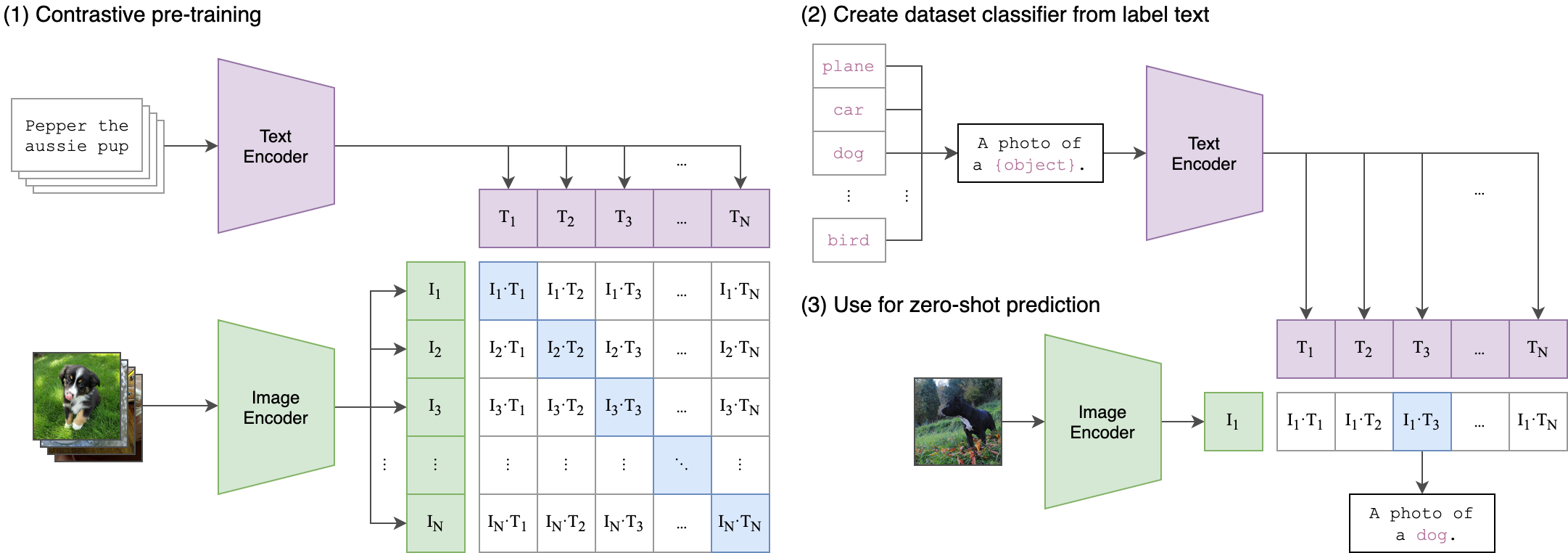
CLIP (Contrastive Language-Image Pre-Training) is a neural network trained on a variety of (image, text) pairs. It can be instructed in natural language to predict the most relevant text snippet, given an image, without directly optimizing for the task, similarly to the zero-shot capabilities of GPT-2 and 3. We found CLIP matches the performance of the original ResNet50 on ImageNet “zero-shot” without using any of the original 1.28M labeled examples, overcoming several major challenges in computer vision.
Approach
Usage
First, install PyTorch 1.7.1 (or later) and torchvision, as well as small additional dependencies, and then install this repo as a Python package. On a CUDA GPU machine, the following will do the trick:
Replace cudatoolkit=11.0 above with the appropriate CUDA version on your machine or cpuonly when installing on a machine without a GPU.
import torch
import clip
from PIL import Image

device = "cuda" if torch.cuda.is_available() else "cpu"
model, preprocess = clip.load("ViT-B/32", device=device)

image = preprocess(Image.open("CLIP.png")).unsqueeze(0).to(device)
text = clip.tokenize(["a diagram", "a dog", "a cat"]).to(device)

with torch.no_grad():
    image_features = model.encode_image(image)
    text_features = model.encode_text(text)

    logits_per_image, logits_per_text = model(image, text)
    probs = logits_per_image.softmax(dim=-1).cpu().numpy()

print("Label probs:", probs)  # prints: [[0.9927937  0.00421068 0.00299572]]
API
The CLIP module clip provides the following methods:
clip.available_models()
Returns the names of the available CLIP models.
clip.load(name, device=..., jit=False)
Returns the model and the TorchVision transform needed by the model, specified by the model name returned by clip.available_models(). It will download the model as necessary. The name argument can also be a path to a local checkpoint.
The device to run the model can be optionally specified, and the default is to use the first CUDA device if there is any, otherwise the CPU. When jit is False, a non-JIT version of the model will be loaded.
Returns a LongTensor containing tokenized sequences of given text input(s). This can be used as the input to the model
The model returned by clip.load() supports the following methods:
model.encode_image(image: Tensor)
Given a batch of images, returns the image features encoded by the vision portion of the CLIP model.
model.encode_text(text: Tensor)
Given a batch of text tokens, returns the text features encoded by the language portion of the CLIP model.
model(image: Tensor, text: Tensor)
Given a batch of images and a batch of text tokens, returns two Tensors, containing the logit scores corresponding to each image and text input. The values are cosine similarities between the corresponding image and text features, times 100.
More Examples
Zero-Shot Prediction
The code below performs zero-shot prediction using CLIP, as shown in Appendix B in the paper. This example takes an image from the CIFAR-100 dataset, and predicts the most likely labels among the 100 textual labels from the dataset.
import os
import clip
import torch
from torchvision.datasets import CIFAR100

# Load the model
device = "cuda" if torch.cuda.is_available() else "cpu"
model, preprocess = clip.load('ViT-B/32', device)

# Download the dataset
cifar100 = CIFAR100(root=os.path.expanduser("~/.cache"), download=True, train=False)

# Prepare the inputs
image, class_id = cifar100[3637]
image_input = preprocess(image).unsqueeze(0).to(device)
text_inputs = torch.cat([clip.tokenize(f"a photo of a {c}") for c in cifar100.classes]).to(device)

# Calculate features
with torch.no_grad():
    image_features = model.encode_image(image_input)
    text_features = model.encode_text(text_inputs)

# Pick the top 5 most similar labels for the image
image_features /= image_features.norm(dim=-1, keepdim=True)
text_features /= text_features.norm(dim=-1, keepdim=True)
similarity = (100.0 * image_features @ text_features.T).softmax(dim=-1)
values, indices = similarity[0].topk(5)

# Print the result
print("\nTop predictions:\n")
for value, index in zip(values, indices):
    print(f"{cifar100.classes[index]:>16s}: {100 * value.item():.2f}%")
The output will look like the following (the exact numbers may be slightly different depending on the compute device):
Trang TopGit này là một snapshot — tab "Readme" hiển thị nguyên văn README của repo (đã bỏ link, giữ ảnh). Repo GitHub ở github.com/haotian-liu/CLIP_vlp là nguồn chính thức.
haotian-liu/CLIP_vlp có bao nhiêu sao?
haotian-liu/CLIP_vlp có 4 sao GitHub — tải lại trang để xem số mới nhất, hoặc xem trực tiếp github.com/haotian-liu/CLIP_vlp. TopGit phản chiếu số sao của GitHub nhưng không cam kết đến từng phút.
haotian-liu/CLIP_vlp có phải mã nguồn mở không?
Có — haotian-liu/CLIP_vlp phát hành theo license MIT, nghĩa là mã nguồn mở để đọc, fork và (tùy license) tái sử dụng. Mã: github.com/haotian-liu/CLIP_vlp.
haotian-liu/CLIP_vlp có tag gì không?
Bản đồng bộ chưa ghi nhận topic GitHub nào cho haotian-liu/CLIP_vlp. GitHub topics hiển thị ở thanh bên phải trang repo — đó là nơi đáng kiểm tra nhất.
haotian-liu/CLIP_vlp có website riêng không?
TopGit chưa ghi nhận URL trang chủ cho haotian-liu/CLIP_vlp. Phần README ở tab phía trên thường có link demo, hoặc xem mô tả GitHub của repo.
haotian-liu/CLIP_vlp còn đang phát triển không?
Commit gần nhất trên haotian-liu/CLIP_vlp là 4.3 năm trước (theo timestamp GitHub). Repo có 1 fork — một chỉ báo về mức độ quan tâm của cộng đồng.
Đọc đầy đủ README ở tab phía trên.
Muốn nghe thêm một ý kiến về CLIP_vlp?
Hỏi một AI đọc được trang này — một cú bấm là có ngay nhận định về CLIP_vlp.

 /CLIP_vlp