hybridgroup/gocv — công cụ AI — đang có 7.5k sao GitHub trong nhóm AI Tools. Go package for computer vision using OpenCV 4 and beyond. Includes support for DNN, CUDA, OpenCV Contrib, and OpenVINO.
Tóm tắt dựng từ metadata GitHub của chính dự án — chưa có bài review TopGit. Trang sẽ tự động cập nhật khi bài review đầy đủ được xuất bản.
VÌ SAO CHƯA CÓ REVIEW
TopGit viết bài đầy đủ cho repo có nhiều sao nhất và được yêu cầu nhiều nhất. Trang này là snapshot trong thời gian chờ — xem README gốc ở tab READ ME.
The GoCV package provides Go language bindings for the OpenCV 4 computer vision library.
The GoCV package supports the latest releases of Go and OpenCV (v4.12.0) on Linux, Docker, macOS, and Windows. Our ongoing mission is help the Go programming language be a "first-class" client compatible with the latest developments in the OpenCV ecosystem.
GoCV supports CUDA for hardware acceleration using Nvidia GPUs. Check out the CUDA README for more info on how to use GoCV with OpenCV/CUDA.
GoCV also supports Intel OpenVINO. Check out the OpenVINO README for more info on how to use GoCV with the Intel OpenVINO toolkit.
How to use
Hello, video
This example opens a video capture device using device "0", reads frames, and shows the video in a GUI window:
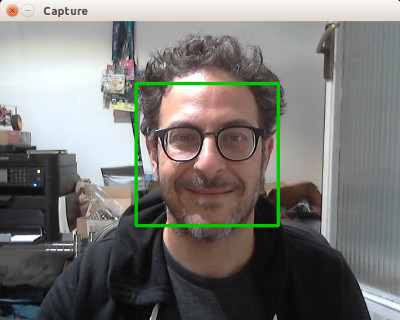
This is a more complete example that opens a video capture device using device "0". It also uses the CascadeClassifier class to load an external data file containing the classifier data. The program grabs each frame from the video, then uses the classifier to detect faces. If any faces are found, it draws a green rectangle around each one, then displays the video in an output window:
package main

import (
	"fmt"
	"image/color"

	"gocv.io/x/gocv"
)

func main() {
    // set to use a video capture device 0
    deviceID := 0

	// open webcam
	webcam, err := gocv.OpenVideoCapture(deviceID)
	if err != nil {
		fmt.Println(err)
		return
	}
	defer webcam.Close()

	// open display window
	window := gocv.NewWindow("Face Detect")
	defer window.Close()

	// prepare image matrix
	img := gocv.NewMat()
	defer img.Close()

	// color for the rect when faces detected
	blue := color.RGBA{0, 0, 255, 0}

	// load classifier to recognize faces
	classifier := gocv.NewCascadeClassifier()
	defer classifier.Close()

	if !classifier.Load("data/haarcascade_frontalface_default.xml") {
		fmt.Println("Error reading cascade file: data/haarcascade_frontalface_default.xml")
		return
	}

	fmt.Printf("start reading camera device: %v\n", deviceID)
	for {
		if ok := webcam.Read(&img); !ok {
			fmt.Printf("cannot read device %v\n", deviceID)
			return
		}
		if img.Empty() {
			continue
		}

		// detect faces
		rects := classifier.DetectMultiScale(img)
		fmt.Printf("found %d faces\n", len(rects))

		// draw a rectangle around each face on the original image
		for _, r := range rects {
			gocv.Rectangle(&img, r, blue, 3)
		}

		// show the image in the window, and wait 1 millisecond
		window.IMShow(img)
		window.WaitKey(1)
	}
}
More examples
There are examples in the cmd directory of this repo in the form of various useful command line utilities, such as capturing an image file, streaming mjpeg video, counting objects that cross a line, and using OpenCV with a DNN for face tracking.
How to install
To install GoCV, you must first have the matching version of OpenCV installed on your system. The current release of GoCV requires OpenCV 4.12.0.
We have instructions for Linux, macOS, Windows, and other platform options as well.
Linux
Please see our web site at https://gocv.io/getting-started/linux/
macOS
Please see our web site at https://gocv.io/getting-started/macos/
Windows
Please see our web site at https://gocv.io/getting-started/windows/
Docker
Please see our web site at https://gocv.io/getting-started/docker/
Android
There is some work in progress for running GoCV on Android using Gomobile. For information on how to install OpenCV/GoCV for Android, please see:
https://gist.github.com/ogero/c19458cf64bd3e91faae85c3ac8874120
See original discussion here:
https://github.com/hybridgroup/gocv/issues/235
Profiling
Since memory allocations for images in GoCV are done through C based code, the go garbage collector will not clean all resources associated with a Mat. As a result, any Mat created must be closed to avoid memory leaks.
To ease the detection and repair of the resource leaks, GoCV provides a Mat profiler that records when each Mat is created and closed. Each time a Mat is allocated, the stack trace is added to the profile. When it is closed, the stack trace is removed. See the runtime/pprof documentation.
In order to include the MatProfile custom profiler, you MUST build or run your application or tests using the -tags matprofile build tag. For example:
go run -tags matprofile cmd/version/main.go
You can get the profile's count at any time using:
gocv.MatProfile.Count()
You can display the current entries (the stack traces) with:
var b bytes.Buffer
gocv.MatProfile.WriteTo(&b, 1)
fmt.Print(b.String())
This can be very helpful to track down a leak. For example, suppose you have
the following nonsense program:
We can see that this program would leak memory. As it exited, it had one Mat that was never closed. The stack trace points to exactly which line the allocation happened on (line 11, the gocv.NewMat()).
Furthermore, if the program is a long running process or if GoCV is being used on a web server, it may be helpful to install the HTTP interface )). For example:
This will leak a Mat once per second. You can see the current profile count and stack traces by going to the installed HTTP debug interface: http://localhost:6060/debug/pprof/gocv.io/x/gocv.Mat.
How to contribute
Please take a look at our CONTRIBUTING.md document to understand our contribution guidelines.
Then check out our ROADMAP.md document to know what to work on next.
Why this project exists
The https://github.com/go-opencv/go-opencv package for Go and OpenCV did not support any version above OpenCV 2.x, and work on adding support for OpenCV 3 had stalled for over a year, mostly due to the complexity of SWIG. That is why we started this project.
The GoCV package uses a C-style wrapper around the OpenCV 4 C++ classes to avoid having to deal with applying SWIG to a huge existing codebase. The mappings are intended to match as closely as possible to the original OpenCV project structure, to make it easier to find things, and to be able to figure out where to add support to GoCV for additional OpenCV image filters, algorithms, and other features.
For example, the OpenCV videoio module wrappers can be found in the GoCV package in the videoio.* files.
This package was inspired by the original https://github.com/go-opencv/go-opencv project, the blog post https://medium.com/@peterleyssens/using-opencv-3-from-golang-5510c312a3c and the repo at https://github.com/sensorbee/opencv thank you all!
License
Licensed under the Apache 2.0 license. Copyright (c) 2017-2026 The Hybrid Group.
Logo generated by GopherizeMe - https://gopherize.me
Trang TopGit này là một snapshot — tab "Readme" hiển thị nguyên văn README của repo (đã bỏ link, giữ ảnh). Repo GitHub ở github.com/hybridgroup/gocv là nguồn chính thức.
hybridgroup/gocv có những chủ đề gì?
GitHub topics của hybridgroup/gocv: "computer-vision", "computervision", "cuda", "dnn", "face-tracking", "gocv", "golang", "image-processing", "mjpeg", "mjpeg-stream", "object-classification", "object-tracking", "onnx", "opencv", "openvino", "tensorflow", "video", "video-capture", "yolo". TopGit xếp repo vào nhóm AI Tools.
hybridgroup/gocv có phải mã nguồn mở không?
TopGit chưa ghi nhận license cho hybridgroup/gocv. Phần lớn repo public trên GitHub là mã nguồn mở, nhưng điều khoản khác nhau từng repo — mở file LICENSE để xác nhận.
hybridgroup/gocv có trang demo không?
Dự án có trang chủ ở https://gocv.io. Tab "Readme" ở trang này thường có ảnh chụp và hướng dẫn bắt đầu nhanh.
hybridgroup/gocv còn đang phát triển không?
Commit gần nhất trên hybridgroup/gocv là 5 tháng trước (theo timestamp GitHub). Repo có 900 fork — một chỉ báo về mức độ quan tâm của cộng đồng.
Đọc đầy đủ README ở tab phía trên.
Muốn nghe thêm một ý kiến về gocv?
Hỏi một AI đọc được trang này — một cú bấm là có ngay nhận định về gocv.
 /gocv
/gocv