iamcco/markdown-preview.nvim hiện có 8.0k sao trên GitHub, viết chủ yếu bằng JavaScript. markdown preview plugin for (neo)vim
Tóm tắt dựng từ metadata GitHub của chính dự án — chưa có bài review TopGit. Trang sẽ tự động cập nhật khi bài review đầy đủ được xuất bản.
VÌ SAO CHƯA CÓ REVIEW
TopGit viết bài đầy đủ cho repo có nhiều sao nhất và được yêu cầu nhiều nhất. Trang này là snapshot trong thời gian chờ — xem README gốc ở tab READ ME.
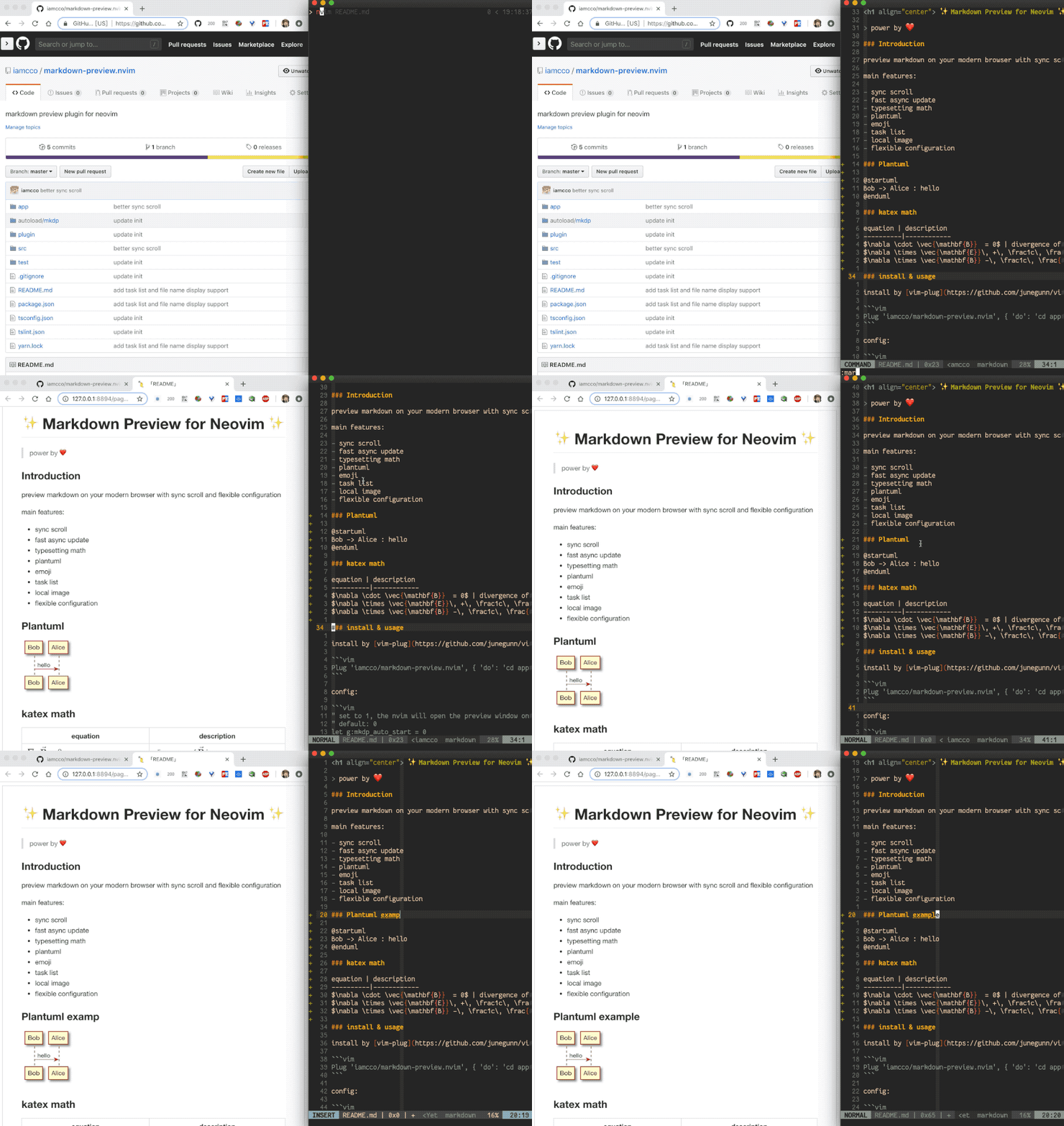
Preview Markdown in your modern browser with synchronised scrolling and flexible configuration.
Main features:
Cross platform (MacOS/Linux/Windows)
Synchronised scrolling
Fast asynchronous updates
KaTeX for typesetting of math
PlantUML
Mermaid
Chart.js
js-sequence-diagrams
Flowchart
dot
Table of contents
Emojis
Task lists
Local images
Flexible configuration
Note the plugin mathjax-support-for-mkdp is not needed for typesetting math.
Installation & Usage
Install with vim-plug:
" If you don't have nodejs and yarn
" use pre build, add 'vim-plug' to the filetype list so vim-plug can update this plugin
" see: https://github.com/iamcco/markdown-preview.nvim/issues/50
Plug 'iamcco/markdown-preview.nvim', { 'do': { -> mkdp#util#install() }, 'for': ['markdown', 'vim-plug']}


" If you have nodejs
Plug 'iamcco/markdown-preview.nvim', { 'do': 'cd app && npx --yes yarn install' }
-- install without yarn or npm
use({
    "iamcco/markdown-preview.nvim",
    run = function() vim.fn["mkdp#util#install"]() end,
})

use({ "iamcco/markdown-preview.nvim", run = "cd app && npm install", setup = function() vim.g.mkdp_filetypes = { "markdown" } end, ft = { "markdown" }, })
Or by hand:
use {'iamcco/markdown-preview.nvim'}
add plugin to the ~/.local/share/nvim/site/pack/packer/start/ directory:
cd ~/.local/share/nvim/site/pack/packer/start/
git clone https://github.com/iamcco/markdown-preview.nvim.git
cd markdown-preview.nvim
npx --yes yarn install
npx --yes yarn build
Please make sure that you have installed node.js and yarn.
Open nvim and run :PackerInstall to make it workable
MarkdownPreview Config:
" set to 1, nvim will open the preview window after entering the Markdown buffer
" default: 0
let g:mkdp_auto_start = 0

" set to 1, the nvim will auto close current preview window when changing
" from Markdown buffer to another buffer
" default: 1
let g:mkdp_auto_close = 1

" set to 1, Vim will refresh Markdown when saving the buffer or
" when leaving insert mode. Default 0 is auto-refresh Markdown as you edit or
" move the cursor
" default: 0
let g:mkdp_refresh_slow = 0

" set to 1, the MarkdownPreview command can be used for all files,
" by default it can be use in Markdown files only
" default: 0
let g:mkdp_command_for_global = 0

" set to 1, the preview server is available to others in your network.
" By default, the server listens on localhost (127.0.0.1)
" default: 0
let g:mkdp_open_to_the_world = 0

" use custom IP to open preview page.
" Useful when you work in remote Vim and preview on local browser.
" For more details see: https://github.com/iamcco/markdown-preview.nvim/pull/9
" default empty
let g:mkdp_open_ip = ''

" specify browser to open preview page
" for path with space
" valid: `/path/with\ space/xxx`
" invalid: `/path/with\\ space/xxx`
" default: ''
let g:mkdp_browser = ''

" set to 1, echo preview page URL in command line when opening preview page
" default is 0
let g:mkdp_echo_preview_url = 0

" a custom Vim function name to open preview page
" this function will receive URL as param
" default is empty
let g:mkdp_browserfunc = ''

" options for Markdown rendering
" mkit: markdown-it options for rendering
" katex: KaTeX options for math
" uml: markdown-it-plantuml options
" maid: mermaid options
" disable_sync_scroll: whether to disable sync scroll, default 0
" sync_scroll_type: 'middle', 'top' or 'relative', default value is 'middle'
"   middle: means the cursor position is always at the middle of the preview page
"   top: means the Vim top viewport always shows up at the top of the preview page
"   relative: means the cursor position is always at relative positon of the preview page
" hide_yaml_meta: whether to hide YAML metadata, default is 1
" sequence_diagrams: js-sequence-diagrams options
" content_editable: if enable content editable for preview page, default: v:false
" disable_filename: if disable filename header for preview page, default: 0
let g:mkdp_preview_options = {
    \ 'mkit': {},
    \ 'katex': {},
    \ 'uml': {},
    \ 'maid': {},
    \ 'disable_sync_scroll': 0,
    \ 'sync_scroll_type': 'middle',
    \ 'hide_yaml_meta': 1,
    \ 'sequence_diagrams': {},
    \ 'flowchart_diagrams': {},
    \ 'content_editable': v:false,
    \ 'disable_filename': 0,
    \ 'toc': {}
    \ }

" use a custom Markdown style. Must be an absolute path
" like '/Users/username/markdown.css' or expand('~/markdown.css')
let g:mkdp_markdown_css = ''

" use a custom highlight style. Must be an absolute path
" like '/Users/username/highlight.css' or expand('~/highlight.css')
let g:mkdp_highlight_css = ''

" use a custom port to start server or empty for random
let g:mkdp_port = ''

" preview page title
" ${name} will be replace with the file name
let g:mkdp_page_title = '「${name}」'

" use a custom location for images
let g:mkdp_images_path = /home/user/.markdown_images

" recognized filetypes
" these filetypes will have MarkdownPreview... commands
let g:mkdp_filetypes = ['markdown']

" set default theme (dark or light)
" By default the theme is defined according to the preferences of the system
let g:mkdp_theme = 'dark'

" combine preview window
" default: 0
" if enable it will reuse previous opened preview window when you preview markdown file.
" ensure to set let g:mkdp_auto_close = 0 if you have enable this option
let g:mkdp_combine_preview = 0

" auto refetch combine preview contents when change markdown buffer
" only when g:mkdp_combine_preview is 1
let g:mkdp_combine_preview_auto_refresh = 1
``` mermaid
gantt
    dateFormat DD-MM-YYY
    axisFormat %m/%y

    title Example
    section example section
    activity :active, 01-02-2019, 03-08-2019
```
js-sequence-diagrams:
``` sequence-diagrams
Andrew->China: Says
Note right of China: China thinks\nabout it
China-->Andrew: How are you?
Andrew->>China: I am good thanks!
```
Flowchart:
``` flowchart
st=>start: Start|past:>http://www.google.com[blank]
e=>end: End|future:>http://www.google.com
op1=>operation: My Operation|past
op2=>operation: Stuff|current
sub1=>subroutine: My Subroutine|invalid
cond=>condition: Yes
or No?|approved:>http://www.google.com
c2=>condition: Good idea|rejected
io=>inputoutput: catch something...|future

st->op1(right)->cond
cond(yes, right)->c2
cond(no)->sub1(left)->op1
c2(yes)->io->e
c2(no)->op2->e
```
Set updatetime to a small number, for instance: set updatetime=100
WSL 2 issue: Can not open browser when using WSL 2 with terminal Vim.
if you are using Ubuntu you can install xdg-utils using sudo apt-get install -y xdg-utils
checkout issue 199 for more detail.
How can I change the dark/light theme?
The default theme is based on your system preferences.
There is a button hidden in the header to change the theme. Place your mouse over the header to reveal it.
How can I pass CLI options to the browser, like opening in a new window?
Answer: Add the following to your Neovim init script:
Linux
  function OpenMarkdownPreview (url)
    execute "silent ! firefox --new-window " . a:url
  endfunction
  let g:mkdp_browserfunc = 'OpenMarkdownPreview'
Replace firefox with chrome if you prefer. Both browsers recognize the --new-window option.
macOS
  function OpenMarkdownPreview (url)
    execute "silent ! open -a Firefox -n --args --new-window " . a:url
  endfunction
  let g:mkdp_browserfunc = 'OpenMarkdownPreview'
Replace Firefox with Google\ Chrome or Brave\ Browser if you prefer. They all recognize the --new-window option.
iamcco/markdown-preview.nvim thuộc nhóm Developer Tools trên TopGit, cùng 4 topic GitHub. Trang Trending và Topics liệt kê các repo cùng số sao và cùng ngôn ngữ để so sánh.
Đọc thêm về iamcco/markdown-preview.nvim ở đâu?
Trang TopGit này là một snapshot — tab "Readme" hiển thị nguyên văn README của repo (đã bỏ link, giữ ảnh). Repo GitHub ở github.com/iamcco/markdown-preview.nvim là nguồn chính thức.
iamcco/markdown-preview.nvim có bao nhiêu sao?
iamcco/markdown-preview.nvim có 8.0k sao GitHub — tải lại trang để xem số mới nhất, hoặc xem trực tiếp github.com/iamcco/markdown-preview.nvim. TopGit phản chiếu số sao của GitHub nhưng không cam kết đến từng phút.
iamcco/markdown-preview.nvim có những chủ đề gì?
GitHub topics của iamcco/markdown-preview.nvim: "markdown", "neovim", "preview", "vim". TopGit xếp repo vào nhóm Developer Tools.
iamcco/markdown-preview.nvim có phải mã nguồn mở không?
Có — iamcco/markdown-preview.nvim phát hành theo license MIT, nghĩa là mã nguồn mở để đọc, fork và (tùy license) tái sử dụng. Mã: github.com/iamcco/markdown-preview.nvim.
iamcco/markdown-preview.nvim có website riêng không?
TopGit chưa ghi nhận URL trang chủ cho iamcco/markdown-preview.nvim. Phần README ở tab phía trên thường có link demo, hoặc xem mô tả GitHub của repo.
iamcco/markdown-preview.nvim còn đang phát triển không?
Commit gần nhất trên iamcco/markdown-preview.nvim là 2.1 năm trước (theo timestamp GitHub). Repo có 407 fork — một chỉ báo về mức độ quan tâm của cộng đồng.
Đọc đầy đủ README ở tab phía trên.
Chưa chắc markdown-preview.nvim có hợp với bạn?
Để ChatGPT, Claude hoặc Perplexity tìm hiểu giúp — bấm bên dưới và xem AI nói gì về markdown-preview.nvim.
 /markdown-preview.nvim