IBM/css-gridish là dự án CSS với 2.2k sao trong nhóm UI / UX. Automatically build your grid design’s CSS Grid code, CSS Flexbox fallback code, Sketch artboards, and Chrome extension.
Tóm tắt dựng từ metadata GitHub của chính dự án — chưa có bài review TopGit. Trang sẽ tự động cập nhật khi bài review đầy đủ được xuất bản.
VÌ SAO CHƯA CÓ REVIEW
TopGit viết bài đầy đủ cho repo có nhiều sao nhất và được yêu cầu nhiều nhất. Trang này là snapshot trong thời gian chờ — xem README gốc ở tab READ ME.
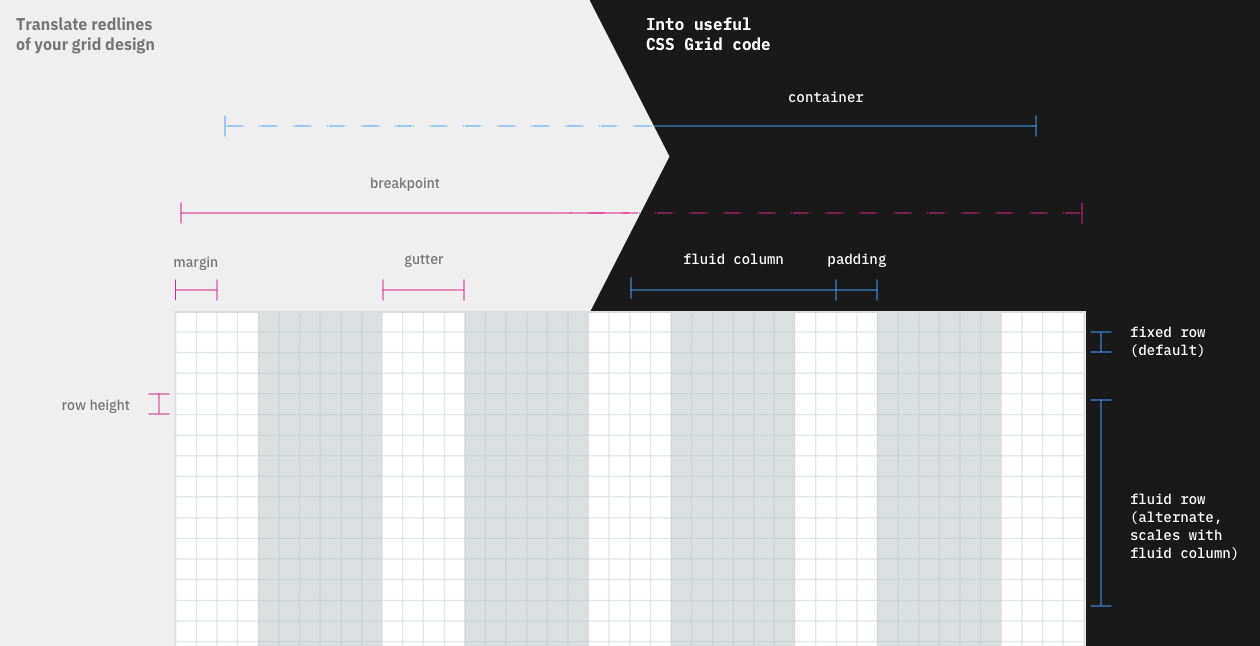
CSS Gridish takes design specs of your product’s grid and builds out several resources for your team to use:
Sketch file with artboards and grid/layout settings for designers
CSS/SCSS code using CSS Grid with a CSS Flexbox fallback for developers
Google Chrome extension for anyone to check a webpage’s alignment
This tool is not a grid system with a grid already designed for you. Instead, CSS Gridish builds all of the resources for the grid your team designed.
We hope it helps teams adapt CSS Grid sooner and enables more complex layouts. To show how versatile the tool is, we have examples of grids from Bootstrap, Carbon Design System, and Material Design.
The truth is that many enterprise projects can’t afford to drop support for browsers that do not support CSS Grid Layout yet. This tool takes your grid’s design specs and builds a slim CSS Grid Layout implementation and a fallback to CSS Flexbox support.
Build your grid code
Requires Node v8.2.0 or higher, which includes npm and npx.
Create a file called css-gridish.json in your project root. See the config documentation or an example config for help.
Determine how you want your grid built:
If you want to build once, run command npx css-gridish.
If you want to add the grid building to your project’s build process:
Run command npm install css-gridish.
Add scripts: {build: "css-gridish"} in your package.json.
Run command npm run build.
Your CSS and README.md with class documentation will be built into ./css-gridish/.
Config file
The config file is where all of your design system specs live. See this example for help. Edit your css-gridish.json to have all generated grid content match your design system:
{
  "prefix": "gridish", // Custom prefix for all classes and filenames
  "breakpoints": {
    // Class name for a breakpoint
    "sm": {
      "breakpoint": 20, // Min-width for media query (number in rem)
      "columns": 4, // Quantity of columns (number)
      "gutter": "2rem", // Space between columns (rem string, px string, vw string or 0)
      "margin": "3vw" // Horizontal margin of grid container (rem string, px string, vw string or 0)
    },
    ...
    "max": {
      "breakpoint": 100,
      "columns": 12,
      "gutter": "4rem",
      "margin": "5vw"
    }
  },
  "extraArtboards": {
    "xlg": 100 // Additional breakpoint for the Sketch file (number in rem)
  },
  "rem": 16, // Base rem unit for all measurements (number in px)
  "rowHeight": 0.5, // Height of a fixed row (number in rem)
  "rows": 30, // Quantity of row variables (number)
  "paths": {
    "route": "css-gridish", // Route that files save in from project root (optional, use `""` for project root, `"css-gridish"` is default)
    "intro": "intro.md" // Path to any markdown you want inserted at the top of your README.md documentation (optional)
  }
}
Tip: For the best results in Sketch, we recommend you make your grid breakpoints, margin, and gutter divisible by the row height.
Required: Even if your design specs do not change between breakpoints, you need to list the max-width breakpoint in the breakpoints object.
The first breakpoint min-width media query is not used to save kilobytes, but we recommend stating it anyways for future artboard-making tools.
Legacy support
If you are supporting browsers that lack CSS Grid Layout support, you can use css-gridish/yourPrefix-legacy.min.css and the legacy classes detailed in the README.md. With the legacy file and classes, the browsers that do not support the final CSS Grid Legacy spec will fallback to a CSS Flexbox alternative. The CSS Flexbox alternative supports embedded subgrids that still reflect the overall grid system’s column structure.
User-defined breakpoints
One of the best parts about CSS Grid Layout is that your users can rearrange the layout at any width in their own media query. Your grid will also support rearranging layout at custom breakpoints for the legacy implementation when the user compiles their own Sass. Just have them define the following map of rem widths before they import in your Sass file:
Once your experience can drop support for browsers like IE 11 and Edge <15, you can simply remove all legacy classes and switch over to the non-legacy files. This is a great progressive-enhancement for your performance when it happens.
Future Updates
Once Edge and Safari gain display: subgrid support, we can remove our dependence on vw units.
Once a solution in the CSS Grid spec is given for one item to ignore grid-gap, we can utilize grid-gap by default instead of opting in to padding classes.
FAQs
Why does none of the CSS Grid code use grid-gap for gutters?
A lot of times, you will want an item to break out of the gutters for background color, to extend media, or for another reason. Until the CSS Grid spec has a way to ignore that gutter, we use the padding classes (.yourGrid-padding) to opt-in to respecting the gutter. The padding classes are always half the size of a gutter for alignment.
Why are columns using vw units and sometimes the calc function?
Until Edge and Safari support
display: subgrid,
it will be difficult for you to write semantic HTML with CSS Grid Layout. We are
able to take advantage of vw units and the calc function so you can embed your
.yourPrefix-grid class inside of itself as much that is needed for you.
Why are there no row classes for the legacy implementation?
Thanks to flexbox’s wrapping functionality, nodes that specify rows are not necessary. Only create a node for a row if it has semantic or accessibility significance. You can keep embedding .yourPrefix-grid as necessary to accomplish this.
What happens in the legacy implementation if I specify the column width for one breakpoint, but not the next larger breakpoint?
To maintain a mobile-first opinion, column widths will scale to the next breakpoint if not specified. This means that a .yourPrefix__col--sm--3 (with 6 total columns) would automatically grow into a .yourPrefix__col--md--6 (with 12 total columns) if no md class was declared to maintain half of the screen size.
IBM/css-gridish thuộc nhóm UI / UX trên TopGit, cùng 1 topic GitHub. Trang Trending và Topics liệt kê các repo cùng số sao và cùng ngôn ngữ để so sánh.
Đọc thêm về IBM/css-gridish ở đâu?
Trang TopGit này là một snapshot — tab "Readme" hiển thị nguyên văn README của repo (đã bỏ link, giữ ảnh). Repo GitHub ở github.com/IBM/css-gridish là nguồn chính thức.
IBM/css-gridish có bao nhiêu sao?
IBM/css-gridish có 2.2k sao GitHub — tải lại trang để xem số mới nhất, hoặc xem trực tiếp github.com/IBM/css-gridish. TopGit phản chiếu số sao của GitHub nhưng không cam kết đến từng phút.
IBM/css-gridish có những chủ đề gì?
GitHub topics của IBM/css-gridish: "design". TopGit xếp repo vào nhóm UI / UX.
IBM/css-gridish còn đang phát triển không?
Commit gần nhất trên IBM/css-gridish là 7.5 năm trước (theo timestamp GitHub). Repo có 100 fork — một chỉ báo về mức độ quan tâm của cộng đồng.
IBM/css-gridish viết bằng ngôn ngữ gì?
IBM/css-gridish chủ yếu viết bằng CSS. Trường "language" của GitHub dựa trên phần lớn byte ở nhánh mặc định.
Vì sao IBM/css-gridish được xếp vào nhóm UI / UX?
TopGit xếp IBM/css-gridish vào nhóm UI / UX dựa trên GitHub topics và mô tả của repo (gắn thẻ: "design"). Việc phân loại dựa trên metadata thật của repo, không phải đoán theo cảm tính biên tập.
Đọc đầy đủ README ở tab phía trên.
Chưa chắc css-gridish có hợp với bạn?
Để ChatGPT, Claude hoặc Perplexity tìm hiểu giúp — bấm bên dưới và xem AI nói gì về css-gridish.
 /css-gridish