5.3k sao GitHub và vẫn tăng — iflytek/astron-rpa là dự án Python mà TopGit đang theo dõi trên nền tảng. Agent-ready RPA suite with out-of-the-box automation tools. Built for individuals and enterprises.
Tóm tắt dựng từ metadata GitHub của chính dự án — chưa có bài review TopGit. Trang sẽ tự động cập nhật khi bài review đầy đủ được xuất bản.
VÌ SAO CHƯA CÓ REVIEW
TopGit viết bài đầy đủ cho repo có nhiều sao nhất và được yêu cầu nhiều nhất. Trang này là snapshot trong thời gian chờ — xem README gốc ở tab READ ME.
Astron RPA Official Site ·
Deployment Guide ·
User Documentation ·
FAQ
English | 简体中文
📋 Overview
AstronRPA is an enterprise-grade Robotic Process Automation (RPA) desktop application. Through a visual designer, it supports low-code/no-code development, enabling users to rapidly build workflows and automate desktop software and web pages.
Astron Agent is the native Agent platform supported by this project. Users can directly call RPA workflow nodes in Astron Agent, and also use Agent workflows in AstronRPA, achieving efficient collaboration between automation processes and intelligent agent systems, empowering broader business automation scenarios.
🎯 Why Choose AstronRPA?
🛠️ Comprehensive Automation Support: Comprehensive coverage of Windows desktop applications and web page automation. Supports common office software like WPS and Office, financial and ERP systems like Kingdee and YonYou, and various browsers like IE, Edge, and Chrome, enabling end-to-end cross-application automation.
🧩 Highly Component-based: 300+ pre-built atomic capabilities covering UI operations, data processing, and system interactions. Supports visual orchestration and custom component extensions with high flexibility and maintainability.
🏭 Enterprise-grade Security & Collaboration: Built-in excellence center and team marketplace with enterprise modules. Provides terminal monitoring, scheduling modes, robot team sharing and collaborative functions. Build a complete enterprise automation management ecosystem with process security, permission control, and cross-team collaboration.
👨💻 Developer-friendly Experience: Low-code, visual process design and debugging environment. Quickly build automation workflows through intuitive drag-and-drop methods, reducing development barriers, improving development efficiency, and enabling business users to participate in automation creation.
🤖 Native Agent Empowerment: Deep integration with Astron Agent platform supporting bi-directional calls between automation processes and AI agents with capability fusion. Achieve seamless connection between task reasoning, decision making, and automated execution, expanding automation boundaries.
🌐 Multi-channel Trigger Integration: Supports direct execution, scheduled tasks, scheduling modes, API calls, and MCP services. Flexible integration capabilities to quickly respond to third-party system integration needs and easily embed in complex business scenarios.
🚀 Quick Start
System Requirements
💻 Client Operating System: Windows 10/11 (primary support)
🧠 RAM >= 8 GiB
Server: Deploy with Docker
Recommended for quick deployment:
For self-hosting, prepare your own server and domain, add gateway/authentication
DNS records at the authoritative DNS provider, and obtain a certificate covering
both names. The deployer maintains DNS, private keys, public ports, and renewals.
See DNS and HTTPS setup before running the commands
below; replace all example.com names with your own.
# Clone the repository
git clone https://github.com/iflytek/astron-rpa.git
cd astron-rpa

# Enter docker directory
cd docker

# Copy .env
cp .env.example .env

# Configure the public HTTPS names in .env
RPA_SERVER_NAME="rpa.example.com"
CASDOOR_SERVER_NAME="auth.example.com"
RPA_HTTPS_REDIRECT_AUTHORITY="rpa.example.com"
CASDOOR_HTTPS_REDIRECT_AUTHORITY="auth.example.com:8443"
CASDOOR_EXTERNAL_ENDPOINT="https://auth.example.com:8443"

# Copy a certificate covering both names and its private key
# to docker/certs/tls.crt and docker/certs/tls.key

# 🚀 Start all services
# Initialize independent Casdoor credentials (see docker/HTTPS_DEPLOYMENT.md 1.3)
docker compose up -d mysql casdoor
# Wait for Casdoor initialization
python3 scripts/sync-casdoor-credentials.py
docker compose up -d

# 📊 Check service status
docker compose ps
After all services have started, open your browser and go to: https://rpa.example.com/api/rpa-auth/user/login-check.
If you see {"code":"900001","data":null,"message":"unauthorized"}, it means the deployment is correct and the connection is working properly.
Open your browser and go to: https://auth.example.com:8443.
If you see the Casdoor login page, it means Casdoor is deployed correctly.
For production deployment and security hardening, refer to the Deployment Guide.
Client: Source Deployment/Binary Deployment
Environment Dependencies
Tool
Version
Description
Node.js
>= 22
JavaScript runtime
Python
3.13.x
RPA engine core
Java
JDK 8+
Backend runtime
pnpm
>= 9
Node.js package manager
UV
0.8+
Python package management tool
7-Zip
-
Create deployment archives
SWIG
-
Connect Python with C/C++
For specific installation instructions and common issues, refer to Build Guide.
Direct Download (Recommended)
Download the latest Release Package
One-Click Build
Prepare Python Environment
# Prepare a Python 3.13.x installation directory (can be a local folder or system installation path)
# The script will copy this directory to create python_core
Run Build Script
# Full build (engine + frontend + desktop app) from project root directory
./build.bat --python-exe "C:\Program Files\Python313\python.exe"

# Or use default configuration (if Python is in default path)
./build.bat

# Wait for completion
# Build successful when console displays "Full Build Complete!"
Note: Please ensure the specified Python interpreter is a clean installation without additional third-party packages to minimize package size.
Build process includes:
✅ Detect/copy Python environment to build/python_core
✅ Install RPA engine dependencies
✅ Compress Python core to resources/python_core.7z
✅ Install frontend dependencies
✅ Build frontend web application
✅ Build desktop application
📦 Install the packaged client
⚙️ After installation, modify the server address in resources/conf.yaml in the installation directory:
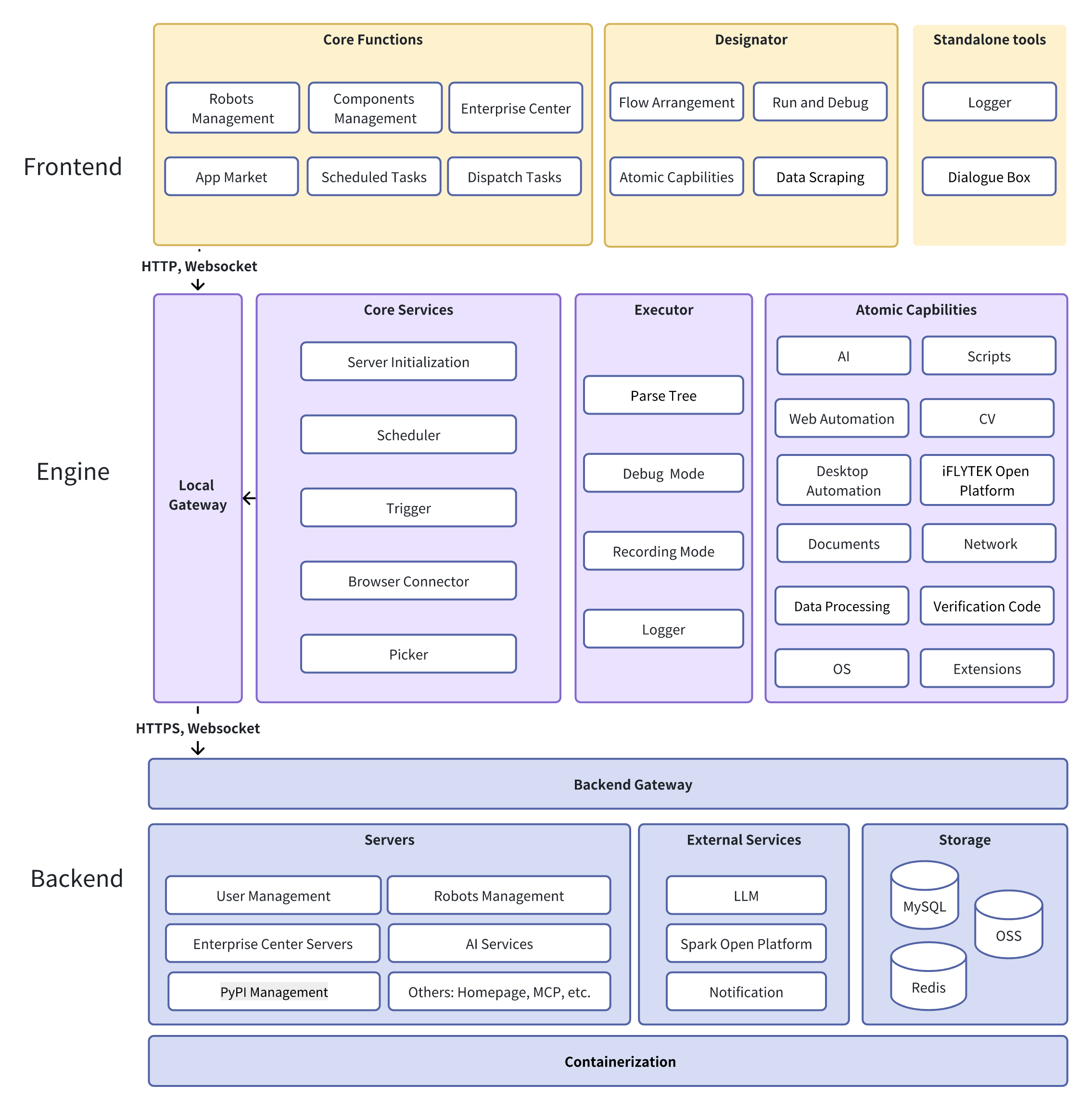
The project adopts a frontend-backend separation architecture. The frontend is built with Vue 3 + TypeScript and Electron for desktop applications; the backend uses Java Spring Boot and Python FastAPI to build microservices supporting business and AI capabilities. The engine layer is based on Python, integrating 20+ RPA components with support for image recognition and UI automation. The entire system is deployed via Docker with high observability and scalability, designed for complex RPA scenarios.
📦 Component Ecosystem
Core Component Packages
astronverse.system: System operations, process management, screenshots
astronverse.browser: Browser automation, web page operations
astronverse.gui: GUI automation, mouse and keyboard operations
astronverse.excel: Excel spreadsheet operations, data processing
iflytek/astron-rpa thuộc nhóm Automation trên TopGit, cùng 16 topic GitHub. Trang Trending và Topics liệt kê các repo cùng số sao và cùng ngôn ngữ để so sánh.
Đọc thêm về iflytek/astron-rpa ở đâu?
Trang TopGit này là một snapshot — tab "Readme" hiển thị nguyên văn README của repo (đã bỏ link, giữ ảnh). Repo GitHub ở github.com/iflytek/astron-rpa là nguồn chính thức.
iflytek/astron-rpa có bao nhiêu sao?
iflytek/astron-rpa có 5.3k sao GitHub — tải lại trang để xem số mới nhất, hoặc xem trực tiếp github.com/iflytek/astron-rpa. TopGit phản chiếu số sao của GitHub nhưng không cam kết đến từng phút.
iflytek/astron-rpa có phải mã nguồn mở không?
Có — iflytek/astron-rpa phát hành theo license Apache-2.0, nghĩa là mã nguồn mở để đọc, fork và (tùy license) tái sử dụng. Mã: github.com/iflytek/astron-rpa.
iflytek/astron-rpa có trang demo không?
Dự án có trang chủ ở http://www.iflyrpa.com. Tab "Readme" ở trang này thường có ảnh chụp và hướng dẫn bắt đầu nhanh.
iflytek/astron-rpa là gì?
iflytek/astron-rpa (iflytek/astron-rpa) là dự án Python trên GitHub. Theo mô tả gốc: Agent-ready RPA suite with out-of-the-box automation tools. Built for individuals and enterprises.
iflytek/astron-rpa so với các dự án Automation khác thế nào?
iflytek/astron-rpa được TopGit xếp vào nhóm Automation, với 5.3k sao GitHub và viết bằng Python. Xem trang chủ đề Automation trên TopGit để so sánh với các dự án tương tự theo số sao và mức độ hoạt động.
Đọc đầy đủ README ở tab phía trên.
astron-rpa có đáng để bạn bỏ thời gian?
ChatGPT, Claude và Perplexity đều đọc được trang này. Hỏi thử xem họ nghĩ gì về astron-rpa.
 /astron-rpa