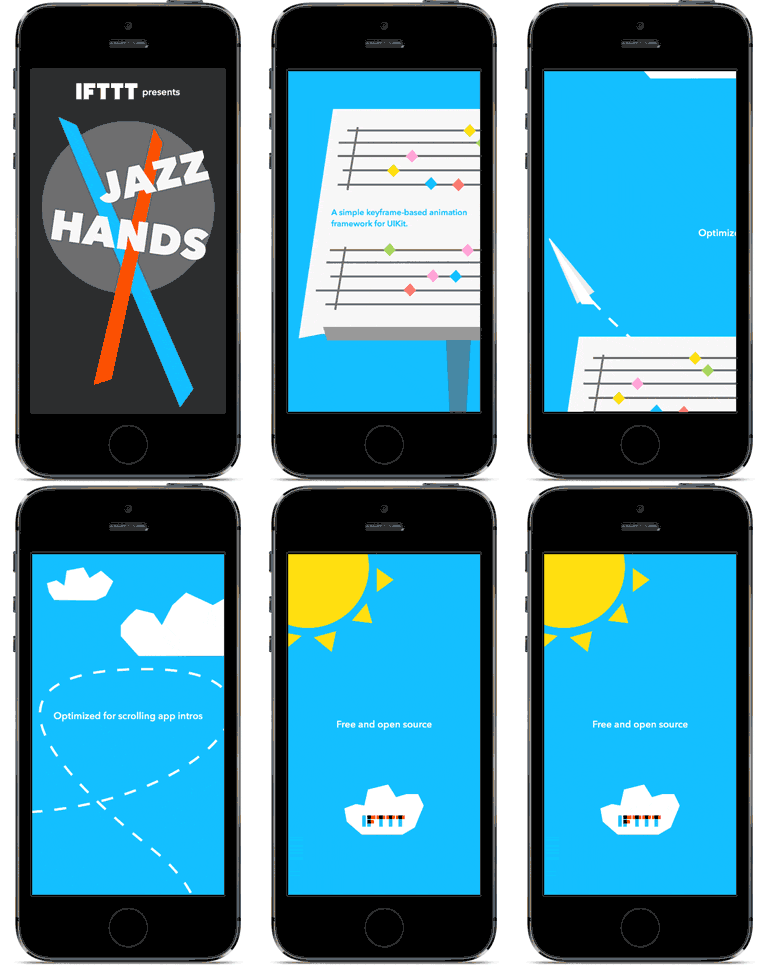
IFTTT/JazzHands được TopGit xếp vào nhóm dự án mã nguồn mở, với 6.3k sao trên GitHub, viết chủ yếu bằng Objective-C. A simple keyframe-based animation framework for UIKit. Perfect for scrolling app intros.
Tóm tắt dựng từ metadata GitHub của chính dự án — chưa có bài review TopGit. Trang sẽ tự động cập nhật khi bài review đầy đủ được xuất bản.
VÌ SAO CHƯA CÓ REVIEW
TopGit viết bài đầy đủ cho repo có nhiều sao nhất và được yêu cầu nhiều nhất. Trang này là snapshot trong thời gian chờ — xem README gốc ở tab READ ME.
Jazz Hands is a simple keyframe-based animation framework for UIKit. Animations can be controlled via gestures, scroll views, KVO, or ReactiveCocoa.
Jazz Hands is used extensively in IF and DO by IFTTT for iPhone and iPad, most famously in the app intro.
##Demo App
Open JazzHandsDemo.xcworkspace to see a simple demonstration of moving, scaling, fading, and transforming views in a scrolling app intro.
To run the example project, clone the repo, and run pod install from the Example directory.
##JazzHands in Swift
Looking to incorporate Jazz Hands into your Swift project? Check out RazzleDazzle, our brand new scrolling keyframe animations library reimagined in Swift.
##Installation
JazzHands is available through CocoaPods. To install
it, simply add the following line to your Podfile:
pod "JazzHands"
You may alternatively just copy the contents of the JazzHands folder into your project.
##Quick Start
First, add JazzHands to your UIViewController.
#import <IFTTTJazzHands.h>
Now, create an Animator to manage all of the animations in this UIViewController.
Create an animation for a view that you want to animate. There are multiple
types of animation that can be applied to a view. For this example, we'll use
IFTTTAlphaAnimation, which fades a view in and out.
Now, to animate the view, tell the animator what time it is. For example, to tie this animation to a UIScrollView, notify the animator of time in the scroller's delegate method.
This will produce an effect where the view will be fully faded in and visible for scroll positions 0 to 30. Between scroll positions 30 and 60, the view will fade out to be invisible, and it will stay faded out for scroll positions greater than 60.
##Animation Types
Jazz Hands supports several types of animations:
IFTTTAlphaAnimation animates the alpha property (creates fade effects).
IFTTTRotationAnimation animates a rotation transform in degrees (for rotation effects).
IFTTTBackgroundColorAnimation animates the backgroundColor property.
IFTTTCornerRadiusAnimation animates the layer.cornerRadius property.
IFTTTHideAnimation animates the hidden property (hides and shows views).
IFTTTScaleAnimation applies a scaling transform (to scale view sizes).
IFTTTTranslationAnimation applies a translation transform (to translate view position).
IFTTTTransform3DAnimation animates the layer.transform property (for 3D transforms).
IFTTTTextColorAnimation animates the textColor property of a UILabel.
IFTTTFillColorAnimation animates the fillColor property of a CAShapeLayer.
IFTTTStrokeStartAnimation animates the strokeStart property of a CAShapeLayer(does not work with IFTTTStrokeEndAnimation).
IFTTTStrokeEndAnimation animates the strokeEnd property of a CAShapeLayer(does not work with IFTTTStrokeStartAnimation).
IFTTTPathPositionAnimation animates the layer.position property of a UIView.
IFTTTConstraintConstantAnimation animates an AutoLayout constraint constant.
IFTTTConstraintMultiplierAnimation animates an AutoLayout constraint constant as a multiple of an attribute of another view (to offset or resize views based on another view's size)
IFTTTScrollViewPageConstraintAnimation animates an AutoLayout constraint constant to place a view on a scroll view page (to position views on a scrollView using AutoLayout)
IFTTTFrameAnimation animates the frame property (moves and sizes views. Not compatible with AutoLayout).
##More Examples
Easy Paging Scrollview Layouts in an AutoLayout World
JazzHands's keepView:onPage: method of the IFTTTAnimatedPagingScrollViewController is a super easy way to lay out a paging scroll view that does what you expect it to when your app is rotated or used in the new split-screen iPad views of iOS9, a notoriously tricky aspect of getting your apps fully AutoLayout-ready. JazzHands sets up an AutoLayout-friendly paging scroll view controller for you, and all you need to do to make your layout respond properly to any view size changes is tell JazzHands which page you'd like things on.
As a bonus, because it's built on top of the animations library, you can even tell JazzHands that you'd like one of your views to show up on multiple pages while other views scroll past, with a single call to keepView:onPages:.
To see the new JazzHands 2.0 AutoLayout magic in action, check out the example project.
###ReactiveCocoa
Say you want to perform some animations based on a UITableView's scroll offset, but you don't want to be the delegate for that table? ReactiveCocoa is perfect for that.
Trang TopGit này là một snapshot — tab "Readme" hiển thị nguyên văn README của repo (đã bỏ link, giữ ảnh). Repo GitHub ở github.com/IFTTT/JazzHands là nguồn chính thức.
IFTTT/JazzHands có bao nhiêu sao?
IFTTT/JazzHands có 6.3k sao GitHub — tải lại trang để xem số mới nhất, hoặc xem trực tiếp github.com/IFTTT/JazzHands. TopGit phản chiếu số sao của GitHub nhưng không cam kết đến từng phút.
IFTTT/JazzHands có tag gì không?
Bản đồng bộ chưa ghi nhận topic GitHub nào cho IFTTT/JazzHands. GitHub topics hiển thị ở thanh bên phải trang repo — đó là nơi đáng kiểm tra nhất.
IFTTT/JazzHands còn đang phát triển không?
Commit gần nhất trên IFTTT/JazzHands là 2.3 năm trước (theo timestamp GitHub). Repo có 659 fork — một chỉ báo về mức độ quan tâm của cộng đồng.
IFTTT/JazzHands viết bằng ngôn ngữ gì?
IFTTT/JazzHands chủ yếu viết bằng Objective-C. Trường "language" của GitHub dựa trên phần lớn byte ở nhánh mặc định.
Đọc đầy đủ README ở tab phía trên.
JazzHands có đáng để bạn bỏ thời gian?
ChatGPT, Claude và Perplexity đều đọc được trang này. Hỏi thử xem họ nghĩ gì về JazzHands.

 /JazzHands