Điểm qua jakearchibald/simple-serviceworker-tutorial: 397 sao trên GitHub, viết chủ yếu bằng JavaScript. A really simple ServiceWorker example, designed to be an interactive introduction to ServiceWorker
Tóm tắt dựng từ metadata GitHub của chính dự án — chưa có bài review TopGit. Trang sẽ tự động cập nhật khi bài review đầy đủ được xuất bản.
VÌ SAO CHƯA CÓ REVIEW
TopGit viết bài đầy đủ cho repo có nhiều sao nhất và được yêu cầu nhiều nhất. Trang này là snapshot trong thời gian chờ — xem README gốc ở tab READ ME.
It's a really simple ServiceWorker example. No build systems, (almost) no dependencies. It's designed to be an interactive introduction to the kinds of things you can do with ServiceWorker.
1. Get it running locally
Either clone it via git, or just grab the zip file.
If you already run a web server locally, put the files there. Or you can run a web server from the terminal for the current directory by installing node.js and running:
npm install
npm start
Visit the site in Chrome (http://localhost:8080 if you used the script above). Open the dev tools and look at the console. Once you refresh the page, it'll be under the ServiceWorker's control.
You can reset the SW & caches at any point by navigating to reset/. That will unregister the ServiceWorker & clear all the caches.
2. Go offline
Disable your internet connection & shut down your local web server.
If you refresh the page, it still works, even through you're offline! Well, we're missing that final JavaScript-added paragraph, but we'll fix that shortly.
Take a look at the code in index.html and sw.js, hopefully the comments make it easy to follow.
3. Fixing that script
The install event in the ServiceWorker is setting up the cache, but it's missing a reference to the script that adds the paragraph to the page. Add it to the array. The URL is script.js. It doesn't need to be a no-cors request like the Flickr image because it's on the same origin.
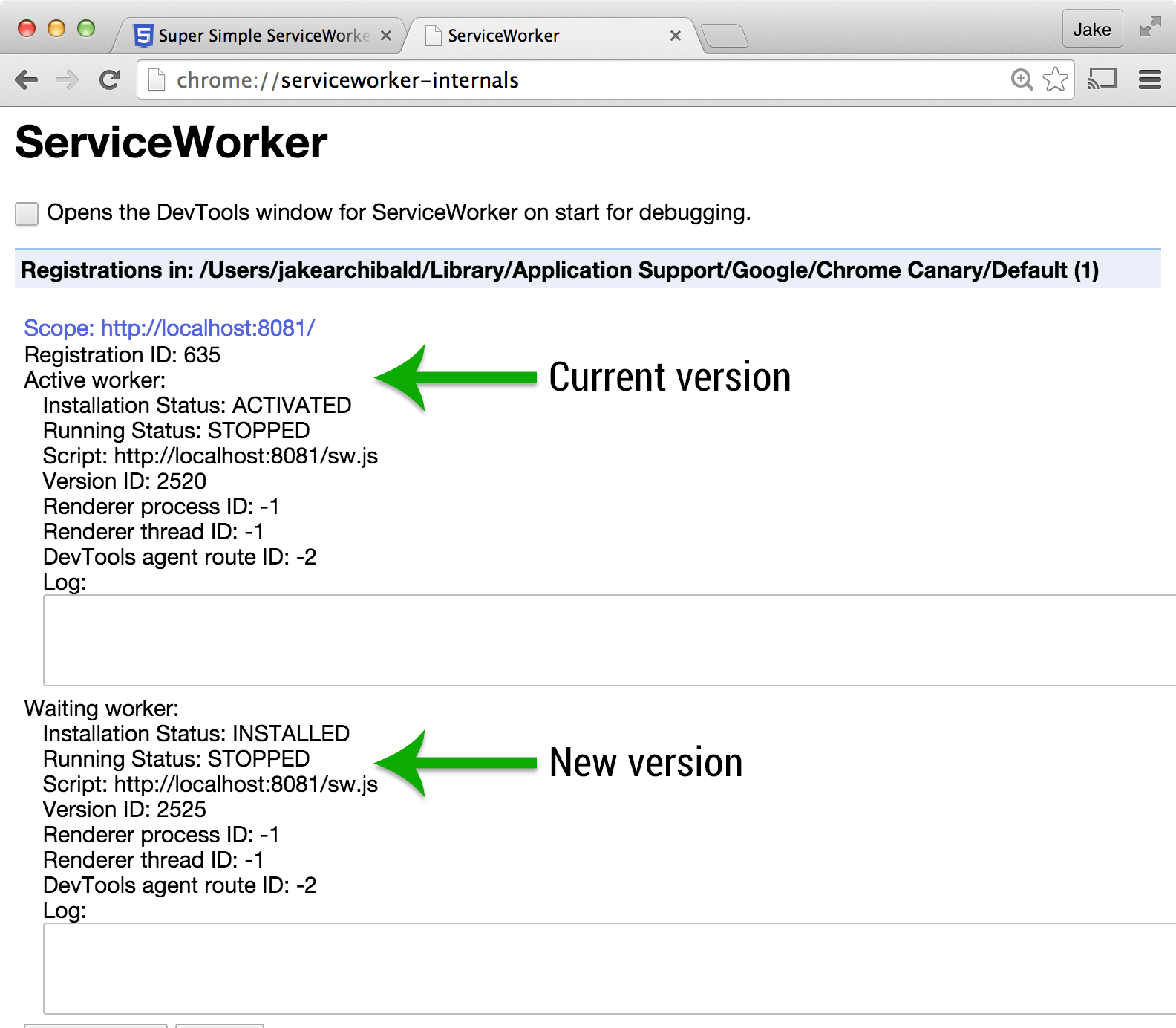
Make sure you're online, refresh the page & watch the console. The browser checks for updates to the ServiceWorker script, if anything in the file has changed it considers it to be a new version. The new version is been picked up, but it isn't ready to use.
If you open a new tab and go to chrome://serviceworker-internals you'll see both the old & new worker listed.
Not seeing the new worker? It could be that your server sent the original worker with a far-future max-age or similar caching header. Instead, use the node server mentioned in exercise 1 instead.
Follow the instructions in the page's console to get the new version working.
Test your page offline, the final JavaScript-added paragraph should have reappeared.
4. Faster updates!
The update process you just encountered means only one version of your app can run at once. That's often useful, but we don't need it right now.
self.skipWaiting called within a ServiceWorker means it won't wait for tabs to stop using the old version before it takes over.
In your install event, before the call to event.waitUntil add:
if (self.skipWaiting) { self.skipWaiting(); }
If you refresh the page now, the new version should activate immediately.
Chrome 40 shipped with ServiceWorker but without skipWaiting, so the if statement prevents errors there. If you want to see the effects of skipWaiting, use a newer version of Chrome, such as Chrome Canary.
skipWaiting means your new worker will handle requests from pages that were loaded with the old worker. If that's a problem, or if multiple tabs running different versions of your app/site is a problem, avoid skipWaiting.
5. Messing around with particular requests
Currently we're responding to all requests by trying the cache & falling back to the network. Let's do something different for particular URLs.
In the fetch event, before calling event.respondWith, add the following code:
if (/\.jpg$/.test(event.request.url)) {
  event.respondWith(fetch('trollface.svg'));
  return;
}
Here we're intercepting URLs that end .jpg and responding with a network fetch for a different resource.
Refresh the page, watch the console, and once the new ServiceWorker is active, refresh again. Now you get a different image!
6. Manual responses
In the previous step, we handled all requests ending .jpg, but often you want finer control over which URLs you handle.
In the fetch event, add the following code before the code you added in the previous exercise:
var pageURL = new URL('./', location);

if (event.request.url === pageURL.href) {
  event.respondWith(new Response("Hello world!"))
  return;
}
Refresh the page, watch the console, and once the new ServiceWorker is active, refresh again. Different response! This is how you create responses manually.
Further reading
You're now cooking with ServiceWorkers! To learn more about how they work, and practical patterns you'll use in apps and sites, check out the resources listed on is-serviceworker-ready.
Đọc thêm về jakearchibald/simple-serviceworker-tutorial ở đâu?
Trang TopGit này là một snapshot — tab "Readme" hiển thị nguyên văn README của repo (đã bỏ link, giữ ảnh). Repo GitHub ở github.com/jakearchibald/simple-serviceworker-tutorial là nguồn chính thức.
jakearchibald/simple-serviceworker-tutorial có phải mã nguồn mở không?
TopGit chưa ghi nhận license cho jakearchibald/simple-serviceworker-tutorial. Phần lớn repo public trên GitHub là mã nguồn mở, nhưng điều khoản khác nhau từng repo — mở file LICENSE để xác nhận.
jakearchibald/simple-serviceworker-tutorial có tag gì không?
Bản đồng bộ chưa ghi nhận topic GitHub nào cho jakearchibald/simple-serviceworker-tutorial. GitHub topics hiển thị ở thanh bên phải trang repo — đó là nơi đáng kiểm tra nhất.
jakearchibald/simple-serviceworker-tutorial có website riêng không?
TopGit chưa ghi nhận URL trang chủ cho jakearchibald/simple-serviceworker-tutorial. Phần README ở tab phía trên thường có link demo, hoặc xem mô tả GitHub của repo.
jakearchibald/simple-serviceworker-tutorial còn đang phát triển không?
Commit gần nhất trên jakearchibald/simple-serviceworker-tutorial là 9.9 năm trước (theo timestamp GitHub). Repo có 77 fork — một chỉ báo về mức độ quan tâm của cộng đồng.
Đọc đầy đủ README ở tab phía trên.
Chưa chắc simple-serviceworker-tutorial có hợp với bạn?
Để ChatGPT, Claude hoặc Perplexity tìm hiểu giúp — bấm bên dưới và xem AI nói gì về simple-serviceworker-tutorial.

 /simple-serviceworker-tutorial