Điểm qua jdan/isomer: 2.9k sao trên GitHub, viết chủ yếu bằng JavaScript, thuộc nhóm Image Tools. Simple isometric graphics library for HTML5 canvas
Tóm tắt dựng từ metadata GitHub của chính dự án — chưa có bài review TopGit. Trang sẽ tự động cập nhật khi bài review đầy đủ được xuất bản.
VÌ SAO CHƯA CÓ REVIEW
TopGit viết bài đầy đủ cho repo có nhiều sao nhất và được yêu cầu nhiều nhất. Trang này là snapshot trong thời gian chờ — xem README gốc ở tab READ ME.
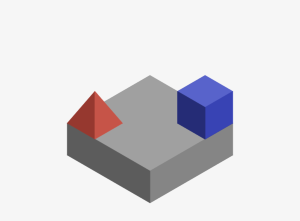
Isomer is an easy-to-use graphics library for drawing isometric scenes.
var Shape = Isomer.Shape;
var Point = Isomer.Point;
var Color = Isomer.Color;
var red = new Color(160, 60, 50);
var blue = new Color(50, 60, 160);

iso.add(Shape.Prism(Point.ORIGIN, 3, 3, 1));
iso.add(Shape.Pyramid(Point(0, 2, 1)), red);
iso.add(Shape.Prism(Point(2, 0, 1)), blue);
Getting Started
First, grab a copy of Isomer here. Then, include the script wherever you see fit:
<script src="/path/to/isomer.min.js"></script>
After which you'll need to place a canvas in your document that we can later refer to. Be sure to give it a width and height.
Note (Optional): To improve the look of your canvas on retina displays, declare the width and height of your canvas element as double how you want it to appear. Then style your canvas with CSS to include the original dimensions.
#art {
  width: 400px;
  height: 300px;
}
At this point we can finally instantiate an Isomer object. Pass it a reference to your canvas like so:
var iso = new Isomer(document.getElementById("art"));
Now you're ready to start drawing!
Build
Isomer uses Gulp as a build tool. To build the project,
first install the dependencies.
To generate isomer.js and isomer.min.js in the dist/ directory.
Develop
Isomer is developed using Webpack. Install
dependencies and build the project like so:
$ npm install
$ npm run dist
test/index.html contains a basic testing page that draws various shapes. This page will load a unminified bundle with source maps.
The test script (accessible via npm test) uses webpack-dev-server to automatically rebuild Isomer on any file changes. This script also opens the testing page (located at http://localhost:2992/webpack-dev-server/) in your default browser. The testing page includes a live reload script to refresh when Isomer is rebuilt and notify if the code is not conform the styling conventions for Isomer.
Isomer also accepts the canvas provided by node-canvas,
meaning you can generate isometric graphics on the command line.
var Canvas = require('canvas');
var canvas = new Canvas(400, 400);
var Isomer = require('isomer');   // npm install isomer
var fs = require('fs');
var out = fs.createWriteStream('output.png');

var iso = new Isomer(canvas);
iso.add(Isomer.Shape.Prism(Isomer.Point.ORIGIN));

canvas.pngStream().pipe(out);
More Info
For more info, check out the official project page.
Trang TopGit này là một snapshot — tab "Readme" hiển thị nguyên văn README của repo (đã bỏ link, giữ ảnh). Repo GitHub ở github.com/jdan/isomer là nguồn chính thức.
jdan/isomer có những chủ đề gì?
GitHub topics của jdan/isomer: "canvas", "isometric-graphics". TopGit xếp repo vào nhóm Image Tools.
jdan/isomer có phải mã nguồn mở không?
Có — jdan/isomer phát hành theo license MIT, nghĩa là mã nguồn mở để đọc, fork và (tùy license) tái sử dụng. Mã: github.com/jdan/isomer.
jdan/isomer có trang demo không?
Dự án có trang chủ ở http://jdan.github.io/isomer. Tab "Readme" ở trang này thường có ảnh chụp và hướng dẫn bắt đầu nhanh.
jdan/isomer còn đang phát triển không?
Commit gần nhất trên jdan/isomer là 4.6 năm trước (theo timestamp GitHub). Repo có 141 fork — một chỉ báo về mức độ quan tâm của cộng đồng.
jdan/isomer dùng license gì?
jdan/isomer phát hành theo license MIT. Nên mở file LICENSE trên GitHub để xác nhận — license metadata đôi khi lệch với thực tế dự án.
Đọc đầy đủ README ở tab phía trên.
isomer có đáng để bạn bỏ thời gian?
ChatGPT, Claude và Perplexity đều đọc được trang này. Hỏi thử xem họ nghĩ gì về isomer.

 /isomer