jdx/gh là dự án Developer Tools trên GitHub, viết chủ yếu bằng Shell, với 175 sao. Easily manage your local git repos
Tóm tắt dựng từ metadata GitHub của chính dự án — chưa có bài review TopGit. Trang sẽ tự động cập nhật khi bài review đầy đủ được xuất bản.
VÌ SAO CHƯA CÓ REVIEW
TopGit viết bài đầy đủ cho repo có nhiều sao nhất và được yêu cầu nhiều nhất. Trang này là snapshot trong thời gian chờ — xem README gốc ở tab READ ME.
gh allows you to very quickly navigate between GitHub project cloned on your
local box. It will cd into project directories quickly and clone repos that do
not exist.
There is a lot of mental overhead trying to manage a custom ~/src directory with your projects. I tried managing by work/personal, programming language, even tried a different directory for each month. I found by simply making your projects path reflect GitHub, it was much easier to remember where things were.
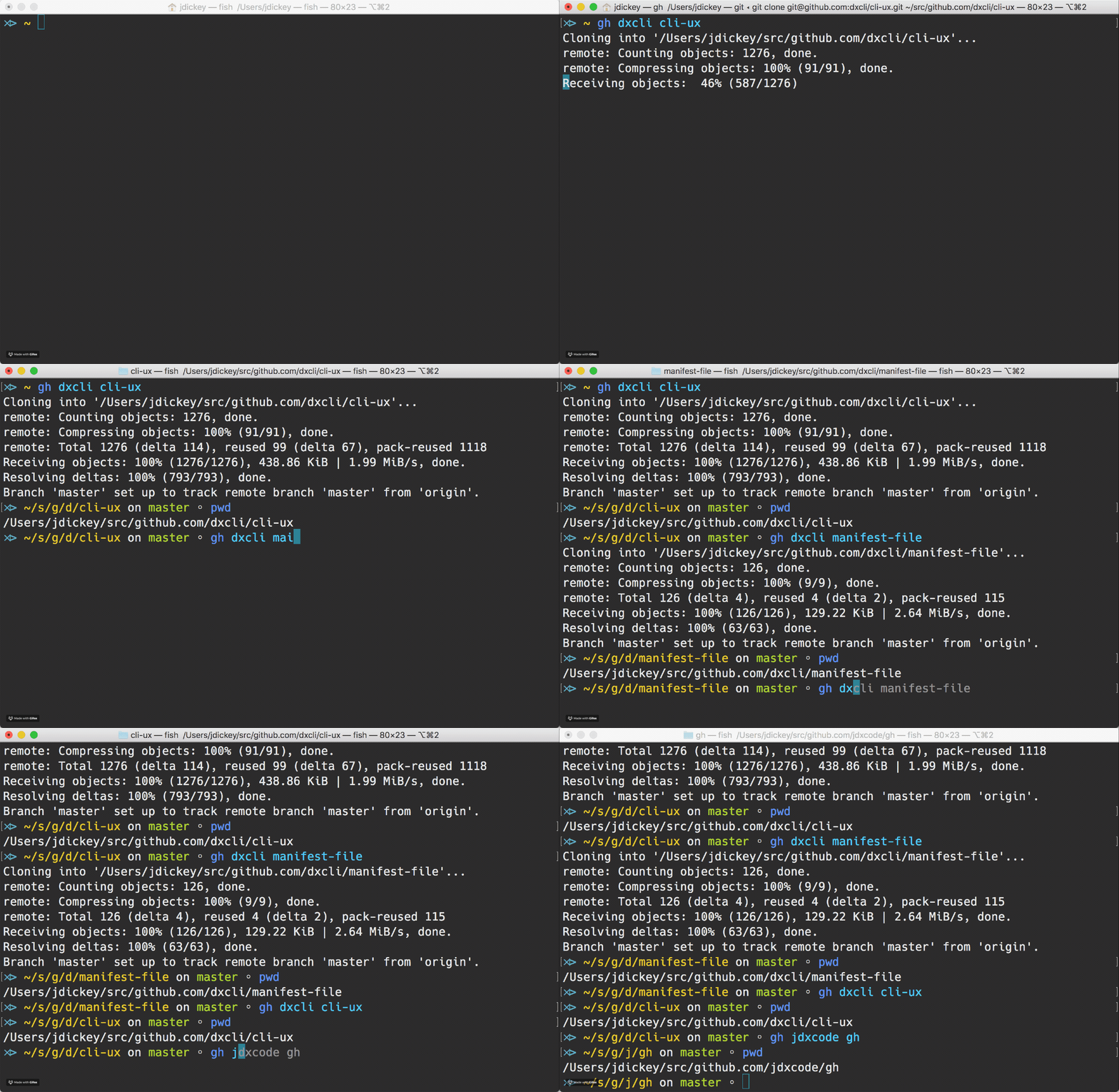
Here is a demo of me moving around various projects
Usage
Changing the base directory
Supported Shells
Installation for bash
Installation For Fish
Installation For Oh-My-ZSH
Installation for zsh
GitHub Alternatives
Go developers
Usage
Clone and/or go to ~/src/github.com/githubuser/githubrepo.
gh githubuser githubrepo
It'll either just be a cd or it will clone [email protected]:githubuser/githubrepo.git
Note that tab completion is available for project and usernames.
Changing the base directory
gh will clone or cd into $GH_BASE_DIR/github.com/user/repo.
By default $GH_BASE_DIR points to $HOME/src. By changing the $GH_BASE_DIR variable in your shell's config file, you can control where gh will clone/cd into.
Note: Already cloned repos will not be transferred to the new location, they will be cloned again.
More important Note: Do not use the tilde-character (~) in $GH_BASE_DIR, use $HOME instead.
# Which plugins would you like to load? (plugins can be found in ~/.oh-my-zsh/plugins/*)
# Custom plugins may be added to ~/.oh-my-zsh/custom/plugins/
# Example format: plugins=(rails git textmate ruby lighthouse)
plugins=(git brew meteor node npm osx redis-cli sublime gh)
Finally reload the ~/.zshrc file:
source ~/.zshrc
The zsh autocompletion supports loading a user's repositories from github. For that to work, you need to set the environment variable GH_FETCH_REPOS to true. You will also need to install jsawk for it to work.
If you now type gh someusername and then press <Tab>, it will load that user's repositories from github and display them to you.
Note that, if autocompletion isn't working, then you probably need to make zsh refresh the completions dumpfile. Just remove the $HOME/.zcompdump-* file:
rm $HOME/.zcompdump-*
and reload the ~/.zshrc again to regenerate it.
For the bb (bitbucket) equivalent, repeat the above instructions, but substitute gh with bb, i.e.:
jdx/gh có 175 sao GitHub — tải lại trang để xem số mới nhất, hoặc xem trực tiếp github.com/jdx/gh. TopGit phản chiếu số sao của GitHub nhưng không cam kết đến từng phút.
jdx/gh có những chủ đề gì?
GitHub topics của jdx/gh: "bash", "cli", "fish", "github", "zsh". TopGit xếp repo vào nhóm Developer Tools.
jdx/gh còn đang phát triển không?
Commit gần nhất trên jdx/gh là 2.9 năm trước (theo timestamp GitHub). Repo có 33 fork — một chỉ báo về mức độ quan tâm của cộng đồng.
jdx/gh là gì?
jdx/gh (jdx/gh) là dự án Shell trên GitHub. Theo mô tả gốc: Easily manage your local git repos
jdx/gh so với các dự án Developer Tools khác thế nào?
jdx/gh được TopGit xếp vào nhóm Developer Tools, với 175 sao GitHub và viết bằng Shell. Xem trang chủ đề Developer Tools trên TopGit để so sánh với các dự án tương tự theo số sao và mức độ hoạt động.
jdx/gh viết bằng ngôn ngữ gì?
jdx/gh chủ yếu viết bằng Shell. Trường "language" của GitHub dựa trên phần lớn byte ở nhánh mặc định.
Vì sao jdx/gh được xếp vào nhóm Developer Tools?
TopGit xếp jdx/gh vào nhóm Developer Tools dựa trên GitHub topics và mô tả của repo (gắn thẻ: "bash", "cli", "fish"). Việc phân loại dựa trên metadata thật của repo, không phải đoán theo cảm tính biên tập.
Đọc đầy đủ README ở tab phía trên.
Chưa chắc gh có hợp với bạn?
Để ChatGPT, Claude hoặc Perplexity tìm hiểu giúp — bấm bên dưới và xem AI nói gì về gh.

 /gh