Được TopGit lập chỉ mục từ metadata GitHub: jdx/mise có 31.9k sao, viết chủ yếu bằng Rust. dev tools, env vars, task runner
Tóm tắt dựng từ metadata GitHub của chính dự án — chưa có bài review TopGit. Trang sẽ tự động cập nhật khi bài review đầy đủ được xuất bản.
VÌ SAO CHƯA CÓ REVIEW
TopGit viết bài đầy đủ cho repo có nhiều sao nhất và được yêu cầu nhiều nhất. Trang này là snapshot trong thời gian chờ — xem README gốc ở tab READ ME.
Getting Started •
Documentation •
Dev Tools •
Environments •
Tasks
Sponsored by entire.io and 37signals.
View all sponsors.
[!TIP]
My latest project, aube just hit stable! It's the fastest Node.js package manager with strong security defaults and is compatible with npm/pnpm/yarn lockfiles!
What is it?
mise prepares your development environment before each command runs. It keeps
project tools, environment variables, and tasks in one mise.toml file so new
shells, checkouts, and CI jobs all start from the same setup.
Install and switch between dev tools like node, python, cmake, terraform, and hundreds more.
Load environment variables per project directory, including values from .env files and other sources.
Define and run tasks for building, testing, linting, and deploying projects.
Demo
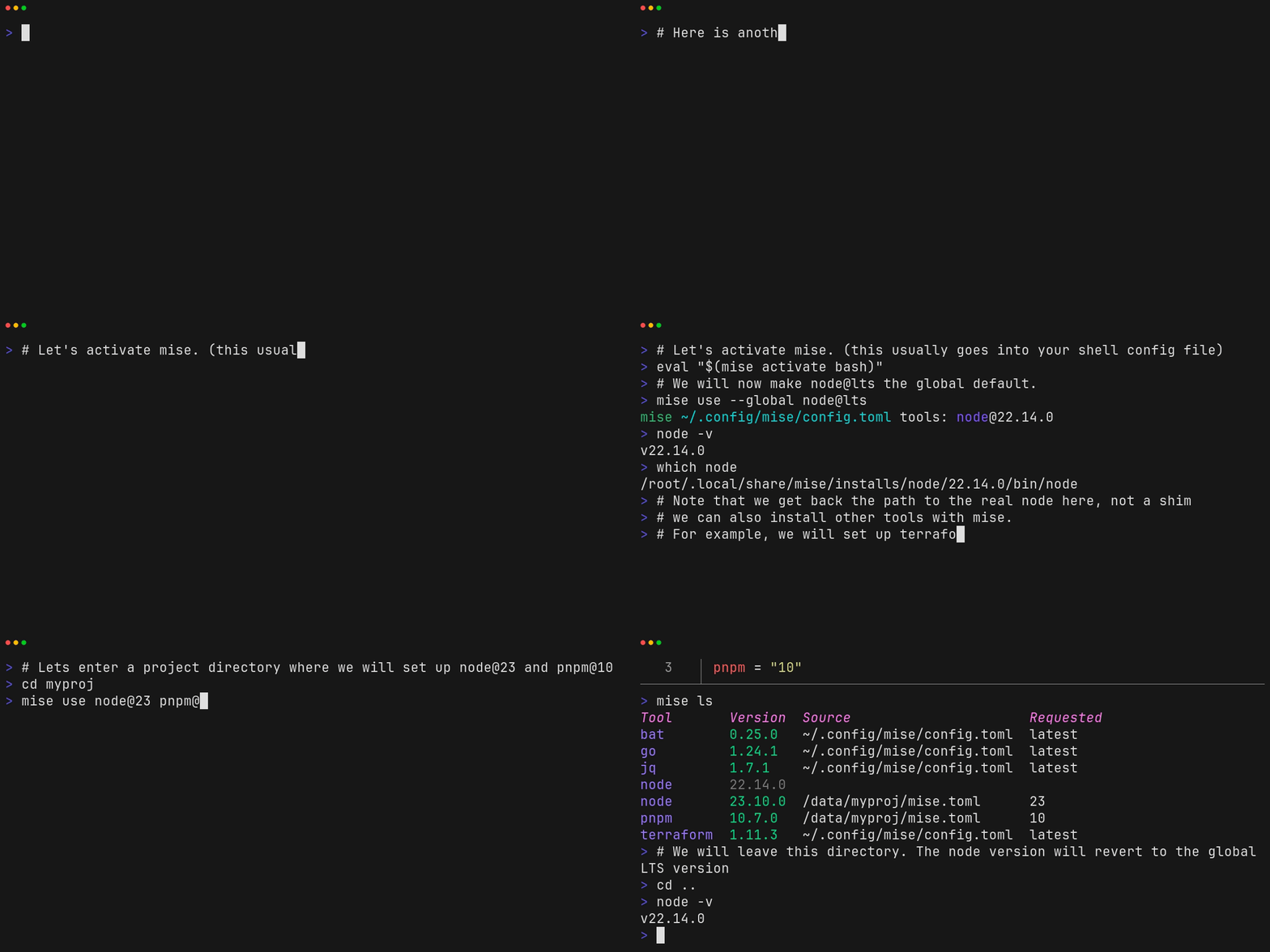
The following demo shows how to install and use mise to manage multiple versions of node on the same system.
Note that calling which node gives us a real path to node, not a shim.
It also shows that you can use mise to install and many other tools such as jq, terraform, or go.
Hook mise into your shell (pick the right one for your shell):
# note this assumes mise is located at ~/.local/bin/mise
# which is what https://mise.run does by default
echo 'eval "$(~/.local/bin/mise activate bash)"' >> ~/.bashrc
echo 'eval "$(~/.local/bin/mise activate zsh)"' >> ~/.zshrc
echo '~/.local/bin/mise activate fish | source' >> ~/.config/fish/config.fish
echo '~/.local/bin/mise activate pwsh | Out-String | Invoke-Expression' >> ~/.config/powershell/Microsoft.PowerShell_profile.ps1
Execute commands with specific tools
$ mise exec node@26 -- node -v
mise [email protected] ✓ installed
v26.x.x
Install tools
$ mise use --global node@26 go@1
$ node -v
v26.x.x
$ go version
go version go1.x.x macos/arm64
See dev tools for more examples.
Manage environment variables
# mise.toml
[env]
SOME_VAR = "foo"
$ mise set SOME_VAR=bar
$ echo $SOME_VAR
bar
Note that mise can also load .env files.
Run tasks
# mise.toml
[tasks.build]
description = "build the project"
run = "echo building..."
$ mise run build
building...
See tasks for more information.
Example mise project
Here is a combined example to give you an idea of how you can use mise to manage your a project's tools, environment, and tasks.
# mise.toml
[tools]
terraform = "1"
aws-cli = "2"

[env]
TF_WORKSPACE = "development"
AWS_REGION = "us-west-2"
AWS_PROFILE = "dev"

[tasks.plan]
description = "Run terraform plan with configured workspace"
run = """
terraform init
terraform workspace select $TF_WORKSPACE
terraform plan
"""

[tasks.validate]
description = "Validate AWS credentials and terraform config"
run = """
aws sts get-caller-identity
terraform validate
"""

[tasks.deploy]
description = "Deploy infrastructure after validation"
depends = ["validate", "plan"]
run = "terraform apply -auto-approve"
Run it with:
mise install # install tools specified in mise.toml
mise run deploy
Find more examples in the mise cookbook.
Full Documentation
See mise.jdx.dev
GitHub Issues & Discussions
Due to the volume of issue submissions mise received, using GitHub Issues became unsustainable for
the project. Instead, mise uses GitHub Discussions which provide a more community-centric platform
for communication and require less management on the part of the maintainers.
Please note the following discussion categories, which match how issues are often used:
Announcements
Ideas: for feature requests, etc.
Troubleshooting & Bug Reports
Special Thanks
Thanks to Namespace for providing CI services for mise.
Trang TopGit này là một snapshot — tab "Readme" hiển thị nguyên văn README của repo (đã bỏ link, giữ ảnh). Repo GitHub ở github.com/jdx/mise là nguồn chính thức.
jdx/mise có bao nhiêu sao?
jdx/mise có 31.9k sao GitHub — tải lại trang để xem số mới nhất, hoặc xem trực tiếp github.com/jdx/mise. TopGit phản chiếu số sao của GitHub nhưng không cam kết đến từng phút.
jdx/mise có phải mã nguồn mở không?
Có — jdx/mise phát hành theo license MIT, nghĩa là mã nguồn mở để đọc, fork và (tùy license) tái sử dụng. Mã: github.com/jdx/mise.
jdx/mise còn đang phát triển không?
Commit gần nhất trên jdx/mise là 3 ngày trước (theo timestamp GitHub). Repo có 1.3k fork — một chỉ báo về mức độ quan tâm của cộng đồng.
jdx/mise dùng license gì?
jdx/mise phát hành theo license MIT. Nên mở file LICENSE trên GitHub để xác nhận — license metadata đôi khi lệch với thực tế dự án.
jdx/mise là gì?
jdx/mise (jdx/mise) là dự án Rust trên GitHub. Theo mô tả gốc: dev tools, env vars, task runner
jdx/mise viết bằng ngôn ngữ gì?
jdx/mise chủ yếu viết bằng Rust. Trường "language" của GitHub dựa trên phần lớn byte ở nhánh mặc định.