Trên GitHub, jesseduffield/lazynpm đã đạt 862 sao, ngôn ngữ Go. terminal UI for npm
Tóm tắt dựng từ metadata GitHub của chính dự án — chưa có bài review TopGit. Trang sẽ tự động cập nhật khi bài review đầy đủ được xuất bản.
VÌ SAO CHƯA CÓ REVIEW
TopGit viết bài đầy đủ cho repo có nhiều sao nhất và được yêu cầu nhiều nhất. Trang này là snapshot trong thời gian chờ — xem README gốc ở tab READ ME.
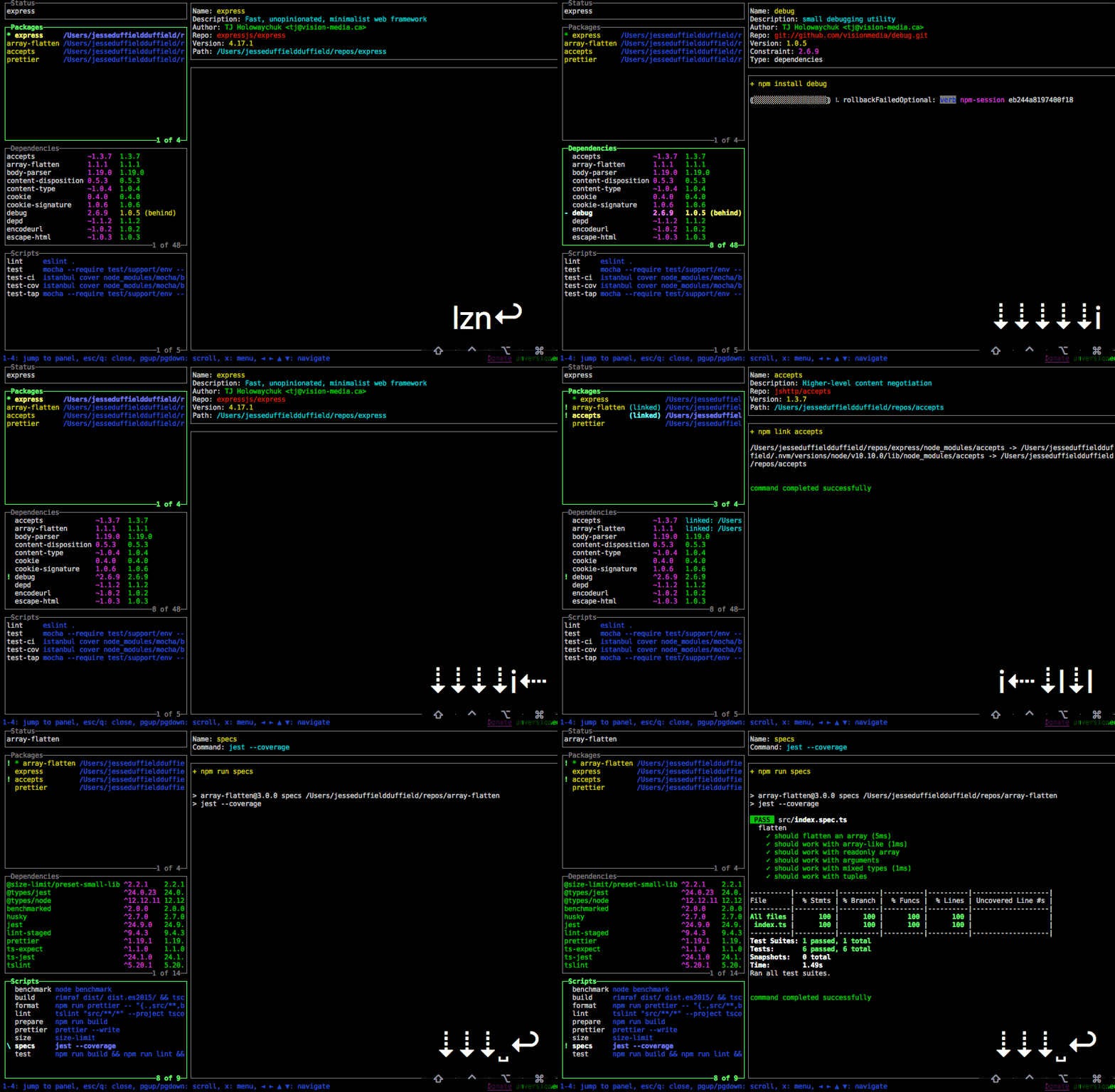
A simple terminal UI for npm commands, written in Go with the gocui library.
npm is pretty cool, but some of its workflows are a little too much for somebody with my atrocious short term memory. If I need to link a couple of dependencies to a package I need to do an npm install on the package so we're up to date, then cd to each dependency package and npm install, then npm run build, then npm link if it's not already globally linked (and how would I know that it is?) and then cd back to the original package and do npm link <dependency> for each dependency. Pretty much every time I'll get halfway through, suspect that I've forgotten a step, then start again from scratch. But who needs a functionining brain when have a tool where every step in the process take one keypress and at a glance you can see how everything is linked up?
lazynpm is the younger brother of lazygit and lazydocker, and has learnt from both its siblings how best to make life lazier in the terminal so that you can focus on what matters: programming.
Table of contents
Installation
Binary releases
Homebrew
Go
Usage
Keybindings
Changing directory on exit
Configuration
Tutorials
Cool Features
Contributing
Donate
Github Sponsors is matching all donations dollar-for-dollar for 12 months so if you're feeling generous consider sponsoring me
Installation
This program is not compatible with Windows because one of its dependencies, pty, is not compatible.
Binary Releases
For Mac OS or Linux, you can download a binary release here.
Homebrew
Normally the lazynpm formula can be found in the Homebrew core but we suggest you tap our formula to get the frequently updated one. It works with Linux, too.
Tap:
brew install jesseduffield/lazynpm/lazynpm
Go
go install github.com/jesseduffield/lazynpm@latest
Please note:
If you get an error claiming that lazynpm cannot be found or is not defined, you
may need to add ~/go/bin to your $PATH (MacOS/Linux). Not to be mistaken for $GOROOT/bin (which is for Go's own binaries,
not apps like lazynpm).
Usage
Call lazynpm in your terminal inside a git repository.
$ lazynpm
If you want, you can
also add an alias for this with echo "alias lzn='lazynpm'" >> ~/.zshrc (or
whichever rc file you're using).
Keybindings
You can check out the list of keybindings here.
Changing Directory On Exit
If you change repos in lazynpm and want your shell to change directory into that repo on exiting lazynpm, add this to your ~/.zshrc (or other rc file):
lzn()
{
    export LAZYNPM_NEW_DIR_FILE=~/.lazynpm/newdir

    lazynpm "$@"

    if [ -f $LAZYNPM_NEW_DIR_FILE ]; then
            cd "$(cat $LAZYNPM_NEW_DIR_FILE)"
            rm -f $LAZYNPM_NEW_DIR_FILE > /dev/null
    fi
}
Then source ~/.zshrc and from now on when you call lzn and exit you'll switch directories to whatever you were in inside lazyigt. To override this behaviour you can exit using shift+Q rather than just q.
Configuration
Check out the configuration docs.
Tutorials
Video Tutorial
Twitch Stream
Cool features
easily link packages and see which packages are linked
pack packages and install from tarballs
instantly know which dependencies are behind (or ahead) based on semver
install/update multiple things at a time
view at a glance each description of a package's dependencies
easily switch between packages
easily change the version constraints on packages
easily add/remove/modify dependencies and scripts
Contributing
I've written the code so that it's easy to build upon, so contributors are welcome! Please check out the contributing guide.
For contributor discussion about things not better discussed here in the repo, join the discord channel
Donate
If you would like to support the development of lazynpm, consider sponsoring me (github is matching all donations dollar-for-dollar for 12 months)
Work in progress
I don't use npm as heavily as I use git/docker so if you have an idea for satisfying a use case I'm not aware of, please raise an issue (and better yet a PR)
Social
If you want to see what I (Jesse) am up to in terms of development, follow me on
twitter or watch me program on
twitch.
Trang TopGit này là một snapshot — tab "Readme" hiển thị nguyên văn README của repo (đã bỏ link, giữ ảnh). Repo GitHub ở github.com/jesseduffield/lazynpm là nguồn chính thức.
jesseduffield/lazynpm có phải mã nguồn mở không?
Có — jesseduffield/lazynpm phát hành theo license MIT, nghĩa là mã nguồn mở để đọc, fork và (tùy license) tái sử dụng. Mã: github.com/jesseduffield/lazynpm.
jesseduffield/lazynpm có tag gì không?
Bản đồng bộ chưa ghi nhận topic GitHub nào cho jesseduffield/lazynpm. GitHub topics hiển thị ở thanh bên phải trang repo — đó là nơi đáng kiểm tra nhất.
jesseduffield/lazynpm có website riêng không?
TopGit chưa ghi nhận URL trang chủ cho jesseduffield/lazynpm. Phần README ở tab phía trên thường có link demo, hoặc xem mô tả GitHub của repo.
jesseduffield/lazynpm còn đang phát triển không?
Commit gần nhất trên jesseduffield/lazynpm là 3.7 năm trước (theo timestamp GitHub). Repo có 40 fork — một chỉ báo về mức độ quan tâm của cộng đồng.
jesseduffield/lazynpm dùng license gì?
jesseduffield/lazynpm phát hành theo license MIT. Nên mở file LICENSE trên GitHub để xác nhận — license metadata đôi khi lệch với thực tế dự án.
Đọc đầy đủ README ở tab phía trên.
lazynpm có đáng để bạn bỏ thời gian?
ChatGPT, Claude và Perplexity đều đọc được trang này. Hỏi thử xem họ nghĩ gì về lazynpm.
 /lazynpm