jiji262/douyin-downloader

Trên GitHub, jiji262/douyin-downloader đã đạt 12.0k sao, ngôn ngữ Python. A practical Douyin downloader for both single-item and profile batch downloads, with progress display, retries, SQLite deduplication, and browser fallback support. 抖音批量下载工具,去水印,支持视频、图集、合集、音乐(原声)。
Tóm tắt dựng từ metadata GitHub của chính dự án — chưa có bài review TopGit. Trang sẽ tự động cập nhật khi bài review đầy đủ được xuất bản.
TopGit viết bài đầy đủ cho repo có nhiều sao nhất và được yêu cầu nhiều nhất. Trang này là snapshot trong thời gian chờ — xem README gốc ở tab READ ME.
Snapshot
Cộng tác viên hàng đầu
Xem cộng tác viên hàng đầu
Douyin Downloader V2.0

A practical Douyin downloader supporting videos, image-notes, collections, music, favorites collections, and profile batch downloads, with progress display, retries, SQLite deduplication, download integrity checks, and browser fallback support.
Desktop App (Douzy)
A desktop GUI built on the same backend, with dedicated workspaces for Douyin, TikTok, and YouTube. Paste a link to start, sync account content, follow every task, and manage downloaded works in a local archive.
- Three platforms: Douyin videos, galleries, profiles, and collections; TikTok videos, photos, and profiles; YouTube videos, Shorts, channels, and playlists
- Account content: sync Douyin following, favorites collections, collected series, and likes
- Visual workflow: multi-link queue, task status and retry controls, local download archive, filters, and quick re-download
Beta: The desktop app is currently in closed beta. To try it, download the build from the Releases page.
| Douyin link download | TikTok download workspace | YouTube workbench |
|---|---|---|
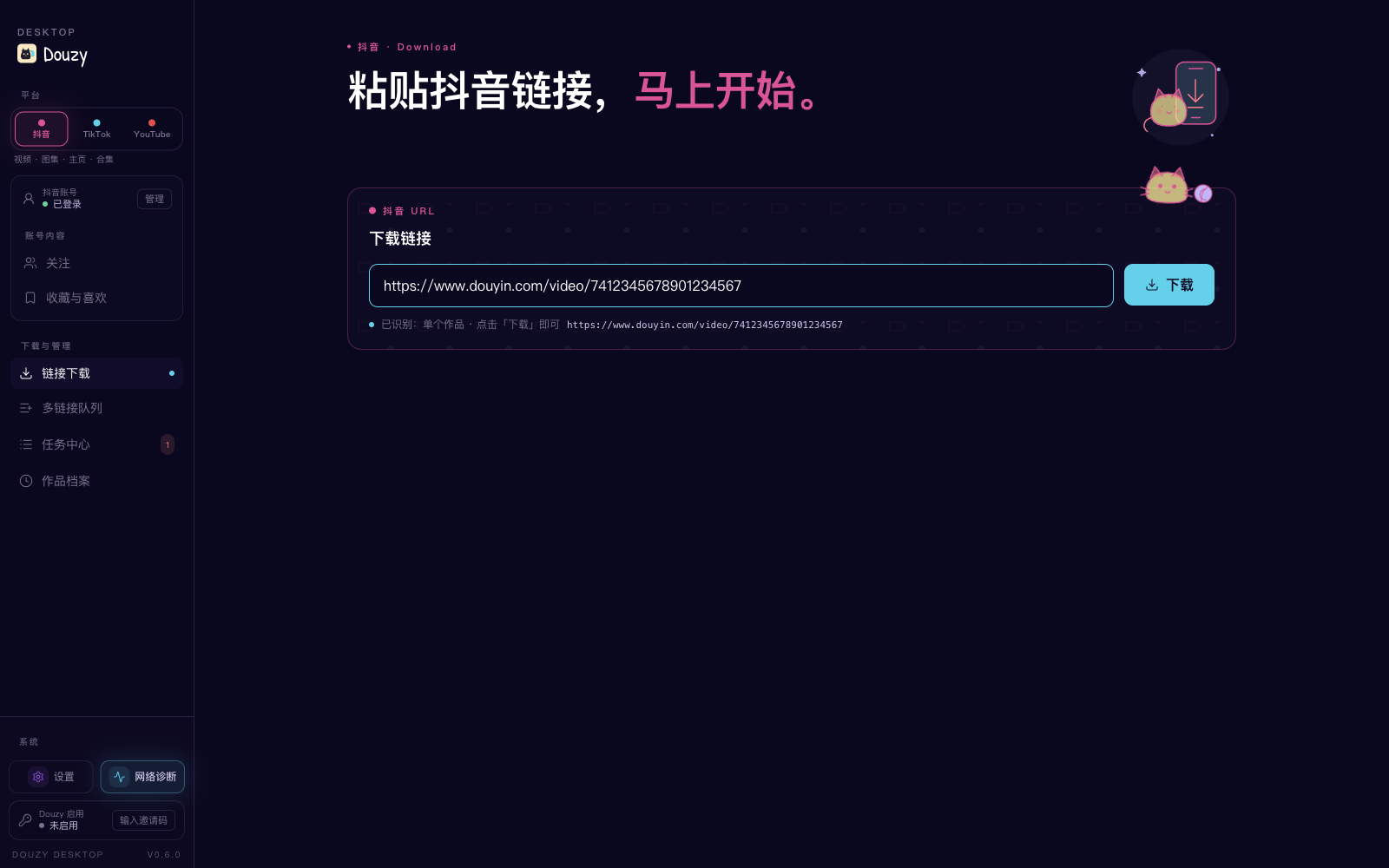 | 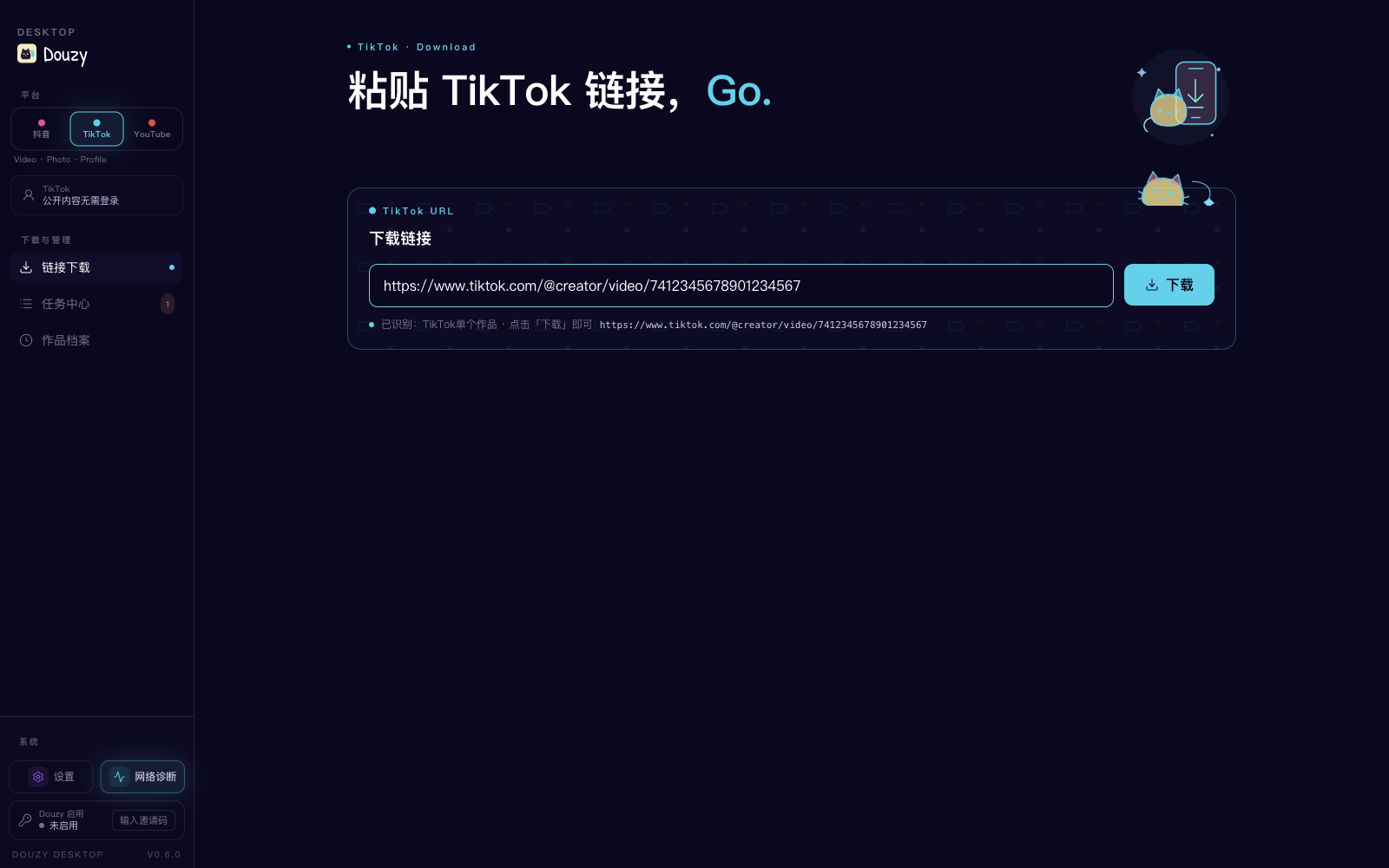 | 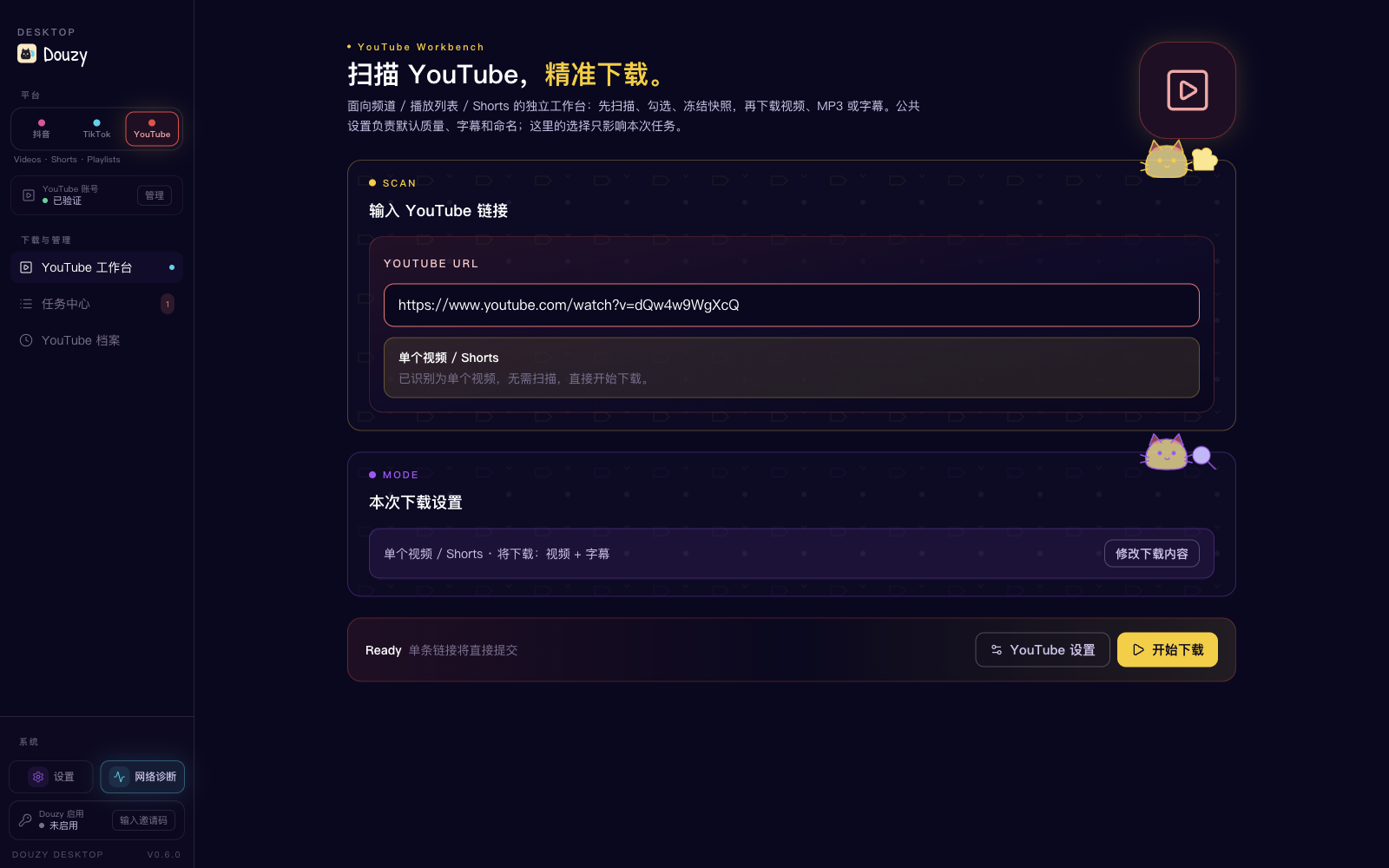 |
| Paste a video, gallery, profile, or collection link and start in one click. | Download public videos, photo posts, and profiles without signing in. | Scan videos, Shorts, channels, and playlists, then configure video, MP3, or subtitle downloads. |
| Following management | Favorites and likes | Task Center |
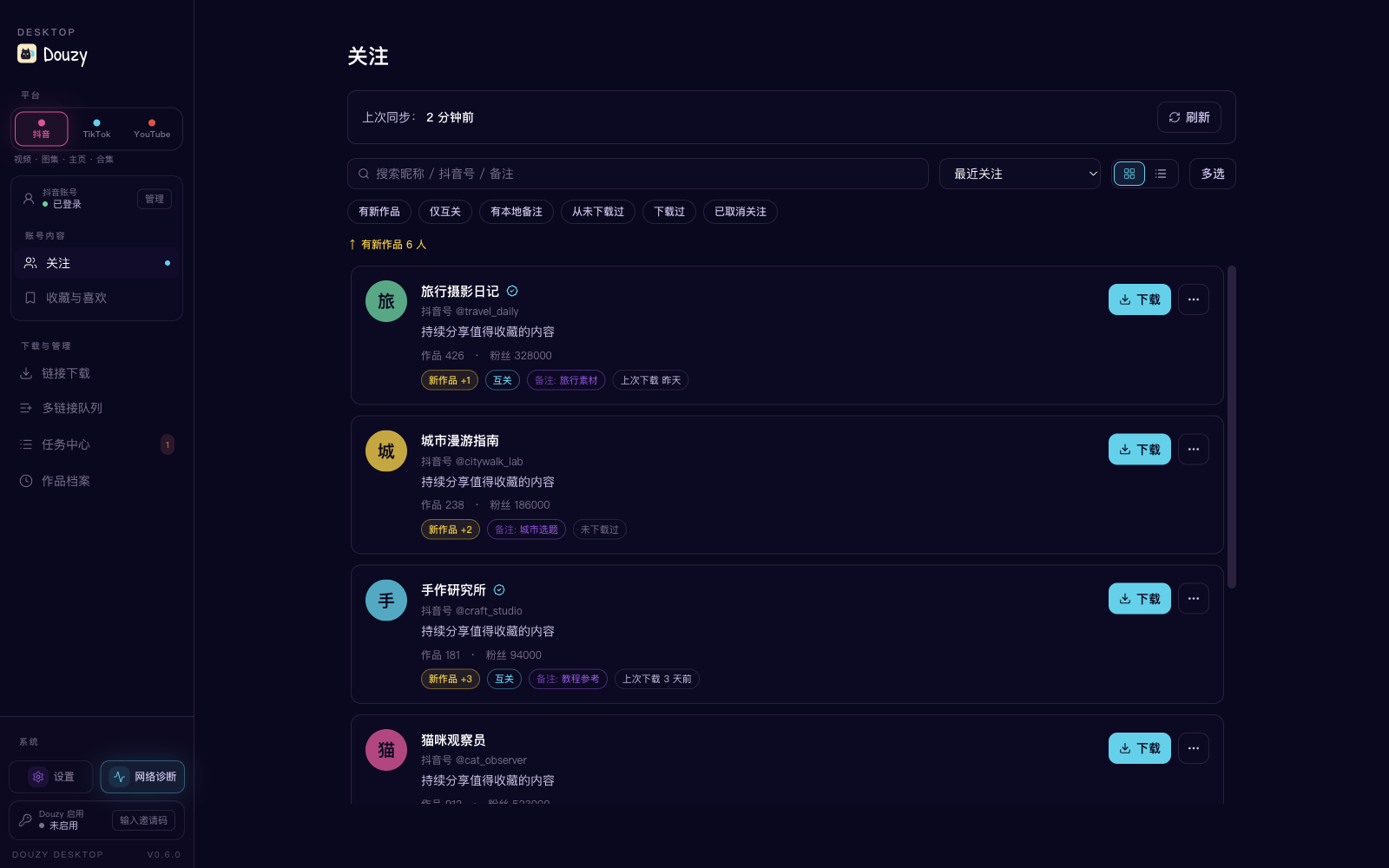 | 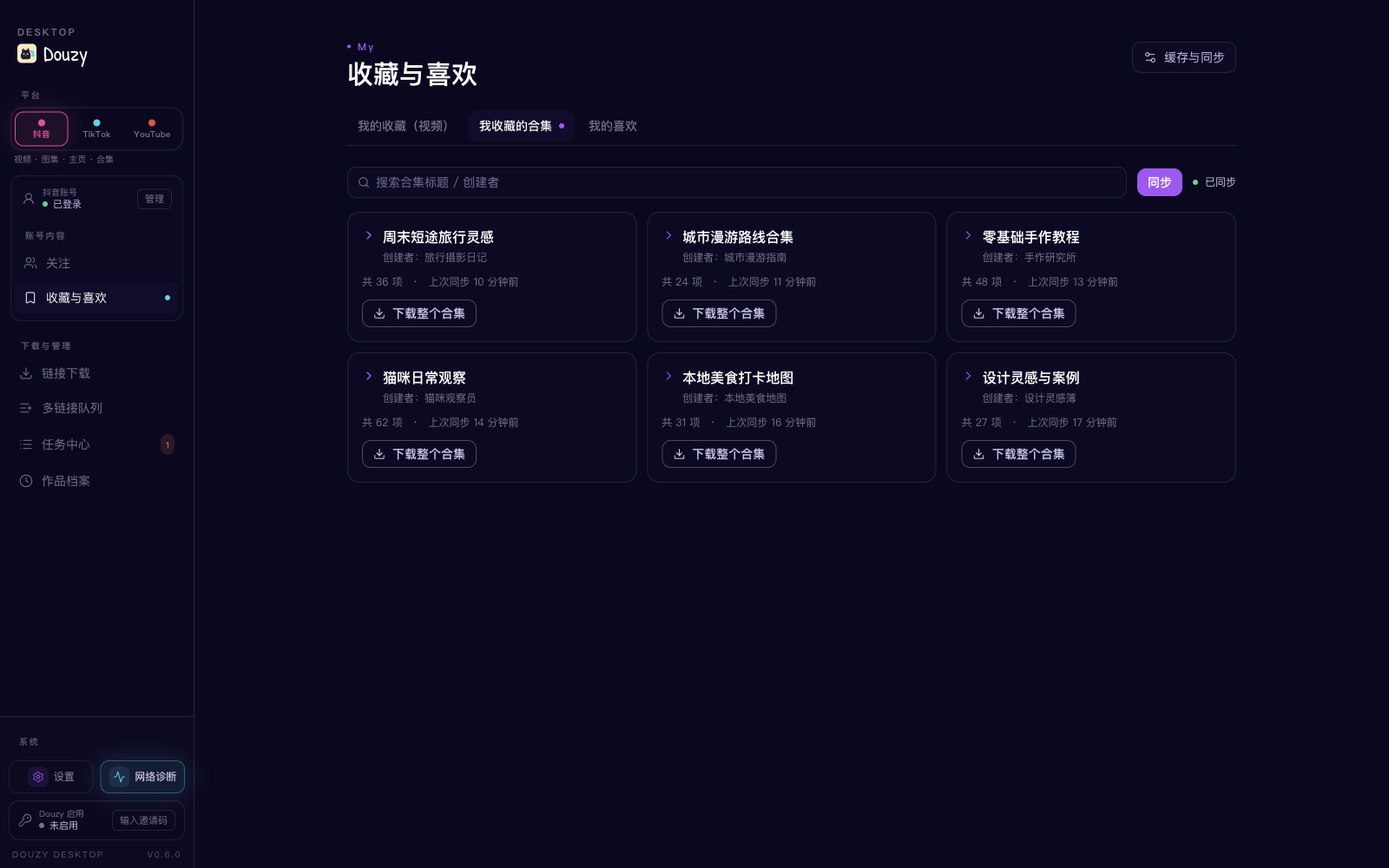 | 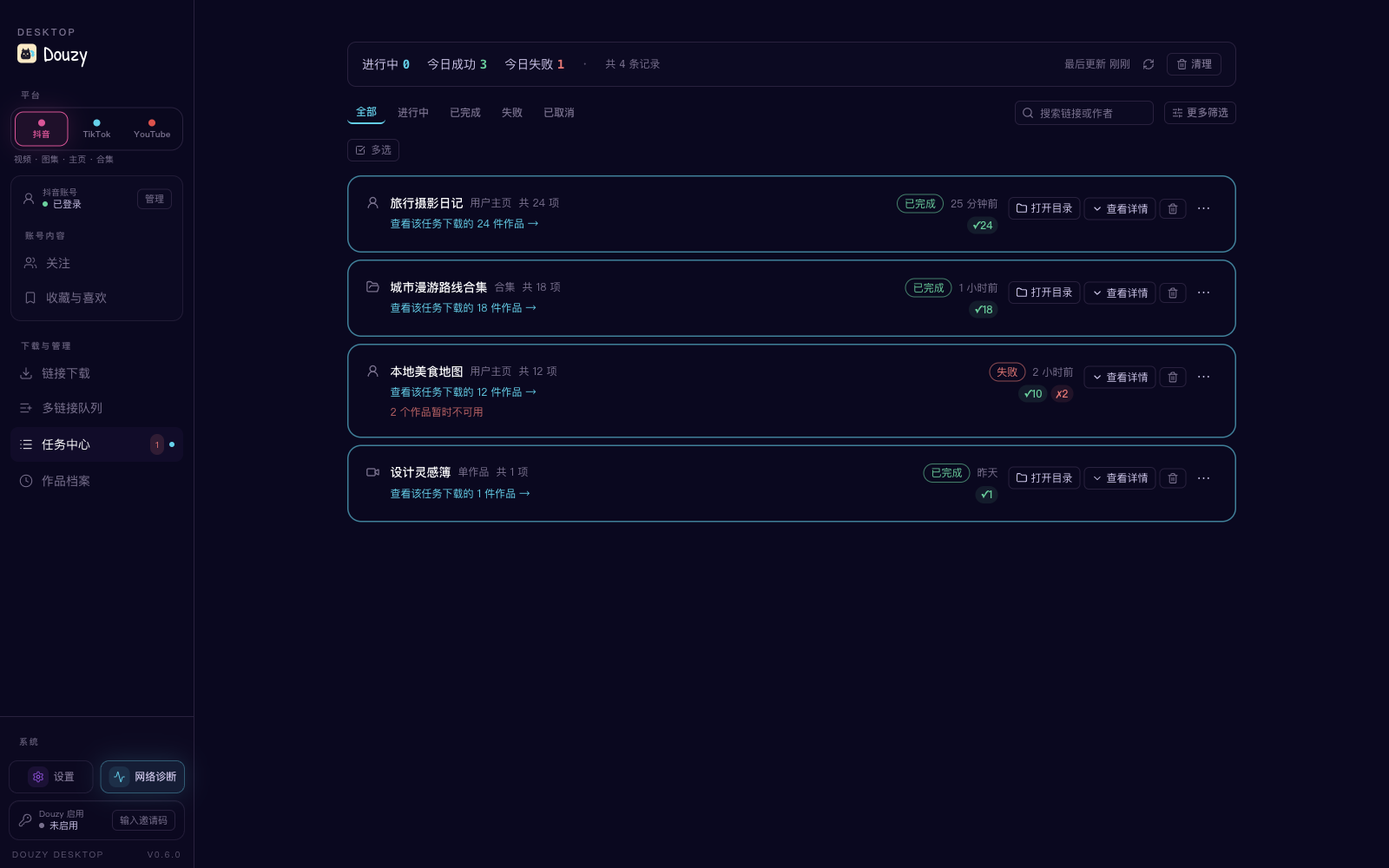 |
| Sync creators, filter new works, add notes, and download directly from the list. | Browse collected videos, series, and liked works from the current Douyin account. | Track job results, retry failures, and open output folders. |
Screenshots were captured from the current desktop main build. Demonstration data is used for privacy.
Feature Overview
⚠️ Douyin's anti-bot gate blocks the CLI from downloading likes / favorites / favorite collections (since 2026-08) and single videos / notes, collections and music (since 2026-09); profile posts can only rely on the browser fallback. See Current Limitations for the cause and what still works; use the Douzy desktop app for these downloads.
Supported
| Feature | Description |
|---|---|
| Single video download | /video/{aweme_id} |
| Single image-note download | /note/{note_id} and /gallery/{note_id} |
| Single collection download | /collection/{mix_id} and /mix/{mix_id} |
| Single music download | /music/{music_id} (prefers direct audio, fallback to first related aweme) |
| Short link parsing | https://v.douyin.com/..., v.iesdouyin.com, bare hosts |
| Profile batch download | /user/{sec_uid} + mode: [post, like, mix, music] |
| Logged-in favorites collections | /user/self?showTab=favorite_collection + mode: [collect, collectmix] |
| No-watermark preferred | Automatically selects watermark-free video source |
| Highest-quality selection | Auto-picks highest bitrate from video.bit_rate ladder (video + live-photo) |
| Live stream recording | live.douyin.com/{room_id} → FLV/HLS, preserves partial data on stream end |
| Comments collection | Per-aweme comments (+ optional replies) saved as *_comments.json |
| Hot search + keyword search | --hot-board [N] / --search "keyword" dumps to JSONL |
| REST API server mode | --serve --serve-port 8000 (optional fastapi + uvicorn) |
| Notification push | Bark / Telegram / Webhook on download completion |
| Extra assets | Cover, music, avatar, JSON metadata |
| Video transcription | Optional, using OpenAI Transcriptions API |
| Concurrent downloads | Configurable concurrency, default 5 |
| Retry with backoff | Exponential backoff (1s, 2s, 5s) |
| Rate limiting | Default 2 req/s |
| SQLite history | Records download metadata; does not decide incremental skips |
| Incremental downloads | Disk-based skip/redownload via increase.post/like/mix/music |
| Time filters | start_time / end_time |
| Browser fallback | Launches browser when pagination is blocked, manual CAPTCHA supported |
| Download integrity check | Content-Length validation, auto-cleanup of incomplete files |
| Progress display | Rich progress bars, supports progress.quiet_logs quiet mode |
| Docker deployment | Dockerfile included |
| CI/CD | GitHub Actions for testing and linting |
Current Limitations
-
Douyin Argus gate: Douyin's edge
ArgusSecurityPluginanswers every non-browser request to these endpoints with HTTP 403Blocked by ArgusSecurityPlugin Uifid Not Found, with or without cookies and no matter how often you retry:- since 2026-08:
aweme/favorite,collects/*,aweme/listcollection,mix/listcollection(likes / favorites / favorite collections) - since 2026-09-10:
mix/aweme(collection items) - since 2026-09-14:
aweme/detail(single video / note),aweme/post(profile posts),mix/detail,mix/list,music/detail,music/aweme,music/list
The required
x-secsdk-web-signaturecan only be produced by the SDK inside a real Douyin web page, which the CLI's direct API requests cannot carry, so single videos / notes, collections, music and likes / favorites cannot be downloaded in the CLI. Profile-post (post) API paging is rejected as well; withplaywrightinstalled andbrowser_fallbackleft on (headed by default), the browser fallback reads the page's own post-list requests and may still work, but it has not been tested against this gate. The Douzy desktop app sends these requests through its built-in login window and is not affected. Endpoints still reachable directly as of 2026-09-14: user profile, following list, comments, live rooms (webcast), hot board and search. - since 2026-08:
-
Browser fallback is fully validated for
post;like/mix/musiccurrently relies on API pagination -
number.allmix/increase.allmixare retained as compatibility aliases and normalized tomix -
collect/collectmixcurrently work for the account represented by the logged-in cookies only -
collect/collectmixmust be used alone and cannot be combined withpost/like/mix/music -
increasecurrently applies topost/like/mix/music; favorites collection modes do not support incremental stop -
Live stream recording saves FLV natively; HLS sources only save the playlist (use ffmpeg for playable output)
-
The webcast room endpoint is not verified against every live scenario — treat as experimental
Quick Start
1) Requirements
- Python 3.8+
- macOS / Linux / Windows
2) Install dependencies
pip install -r requirements.txt
For browser fallback and automatic cookie capture:
pip install playwright
python -m playwright install chromium
3) Copy config file
cp config.example.yml config.yml
4) Get cookies (recommended: automatic)
python -m tools.cookie_fetcher --config config.yml
After logging into Douyin, return to the terminal and press Enter. Cookies will be written to your config automatically.
5) Docker deployment (optional)
docker build -t douyin-downloader .
docker run -v $(pwd)/config.yml:/app/config.yml -v $(pwd)/Downloaded:/app/Downloaded douyin-downloader
Minimal Working Config
link:
  - https://www.douyin.com/user/MS4wLjABAAAAxxxx

path: ./Downloaded/
mode:
  - post

number:
  post: 0
  collect: 0
  collectmix: 0

thread: 5
retry_times: 3
proxy: ""
database: true
database_path: dy_downloader.db

progress:
  quiet_logs: true

cookies:
  msToken: ""
  ttwid: YOUR_TTWID
  odin_tt: YOUR_ODIN_TT
  passport_csrf_token: YOUR_CSRF_TOKEN
  sid_guard: ""

browser_fallback:
  enabled: true
  headless: false
  max_scrolls: 240
  idle_rounds: 8
  wait_timeout_seconds: 600

transcript:
  enabled: false
  model: gpt-4o-mini-transcribe
  output_dir: ""
  response_formats: ["txt", "json"]
  api_url: https://api.openai.com/v1/audio/transcriptions
  api_key_env: OPENAI_API_KEY
  api_key: ""
Usage
Run with a config file
python run.py -c config.yml
Append CLI arguments
python run.py -c config.yml \
  -u "https://www.douyin.com/video/7604129988555574538" \
  -t 8 \
  -p ./Downloaded
Arguments
| Argument | Description |
|---|---|
-u, --url | Append download link(s), can be repeated |
-c, --config | Specify config file (default: config.yml) |
-p, --path | Specify download directory |
-t, --thread | Specify concurrency |
--show-warnings | Show warning/error logs |
-v, --verbose | Show info/warning/error logs |
--hot-board [N] | Fetch Douyin hot search board and write JSONL; optional top-N |
--search KEYWORD | Search videos by keyword, write JSONL |
--search-max N | Max items for --search (default 50) |
--serve | Run as REST API server (requires pip install fastapi uvicorn) |
--serve-host HOST | REST server listen host (default 127.0.0.1) |
--serve-port PORT | REST server listen port (default 8000) |
--version | Show version number |
Typical Scenarios
Download one video
link:
  - https://www.douyin.com/video/7604129988555574538
Download one image-note
link:
  - https://www.douyin.com/note/7341234567890123456
Download a collection
link:
  - https://www.douyin.com/collection/7341234567890123456
Download a music track
link:
  - https://www.douyin.com/music/7341234567890123456
Batch download a creator's posts
link:
  - https://www.douyin.com/user/MS4wLjABAAAAxxxx
mode:
  - post
number:
  post: 50
Batch download a creator's liked posts
link:
  - https://www.douyin.com/user/MS4wLjABAAAAxxxx
mode:
  - like
number:
  like: 0    # 0 means download all
Download multiple modes at once
link:
  - https://www.douyin.com/user/MS4wLjABAAAAxxxx
mode:
  - post
  - like
  - mix
  - music
Cross-mode deduplication: the same aweme_id won't be downloaded twice across different modes.
Download logged-in favorites collection items
link:
  - https://www.douyin.com/user/self?showTab=favorite_collection
mode:
  - collect
number:
  collect: 0
Download logged-in collected mixes
link:
  - https://www.douyin.com/user/self?showTab=favorite_collection
mode:
  - collectmix
number:
  collectmix: 0
Record a live stream (experimental)
link:
  - https://live.douyin.com/123456789   # or /follow/live/{room_id}
live:
  max_duration_seconds: 3600   # 0 = record until broadcaster ends
  chunk_size: 65536
  idle_timeout_seconds: 30
The recorder saves an FLV file under Downloaded/{author}/live/ plus a *_room.json
metadata snapshot. If the broadcaster ends the stream, network goes idle, or you
Ctrl+C, any already-recorded bytes are preserved (the .tmp file is promoted to
the final file).
Collect comments per aweme
comments:
  enabled: true
  include_replies: false   # true will fetch each comment's second-level replies (extra API calls)
  max_comments: 500        # 0 = no cap
  page_size: 20
Generates a {date}_{title}_{aweme_id}_comments.json next to the media file.
Dump the hot search board
python run.py --hot-board 30 -p ./Downloaded
# Output: ./Downloaded/hot_board/20260424_221530.jsonl
Search by keyword
python run.py --search "猫咪" --search-max 100 -p ./Downloaded
# Output: ./Downloaded/search/猫咪_20260424_221530.jsonl
Run as REST API server
pip install fastapi uvicorn       # one-time optional dep
python run.py --serve --serve-port 8000
Endpoints:
| Method | Path | Description |
|---|---|---|
| POST | /api/v1/download | Submit {"url": "..."}, returns {job_id, status} |
| GET | /api/v1/jobs/{job_id} | Get a specific job's status/counts |
| GET | /api/v1/jobs | List recent jobs (TTL + capacity capped) |
| GET | /api/v1/health | Health probe |
Finished jobs are pruned by TTL (default 24h) and max-jobs (default 500) — in-flight jobs are never pruned. Configure via server.max_jobs / server.job_ttl_seconds.
Send a notification on completion
notifications:
  enabled: true
  on_success: true
  on_failure: true
  providers:
    - type: bark
      url: https://api.day.app/YOUR_DEVICE_KEY
      sound: bell
    - type: telegram
      bot_token: "123456:ABC..."
      chat_id: "987654321"
    - type: webhook                 # works with 企业微信/飞书/钉钉 bot URLs too
      url: https://qyapi.weixin.qq.com/cgi-bin/webhook/send?key=xxx
      extra_body:
        msgtype: text
All enabled providers are notified in parallel; a failing provider never blocks the download flow.
Incremental download (disk-based)
increase:
  post: true
With true, the downloader skips an item only when its non-empty primary media
already exists under the current download directory. Deleting the media file makes
the next run download it again; SQLite history does not affect this decision.
Set a mode to false to redownload and atomically replace existing files within the
current number/date/media filters.
Full crawl (no item limit)
number:
  post: 0
Optional Feature: Video Transcription (transcript)
Current behavior applies to video items only (image-note items do not generate transcripts).
1) Enable in config
transcript:
  enabled: true
  model: gpt-4o-mini-transcribe
  output_dir: ""        # empty: same folder as video; non-empty: mirrored to target dir
  response_formats:
    - txt
    - json
  api_key_env: OPENAI_API_KEY
  api_key: ""           # can be set directly, or via environment variable
Recommended to provide key through environment variable:
export OPENAI_API_KEY="sk-xxxx"
2) Output files
When enabled, it generates:
xxx.transcript.txtxxx.transcript.json
If database: true, job status is also recorded in SQLite table transcript_job (success/failed/skipped).
Testing
Recommended:
python3 -m pytest -q
Plain pytest is also supported now:
pytest -q
Key Config Fields
| Field | Description |
|---|---|
mode | Supports post/like/mix/music; logged-in favorites mode additionally supports standalone collect/collectmix |
number.post/like/mix/music/collect/collectmix | Per-mode download limit, 0 = unlimited |
increase.post/like/mix/music | true: skip existing primary media on disk; false: redownload and overwrite current scope |
start_time / end_time | Time filter (format: YYYY-MM-DD) |
folderstyle | Create per-item subdirectories |
browser_fallback.* | Browser fallback for post when pagination is restricted |
progress.quiet_logs | Quiet logs during progress stage |
transcript.* | Optional transcription after video download |
comments.* | Per-aweme comments collection (opt-in) |
live.* | Live stream recording options (max_duration_seconds / chunk_size / idle_timeout_seconds) |
notifications.* | Bark/Telegram/Webhook push on completion |
server.* | REST API server tuning (max_jobs, job_ttl_seconds) |
proxy | Optional HTTP/HTTPS proxy setting |
database | Enable SQLite deduplication and history |
database_path | SQLite path, default is dy_downloader.db in the current working directory |
thread | Concurrent download count |
retry_times | Retry count on failure |
Output Structure
Default with folderstyle: true and database_path: dy_downloader.db:
workspace/
├── config.yml
├── dy_downloader.db          # default location when database: true
└── Downloaded/
    ├── download_manifest.jsonl
    ├── hot_board/                # when --hot-board is used
    │   └── 20260424_221530.jsonl
    ├── search/                   # when --search is used
    │   └── 猫咪_20260424_221530.jsonl
    └── AuthorName/
        ├── post/
        │   └── 2024-02-07_Title_aweme_id/
        │       ├── ...mp4
        │       ├── ..._cover.jpg
        │       ├── ..._music.mp3
        │       ├── ..._data.json
        │       ├── ..._avatar.jpg
        │       ├── ..._comments.json    # when comments.enabled
        │       ├── ...transcript.txt
        │       └── ...transcript.json
        ├── like/
        │   └── ...
        ├── mix/
        │   └── ...
        ├── music/
        │   └── ...
        ├── collect/
        │   └── ...
        ├── collectmix/
        │   └── ...
        └── live/                 # when recording live streams
            └── 2026-04-24_2215_LiveTitle_RoomId/
                ├── ...flv
                └── ..._room.json
Re-downloading Content
The program uses a database record + local file dual check to decide whether to skip already-downloaded content. To force re-download, you need to clean up accordingly:
Re-download a specific item
# Delete local files (folder name contains the aweme_id)
rm -rf Downloaded/AuthorName/post/*_<aweme_id>/

# Delete database record
sqlite3 dy_downloader.db "DELETE FROM aweme WHERE aweme_id = '<aweme_id>';"
Re-download all items from a specific author
rm -rf Downloaded/AuthorName/
sqlite3 dy_downloader.db "DELETE FROM aweme WHERE author_name = 'AuthorName';"
Full reset (re-download everything)
rm -rf Downloaded/
rm dy_downloader.db
Note: Deleting only the database but keeping files will NOT trigger re-download — the program scans local filenames for aweme_id to detect existing downloads. Deleting only files but keeping the database WILL trigger re-download (the program treats "in DB but missing locally" as needing retry).
FAQ
1) Why do I only get around 20 posts?
This is a common pagination risk-control behavior. Make sure:
browser_fallback.enabled: truebrowser_fallback.headless: false- complete verification manually in the browser popup, and do not close it too early
2) Why is the progress output noisy/repeated?
By default, progress.quiet_logs: true suppresses logs during progress stage.
Use --show-warnings or -v temporarily when debugging.
3) What if cookies are expired?
Run:
python -m tools.cookie_fetcher --config config.yml
4) Why are transcript files not generated?
Check in order:
- whether
transcript.enabledistrue - whether downloaded items are videos (image-notes are not transcribed)
- whether
OPENAI_API_KEY(ortranscript.api_key) is valid - whether
response_formatsincludestxtorjson
5) How to view download history?
sqlite3 dy_downloader.db "SELECT aweme_id, title, author_name, datetime(download_time, 'unixepoch', 'localtime') FROM aweme ORDER BY download_time DESC LIMIT 20;"
Community Group

点击链接加入群聊【QQ群】:https://qm.qq.com/q/9xoNt8Wzv4
Disclaimer
This project is for technical research, learning, and personal data management only. Please use it legally and responsibly:
- Do not use it to infringe others' privacy, copyright, or other legal rights
- Do not use it for any illegal purpose
- Users are solely responsible for all risks and liabilities arising from usage
- If platform policies or interfaces change and features break, this is a normal technical risk
By continuing to use this project, you acknowledge and accept the statements above.
License
This project is licensed under the MIT License. See LICENSE for details.
Friendly Links
- LINUX DO
Repo liên quan
Master programming by recreating your favorite technologies from scratch.
A curated meta-list of curated lists organized by technology domain. The repository acts as a directory pointing to hundreds of specialized awesome lists covering programming languages, platforms, frameworks, and tooling. All content is community-contributed under the CC0 public domain dedication.
Public APIs is a community-curated GitHub repository listing free, publicly accessible APIs across a wide range of categories, with auth type, HTTPS, and CORS noted for each entry. It's a browsable reference, not a library to install.
freeCodeCamp is a free, self-paced curriculum for learning to code, published as open source at freeCodeCamp/freeCodeCamp. It's a 501(c)(3) nonprofit funded by donor support, structured around six certifications in its Full-Stack Developer Curriculum, each gated by required projects instead of open-book quizzes. The repository also carries beta language certifications for developers, interview-prep resources, and the code that runs the live freecodecamp.org platform.
Trả lời nhanh
Đọc thêm về jiji262/douyin-downloader ở đâu?
Trang TopGit này là một snapshot — tab "Readme" hiển thị nguyên văn README của repo (đã bỏ link, giữ ảnh). Repo GitHub ở github.com/jiji262/douyin-downloader là nguồn chính thức.
jiji262/douyin-downloader có phải mã nguồn mở không?
Có — jiji262/douyin-downloader phát hành theo license MIT, nghĩa là mã nguồn mở để đọc, fork và (tùy license) tái sử dụng. Mã: github.com/jiji262/douyin-downloader.
jiji262/douyin-downloader có tag gì không?
Bản đồng bộ chưa ghi nhận topic GitHub nào cho jiji262/douyin-downloader. GitHub topics hiển thị ở thanh bên phải trang repo — đó là nơi đáng kiểm tra nhất.
jiji262/douyin-downloader có website riêng không?
TopGit chưa ghi nhận URL trang chủ cho jiji262/douyin-downloader. Phần README ở tab phía trên thường có link demo, hoặc xem mô tả GitHub của repo.
jiji262/douyin-downloader còn đang phát triển không?
Commit gần nhất trên jiji262/douyin-downloader là 3 ngày trước (theo timestamp GitHub). Repo có 1.8k fork — một chỉ báo về mức độ quan tâm của cộng đồng.
jiji262/douyin-downloader dùng license gì?
jiji262/douyin-downloader phát hành theo license MIT. Nên mở file LICENSE trên GitHub để xác nhận — license metadata đôi khi lệch với thực tế dự án.
Đọc đầy đủ README ở tab phía trên.
Vẫn đang phân vân về douyin-downloader?
Một cú bấm sẽ gửi câu hỏi kèm trang này cho AI — xem AI nói gì về douyin-downloader.