Là một dự án mã nguồn mở, johnno1962/Xtrace đã đạt 1.8k sao trên GitHub, ngôn ngữ Objective-C++. Trace Objective-C method calls by class or instance
Tóm tắt dựng từ metadata GitHub của chính dự án — chưa có bài review TopGit. Trang sẽ tự động cập nhật khi bài review đầy đủ được xuất bản.
VÌ SAO CHƯA CÓ REVIEW
TopGit viết bài đầy đủ cho repo có nhiều sao nhất và được yêu cầu nhiều nhất. Trang này là snapshot trong thời gian chờ — xem README gốc ở tab READ ME.
Note: This project has been superseeded by the more rigourous SwiftTrace.
Trace Objective-C method calls by class or instance
Xtrace is a header Xtrace.h and a C++ implementation file Xtrace.mm that allows
you to intercept all method calls to instances of a class or a particular instance
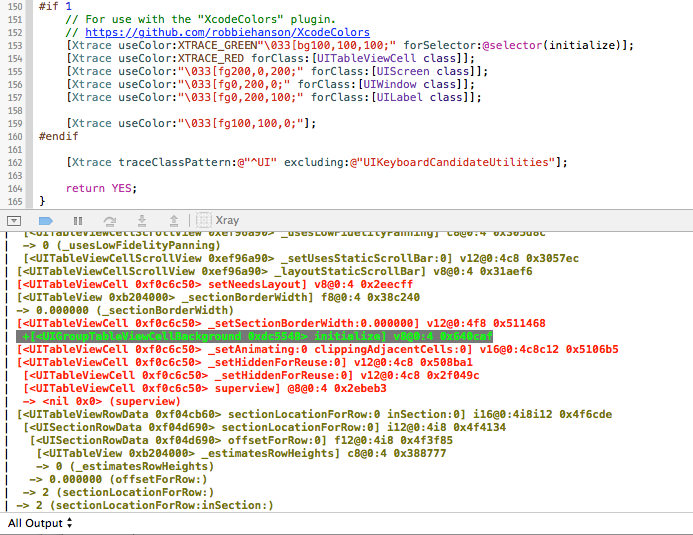
giving you output such as this:
To use, add Xtrace.{h,mm} to your project and add an import of Xtrace.h to your
project's ".pch" file so you can access its methods from anywhere in your project.
There is a simple category based shortcut interface to start tracing:
	[MyClass xtrace]; // to trace all calls to instances of a class
	// this will intercept all methods of any superclasses as well
    // but only for instances of the class that has been traced (v2.1)

	[instance xtrace]; // to trace all calls to a particular instance.
	// multiple instances can by traced, use "notrace" to stop tracing
    // instance tracing takes precedence over class based filtering.

    [Xtrace traceBundleContainingClass:myClass];
    // trace your entire app's classes or those of an embedded framework

    [Xtrace traceClassPattern:@"^UI" excluding:nil]; // trace all of UIkit
If you have the XcodeColors plugin
installed you can now color traces by selector, class or group of classes:
As an alternative to building Xtrace into your project, Xtrace is now included
in the "code injection" plugin from injectionforxcode.com.
Once you have injected, all xtrace methods are available for you to use in lldb.
(lldb) p [UITableView xtrace]

// dump pseudo-header for class
(lldb) p [UITableView xdump]
@interface UITableView : UIScrollView {
    id<UITableViewDataSource> _dataSource; // @"<UITableViewDataSource>"
    UITableViewRowData * _rowData; // @"UITableViewRowData"
    float _rowHeight; // f
    float _sectionHeaderHeight; // f
    float _sectionFooterHeight; // f
    float _estimatedRowHeight; // f
    float _estimatedSectionHeaderHeight; // f
    float _estimatedSectionFooterHeight; // f
    CGRect _visibleBounds; // {CGRect="origin"{CGPoint="x"f"y"f}"size"{CGSize="width"f"height"f}}
...
The example project, originally called "Xray" will show you how to use the Xtrace module
to get up and running. Your milage will vary though the source should build and work for
32 bit configurations on an iOS device or 64 bit OS X applications or the simulator.
The starting point is the XRAppDelegate.m class. The XRDetailViewController.m then
switches to instance viewing of a specific UILabel when the detail view loads.
Display of method arguments is now on by default, but if you have problems:
[Xtrace showArguments:NO];
You can display the calling function on entry by setting:
[Xtrace showCaller:YES];
You should also be able to switch to log the "description" of all values using:
[Xtrace describeValues:YES];
Other features are a method name filtering regular expression. These filters
are applied as the class is "swizzled" when you request tracing.
[Xtrace includeMethods:@"a|regular|expression"];
[Xtrace excludeMethods:@"WithObjects:$"]; // varargs methods don't work
[Xtrace excludeTypes:@"CGRect|CGSize"]; // stack frame problems on 64 bits
[Xtrace excludeTypes:nil]; // reset filter after class is set up.
Classes can also be excluded (again before other classes are traced) by calling:
[UIView notrace]; // or alternatively..
[Xtrace dontTrace:[UIView class]];
A rudimentary profiling interface is also available:
Finally, callbacks can also be registered on a delegate to be called before or after any method is called:
[Xtrace setDelegate:delegate]; // delegate must not be traced itself
[Xtrace forClass:[UILabel class] after:@selector(setText:) callback:@selector(label:setText:)];

// void method signature for UILabel
- (void)setText:(NSString *)text;

// "before" and "after" callback implementation in delegate
- (void)label:(id)receiver setText:(NSString *)text {
    ...
}
Callbacks for specific methods can be used independently of full Class or instance tracing.
"after" callbacks for methods that return a value can replace the value returned to the caller
something like a variation on "aspect oriented programming".
// non-void method signature in class "AClass"
- (NSString *)appendString:(NSString *)string;

// code to inject "after" method callback
[Xtrace forClass:[AClass class] after:@selector(appendString:) callback:@selector(out:object:appendString:)];

// "after" callback implementation in delegate
- (NSString *)out:(NSString *)originalReturnValue object:(id)receiver appendString:(NSString *)string {
    ...
    return newReturnValue; // could be originalReturnValue
}
The callback selector names are arbitrary. It's the order and type of arguments that is critical.
Expect some trouble passing structs on 64 bit builds. The signature for intercepting a "getter"
is a little contrived:
Reliability is now quite good for 32 bit builds considering.. I've had to introduce
a method exclusion blacklist of a few methods causing problems. On 64 bit OS X
you can expect some stack frame complications for methods with "struct" argument
or return types - in particular for arguments to callbacks to the delegate.
Xtrace does not currently work on the ARM64 abi - rebuild for 32 bits.
The ordering of calls to the api is: 1) Any class exclusions, 2) any method selector filter then
3) Class tracing or instance tracing and 4) any callbacks. That's about it. If you encounter
problems drop me a line on xtrace (at) johnholdsworth.com. The developer of Xtrace and the
"Injection Plugin" is available for Cocoa/iOS development work in the London area.
Announcements of major commits to the repo will be made on twitter @Injection4Xcode.
As ever:
THE SOFTWARE IS PROVIDED "AS IS", WITHOUT WARRANTY OF ANY KIND, EXPRESS OR IMPLIED,
INCLUDING BUT NOT LIMITED TO THE WARRANTIES OF MERCHANTABILITY, FITNESS FOR A PARTICULAR
PURPOSE AND NONINFRINGEMENT. IN NO EVENT SHALL THE AUTHORS OR COPYRIGHT HOLDERS BE LIABLE
FOR ANY CLAIM, DAMAGES OR OTHER LIABILITY, WHETHER IN AN ACTION OF CONTRACT, TORT OR OTHERWISE,
ARISING FROM, OUT OF OR IN CONNECTION WITH THE SOFTWARE OR THE USE OR OTHER DEALINGS IN THE SOFTWARE.
Trang TopGit này là một snapshot — tab "Readme" hiển thị nguyên văn README của repo (đã bỏ link, giữ ảnh). Repo GitHub ở github.com/johnno1962/Xtrace là nguồn chính thức.
johnno1962/Xtrace có bao nhiêu sao?
johnno1962/Xtrace có 1.8k sao GitHub — tải lại trang để xem số mới nhất, hoặc xem trực tiếp github.com/johnno1962/Xtrace. TopGit phản chiếu số sao của GitHub nhưng không cam kết đến từng phút.
johnno1962/Xtrace có phải mã nguồn mở không?
Có — johnno1962/Xtrace phát hành theo license MIT, nghĩa là mã nguồn mở để đọc, fork và (tùy license) tái sử dụng. Mã: github.com/johnno1962/Xtrace.
johnno1962/Xtrace còn đang phát triển không?
Commit gần nhất trên johnno1962/Xtrace là 5.5 năm trước (theo timestamp GitHub). Repo có 132 fork — một chỉ báo về mức độ quan tâm của cộng đồng.
johnno1962/Xtrace là gì?
johnno1962/Xtrace (johnno1962/Xtrace) là dự án Objective-C++ trên GitHub. Theo mô tả gốc: Trace Objective-C method calls by class or instance
Đọc đầy đủ README ở tab phía trên.
Vẫn đang phân vân về Xtrace?
Một cú bấm sẽ gửi câu hỏi kèm trang này cho AI — xem AI nói gì về Xtrace.
 /Xtrace
 Xtrace