josdejong/jsoneditor — 12.3k★ trên GitHub (JavaScript). A web-based tool to view, edit, format, and validate JSON
Tóm tắt dựng từ metadata GitHub của chính dự án — chưa có bài review TopGit. Trang sẽ tự động cập nhật khi bài review đầy đủ được xuất bản.
VÌ SAO CHƯA CÓ REVIEW
TopGit viết bài đầy đủ cho repo có nhiều sao nhất và được yêu cầu nhiều nhất. Trang này là snapshot trong thời gian chờ — xem README gốc ở tab READ ME.
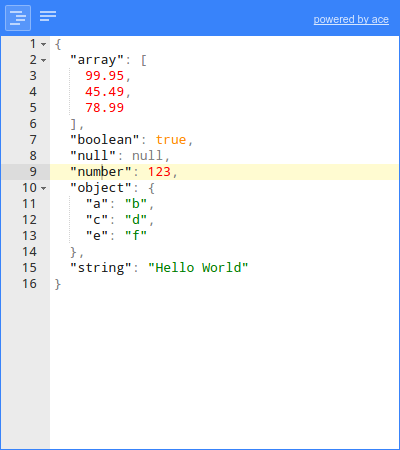
JSON Editor is a web-based tool to view, edit, format, and validate JSON. It has various modes such as a tree editor, a code editor, and a plain text editor. The editor can be used as a component in your own web application. It can be loaded as CommonJS module, AMD module, or as a regular javascript file.
The library was originally developed as core component of the popular web application https://jsoneditoronline.org and has been open sourced since then.
Continuous integration tests are run on GitHub Actions, and LambdaTest is used to test on all major browsers.
Thanks, GitHub Actions and LambdaTest for the generous support for this open source project!
Successor: svelte-jsoneditor
This library jsoneditor has a successor: svelte-jsoneditor. The new editor is not a one-to-one replacement, so there may be reasons to stick with jsoneditor.
The main differences between the two are described here.
Features
JSONEditor has various modes, with the following features.
Tree mode
Change, add, move, remove, and duplicate fields and values.
Sort arrays and objects.
Transform JSON using JMESPath queries.
Colorized code.
Color picker.
Search & highlight text in the tree view.
Undo and redo all actions.
JSON schema validation (powered by ajv).
Code mode
Colorized code (powered by Ace).
Inspect JSON (powered by Ace).
Format and compact JSON.
Repair JSON.
JSON schema validation (powered by ajv).
Text mode
Format and compact JSON.
Repair JSON.
JSON schema validation (powered by ajv).
Preview mode
Handle large JSON documents up to 500 MiB.
Transform JSON using JMESPath queries.
Format and compact JSON.
Repair JSON.
JSON schema validation (powered by ajv).
Documentation
Documentation:
API
Usage
Shortcut keys
Examples
Source
History
Install
with npm (recommended):
npm install jsoneditor
Alternatively, you can use another JavaScript package manager like https://yarnpkg.com/, or a CDN such as https://cdnjs.com/ or https://www.jsdelivr.com/.
Use
Note that in the following example, you'll have to change the urls jsoneditor/dist/jsoneditor.min.js and jsoneditor/dist/jsoneditor.min.css to match the place where you've downloaded the library, or fill in the URL of the CDN you're using.
<!DOCTYPE HTML>
<html lang="en">
<head>
    <!-- when using the mode "code", it's important to specify charset utf-8 -->
    <meta charset="utf-8">

    <link href="jsoneditor/dist/jsoneditor.min.css" rel="stylesheet" type="text/css">
    <script src="jsoneditor/dist/jsoneditor.min.js"></script>
</head>
<body>
    <div id="jsoneditor" style="width: 400px; height: 400px;"></div>

    <script>
        // create the editor
        const container = document.getElementById("jsoneditor")
        const options = {}
        const editor = new JSONEditor(container, options)

        // set json
        const initialJson = {
            "Array": [1, 2, 3],
            "Boolean": true,
            "Null": null,
            "Number": 123,
            "Object": {"a": "b", "c": "d"},
            "String": "Hello World"
        }
        editor.set(initialJson)

        // get json
        const updatedJson = editor.get()
    </script>
</body>
</html>
Build
The code of the JSON Editor is located in the folder ./src. To build
jsoneditor:
Install dependencies:
npm install
Build JSON Editor:
npm run build
This will generate the files ./jsoneditor.js, ./jsoneditor.css, and
minified versions in the dist of the project.
To automatically build when a source file has changed:
npm start
This will update ./jsoneditor.js and ./jsoneditor.css in the dist folder
on every change, but it will NOT update the minified versions as that's
an expensive operation.
Test
Run unit tests:
npm test
Run code linting (JavaScript Standard Style):
npm run lint
License
jsoneditor is released as open source under the permissive the Apache 2.0 license.
If you are using jsoneditor commercially, there is a social (but no legal) expectation that you help fund its maintenance. Start here.
Trang TopGit này là một snapshot — tab "Readme" hiển thị nguyên văn README của repo (đã bỏ link, giữ ảnh). Repo GitHub ở github.com/josdejong/jsoneditor là nguồn chính thức.
josdejong/jsoneditor có bao nhiêu sao?
josdejong/jsoneditor có 12.3k sao GitHub — tải lại trang để xem số mới nhất, hoặc xem trực tiếp github.com/josdejong/jsoneditor. TopGit phản chiếu số sao của GitHub nhưng không cam kết đến từng phút.
josdejong/jsoneditor có tag gì không?
Bản đồng bộ chưa ghi nhận topic GitHub nào cho josdejong/jsoneditor. GitHub topics hiển thị ở thanh bên phải trang repo — đó là nơi đáng kiểm tra nhất.
josdejong/jsoneditor còn đang phát triển không?
Commit gần nhất trên josdejong/jsoneditor là 20 ngày trước (theo timestamp GitHub). Repo có 2.1k fork — một chỉ báo về mức độ quan tâm của cộng đồng.
josdejong/jsoneditor viết bằng ngôn ngữ gì?
josdejong/jsoneditor chủ yếu viết bằng JavaScript. Trường "language" của GitHub dựa trên phần lớn byte ở nhánh mặc định.
Đọc đầy đủ README ở tab phía trên.
Vẫn đang phân vân về jsoneditor?
Một cú bấm sẽ gửi câu hỏi kèm trang này cho AI — xem AI nói gì về jsoneditor.

 /jsoneditor