4.0k sao GitHub và vẫn tăng — junyanz/iGAN là dự án Python mà TopGit đang theo dõi trên nền tảng. Interactive Image Generation via Generative Adversarial Networks
Tóm tắt dựng từ metadata GitHub của chính dự án — chưa có bài review TopGit. Trang sẽ tự động cập nhật khi bài review đầy đủ được xuất bản.
VÌ SAO CHƯA CÓ REVIEW
TopGit viết bài đầy đủ cho repo có nhiều sao nhất và được yêu cầu nhiều nhất. Trang này là snapshot trong thời gian chờ — xem README gốc ở tab READ ME.
iGAN: Interactive Image Generation via Generative Adversarial Networks
Project | Youtube | Paper
Recent projects:
[pix2pix]: Torch implementation for learning a mapping from input images to output images.
[CycleGAN]: Torch implementation for learning an image-to-image translation (i.e., pix2pix) without input-output pairs.
[pytorch-CycleGAN-and-pix2pix]: PyTorch implementation for both unpaired and paired image-to-image translation.
Overview
iGAN (aka. interactive GAN) is the author's implementation of interactive image generation interface described in:
"Generative Visual Manipulation on the Natural Image Manifold"
Jun-Yan Zhu, Philipp Krähenbühl, Eli Shechtman, Alexei A. Efros
In European Conference on Computer Vision (ECCV) 2016
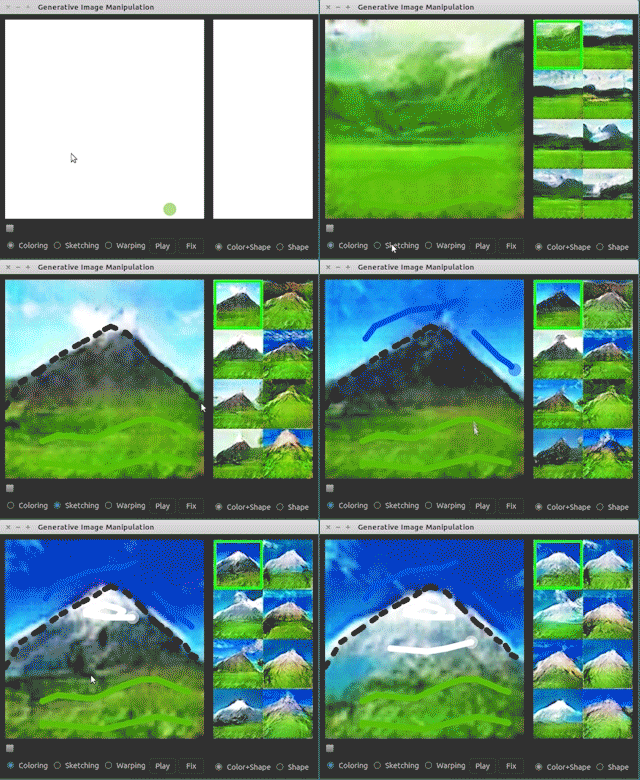
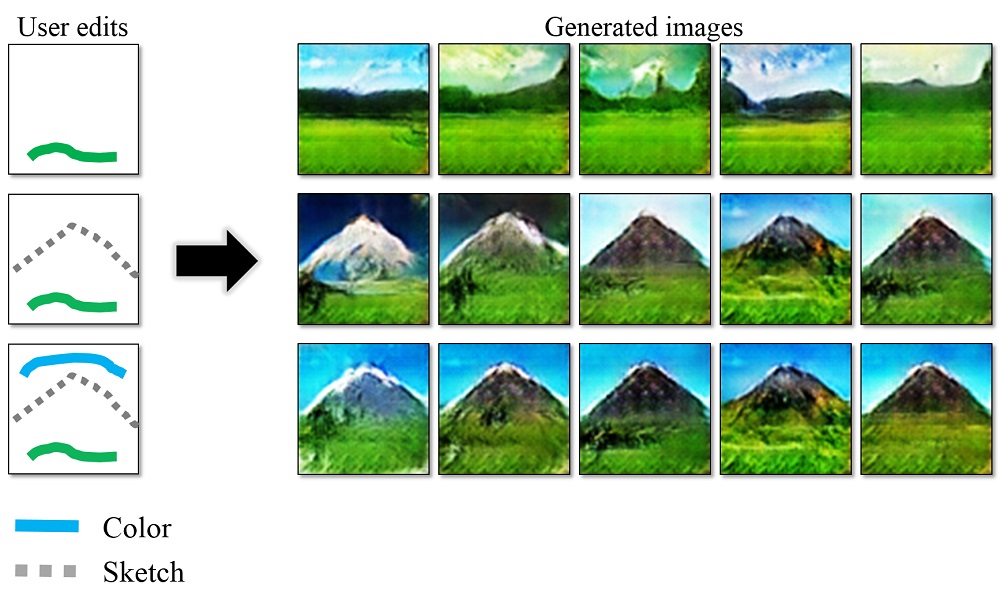
Given a few user strokes, our system could produce photo-realistic samples that best satisfy the user edits in real-time. Our system is based on deep generative models such as Generative Adversarial Networks (GAN) and DCGAN. The system serves the following two purposes:
An intelligent drawing interface for automatically generating images inspired by the color and shape of the brush strokes.
An interactive visual debugging tool for understanding and visualizing deep generative models. By interacting with the generative model, a developer can understand what visual content the model can produce, as well as the limitation of the model.
Please cite our paper if you find this code useful in your research. (Contact: Jun-Yan Zhu, junyanz at mit dot edu)
PyQt4: more details on Qt installation can be found here
sudo apt-get install python-qt4
Qdarkstyle
sudo pip install qdarkstyle
dominate
sudo pip install dominate
GPU + CUDA + cuDNN:
The code is tested on GTX Titan X + CUDA 7.5 + cuDNN 5. Here are the tutorials on how to install CUDA and cuDNN. A decent GPU is required to run the system in real-time. [Warning] If you run the program on a GPU server, you need to use remote desktop software (e.g., VNC), which may introduce display artifacts and latency problem.
Python3
For Python3 users, you need to replace pip with pip3:
PyQt4 with Python3:
sudo apt-get install python3-pyqt4
OpenCV3 with Python3: see the installation instruction.
Interface:
See [Youtube] at 2:18s for the interactive image generation demos.
Layout
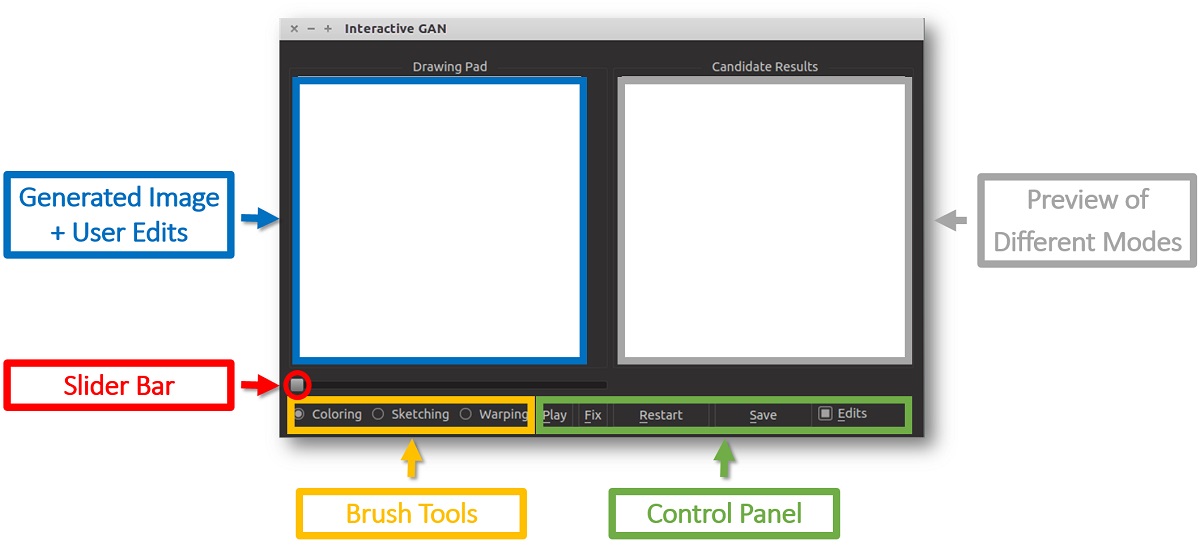
Drawing Pad: This is the main window of our interface. A user can apply different edits via our brush tools, and the system will display the generated image. Check/Uncheck Edits button to display/hide user edits.
Candidate Results: a display showing thumbnails of all the candidate results (e.g., different modes) that fits the user edits. A user can click a mode (highlighted by a green rectangle), and the drawing pad will show this result.
Brush Tools: Coloring Brush for changing the color of a specific region; Sketching brush for outlining the shape. Warping brush for modifying the shape more explicitly.
Slider Bar: drag the slider bar to explore the interpolation sequence between the initial result (i.e., randomly generated image) and the current result (e.g., image that satisfies the user edits).
Control Panel: Play: play the interpolation sequence; Fix: use the current result as additional constraints for further editing Restart: restart the system; Save: save the result to a webpage. Edits: Check the box if you would like to show the edits on top of the generated image.
User interaction
Coloring Brush: right-click to select a color; hold left click to paint; scroll the mouse wheel to adjust the width of the brush.
Sketching Brush: hold left-click to sketch the shape.
Warping Brush: We recommend you first use coloring and sketching before the warping brush. Right-click to select a square region; hold left click to drag the region; scroll the mouse wheel to adjust the size of the square region.
Shortcuts: P for Play, F for Fix, R for Restart; S for Save; E for Edits; Q for quitting the program.
Tooltips: when you move the cursor over a button, the system will display the tooltip of the button.
Model Zoo:
Download the Theano DCGAN model (e.g., outdoor_64). Before using our system, please check out the random real images vs. DCGAN generated samples to see which kind of images that a model can produce.
ourdoor_64.dcgan_theano (64x64): trained on 150K landscape images from MIT Places dataset [Real vs. DCGAN].
church_64.dcgan_theano (64x64): trained on 126k church images from the LSUN challenge [Real vs. DCGAN].
handbag_64.dcgan_theano (64x64): trained on 137K handbag images downloaded from Amazon [Real vs. DCGAN].
shoes_64.dcgan_theano (64x64): trained on 50K shoes images collected by Yu and Grauman [Real vs. DCGAN].
hed_shoes_64.dcgan_theano (64x64): trained on 50K shoes sketches (computed by HED) [Real vs. DCGAN]. (Use this model with --shadow flag)
We provide a simple script to generate samples from a pre-trained DCGAN model. You can run this script to test if Theano, CUDA, cuDNN are configured properly before running our interface.
Type python iGAN_main.py --help for a complete list of the arguments. Here we discuss some important arguments:
--model_name: the name of the model (e.g., outdoor_64, shoes_64, etc.)
--model_type: currently only supports dcgan_theano.
--model_file: the file that stores the generative model; If not specified, model_file='./models/%s.%s' % (model_name, model_type)
--top_k: the number of the candidate results being displayed
--average: show an average image in the main window. Inspired by AverageExplorer, average image is a weighted average of multiple generated results, with the weights reflecting user-indicated importance. You can switch between average mode and normal mode by press A.
--shadow: We build a sketching assistance system for guiding the freeform drawing of objects inspired by ShadowDraw
To use the interface, download the model hed_shoes_64 and run the following script
Check the result saved in ./pics/shoes_test_cnn_opt.png
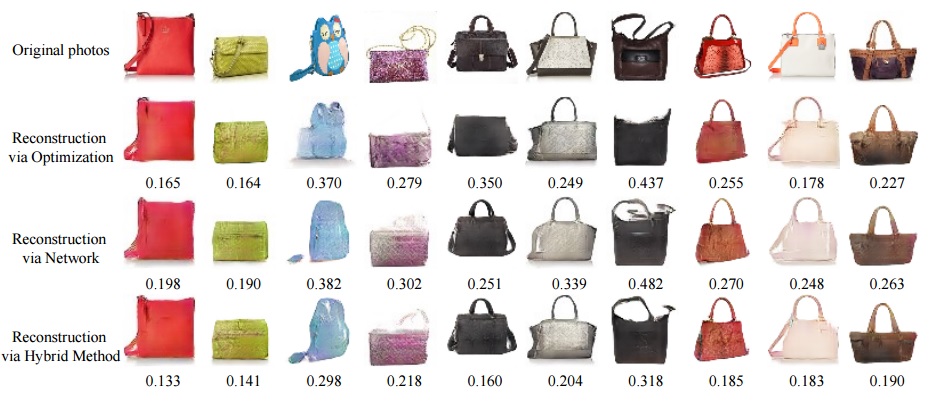
We provide three methods: opt for optimization method; cnn for feed-forward network method (fastest); cnn_opt hybrid of the previous methods (default and best). Type python iGAN_predict.py --help for a complete list of the arguments.
Script without UI
We also provide a standalone script that should work without UI. Given user constraints (i.e., a color map, a color mask, and an edge map), the script generates multiple images that mostly satisfy the user constraints. See python iGAN_script.py --help for more details.
@inproceedings{zhu2016generative,
  title={Generative Visual Manipulation on the Natural Image Manifold},
  author={Zhu, Jun-Yan and Kr{\"a}henb{\"u}hl, Philipp and Shechtman, Eli and Efros, Alexei A.},
  booktitle={Proceedings of European Conference on Computer Vision (ECCV)},
  year={2016}
}
Cat Paper Collection
If you love cats, and love reading cool graphics, vision, and learning papers, please check out our Cat Paper Collection:
[Github] [Webpage]
Acknowledgement
We modified the DCGAN code in our package. Please cite the original DCGAN paper if you use their models.
This work was supported, in part, by funding from Adobe, eBay, and Intel, as well as a hardware grant from NVIDIA. J.-Y. Zhu is supported by Facebook Graduate Fellowship.
junyanz/iGAN thuộc nhóm AI Tools trên TopGit, cùng 8 topic GitHub. Trang Trending và Topics liệt kê các repo cùng số sao và cùng ngôn ngữ để so sánh.
Đọc thêm về junyanz/iGAN ở đâu?
Trang TopGit này là một snapshot — tab "Readme" hiển thị nguyên văn README của repo (đã bỏ link, giữ ảnh). Repo GitHub ở github.com/junyanz/iGAN là nguồn chính thức.
junyanz/iGAN có bao nhiêu sao?
junyanz/iGAN có 4.0k sao GitHub — tải lại trang để xem số mới nhất, hoặc xem trực tiếp github.com/junyanz/iGAN. TopGit phản chiếu số sao của GitHub nhưng không cam kết đến từng phút.
junyanz/iGAN có phải mã nguồn mở không?
Có — junyanz/iGAN phát hành theo license MIT, nghĩa là mã nguồn mở để đọc, fork và (tùy license) tái sử dụng. Mã: github.com/junyanz/iGAN.
junyanz/iGAN còn đang phát triển không?
Commit gần nhất trên junyanz/iGAN là 6.0 năm trước (theo timestamp GitHub). Repo có 584 fork — một chỉ báo về mức độ quan tâm của cộng đồng.
junyanz/iGAN dùng license gì?
junyanz/iGAN phát hành theo license MIT. Nên mở file LICENSE trên GitHub để xác nhận — license metadata đôi khi lệch với thực tế dự án.
junyanz/iGAN là gì?
junyanz/iGAN (junyanz/iGAN) là dự án Python trên GitHub. Theo mô tả gốc: Interactive Image Generation via Generative Adversarial Networks
junyanz/iGAN viết bằng ngôn ngữ gì?
junyanz/iGAN chủ yếu viết bằng Python. Trường "language" của GitHub dựa trên phần lớn byte ở nhánh mặc định.
Đọc đầy đủ README ở tab phía trên.
iGAN có đáng để bạn bỏ thời gian?
ChatGPT, Claude và Perplexity đều đọc được trang này. Hỏi thử xem họ nghĩ gì về iGAN.
 /iGAN
/iGAN