TopGit theo dõi k4yt3x/scutum trên GitHub trong nhóm Security, đã đạt 84 sao. Linux Automatic ARP (TCP / UDP / ICMP) Firewall
Tóm tắt dựng từ metadata GitHub của chính dự án — chưa có bài review TopGit. Trang sẽ tự động cập nhật khi bài review đầy đủ được xuất bản.
VÌ SAO CHƯA CÓ REVIEW
TopGit viết bài đầy đủ cho repo có nhiều sao nhất và được yêu cầu nhiều nhất. Trang này là snapshot trong thời gian chờ — xem README gốc ở tab READ ME.
In short, SCUTUM configures your personal computer automatically against malicious TCP/UDP traffic and ARP spoofing attacks. This software uses UFW to setup conventional firewall for you, determines and locks the gateway MAC address so you won't get ARP-spoofed.
This software is designed to be compact and effective. Currently it can support only one interface at a time. Traffic will only be allowed on one interface. We are looking into possibilities of supporting multiple interfaces at once.
2.10.2 (May 5, 2019)
Fixed nftables ARP issues. ARP packets are now correctly blocked in the arp table instead of inet.
Replaced format strings with f-strings.
2.10.0 (November 2, 2018)
Fixed the problem when SCUTUM is first enabled, gateway MAC address is not
cached and locked.
2.10.0 (October 31, 2018)
Changed configuration file to JSON
Please delete the old INI config and reinstall scutum.
Added support for netfilter.
Grouped sections of code into methods for easier code maintenance.
Full SCUTUM Dependency list can be found in DEPENDENCIES.md
via curl
$ sudo sh -c "$(curl -fsSL https://raw.githubusercontent.com/K4YT3X/scutum/master/bin/quickinstall.sh)"
via wget
$ sudo sh -c "$(wget https://raw.githubusercontent.com/K4YT3X/scutum/master/bin/quickinstall.sh -O -)"
What is SCUTUM?
Long story short, ARP firewall. It automatically adds gateways to the whitelist on connect and blocks everthing else to avoid potential threat.
SCUTUM is an ARP firewall that prevents your computer from being ARP-spoofed by other computers on LAN. SCUTUM controls "arptables" in your computer so it accepts ARP packets only from the gateway. This way, when people with malicious intentions cannot spoof your arp table. SCUTUM also prevents other people from detecting your device on LAN if SCUTUM is used with properly configured TCP/UDP firewall.
SCUTUM is also capable of handling tcp/udp/icmp traffic with iptables. You can choose to enable this feature during installation. However, a more professional firewall controller like UFW is recommended. They can handle traffic with more precision.
Usage & Installation
You should run a installation before running it for the first time for setting up configuration files.
I am not sure if portable version is necessary. If you think this should be changed, raise an issue and I will change it.
Installation
Quick install above is recommended
git clone https://github.com/K4YT3X/scutum.git
cd scutum/bin
sudo python3 scutum.py --install
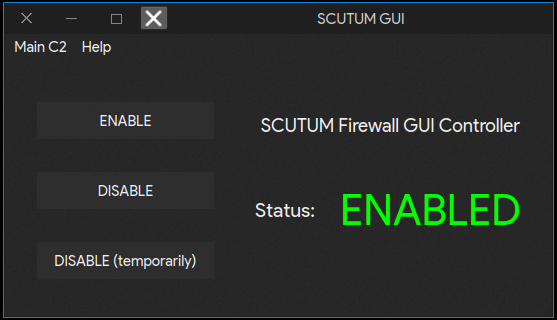
GUI Usage (Currently not working)
ENABLE: Enable SCUTUM (Start spontaneously)
DISABLE: Disable SCUTUM (Never start spontaneously)
DISABLE (Temporarily): Disable SCUTUM until the next time connected to a network
Usage
SCUTUM starts automatically by itself after installation.
Full up-to-date usage can be found by executing:
$ scutum --help
$ sudo service scutum start     # Start scutum service
$ sudo service scutum stop      # Stop scutum service
$ sudo systemctl enable scutum  # Start SCUTUM with system
$ sudo systemctl disable scutum # Don't start SCUTUM with system
$ sudo scutum                   # Start SCUTUM Normally
$ sudo scutum --start           # Start SCUTUM Manually for once even it it's disabled
$ sudo scutum --enable          # Enable SCUTUM (Start automatically on connect)
$ sudo scutum --disable         # Disable SCUTUM (Don't start automatically on connect)
$ sudo scutum --reset           # Reset SCUTUM (Allow ALL ARP packages temporarily)
$ sudo scutum --purgelog        # Purge SCUTUM logs
$ sudo scutum --install         # Run scutum installation wizard and install SCUTUM into system
$ sudo scutum --uninstall       # Remove SCUTUM from system completely
$ sudo scutum --upgrade         # Upgrade SCUTUM and AVALON Framework
SCUTUM Workflow
postconnect
Connect to Wi-Fi
Accept all ARP packets
Cache gateway MAC address by establishing a socket connection with a timeout of 0
Trang TopGit này là một snapshot — tab "Readme" hiển thị nguyên văn README của repo (đã bỏ link, giữ ảnh). Repo GitHub ở github.com/k4yt3x/scutum là nguồn chính thức.
k4yt3x/scutum có bao nhiêu sao?
k4yt3x/scutum có 84 sao GitHub — tải lại trang để xem số mới nhất, hoặc xem trực tiếp github.com/k4yt3x/scutum. TopGit phản chiếu số sao của GitHub nhưng không cam kết đến từng phút.
k4yt3x/scutum có những chủ đề gì?
GitHub topics của k4yt3x/scutum: "arp", "arp-spoofing", "firewall", "linux", "security", "ufw". TopGit xếp repo vào nhóm Security.
k4yt3x/scutum có website riêng không?
TopGit chưa ghi nhận URL trang chủ cho k4yt3x/scutum. Phần README ở tab phía trên thường có link demo, hoặc xem mô tả GitHub của repo.
k4yt3x/scutum còn đang phát triển không?
Commit gần nhất trên k4yt3x/scutum là 6.8 năm trước (theo timestamp GitHub). Repo có 21 fork — một chỉ báo về mức độ quan tâm của cộng đồng.
k4yt3x/scutum dùng license gì?
k4yt3x/scutum phát hành theo license GPL-3.0. Nên mở file LICENSE trên GitHub để xác nhận — license metadata đôi khi lệch với thực tế dự án.
k4yt3x/scutum viết bằng ngôn ngữ gì?
k4yt3x/scutum chủ yếu viết bằng Python. Trường "language" của GitHub dựa trên phần lớn byte ở nhánh mặc định.
Đọc đầy đủ README ở tab phía trên.
Vẫn đang phân vân về scutum?
Một cú bấm sẽ gửi câu hỏi kèm trang này cho AI — xem AI nói gì về scutum.
 /scutum