kartik-v/bootstrap-fileinput được TopGit xếp vào nhóm dự án frontend, với 5.3k sao trên GitHub, viết chủ yếu bằng JavaScript. An enhanced HTML 5 file input for Bootstrap 5.x/4.x./3.x with file preview, multiple selection, and more features.
Tóm tắt dựng từ metadata GitHub của chính dự án — chưa có bài review TopGit. Trang sẽ tự động cập nhật khi bài review đầy đủ được xuất bản.
VÌ SAO CHƯA CÓ REVIEW
TopGit viết bài đầy đủ cho repo có nhiều sao nhất và được yêu cầu nhiều nhất. Trang này là snapshot trong thời gian chờ — xem README gốc ở tab READ ME.
An enhanced HTML 5 file input for Bootstrap 5.x, 4.x, and 3.x with file preview for various files, offers multiple selection, resumable chunk uploads, and more. The plugin allows you a simple way to setup an advanced file picker/upload control built to work specially with Bootstrap 5.x, 4.x, and 3.x CSS3 styles. It enhances the file input functionality further, by offering support to preview a wide variety of files i.e. images, text, html, video, audio, flash, and objects. In addition, it includes AJAX based uploads, dragging & dropping files, viewing upload progress, and selectively previewing, adding, or deleting files.
NEW: Bootstrap 5.x support is added from v5.2.0 (major release after v5.1.5) of the plugin. With v5.2.0, the plugin is able to automatically detect the bootstrap library version and deliver the relevant bootstrap specific functionality (if the bootstrap library JS file is loaded). Alternatively, check the $.fn.fileinputBsVersion setting for advanced use cases to avoid Bootstrap version detection issues.
NOTE: Version 5.x is a significant rewrite. With version 5.x, the plugin code has been revamped with enhanced file management, resumable chunk uploads support, and other new features. You can go through the various closed enhancements and features and documented for Release 5.x milestone.
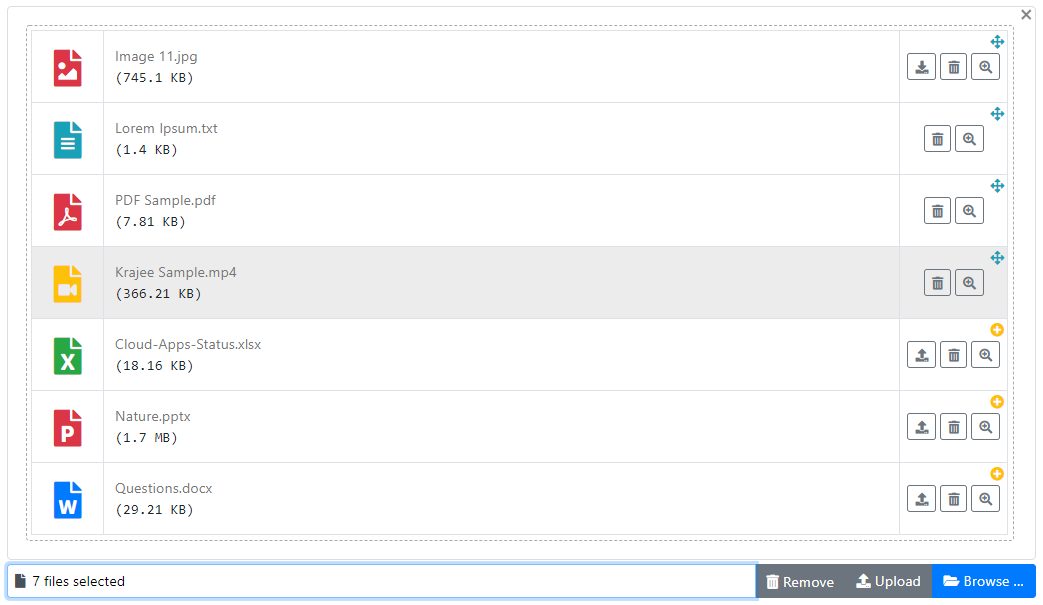
NOTE: An alternative new Krajee Explorer Theme (preview shown below) for bootstrap-fileinput has been released and available since v4.3.7. For more theming options and suggestions refer the theming demos.
Documentation and Demo
View the plugin documentation and plugin demos at Krajee JQuery plugins.
Pre-requisites
Bootstrap 5.x or 4.x, or 3.x
Latest JQuery
Most modern browsers supporting HTML5 (inputs and FileReader API) including CSS3 & JQuery. For Internet Explorer, one must use IE versions 10 and above. IE9 and below will work as a normal file input, and will not support multiple file selection or the HTML 5 FileReader API.
With release 4.0, AJAX uploads are supported. AJAX uploads require that the browser support HTML5 FormData and XHR2 (XMLHttpRequest 2). Most modern browsers support FormData and XHR2. The plugin will automatically degrade to normal form based submission for browsers not supporting AJAX uploads
NOTE:
Bootstrap 5.x is supported in addition to Bootstrap 3.x and 4.x since release v5.2.0. Refer the CHANGE LOG for details.
Bootstrap 4.x is supported in addition to Bootstrap 3.x since release v4.4.4. Refer the CHANGE LOG for details.
You can use the sass branch for installation using bootstrap-sass dependency.
The master branch can be used for installation using plain bootstrap dependency.
Installation
Using Bower
To install using the bower package manager run:
bower install bootstrap-fileinput
Using NPM
To install using the npm package manager run:
npm install bootstrap-fileinput
Using Composer
To install using the composer package manager run:
You can also manually install the plugin easily to your project. Just download the source ZIP or TAR ball and extract the plugin assets (css and js folders) into your project.
Usage
Step 1: Load the following assets on your page in the order mentioned.
<!-- bootstrap 5.x or 4.x is supported. You can also use the bootstrap css 3.3.x versions -->
<link rel="stylesheet" href="https://cdn.jsdelivr.net/npm/[email protected]/dist/css/bootstrap.min.css" crossorigin="anonymous">

<!-- default icons used in the plugin are from Bootstrap 5.x icon library (which can be enabled by loading CSS below) -->
<link rel="stylesheet" href="https://cdn.jsdelivr.net/npm/[email protected]/font/bootstrap-icons.min.css" crossorigin="anonymous">

<!-- alternatively you can use the font awesome icon library if using with `fas` theme (or Bootstrap 4.x) by uncommenting below. -->
<!-- link rel="stylesheet" href="https://use.fontawesome.com/releases/v5.15.4/css/all.css" crossorigin="anonymous" -->

<!-- the fileinput plugin styling CSS file -->
<link href="https://cdn.jsdelivr.net/gh/kartik-v/[email protected]/css/fileinput.min.css" media="all" rel="stylesheet" type="text/css" />

<!-- if using RTL (Right-To-Left) orientation, load the RTL CSS file after fileinput.css by uncommenting below -->
<!-- link href="https://cdn.jsdelivr.net/gh/kartik-v/[email protected]/css/fileinput-rtl.min.css" media="all" rel="stylesheet" type="text/css" /-->

<!-- the jQuery Library -->
<script src="https://code.jquery.com/jquery-3.6.0.min.js" crossorigin="anonymous"></script>

<!-- buffer.min.js and filetype.min.js are necessary in the order listed for advanced mime type parsing and more correct
     preview. This is a feature available since v5.5.0 and is needed if you want to ensure file mime type is parsed
     correctly even if the local file's extension is named incorrectly. This will ensure more correct preview of the
     selected file (note: this will involve a small processing overhead in scanning of file contents locally). If you
     do not load these scripts then the mime type parsing will largely be derived using the extension in the filename
     and some basic file content parsing signatures. -->
<script src="https://cdn.jsdelivr.net/gh/kartik-v/[email protected]/js/plugins/buffer.min.js" type="text/javascript"></script>
<script src="https://cdn.jsdelivr.net/gh/kartik-v/[email protected]/js/plugins/filetype.min.js" type="text/javascript"></script>

<!-- piexif.min.js is needed for auto orienting image files OR when restoring exif data in resized images and when you
    wish to resize images before upload. This must be loaded before fileinput.min.js -->
<script src="https://cdn.jsdelivr.net/gh/kartik-v/[email protected]/js/plugins/piexif.min.js" type="text/javascript"></script>

<!-- sortable.min.js is only needed if you wish to sort / rearrange files in initial preview.
    This must be loaded before fileinput.min.js -->
<script src="https://cdn.jsdelivr.net/gh/kartik-v/[email protected]/js/plugins/sortable.min.js" type="text/javascript"></script>

<!-- bootstrap.bundle.min.js below is needed if you wish to zoom and preview file content in a detail modal
    dialog. bootstrap 5.x or 4.x is supported. You can also use the bootstrap js 3.3.x versions. -->
<script src="https://cdn.jsdelivr.net/npm/[email protected]/dist/js/bootstrap.bundle.min.js" crossorigin="anonymous"></script>

<!-- the main fileinput plugin script JS file -->
<script src="https://cdn.jsdelivr.net/gh/kartik-v/[email protected]/js/fileinput.min.js"></script>

<!-- following theme script is needed to use the Font Awesome 5.x theme (`fas`). Uncomment if needed. -->
<!-- script src="https://cdn.jsdelivr.net/gh/kartik-v/[email protected]/themes/fas/theme.min.js"></script -->

<!-- optionally if you need translation for your language then include the locale file as mentioned below (replace LANG.js with your language locale) -->
<script src="https://cdn.jsdelivr.net/gh/kartik-v/[email protected]/js/locales/LANG.js"></script>
With v5.2.1, the plugin is able to automatically detect the bootstrap library version and deliver the relevant bootstrap specific functionality (if you have loaded the bootstrap.min.js before fileinput.min.js). In case of any issues - you can explicitly set the bootstrap version by setting the following variable before the plugin initialization script.
// set this before initializing the fileinput plugin
$.fn.fileinputBsVersion = '3.4.1'; // for example if using bootstrap css 3.4.1 version
If you noticed, you need to load the jquery.min.js and bootstrap.min.css in addition to the fileinput.min.css and fileinput.min.js. The theme file themes/fa/theme.js can be optionally included for the font awesome icons styling. The locale file <lang>.js can be optionally included for translating for your language if needed.
Optional Dependent Plugins
The piexif.min.js file is the source for the Piexifjs plugin by hMatoba. It is required to be loaded before fileinput.min.js if you wish to use the image resize feature of the bootstrap-fileinput plugin.
The sortable.min.js file is the source for the Sortable plugin by rubaxa. It is required to be loaded before fileinput.min.js if you wish to sort the thumbnails in the initial preview.
For ease of access, the sources for the above plugins are included in the js/plugins folder of this project repository.
Step 2: Initialize the plugin on your page. For example,
// HTML markup
<input id="input-id" name="file-data" type="file">

<script>
$(document).ready(function() {
    // initialize with defaults
    $("#input-id").fileinput();

    // with plugin options
    $("#input-id").fileinput({'uploadUrl': '/path/to/your-upload-api', 'previewFileType': 'any'});
});
</script>
The #input-id is the identifier for the input (e.g. type = file) on your page, which is hidden automatically by the plugin.
Alternatively, you can directly call the plugin options by setting data attributes to your input field. To auto initialize the plugin with just HTML markup - add the CSS class file to your file input markup element.
NOTE: When initializing the plugin via javascript (as mentioned earlier), do not add the CSS class file to the input markup (else you would get an erronaeous / inconsistent output).
Contributors
Code Contributors
This project exists thanks to all the people who contribute. [Contribute].
Financial Contributors
Become a financial contributor and help us sustain our community. [Contribute]
Individuals
Organizations
Support this project with your organization. Your logo will show up here with a link to your website. [Contribute]
License
bootstrap-fileinput is released under the BSD-3-Clause License. See the bundled LICENSE.md for details.
kartik-v/bootstrap-fileinput thuộc nhóm Frontend trên TopGit, cùng 20 topic GitHub. Trang Trending và Topics liệt kê các repo cùng số sao và cùng ngôn ngữ để so sánh.
Đọc thêm về kartik-v/bootstrap-fileinput ở đâu?
Trang TopGit này là một snapshot — tab "Readme" hiển thị nguyên văn README của repo (đã bỏ link, giữ ảnh). Repo GitHub ở github.com/kartik-v/bootstrap-fileinput là nguồn chính thức.
kartik-v/bootstrap-fileinput có bao nhiêu sao?
kartik-v/bootstrap-fileinput có 5.3k sao GitHub — tải lại trang để xem số mới nhất, hoặc xem trực tiếp github.com/kartik-v/bootstrap-fileinput. TopGit phản chiếu số sao của GitHub nhưng không cam kết đến từng phút.
kartik-v/bootstrap-fileinput có phải mã nguồn mở không?
TopGit chưa ghi nhận license cho kartik-v/bootstrap-fileinput. Phần lớn repo public trên GitHub là mã nguồn mở, nhưng điều khoản khác nhau từng repo — mở file LICENSE để xác nhận.
kartik-v/bootstrap-fileinput có trang demo không?
Dự án có trang chủ ở http://plugins.krajee.com/file-input. Tab "Readme" ở trang này thường có ảnh chụp và hướng dẫn bắt đầu nhanh.
kartik-v/bootstrap-fileinput còn đang phát triển không?
Commit gần nhất trên kartik-v/bootstrap-fileinput là 3 tháng trước (theo timestamp GitHub). Repo có 2.3k fork — một chỉ báo về mức độ quan tâm của cộng đồng.
Đọc đầy đủ README ở tab phía trên.
Vẫn đang phân vân về bootstrap-fileinput?
Một cú bấm sẽ gửi câu hỏi kèm trang này cho AI — xem AI nói gì về bootstrap-fileinput.
 /bootstrap-fileinput