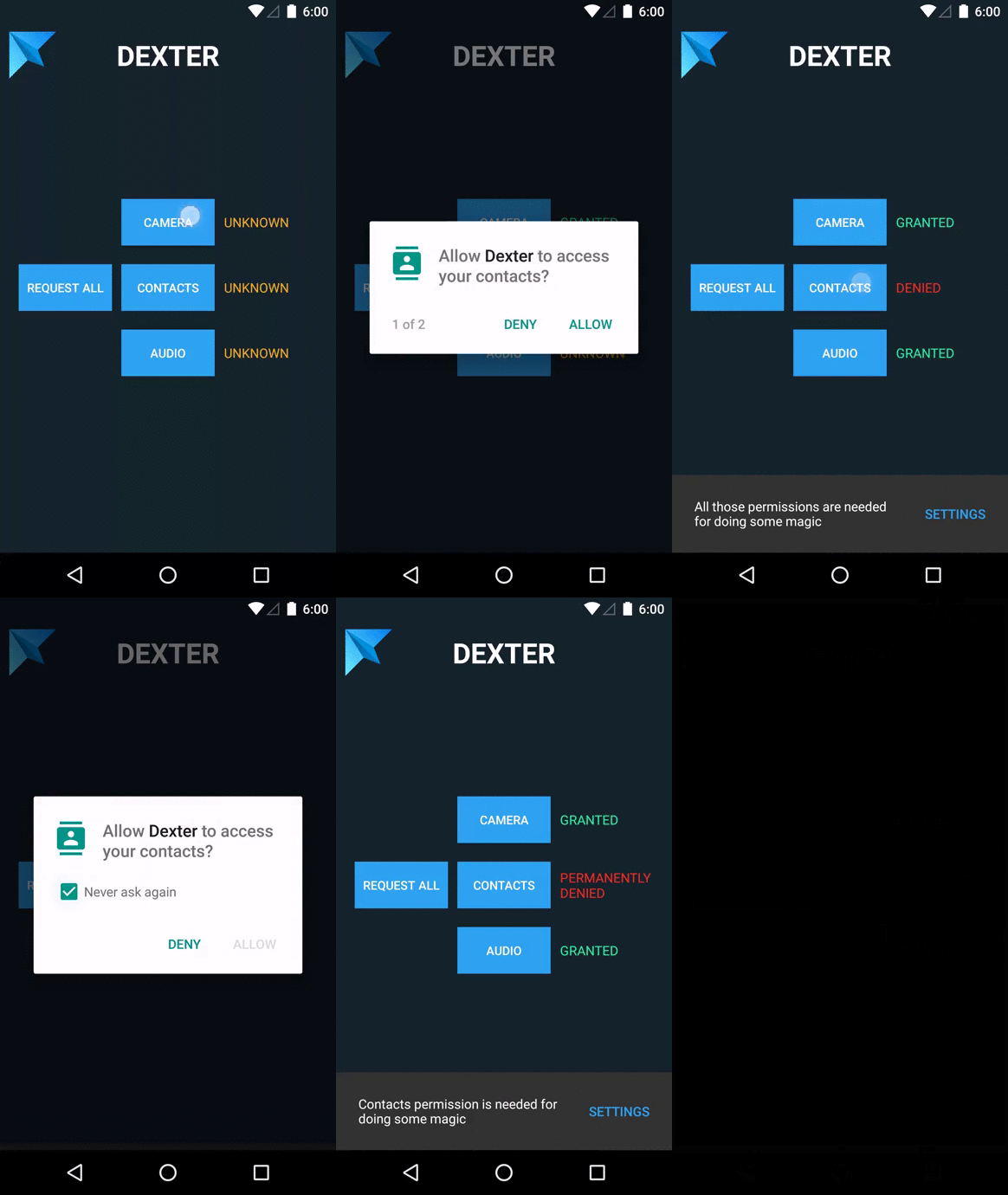
Trên GitHub, Karumi/Dexter đã đạt 5.2k sao, nhóm Mobile, ngôn ngữ Java. Android library that simplifies the process of requesting permissions at runtime.
Tóm tắt dựng từ metadata GitHub của chính dự án — chưa có bài review TopGit. Trang sẽ tự động cập nhật khi bài review đầy đủ được xuất bản.
VÌ SAO CHƯA CÓ REVIEW
TopGit viết bài đầy đủ cho repo có nhiều sao nhất và được yêu cầu nhiều nhất. Trang này là snapshot trong thời gian chờ — xem README gốc ở tab READ ME.
This project is no longer under active development. If you are looking for an Android library to be able to request Android permissions in runtime take a look here
Dexter is an Android library that simplifies the process of requesting permissions at runtime.
Android Marshmallow includes a new functionality to let users grant or deny permissions when running an app instead of granting them all when installing it. This approach gives the user more control over applications but requires developers to add lots of code to support it.
Dexter frees your permission code from your activities and lets you write that logic anywhere you want.
To make your life easier we offer some PermissionListener implementations to perform recurrent actions:
BasePermissionListener to make it easier to implement only the methods you want. Keep in mind that you should not call super methods when overriding them.
DialogOnDeniedPermissionListener to show a configurable dialog whenever the user rejects a permission request:
PermissionListener dialogPermissionListener =
	DialogOnDeniedPermissionListener.Builder
		.withContext(context)
		.withTitle("Camera permission")
		.withMessage("Camera permission is needed to take pictures of your cat")
		.withButtonText(android.R.string.ok)
		.withIcon(R.mipmap.my_icon)
		.build();
SnackbarOnDeniedPermissionListener to show a snackbar message whenever the user rejects a permission request:
PermissionListener snackbarPermissionListener =
	SnackbarOnDeniedPermissionListener.Builder
		.with(view, "Camera access is needed to take pictures of your dog")
		.withOpenSettingsButton("Settings")
        .withCallback(new Snackbar.Callback() {
            @Override
            public void onShown(Snackbar snackbar) {
                // Event handler for when the given Snackbar is visible
            }
            @Override
            public void onDismissed(Snackbar snackbar, int event) {
                // Event handler for when the given Snackbar has been dismissed
            }
        }).build();
CompositePermissionListener to compound multiple listeners into one:
The MultiplePermissionsReport contains all the details of the permission request like the list of denied/granted permissions or utility methods like areAllPermissionsGranted and isAnyPermissionPermanentlyDenied.
As with the single permission listener, there are also some useful implementations for recurring patterns:
BaseMultiplePermissionsListener to make it easier to implement only the methods you want. Keep in mind that you should not call super methods when overriding them.
DialogOnAnyDeniedMultiplePermissionsListener to show a configurable dialog whenever the user rejects at least one permission:
MultiplePermissionsListener dialogMultiplePermissionsListener =
	DialogOnAnyDeniedMultiplePermissionsListener.Builder
		.withContext(context)
		.withTitle("Camera & audio permission")
		.withMessage("Both camera and audio permission are needed to take pictures of your cat")
		.withButtonText(android.R.string.ok)
		.withIcon(R.mipmap.my_icon)
		.build();
SnackbarOnAnyDeniedMultiplePermissionsListener to show a snackbar message whenever the user rejects any of the requested permissions:
MultiplePermissionsListener snackbarMultiplePermissionsListener =
	SnackbarOnAnyDeniedMultiplePermissionsListener.Builder
		.with(view, "Camera and audio access is needed to take pictures of your dog")
		.withOpenSettingsButton("Settings")
        .withCallback(new Snackbar.Callback() {
            @Override
            public void onShown(Snackbar snackbar) {
                // Event handler for when the given Snackbar is visible
            }
            @Override
            public void onDismissed(Snackbar snackbar, int event) {
                // Event handler for when the given Snackbar has been dismissed
            }
        })
		.build();
CompositePermissionListener to compound multiple listeners into one:
If you want to receive permission listener callbacks on the same thread that fired the permission request, you just need to call onSameThread before checking for permissions:
Android will notify you when you are requesting a permission that needs an additional explanation for its usage, either because it is considered dangerous, or because the user has already declined that permission once.
Dexter will call the method onPermissionRationaleShouldBeShown implemented in your listener with a PermissionToken. It's important to keep in mind that the request process will pause until the token is used, therefore, you won't be able to call Dexter again or request any other permissions if the token has not been used.
The most simple implementation of your onPermissionRationaleShouldBeShown method could be:
@Override public void onPermissionRationaleShouldBeShown(PermissionRequest permission, PermissionToken token) {
	token.continuePermissionRequest();
}
Error handling
If you think there is an error in your Dexter integration, just register a PermissionRequestErrorListener when calling Dexter:
Dexter.withContext(context)
	.withPermission(permission)
	.withListener(listener)
	.withErrorListener(new PermissionRequestErrorListener() {
		@Override public void onError(DexterError error) {
			Log.e("Dexter", "There was an error: " + error.toString());
		}
	}).check();
The library will notify you when something bad happens. In general, it is a good practice to, at least, log every error Dexter may throw but is up to you, the developer, to do that.
IMPORTANT: Remember to follow the Google design guidelines to make your application as user-friendly as possible.
Permission dialog not being shown
If you are using the MultiplePermissionsListener and you don't see the permission dialog the second time the permission is checked review your configuration. Keep in mind you need to let Dexter know the rationale you can show was closed or not by calling token?.continuePermissionRequest(). If you don't do this, the next time the permission is requested, the OS dialog asking for this permission won't be shown. You can find more information about this in here. This is an example of how a multiple permission request should be implemented:
button.setOnClickListener {
    Dexter.withContext(this@MainActivity)
                        .withPermissions(
                            Manifest.permission.ACCESS_COARSE_LOCATION
                            ,Manifest.permission.ACCESS_FINE_LOCATION)
                        .withListener(object: MultiplePermissionsListener {
                            override fun onPermissionsChecked(report: MultiplePermissionsReport?) {
                                report?.let {
                                    if(report.areAllPermissionsGranted()){
                                        toast("OK")
                                    }
                                }
                            }
                            override fun onPermissionRationaleShouldBeShown(
                                permissions: MutableList<PermissionRequest>?,
                                token: PermissionToken?
                            ) {
                                // Remember to invoke this method when the custom rationale is closed
                                // or just by default if you don't want to use any custom rationale.
                                token?.continuePermissionRequest()
                            }
                        })
                        .withErrorListener {
                            toast(it.name)
                        }
                        .check()
}
Caveats
For permissions that did not exist before API Level 16, you should check the OS version and use ContextCompat.checkSelfPermission. See You Cannot Hold Non-Existent Permissions.
Don't call Dexter from an Activity with the flag noHistory enabled. When a permission is requested, Dexter creates its own Activity internally and pushes it into the stack causing the original Activity to be dismissed.
Permissions SYSTEM_ALERT_WINDOW and WRITE_SETTINGS are considered special by Android. Dexter doesn't handle those and you'll need to request them in the old fashioned way.
Contributors
Thank you all for your work!
Carlos Morera de la Chica
Alex Florescu
Pedro Veloso
Dion Segijn
Christian Panadero
Vignesh
Andy French
Bernat Borrás Paronella
Bastien Paul
Bas Broek
Bartek Lipinski
emmano
Konrad Morawski
Hrant Alaverdyan
Carla
Pavel Stepanov
Emmett Wilson
Max
Al B.
Vladislav Bauer
Jc Miñarro
handrenliang
jcruzsousa
lzdon
Do you want to contribute?
Feel free to add any useful feature to the library, we will be glad to improve it with your help.
Keep in mind that your PRs must be validated by Travis-CI. Please, run a local build with ./gradlew checkstyle build test before submiting your code.
Libraries used in this project
Butterknife
JUnit
Mockito
License
Copyright 2015 Karumi

Licensed under the Apache License, Version 2.0 (the "License");
you may not use this file except in compliance with the License.
You may obtain a copy of the License at

   http://www.apache.org/licenses/LICENSE-2.0

Unless required by applicable law or agreed to in writing, software
distributed under the License is distributed on an "AS IS" BASIS,
WITHOUT WARRANTIES OR CONDITIONS OF ANY KIND, either express or implied.
See the License for the specific language governing permissions and
limitations under the License.
Trang TopGit này là một snapshot — tab "Readme" hiển thị nguyên văn README của repo (đã bỏ link, giữ ảnh). Repo GitHub ở github.com/Karumi/Dexter là nguồn chính thức.
Karumi/Dexter có bao nhiêu sao?
Karumi/Dexter có 5.2k sao GitHub — tải lại trang để xem số mới nhất, hoặc xem trực tiếp github.com/Karumi/Dexter. TopGit phản chiếu số sao của GitHub nhưng không cam kết đến từng phút.
Karumi/Dexter có phải mã nguồn mở không?
Có — Karumi/Dexter phát hành theo license Apache-2.0, nghĩa là mã nguồn mở để đọc, fork và (tùy license) tái sử dụng. Mã: github.com/Karumi/Dexter.
Karumi/Dexter còn đang phát triển không?
Commit gần nhất trên Karumi/Dexter là 5.2 năm trước (theo timestamp GitHub). Repo có 675 fork — một chỉ báo về mức độ quan tâm của cộng đồng.
Karumi/Dexter là gì?
Karumi/Dexter (Karumi/Dexter) là dự án Java trên GitHub. Theo mô tả gốc: Android library that simplifies the process of requesting permissions at runtime.
Karumi/Dexter so với các dự án Mobile khác thế nào?
Karumi/Dexter được TopGit xếp vào nhóm Mobile, với 5.2k sao GitHub và viết bằng Java. Xem trang chủ đề Mobile trên TopGit để so sánh với các dự án tương tự theo số sao và mức độ hoạt động.
Đọc đầy đủ README ở tab phía trên.
Muốn nghe thêm một ý kiến về Dexter?
Hỏi một AI đọc được trang này — một cú bấm là có ngay nhận định về Dexter.
 /Dexter
 Dexter