TopGit theo dõi kha-white/manga-ocr trên GitHub trong nhóm Developer Tools, đã đạt 2.8k sao. Optical character recognition for Japanese text, with the main focus being Japanese manga
Tóm tắt dựng từ metadata GitHub của chính dự án — chưa có bài review TopGit. Trang sẽ tự động cập nhật khi bài review đầy đủ được xuất bản.
VÌ SAO CHƯA CÓ REVIEW
TopGit viết bài đầy đủ cho repo có nhiều sao nhất và được yêu cầu nhiều nhất. Trang này là snapshot trong thời gian chờ — xem README gốc ở tab READ ME.
Optical character recognition for Japanese text, with the main focus being Japanese manga.
It uses a custom end-to-end model built with Transformers' Vision Encoder Decoder framework.
Manga OCR can be used as a general purpose printed Japanese OCR, but its main goal was to provide a high quality
text recognition, robust against various scenarios specific to manga:
both vertical and horizontal text
text with furigana
text overlaid on images
wide variety of fonts and font styles
low quality images
Unlike many OCR models, Manga OCR supports recognizing multi-line text in a single forward pass,
so that text bubbles found in manga can be processed at once, without splitting them into lines.
See also:
Poricom, a GUI reader, which uses manga-ocr
mokuro, a tool, which uses manga-ocr to generate an HTML overlay for manga
Xelieu's guide, a comprehensive guide on setting up a reading and mining workflow with manga-ocr/mokuro (and many other useful tips)
Development code, including code for training and synthetic data generation: link
Description of synthetic data generation pipeline + examples of generated images: link
Installation
You need Python 3.9 or newer. Please note, that the newest Python release might not be supported due to a PyTorch dependency, which often breaks with new Python releases and needs some time to catch up.
Refer to PyTorch website for a list of supported Python versions.
Some users have reported problems with Python installed from Microsoft Store. If you see an error:
ImportError: DLL load failed while importing fugashi: The specified module could not be found.,
try installing Python from the official site.
If you want to run with GPU, install PyTorch as described here,
otherwise this step can be skipped.
Install with pip:
pip install manga-ocr
Or with uv:
uv add manga-ocr
You can also run manga-ocr without installing it into your project, using uvx:
uvx manga_ocr
Troubleshooting
ImportError: DLL load failed while importing fugashi: The specified module could not be found. - might be because of Python installed from Microsoft Store, try installing Python from the official site
problem with installing mecab-python3 on ARM architecture - try this workaround
Usage
Python API
from manga_ocr import MangaOcr

mocr = MangaOcr()
text = mocr('/path/to/img')
or
import PIL.Image

from manga_ocr import MangaOcr

mocr = MangaOcr()
img = PIL.Image.open('/path/to/img')
text = mocr(img)
Running in the background
Manga OCR can run in the background and process new images as they appear.
You might use a tool like ShareX or Flameshot to manually capture a region of the screen and let the
OCR read it either from the system clipboard, or a specified directory. By default, Manga OCR will write recognized text to clipboard,
from which it can be read by a dictionary like Yomitan.
Clipboard mode on Linux requires wl-copy for Wayland sessions or xclip for X11 sessions. You can find out which one your system needs by running echo $XDG_SESSION_TYPE in the terminal.
Your full setup for reading manga in Japanese with a dictionary might look like this:
capture region with ShareX -> write image to clipboard -> Manga OCR -> write text to clipboard -> Yomitan
To read images from clipboard and write recognized texts to clipboard, run in command line:
manga_ocr
To read images from ShareX's screenshot folder, run in command line:
manga_ocr "/path/to/sharex/screenshot/folder"
Note that when running in the clipboard scanning mode, any image that you copy to clipboard will be processed by OCR and replaced
by recognized text. If you want to be able to copy and paste images as usual, you should use the folder scanning mode instead
and define a separate task in ShareX just for OCR, which saves screenshots to some folder without copying them to clipboard.
When running for the first time, downloading the model (~400 MB) might take a few minutes.
The OCR is ready to use after OCR ready message appears in the logs.
To see other options, run in command line:
manga_ocr --help
If manga_ocr doesn't work, you might also try replacing it with python -m manga_ocr.
Usage tips
OCR supports multi-line text, but the longer the text, the more likely some errors are to occur.
If the recognition failed for some part of a longer text, you might try to run it on a smaller portion of the image.
The model was trained specifically to handle manga well, but should do a decent job on other types of printed text,
such as novels or video games. It probably won't be able to handle handwritten text though.
The model always attempts to recognize some text on the image, even if there is none.
Because it uses a transformer decoder (and therefore has some understanding of the Japanese language),
it might even "dream up" some realistically looking sentences! This shouldn't be a problem for most use cases,
but it might get improved in the next version.
Examples
Here are some cherry-picked examples showing the capability of the model.
image
Manga OCR result
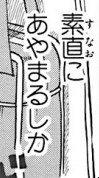
素直にあやまるしか
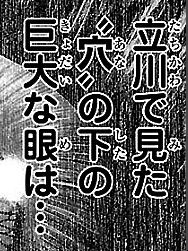
立川で見た〝穴〟の下の巨大な眼は:
実戦剣術も一流です
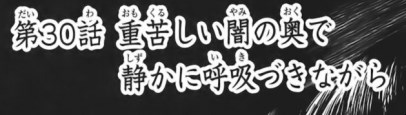
第30話重苦しい闇の奥で静かに呼吸づきながら
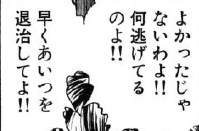
よかったじゃないわよ!何逃げてるのよ!!早くあいつを退治してよ!
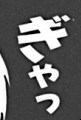
ぎゃっ
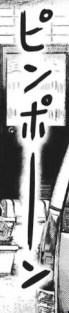
ピンポーーン
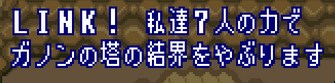
LINK!私達7人の力でガノンの塔の結界をやぶります
ファイアパンチ
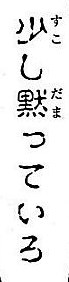
少し黙っている
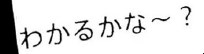
わかるかな〜?
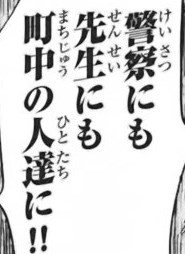
警察にも先生にも町中の人達に!!
Contact
For any inquiries, please feel free to contact me at [email protected]
Trang TopGit này là một snapshot — tab "Readme" hiển thị nguyên văn README của repo (đã bỏ link, giữ ảnh). Repo GitHub ở github.com/kha-white/manga-ocr là nguồn chính thức.
kha-white/manga-ocr có bao nhiêu sao?
kha-white/manga-ocr có 2.8k sao GitHub — tải lại trang để xem số mới nhất, hoặc xem trực tiếp github.com/kha-white/manga-ocr. TopGit phản chiếu số sao của GitHub nhưng không cam kết đến từng phút.
kha-white/manga-ocr có phải mã nguồn mở không?
Có — kha-white/manga-ocr phát hành theo license Apache-2.0, nghĩa là mã nguồn mở để đọc, fork và (tùy license) tái sử dụng. Mã: github.com/kha-white/manga-ocr.
kha-white/manga-ocr còn đang phát triển không?
Commit gần nhất trên kha-white/manga-ocr là 4 tháng trước (theo timestamp GitHub). Repo có 144 fork — một chỉ báo về mức độ quan tâm của cộng đồng.
kha-white/manga-ocr là gì?
kha-white/manga-ocr (kha-white/manga-ocr) là dự án Python trên GitHub. Theo mô tả gốc: Optical character recognition for Japanese text, with the main focus being Japanese manga
kha-white/manga-ocr so với các dự án Developer Tools khác thế nào?
kha-white/manga-ocr được TopGit xếp vào nhóm Developer Tools, với 2.8k sao GitHub và viết bằng Python. Xem trang chủ đề Developer Tools trên TopGit để so sánh với các dự án tương tự theo số sao và mức độ hoạt động.
Đọc đầy đủ README ở tab phía trên.
Vẫn đang phân vân về manga-ocr?
Một cú bấm sẽ gửi câu hỏi kèm trang này cho AI — xem AI nói gì về manga-ocr.

 /manga-ocr