koush/ion là dự án Java với 6.2k sao. Android Asynchronous Networking and Image Loading
Tóm tắt dựng từ metadata GitHub của chính dự án — chưa có bài review TopGit. Trang sẽ tự động cập nhật khi bài review đầy đủ được xuất bản.
VÌ SAO CHƯA CÓ REVIEW
TopGit viết bài đầy đủ cho repo có nhiều sao nhất và được yêu cầu nhiều nhất. Trang này là snapshot trong thời gian chờ — xem README gốc ở tab READ ME.
Images into ImageViews or Bitmaps (animated GIFs supported too)
JSON (via Gson)
Strings
Files
Java types using Gson
Easy to use Fluent API designed for Android
Automatically cancels operations when the calling Activity finishes
Manages invocation back onto the UI thread
All operations return a Future and can be cancelled
HTTP POST/PUT:
text/plain
application/json - both JsonObject and POJO
application/x-www-form-urlencoded
multipart/form-data
Transparent usage of HTTP features and optimizations:
SPDY and HTTP/2
Caching
Gzip/Deflate Compression
Connection pooling/reuse via HTTP Connection: keep-alive
Uses the best/stablest connection from a server if it has multiple IP addresses
Cookies
View received headers
Grouping and cancellation of requests
Download progress callbacks
Supports file:/, http(s):/, and content:/ URIs
Request level logging and profiling
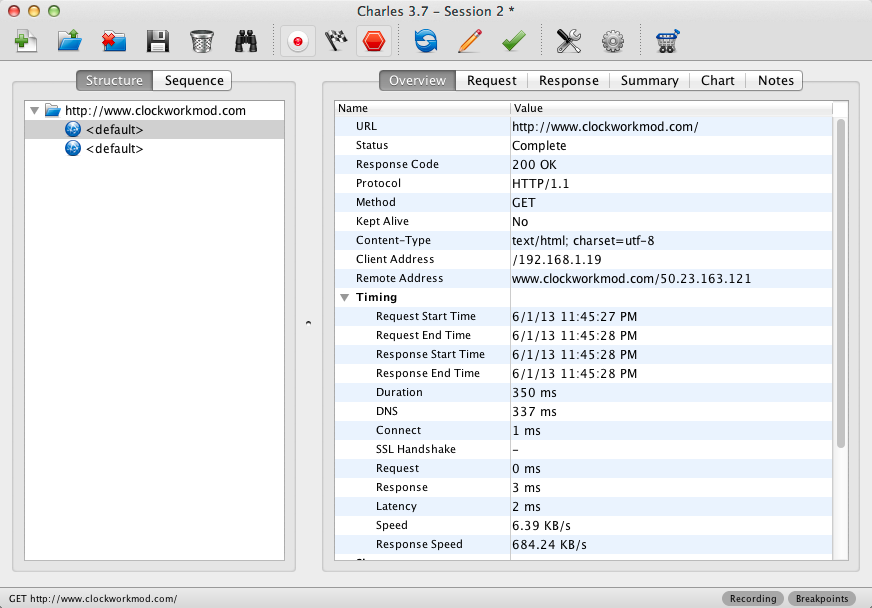
Support for proxy servers like Charles Proxy to do request analysis
Based on NIO and AndroidAsync
Ability to use self signed SSL certificates
Samples
The included documented ion-sample project includes some samples that demo common Android network operations:
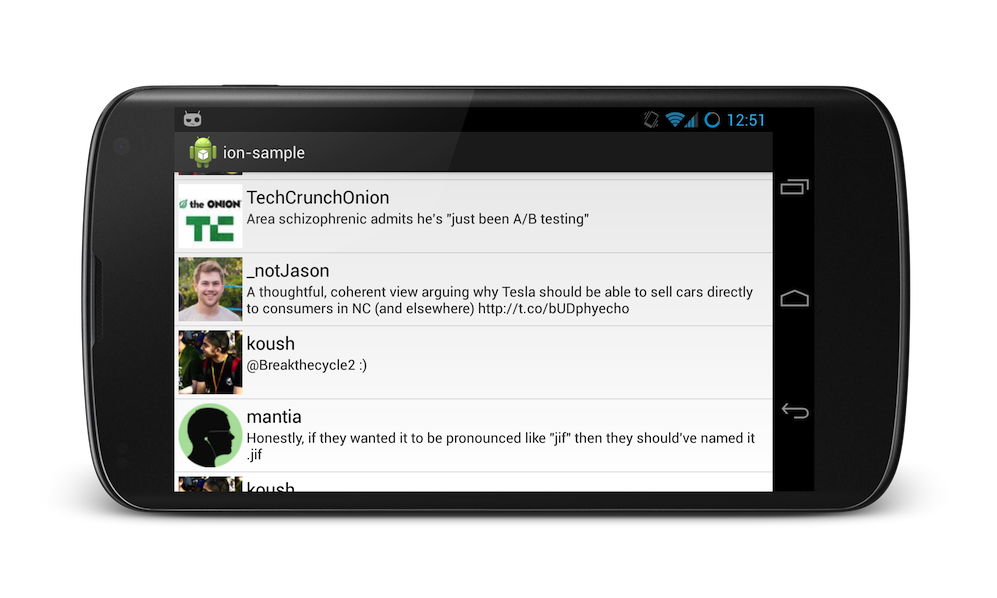
Twitter Client Sample
Download JSON from a server (twitter feed)
Populate a ListView Adapter and fetch more data as you scroll to the end
Put images from a URLs into ImageViews (twitter profile pictures)
File Download with Progress Bar Sample
Get JSON and show images with the Image Search Sample
More Examples
Looking for more? Check out the examples below that demonstrate some other common scenarios. You can also take a look
at 30+ ion unit tests in the ion-test.
Get JSON
Ion.with(context)
.load("http://example.com/thing.json")
.asJsonObject()
.setCallback(new FutureCallback<JsonObject>() {
   @Override
    public void onCompleted(Exception e, JsonObject result) {
        // do stuff with the result or error
    }
});
Post JSON and read JSON
JsonObject json = new JsonObject();
json.addProperty("foo", "bar");

Ion.with(context)
.load("http://example.com/post")
.setJsonObjectBody(json)
.asJsonObject()
.setCallback(new FutureCallback<JsonObject>() {
   @Override
    public void onCompleted(Exception e, JsonObject result) {
        // do stuff with the result or error
    }
});
Post application/x-www-form-urlencoded and read a String
Ion.with(context)
.load("http://example.com/really-big-file.zip")
// have a ProgressBar get updated automatically with the percent
.progressBar(progressBar)
// and a ProgressDialog
.progressDialog(progressDialog)
// can also use a custom callback
.progress(new ProgressCallback() {@Override
   public void onProgress(long downloaded, long total) {
       System.out.println("" + downloaded + " / " + total);
   }
})
.write(new File("/sdcard/really-big-file.zip"))
.setCallback(new FutureCallback<File>() {
   @Override
    public void onCompleted(Exception e, File file) {
        // download done...
        // do stuff with the File or error
    }
});
Setting Headers
Ion.with(context)
.load("http://example.com/test.txt")
// set the header
.setHeader("foo", "bar")
.asString()
.setCallback(...)
Load an image into an ImageView
// This is the "long" way to do build an ImageView request... it allows you to set headers, etc.
Ion.with(context)
.load("http://example.com/image.png")
.withBitmap()
.placeholder(R.drawable.placeholder_image)
.error(R.drawable.error_image)
.animateLoad(spinAnimation)
.animateIn(fadeInAnimation)
.intoImageView(imageView);

// but for brevity, use the ImageView specific builder...
Ion.with(imageView)
.placeholder(R.drawable.placeholder_image)
.error(R.drawable.error_image)
.animateLoad(spinAnimation)
.animateIn(fadeInAnimation)
.load("http://example.com/image.png");
The Ion Image load API has the following features:
Disk and memory caching
Bitmaps are held via weak references so memory is managed very efficiently
ListView Adapter recycling support
Bitmap transformations via the .transform(Transform)
Animate loading and loaded ImageView states
DeepZoom for extremely large images
Futures
All operations return a custom Future that allows
you to specify a callback that runs on completion.
public interface Future<T> extends Cancellable, java.util.concurrent.Future<T> {
    /**
     * Set a callback to be invoked when this Future completes.
     * @param callback
     * @return
     */
    public Future<T> setCallback(FutureCallback<T> callback);
}

Future<String> string = Ion.with(context)
.load("http://example.com/string.txt")
.asString();

Future<JsonObject> json = Ion.with(context)
.load("http://example.com/json.json")
.asJsonObject();

Future<File> file = Ion.with(context)
.load("http://example.com/file.zip")
.write(new File("/sdcard/file.zip"));

Future<Bitmap> bitmap = Ion.with(context)
.load("http://example.com/image.png")
.intoImageView(imageView);
Cancelling Requests
Futures can be cancelled by calling .cancel():
bitmap.cancel();
json.cancel();
Blocking on Requests
Though you should try to use callbacks for handling requests whenever possible, blocking on requests is possible too.
All Futures have a Future.get() method that waits for the result of the request, by blocking if necessary.
By default, Ion automatically places all requests into a group with all the other requests
created by that Activity or Service. Using the cancelAll(Activity) call, all requests
still pending can be easily cancelled:
Ion also lets you tag your requests into groups to allow for easy cancellation of requests in that group later:
Object jsonGroup = new Object();
Object imageGroup = new Object();

Future<JsonObject> json1 = Ion.with(activity)
.load("http://example.com/test.json")
// tag in a custom group
.group(jsonGroup)
.asJsonObject();

Future<JsonObject> json2 = Ion.with(activity)
.load("http://example.com/test2.json")
// use the same custom group as the other json request
.group(jsonGroup)
.asJsonObject();

Future<Bitmap> image1 = Ion.with(activity)
.load("http://example.com/test.png")
// for this image request, use a different group for images
.group(imageGroup)
.intoImageView(imageView1);

Future<Bitmap> image2 = Ion.with(activity)
.load("http://example.com/test2.png")
// same imageGroup as before
.group(imageGroup)
.intoImageView(imageView2);

// later... to cancel only image downloads:
Ion.getDefault(activity).cancelAll(imageGroup);
Proxy Servers (like Charles Proxy)
Proxy server settings can be enabled all Ion requests, or on a per request basis:
// proxy all requests
Ion.getDefault(context).configure().proxy("mycomputer", 8888);

// or... to proxy specific requests
Ion.with(context)
.load("http://example.com/proxied.html")
.proxy("mycomputer", 8888)
.getString();
Using Charles Proxy on your desktop computer in conjunction with request proxying will prove invaluable for debugging!
Viewing Received Headers
Ion operations return a ResponseFuture,
which grant access to response properties via the Response object.
The Response object contains the headers, as well as the result:
Ion.with(getContext())
.load("http://example.com/test.txt")
.asString()
.withResponse()
.setCallback(new FutureCallback<Response<String>>() {
    @Override
    public void onCompleted(Exception e, Response<String> result) {
        // print the response code, ie, 200
        System.out.println(result.getHeaders().code());
        // print the String that was downloaded
        System.out.println(result.getResult());
    }
});
Trang TopGit này là một snapshot — tab "Readme" hiển thị nguyên văn README của repo (đã bỏ link, giữ ảnh). Repo GitHub ở github.com/koush/ion là nguồn chính thức.
koush/ion có bao nhiêu sao?
koush/ion có 6.2k sao GitHub — tải lại trang để xem số mới nhất, hoặc xem trực tiếp github.com/koush/ion. TopGit phản chiếu số sao của GitHub nhưng không cam kết đến từng phút.
koush/ion có phải mã nguồn mở không?
TopGit chưa ghi nhận license cho koush/ion. Phần lớn repo public trên GitHub là mã nguồn mở, nhưng điều khoản khác nhau từng repo — mở file LICENSE để xác nhận.
koush/ion có tag gì không?
Bản đồng bộ chưa ghi nhận topic GitHub nào cho koush/ion. GitHub topics hiển thị ở thanh bên phải trang repo — đó là nơi đáng kiểm tra nhất.
koush/ion có website riêng không?
TopGit chưa ghi nhận URL trang chủ cho koush/ion. Phần README ở tab phía trên thường có link demo, hoặc xem mô tả GitHub của repo.
koush/ion còn đang phát triển không?
Commit gần nhất trên koush/ion là 24 ngày trước (theo timestamp GitHub). Repo có 1.0k fork — một chỉ báo về mức độ quan tâm của cộng đồng.
Đọc đầy đủ README ở tab phía trên.
Vẫn đang phân vân về ion?
Một cú bấm sẽ gửi câu hỏi kèm trang này cho AI — xem AI nói gì về ion.
 /ion
/ion