Điểm qua krzysztofzablocki/LifetimeTracker: 3.3k sao trên GitHub, viết chủ yếu bằng Swift, thuộc nhóm Mobile. Find retain cycles / memory leaks sooner.
Tóm tắt dựng từ metadata GitHub của chính dự án — chưa có bài review TopGit. Trang sẽ tự động cập nhật khi bài review đầy đủ được xuất bản.
VÌ SAO CHƯA CÓ REVIEW
TopGit viết bài đầy đủ cho repo có nhiều sao nhất và được yêu cầu nhiều nhất. Trang này là snapshot trong thời gian chờ — xem README gốc ở tab READ ME.
LifetimeTracker can surface retain cycle / memory issues right as you develop your application, and it will surface them to you immediately, so you can find them with more ease.
Instruments and Memory Graph Debugger are great, but too many times, developers forget to check for issues as they close the feature implementation.
If you use those tools sporadically many of the issues they surface will require you to investigate the cause and cost you a lot of time in the process.
Other tools like FBRetainCycleDetector rely on objc runtime magic to find the problems, but that means they can't really be used for pure Swift classes. This small tool simply focuses on tracking lifetime of objects which means that it can be used in both Objective-C and Swift codebases, and it doesn't rely on any complex or automatic magic behaviour.
If you'd like to support my work and improve your engineering workflows, check out my SwiftyStack course
Installation
CocoaPods
Add pod 'LifetimeTracker' to your Podfile.
Carthage
Add github "krzysztofzablocki/LifetimeTracker" to your Cartfile.
Swift Package Manager
Add LifetimeTracker" to the dependencies value of your Package.swift.
To Integrate visual notifications simply add following line at the start of AppDelegate(didFinishLaunchingWithOptions:) or if you are using iOS 13+ SceneDelegates in scene(willConnectTo:options:).
You can control when the dashboard is visible: alwaysVisible, alwaysHidden, or visibleWithIssuesDetected.
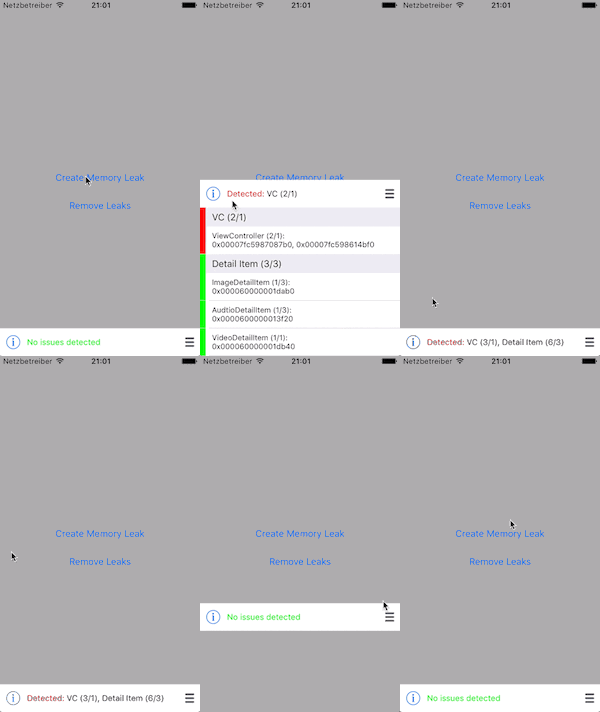
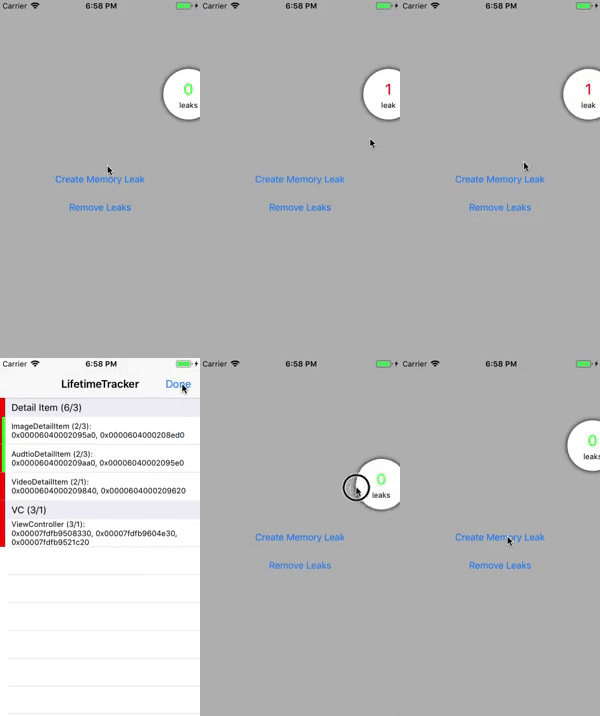
There are two styles available. A overlay bar view which shows the detailed list of issues directly on the screen or a circular view which displays only the amount of issues and opens the detailed list as modal view controller.
Tracking key actors
Usually, you want to use LifetimeTracker to track only key actors in your app, like ViewModels / Controllers etc. When you have more than maxCount items alive, the tracker will let you know.
Swift
You conform to LifetimeTrackable and call trackLifetime() at the end of your init functions:
If you are using Danger, you can use it to add both checkboxes to each PR to ensure people have verified no retain cycles were created but also to inform you when someone forgets to call trackLifetime() function.
#
# ** FILE CHECKS **
# Checks for certain rules and warns if needed.
# Some rules can be disabled by using // danger:disable rule_name
#
# Rules:
# - Check if the modified file is a View and doesn't implement LifetimeTrackable (lifetime_tracking)

# Sometimes an added file is also counted as modified. We want the files to be checked only once.
files_to_check = (git.modified_files + git.added_files).uniq
(files_to_check - %w(Dangerfile)).each do |file|
	next unless File.file?(file)
	# Only check inside swift files
  next unless File.extname(file).include?(".swift")

  # Will be used to check if we're inside a comment block.
	is_comment_block = false

	# Collects all disabled rules for this file.
	disabled_rules = []

	filelines = File.readlines(file)
	filelines.each_with_index do |line, index|
		if is_comment_block
			if line.include?("*/")
				is_comment_block = false
			end
		elsif line.include?("/*")
			is_comment_block = true
		elsif line.include?("danger:disable")
			rule_to_disable = line.split.last
			disabled_rules.push(rule_to_disable)
		else
			# Start our custom line checks
			# e.g. you could do something like check for methods that only call the super class' method
			#if line.include?("override") and line.include?("func") and filelines[index+1].include?("super") and filelines[index+2].include?("}")
			#	warn("Override methods which only call super can be removed", file: file, line: index+3)
			#end
    end
	end

	# Only continue checks for Lifetime Trackable types
	next unless (File.basename(file).include?("ViewModel") or File.basename(file).include?("ViewController") or File.basename(file).include?("View.swift")) and !File.basename(file).include?("Node") and !File.basename(file).include?("Tests") and !File.basename(file).include?("FlowCoordinator")

	if disabled_rules.include?("lifetime_tracking") == false
		if File.readlines(file).grep(/LifetimeTrackable/).any?
			fail("You forgot to call trackLifetime() from your initializers in " + File.basename(file, ".*") + " (lifetime_tracking)") unless File.readlines(file).grep(/trackLifetime()/).any?
		else
			warn("Please add support for LifetimeTrackable to " + File.basename(file, ".*") + " . (lifetime_tracking)")
		end
		markdown("- [ ] I've verified that showing and hiding " + File.basename(file, ".*") + " doesn't surface any [LifetimeTracker](https://github.com/krzysztofzablocki/LifetimeTracker) issues")
	end

end
Surface last notification from the stack
Sometimes it is useful to get information about last retain cycle in order to log it to external sources such as analytics/trackers. In order to do that we can update initial configuration with onLeakDetected:
LifetimeTracker.setup(onLeakDetected: { entity, _ in
	log.warning("POSSIBLE LEAK ALERT: \(entity.name) - current count: \(entity.count), max count: \(entity.maxCount)")
}, onUpdate: LifetimeTrackerDashboardIntegration(visibility: .alwaysVisible, style: .bar).refreshUI)
Group tracked objects
You can group tracked objects together. maxCount of a group will be calculated by maxCount of all members per default. However, you can override it and provide a separate value to the group with groupMaxCount.
You may want to do this when you have a set of subclasses which can appear x times each, but in total only less than the sum of all subclasses:
// DetailPage: UIViewController

// VideoDetailPage: DetailItem
LifetimeConfiguration(maxCount: 3, groupName: "Detail Page")

// ImageDetailPage: DetailItem
LifetimeConfiguration(maxCount: 3, groupName: "Detail Page")

=> Group warning if 7 DetailPage objects are alive

// VideoDetailPage: DetailItem
LifetimeConfiguration(maxCount: 3, groupName: "Detail Page", groupMaxCount: 3)

// ImageDetailPage: DetailItem
LifetimeConfiguration(maxCount: 3, groupName: "Detail Page", groupMaxCount: 3)

=> Group warning if 4 DetailPage object are alive
Writing integration tests for memory leaks
You can access the summary label using accessibility identifier LifetimeTracker.summaryLabel, which allows you to write integration tests that end up with looking up whether any issues were found.
License
LifetimeTracker is available under the MIT license. See LICENSE for more information.
Attributions
I've used SwiftPlate to generate xcodeproj compatible with CocoaPods and Carthage.
Đọc thêm về krzysztofzablocki/LifetimeTracker ở đâu?
Trang TopGit này là một snapshot — tab "Readme" hiển thị nguyên văn README của repo (đã bỏ link, giữ ảnh). Repo GitHub ở github.com/krzysztofzablocki/LifetimeTracker là nguồn chính thức.
krzysztofzablocki/LifetimeTracker có bao nhiêu sao?
krzysztofzablocki/LifetimeTracker có 3.3k sao GitHub — tải lại trang để xem số mới nhất, hoặc xem trực tiếp github.com/krzysztofzablocki/LifetimeTracker. TopGit phản chiếu số sao của GitHub nhưng không cam kết đến từng phút.
krzysztofzablocki/LifetimeTracker có những chủ đề gì?
GitHub topics của krzysztofzablocki/LifetimeTracker: "ios", "memory-leaks", "retain-cycles", "swift", "tool". TopGit xếp repo vào nhóm Mobile.
krzysztofzablocki/LifetimeTracker có trang demo không?
Dự án có trang chủ ở http://merowing.info. Tab "Readme" ở trang này thường có ảnh chụp và hướng dẫn bắt đầu nhanh.
krzysztofzablocki/LifetimeTracker còn đang phát triển không?
Commit gần nhất trên krzysztofzablocki/LifetimeTracker là 5 tháng trước (theo timestamp GitHub). Repo có 154 fork — một chỉ báo về mức độ quan tâm của cộng đồng.
krzysztofzablocki/LifetimeTracker dùng license gì?
krzysztofzablocki/LifetimeTracker phát hành theo license MIT. Nên mở file LICENSE trên GitHub để xác nhận — license metadata đôi khi lệch với thực tế dự án.
krzysztofzablocki/LifetimeTracker viết bằng ngôn ngữ gì?
krzysztofzablocki/LifetimeTracker chủ yếu viết bằng Swift. Trường "language" của GitHub dựa trên phần lớn byte ở nhánh mặc định.
Đọc đầy đủ README ở tab phía trên.
Muốn nghe thêm một ý kiến về LifetimeTracker?
Hỏi một AI đọc được trang này — một cú bấm là có ngay nhận định về LifetimeTracker.
 /LifetimeTracker