ktr0731/evans

ktr0731/evans là dự án Go với 4.5k sao trong nhóm Developer Tools. Evans: more expressive universal gRPC client
Tóm tắt dựng từ metadata GitHub của chính dự án — chưa có bài review TopGit. Trang sẽ tự động cập nhật khi bài review đầy đủ được xuất bản.
TopGit viết bài đầy đủ cho repo có nhiều sao nhất và được yêu cầu nhiều nhất. Trang này là snapshot trong thời gian chờ — xem README gốc ở tab READ ME.
Snapshot
Cộng tác viên hàng đầu
Xem cộng tác viên hàng đầu



Motivation
Evans has been created to use easier than other existing gRPC clients.
If you want to keep your product quality, you must use CI with gRPC testing, should not do use manual testing.
Evans will complete your other use cases just like:
- Manually gRPC API inspection
- To automate some tasks by scripting
The above use cases are corresponding to Evans's two modes, REPL mode, and CLI mode.
REPL mode
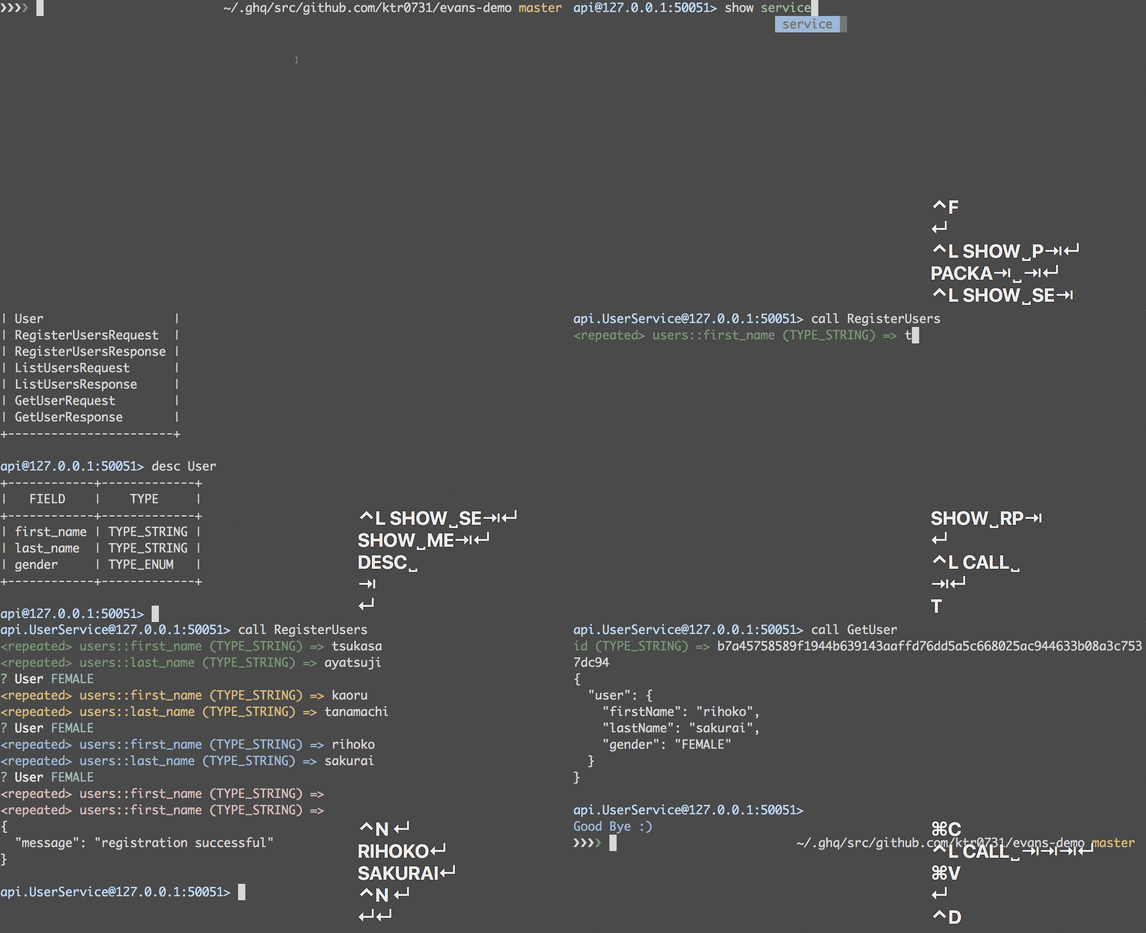
REPL mode is the solution for first use case.
You can use it without thinking like the package name, service name, RPC name, command usage, and so on because REPL mode has powerful completion!
CLI mode
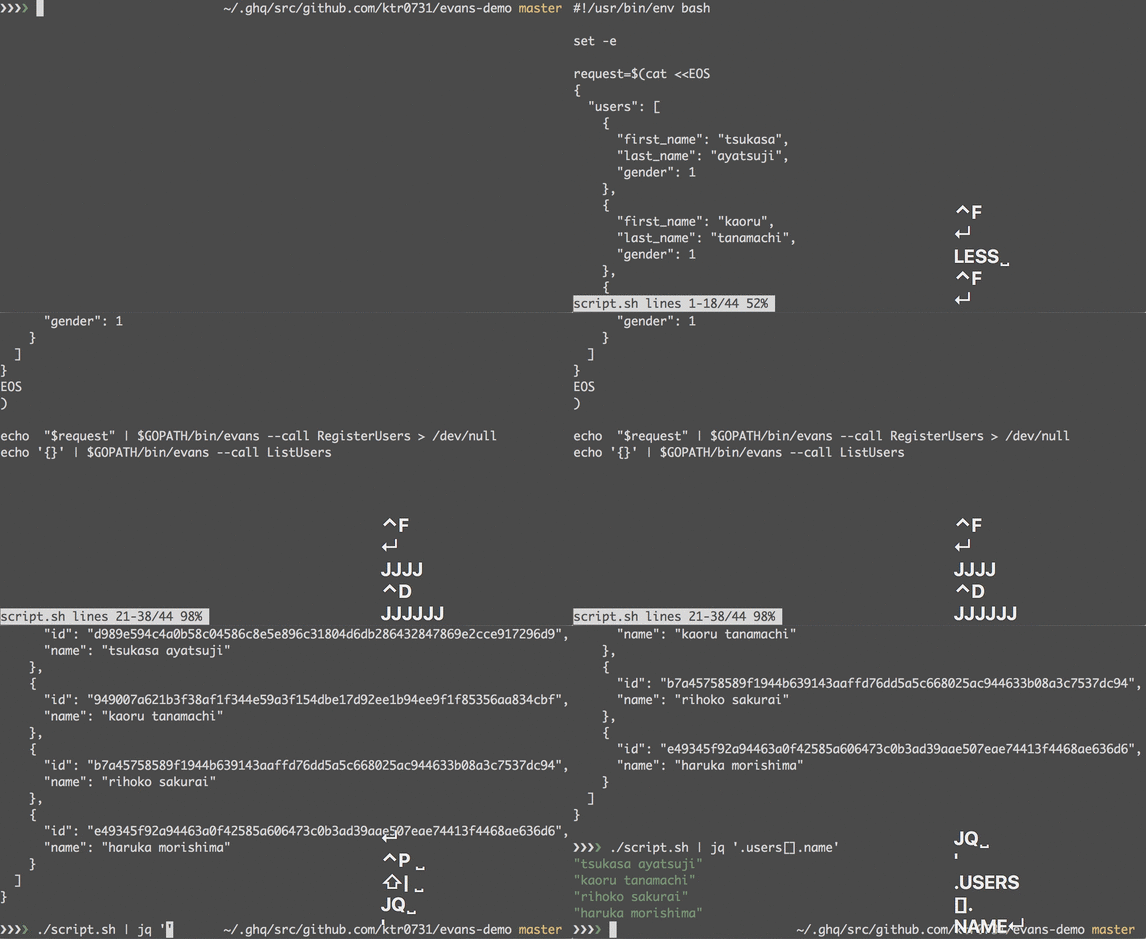
CLI mode is a stateless mode just like grpc-ecosystem/polyglot.
It sends one request per one command as its name suggests.
So it is based on UNIX philosophy.
For example, read inputs from stdin, the command will be a filter command.
On the other hand, the command result will be outputted to stdout by JSON formatted.
So, you can format it by any commands like jq. Also, if you want to use the same command (e.g. use same JSON inputs), you can use --file (-f) option.
Table of Contents
- Installation
- From GitHub Releases
- macOS
- Docker image
- [Not-recommended] go install
- Usage (REPL)
- Basic usage
- Repeated fields
- Enum fields
- Bytes type fields
- Client streaming RPC
- Server streaming RPC
- Bidirectional streaming RPC
- Skip the rest of the fields
- Enriched response
- Repeat the previous call
- Usage (CLI)
- Basic usage
- Repeated fields
- Enum fields
- Bytes type fields
- Client streaming RPC
- Server streaming RPC
- Bidirectional streaming RPC
- Enriched response
- Other features
- gRPC-Web
- Supported IDL (interface definition language)
- Supported Codec
- Supported Compressor
- See Also
Installation
Highly recommended methods are GitHub Releases or Homebrew because these can be updated automatically by the built-in feature in Evans.
From GitHub Releases
Please see GitHub Releases.
Available binaries are:
- macOS
- Linux
- Windows
macOS
brew tap ktr0731/evans
brew install evans
Docker image
You can use our docker image to run Evans - please see container registry.
For example, if you want to connect to the server on host example.com on port 50051 using proto file in ./proto/files/file-name.proto (default working directory is /mount):
$ docker run --rm -v "$(pwd):/mount:ro" \
    ghcr.io/ktr0731/evans:latest \
      --path ./proto/files \
      --proto file-name.proto \
      --host example.com \
      --port 50051 \
      repl
[Not-recommended] go install
Go v1.20 or later is required.
go install github.com/ktr0731/evans@latest
Usage (REPL)
Basic usage
Evans consists of some commands in REPL mode.
The proto file which read in the demonstration and its implementation are available at ktr0731/grpc-test.
grpc-test's details can see grpc-test --help.
Enter to REPL.
cd grpc-test
evans --proto api/api.proto repl
If your server is enabling gRPC reflection, you can launch Evans with only -r (--reflection) option.
evans -r repl
Also if the server requires secure TLS connections, you can launch Evans with the -t (--tls) option.
evans --tls --host example.com -r repl
To show package names of proto files REPL read:
> show package
+---------+
| PACKAGE |
+---------+
| api     |
+---------+
To show the summary of services or messages:
> package api
> show service
+---------+----------------------+-----------------------------+----------------+
| SERVICE |         RPC          |         REQUESTTYPE         |  RESPONSETYPE  |
+---------+----------------------+-----------------------------+----------------+
| Example | Unary                | SimpleRequest               | SimpleResponse |
|         | UnaryMessage         | UnaryMessageRequest         | SimpleResponse |
|         | UnaryRepeated        | UnaryRepeatedRequest        | SimpleResponse |
|         | UnaryRepeatedMessage | UnaryRepeatedMessageRequest | SimpleResponse |
|         | UnaryRepeatedEnum    | UnaryRepeatedEnumRequest    | SimpleResponse |
|         | UnarySelf            | UnarySelfRequest            | SimpleResponse |
|         | UnaryMap             | UnaryMapRequest             | SimpleResponse |
|         | UnaryMapMessage      | UnaryMapMessageRequest      | SimpleResponse |
|         | UnaryOneof           | UnaryOneofRequest           | SimpleResponse |
|         | UnaryEnum            | UnaryEnumRequest            | SimpleResponse |
|         | UnaryBytes           | UnaryBytesRequest           | SimpleResponse |
|         | ClientStreaming      | SimpleRequest               | SimpleResponse |
|         | ServerStreaming      | SimpleRequest               | SimpleResponse |
|         | BidiStreaming        | SimpleRequest               | SimpleResponse |
+---------+----------------------+-----------------------------+----------------+

> show message
+-----------------------------+
|           MESSAGE           |
+-----------------------------+
| SimpleRequest               |
| SimpleResponse              |
| Name                        |
| UnaryMessageRequest         |
| UnaryRepeatedRequest        |
| UnaryRepeatedMessageRequest |
| UnaryRepeatedEnumRequest    |
| UnarySelfRequest            |
| Person                      |
| UnaryMapRequest             |
| UnaryMapMessageRequest      |
| UnaryOneofRequest           |
| UnaryEnumRequest            |
| UnaryBytesRequest           |
+-----------------------------+
To show more description of a message:
> desc SimpleRequest
+-------+-------------+
| FIELD |    TYPE     |
+-------+-------------+
| name  | TYPE_STRING |
+-------+-------------+
Set headers for each request:
> header foo=bar
To show headers:
> show header
+-------------+-------+
|     KEY     |  VAL  |
+-------------+-------+
| foo         | bar   |
| grpc-client | evans |
+-------------+-------+
Note that if you want to set comma-included string to a header value, it is required to specify --raw option.
To remove the added header:
> header foo
> show header
+-------------+-------+
|     KEY     |  VAL  |
+-------------+-------+
| grpc-client | evans |
+-------------+-------+
Call a RPC:
> service Example
> call Unary
name (TYPE_STRING) => ktr
{
  "message": "hello, ktr"
}
Evans constructs a gRPC request interactively and sends the request to a gRPC server.
Finally, Evans prints the JSON formatted result.
Repeated fields
repeated is an array-like data structure.
You can input some values and finish with CTRL-D
> call UnaryRepeated
<repeated> name (TYPE_STRING) => foo
<repeated> name (TYPE_STRING) => bar
<repeated> name (TYPE_STRING) => baz
<repeated> name (TYPE_STRING) =>
{
  "message": "hello, foo, bar, baz"
}
Enum fields
You can select one from the proposed selections.
When CTRL-C is entered, default value 0 will be used.
When CTRL-D is entered, inputting will be aborted.
> call UnaryEnum
? UnaryEnumRequest  [Use arrows to move, type to filter]
> Male
  Female
{
  "message": "M"
}
Bytes type fields
You can pass bytes as a base64-encoded string.
> call UnaryBytes
data (TYPE_BYTES) => SGVsbG8gV29ybGQh
{
  "message": "received: (bytes) 48 65 6c 6c 6f 20 57 6f 72 6c 64 21, (string) Hello World!"
}
⚠️ Warning: Previously, bytes were passed as a (quoted) byte literal or Unicode literal string.
While evans currenty still attempts to fall back to that encoding if decoding as base64 fails, it's discouraged, and might be dropped.
Please either encode bytes as base64, or pass --bytes-as-quoted-literals
explicitly:
> call UnaryBytes --bytes-as-quoted-literals
data (TYPE_BYTES) => \x46\x6f\x6f
{
  "message": "received: (bytes) 46 6f 6f, (string) Foo"
}

> call UnaryBytes --bytes-as-quoted-literals
data (TYPE_BYTES) => \u65e5\u672c\u8a9e
{
  "message": "received: (bytes) e6 97 a5 e6 9c ac e8 aa 9e, (string) 日本語"
}
You can also add the flag --bytes-as-base64 to explicitly disable the
fallback behaviour.
Or add the flag --bytes-from-file to read bytes from the provided relative path
> call UnaryBytes --bytes-from-file
data (TYPE_BYTES) => ../relative/path/to/file
Client streaming RPC
Client streaming RPC accepts some requests and then returns only one response.
Finish request inputting with CTRL-D
> call ClientStreaming
name (TYPE_STRING) => ktr
name (TYPE_STRING) => ktr
name (TYPE_STRING) => ktr
name (TYPE_STRING) =>
{
  "message": "ktr, you greet 3 times."
}
Server streaming RPC
Server streaming RPC accepts only one request and then returns some responses. Each response is represented as another JSON formatted output.
name (TYPE_STRING) => ktr
{
  "message": "hello ktr, I greet 0 times."
}

{
  "message": "hello ktr, I greet 1 times."
}
Bidirectional streaming RPC
Bidirectional streaming RPC accepts some requests and returns some responses corresponding to each request. Finish request inputting with CTRL-D
> call BidiStreaming
name (TYPE_STRING) => foo
{
  "message": "hello foo, I greet 0 times."
}

{
  "message": "hello foo, I greet 1 times."
}

{
  "message": "hello foo, I greet 2 times."
}

name (TYPE_STRING) => bar
{
  "message": "hello bar, I greet 0 times."
}

name (TYPE_STRING) =>
Skip the rest of the fields
Evans recognizes CTRL-C as a special key that skips the rest of the fields in the current message type.
For example, we assume that we are inputting Request described in the following message:
message FullName {
  string first_name = 1;
  string last_name = 2;
}

message Request {
  string nickname = 1;
  FullName full_name = 2;
}
If we enter CTRL-C at the following moment, full_name field will be skipped.
nickname (TYPE_STRING) =>
The actual request value is just like this.
{}
If we enter CTRL-C at the following moment, last_name field will be skipped.
nickname (TYPE_STRING) => myamori
full_name::first_name (TYPE_STRING) => aoi
full_name::last_name (TYPE_STRING) =>
The actual request value is just like this.
{
  "nickname": "myamori",
  "fullName": {
    "firstName": "aoi"
  }
}
By default, Evans digs down each message field automatically.
For example, we assume that we are inputting Request described in the following message:
message FullName {
  string first_name = 1;
  string last_name = 2;
}

message Request {
  FullName full_name = 1;
}
In this case, REPL prompts full_name.first_name automatically. To skip full_name itself, we can use --dig-manually option.
It asks whether dig down a message field when the prompt encountered it.
Enriched response
To display more enriched response, you can use --enrich option.
> call --enrich Unary
name (TYPE_STRING) => ktr
content-type: application/grpc
header_key1: header_val1
header_key2: header_val2

{
  "message": "hello, ktr"
}

trailer_key1: trailer_val1
trailer_key2: trailer_val2

code: OK
number: 0
message: ""
Repeat the previous call
With --repeat option, you can repeat the previous call with the same input.
Note that Client/Bidirectional streaming RPC is not supported.
> call Unary
name (TYPE_STRING) => ktr
{
  "message": "hello, ktr"
}

> call --repeat Unary
name (TYPE_STRING) => ktr
{
  "message": "hello, ktr"
}
Usage (CLI)
Basic usage
CLI mode also has some commands.
list command provides gRPC service inspection against to the gRPC server.
$ evans -r cli list
api.Example
grpc.reflection.v1alpha.ServerReflection
If an service name is specified, it displays methods belonging to the service.
$ evans -r cli list api.Example
api.Example.Unary
api.Example.UnaryBytes
api.Example.UnaryEnum
...
desc command describes the passed symbol (service, method, message, and so on).
api.Example:
service Example {
  rpc Unary ( .api.SimpleRequest ) returns ( .api.SimpleResponse );
  rpc UnaryBytes ( .api.UnaryBytesRequest ) returns ( .api.SimpleResponse );
  rpc UnaryEnum ( .api.UnaryEnumRequest ) returns ( .api.SimpleResponse );
  ...
}
call command invokes a method.
You can input requests from stdin or files.
Use --file (-f) to specify a file.
$ cat request.json
{
  "name": "ktr"
}

$ evans --proto api/api.proto cli call --file request.json api.Example.Unary
{
  "message": "hello, ktr"
}
If gRPC reflection is enabled, --reflection (-r) is available instead of specifying proto files.
$ evans -r cli call --file request.json api.Example.Unary
{
  "message": "hello, ktr"
}
Use stdin.
$ echo '{ "name": "ktr" }' | evans cli call api.Example.Unary
{
  "message": "hello, ktr"
}
If .evans.toml is exist in Git project root, you can denote default values.
[default]
protoFile = ["api/api.proto"]
package = "api"
service = "Example"
Then, the command will be more clear.
$ echo '{ "name": "ktr" }' | evans cli call Unary
{
  "message": "hello, ktr"
}
Repeated fields
$ echo '{ "name": ["foo", "bar"] }' | evans -r cli call api.Example.UnaryRepeated
{
  "message": "hello, foo, bar"
}
Enum fields
$ echo '{ "choice": 0 }' | evans -r cli call api.Example.UnaryEnum
{
  "message": "1"
}
Bytes type fields
You need to encode bytes by Base64.
This constraint is come from Go's standard package encoding/json
$ echo 'Foo' | base64
Rm9vCg==

$ echo '{"data": "Rm9vCg=="}' | evans -r cli call api.Example.UnaryBytes
Client streaming RPC
$ echo '{ "name": "ktr" } { "name": "ktr" }' | evans -r cli call api.Example.ClientStreaming
{
  "message": "ktr, you greet 2 times."
}
Server streaming RPC
$ echo '{ "name": "ktr" }' | evans -r cli call api.Example.ServerStreaming
{
  "message": "hello ktr, I greet 0 times."
}

{
  "message": "hello ktr, I greet 1 times."
}

{
  "message": "hello ktr, I greet 2 times."
}
Bidirectional streaming RPC
$ echo '{ "name": "foo" } { "name": "bar" }' | evans -r cli call api.Example.BidiStreaming
{
  "message": "hello foo, I greet 0 times."
}

{
  "message": "hello foo, I greet 1 times."
}

{
  "message": "hello foo, I greet 2 times."
}

{
  "message": "hello foo, I greet 3 times."
}

{
  "message": "hello bar, I greet 0 times."
}
Enriched response
To display more enriched response, you can use --enrich option.
$ echo '{"name": "ktr"}' | evans -r cli call --enrich api.Example.Unary                                                                                     ~/.ghq/src/github.com/ktr0731/grpc-test master
content-type: application/grpc
header_key1: header_val1
header_key2: header_val2

{
  "message": "hello, ktr"
}

trailer_key1: trailer_val1
trailer_key2: trailer_val2

code: OK
number: 0
message: ""
JSON output is also available with --out json option.
Other features
gRPC-Web
Evans also support gRPC-Web protocol.
Tested gRPC-Web implementations are:
- improbable-eng/grpc-web
At the moment TLS is not supported for gRPC-Web.
Supported IDL (interface definition language)
- Protocol Buffers 3
Supported Codec
- Protocol Buffers 3
Supported Compressor
- GZIP
See Also
Evans (DJ YOSHITAKA)

Repo liên quan
yt-dlp is a Python command-line downloader that pulls audio and video from thousands of sites and hands post-processing off to ffmpeg. It's a fork of youtube-dl built for people who want fast fixes when a site breaks, not a polished app.
Ollama is a Go-based CLI and local server for running open large language models — Llama, Gemma, Qwen, DeepSeek, and more — on your own hardware. It wraps the llama.cpp inference engine, exposes a REST API on port 11434, and ships official Python and JavaScript clients so apps can call a local model instead of a hosted one.
fzf is a Go-based command-line fuzzy finder that turns any piped list — files, shell history, running processes — into an interactively searchable menu, with official shell integration for Bash, Zsh, Fish, and Nushell plus a Vim/Neovim plugin. It's released under the MIT license and distributed as a single binary across Homebrew, most Linux package managers, and Windows package managers like Scoop and Chocolatey.
act is a command-line tool that runs the workflows in a repo's .github/workflows/ folder on your own machine instead of on GitHub's servers. It calls Docker's API to fetch or assemble the images a workflow needs and runs each job in a container set up to mirror GitHub's environment variables and filesystem, per the README, so you get fast feedback on a workflow edit without committing and pushing, or can use the same workflow definitions as a local task runner instead of a Makefile.
Trả lời nhanh
Đọc thêm về ktr0731/evans ở đâu?
Trang TopGit này là một snapshot — tab "Readme" hiển thị nguyên văn README của repo (đã bỏ link, giữ ảnh). Repo GitHub ở github.com/ktr0731/evans là nguồn chính thức.
ktr0731/evans có bao nhiêu sao?
ktr0731/evans có 4.5k sao GitHub — tải lại trang để xem số mới nhất, hoặc xem trực tiếp github.com/ktr0731/evans. TopGit phản chiếu số sao của GitHub nhưng không cam kết đến từng phút.
ktr0731/evans có phải mã nguồn mở không?
Có — ktr0731/evans phát hành theo license MIT, nghĩa là mã nguồn mở để đọc, fork và (tùy license) tái sử dụng. Mã: github.com/ktr0731/evans.
ktr0731/evans còn đang phát triển không?
Commit gần nhất trên ktr0731/evans là 2.6 năm trước (theo timestamp GitHub). Repo có 192 fork — một chỉ báo về mức độ quan tâm của cộng đồng.
ktr0731/evans là gì?
ktr0731/evans (ktr0731/evans) là dự án Go trên GitHub. Theo mô tả gốc: Evans: more expressive universal gRPC client
ktr0731/evans so với các dự án Developer Tools khác thế nào?
ktr0731/evans được TopGit xếp vào nhóm Developer Tools, với 4.5k sao GitHub và viết bằng Go. Xem trang chủ đề Developer Tools trên TopGit để so sánh với các dự án tương tự theo số sao và mức độ hoạt động.
Đọc đầy đủ README ở tab phía trên.
Muốn nghe thêm một ý kiến về evans?
Hỏi một AI đọc được trang này — một cú bấm là có ngay nhận định về evans.