TopGit theo dõi lc-soft/LCUI trên GitHub trong nhóm Backend, đã đạt 4.3k sao. C library for building user interfaces
Tóm tắt dựng từ metadata GitHub của chính dự án — chưa có bài review TopGit. Trang sẽ tự động cập nhật khi bài review đầy đủ được xuất bản.
VÌ SAO CHƯA CÓ REVIEW
TopGit viết bài đầy đủ cho repo có nhiều sao nhất và được yêu cầu nhiều nhất. Trang này là snapshot trong thời gian chờ — xem README gốc ở tab READ ME.
LCUI is a library written in C for building graphical user interfaces. Its goal is to explore and practice new ways of developing user interfaces, characterized by its small size, ease of use, and provision of convenient development tools to help developers quickly create desktop applications with graphical user interfaces.
LC originates from the initials of the author's name. The library was initially designed to help the author develop small projects and gain development experience. However, the author did not gain a competitive advantage in the job market, which is crowded with C/C++ experts, and thus had to work in web front-end development. As a result, LCUI now leans towards integrating technologies from the web front-end domain.
Key Features
Cross-platform: Supports Windows and Linux.
Fully custom-drawn components: Ensures consistent appearance and behavior of components across platforms.
DPI awareness: Automatically scales the UI on high-resolution screens to maintain a clear display.
Built-in CSS engine: Enables the use of CSS for defining UI styles and layouts, making it easier for developers with web development experience to get started.
Modern development tools: Includes tools that allow you to build user interfaces using TypeScript with JSX syntax, the React library, and other web frontend technologies.
Development Experience Preview
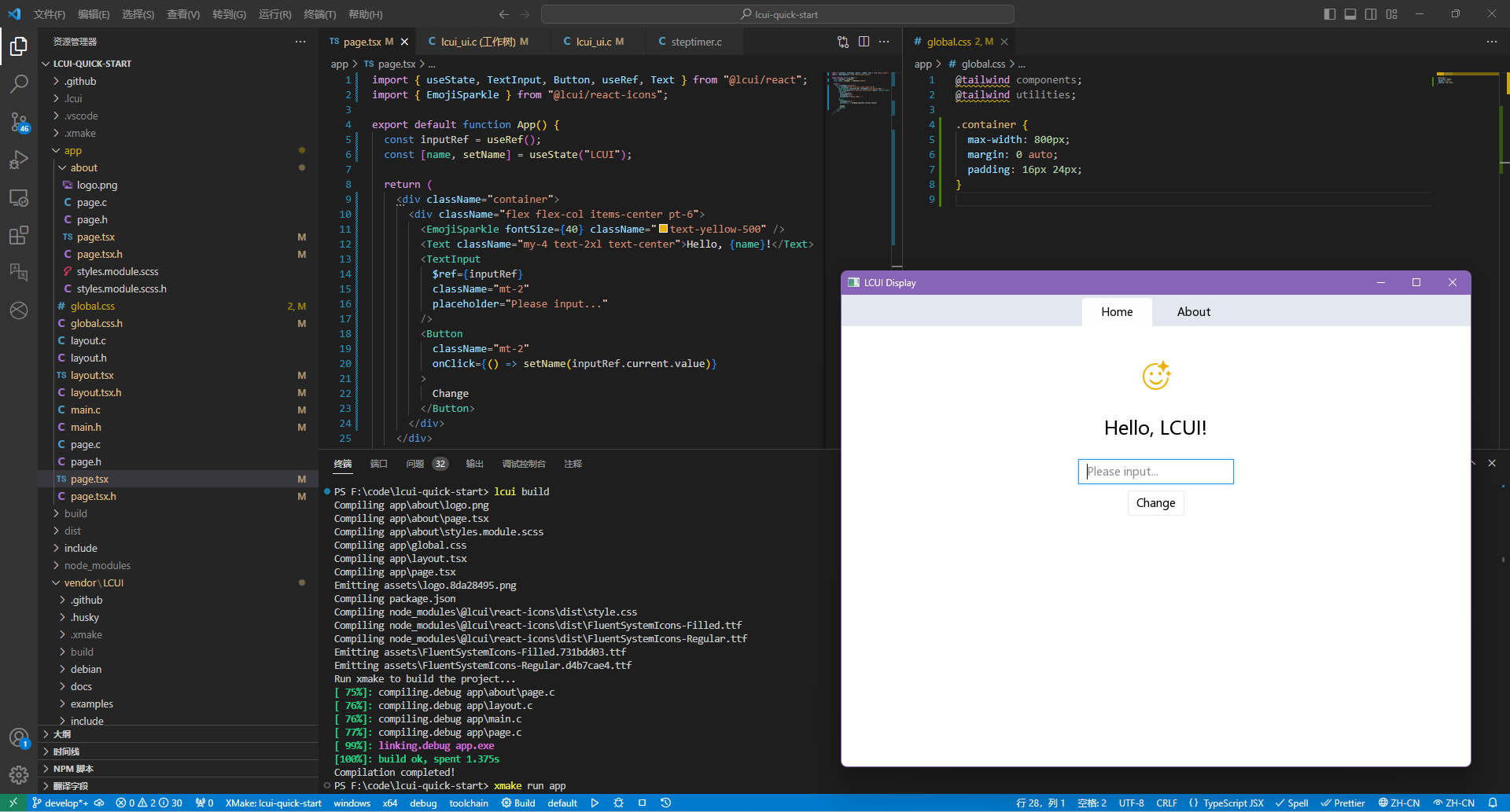
You can get an overview of the development experience for LCUI applications from the following image:
Component Development in React-like Style: Writing UI configuration files using TypeScript. With the combined advantages of TypeScript, JSX syntax, and the LCUI React library, you can succinctly describe UI structure, resource dependencies, component states, data binding, and event binding.
Various Stylesheet Writing Methods: Tailwind CSS, CSS Modules, Sass, and global CSS.
File-system based router: Organize application pages in directory form, with each page corresponding to a directory. The path of the directory serves as the route for that page. With the built-in application router, you can easily implement page switching and navigation without manual route configuration.
User-friendly and Modern Icon Library: Icons are sourced from the fluentui-system-icons library, with partial customization to fit LCUI's characteristics, offering similar usage patterns.
Command-line Development Tool: Run the lcui build command to preprocess configuration files within the app directory, then generate corresponding C source code and resource files.
Architecture
Over time LCUI has been built up to be based on various libraries:
lib/yutil: Utility library providing common data structures and functions.
lib/pandagl: PandaGL (Panda Graphics Library), a graphics library offering font management, text layout, image processing, and rendering capabilities.
lib/css: CSS parser and selector engine, enabling CSS parsing and selection functionalities.
lib/ptk: Platform Toolkit library offering cross-platform unified system-related APIs, including message loops, window management, timers, worker threads, and input methods.
lib/ui-server: UI server that maps UI components to system windows.
The core source code of LCUI is located in the src/ directory and is divided into the following modules:
app: Application lifecycle, event, and UI management.
fonts: Default font settings.
settings: Global settings, providing switches and parameter configurations for certain features.
ui: UI and window management.
widgets: Predefined components.
worker: Asynchronous task management.
Quick Start
Before you begin, you need to install the following software on your computer:
Git: Version control tool used to download the source code of the example project.
XMake: Build tool used to build the project.
Node.js: JavaScript runtime environment used to run the LCUI command-line development tool.
Then, run the following commands in a command-line window:
# Install the LCUI command-line development tool
npm install -g @lcui/cli

# Create an LCUI application project
lcui create my-lcui-app
Follow the prompts provided by the commands afterward.
Documentation
Online Documentation
Request for Comments (RFC)
Changelog
Contribution Guidelines
Tutorials
Title
Preview
Summary
Image Viewer
Develop an image viewer program based on the LCUI library, build its graphical interface with web technologies, implement the interface interaction logic and various functions with C language, and deeply explore the features and development techniques of LCUI in the UI aspect.
Todo List
Learn the basic concepts and usage of LCUI, as well as how to use it to build UI and implement state management, UI updates, and interactions.
Fabric
Rewrite the existing fabric simulation program's JavaScript source code in C language, and use the cairo graphics library for fabric rendering. Then, apply LCUI to implement fabric animation playback and interaction.
Browser
(Outdated)
Referencing a web browser, use LCUI to implement similar UI structure, layout, style, and multi-tab management features. Utilize LCUI's routing management functionality to implement multi-tab page state management and navigation, as well as a simple file browsing page.
Roadmap
Below are the items for potential future development:
LCUI
Improve API design.
Enhance the CSS engine to support inherit and !important.
Add an SDL backend to replace the lib/ptk library.
Adapt other open-source graphics libraries to achieve better rendering performance.
Multi language support for internationalization.
Optimize memory usage.
Improve performance.
Command-Line Tools
lcui build --watch: Continuously monitor file changes and automatically rebuild.
lcui dev-server: Similar to webpack-dev-server, build LCUI applications as websites to allow developers to preview UI in the browser.
Add build caching to rebuild only the modified files.
React Component Library
Develop a component library for LCUI applications using TypeScript + React, inspired by some web frontend component libraries (e.g., radix, shadcn/ui), and reuse components from the LC Design library.
Documentation
Tutorials
Request for Comments (RFC)
Contribution
Think LCUI is slow to update? there are many ways to contribute to LCUI.
Submit bugs and help us verify fixes as they are checked in.
Share some interesting ideas related to GUI development in the issues page.
Search for FIXME comments in the source code and try to fix them.
Fund the issues that interest you on IssueHunt to attract other developers to contribute.
Review the source code changes.
Contribute bug fixes.
LCUI has adopted the code of conduct defined by the Contributor Covenant. This document is used across many open source communities, and we think it articulates our values well. For more, see the Code of Conduct.
FAQ
Compilation error
The build configuration of this project has included the "Treat Warnings as Errors" compilation option. This might be because your compiler is relatively new and can detect more issues from the code.
You can try to search for all xmake.lua files that contain set_warnings("all", "error") and remove this rule.
Is this a browser engine? Or a development library like Electron that integrates a browser environment?
No, you can think of it as a traditional GUI development library that incorporates some web technologies.
Why should I choose LCUI over other GUI libraries/frameworks?
It's recommended to prioritize other GUI libraries/frameworks, as LCUI currently lacks:
Rich Built-in Components: You will need to build almost all the components in your UI from scratch, leading to higher development costs.
Efficient Graphics Rendering Performance: Interfaces with extensive and complex content may experience lag.
Animation System: The lack of visual feedback affects the user interaction experience.
Detailed and User-friendly Documentation: The existing documentation and examples are only for a simple understanding. If you want to study in depth, you need to read the source code, so the learning cost is relatively high.
Active Updates: Limited by the maintainer's personal interests and time, the update frequency of this project is very low. Therefore, the functional requirements or bugs you submit may not necessarily be resolved, especially those in the old versions.
Given its current state, LCUI is best suited for fulfilling the maintainer's personal needs or developing simple tools with minimal UI content and interactions.
Support development with TypeScript? If I know how to use it, why wouldn’t I just go with Electron?
Currently, TypeScript is primarily used to describe UI and resource dependencies, with only a few TypeScript features in use. You don’t need to study it in depth; in most cases, you can simply refer to example code for implementation.
If you have extensive web development experience and are willing to learn Electron, then Electron is clearly the better choice.
How about CSS support?
The following is a list of supported CSS features. Checked is supported (But does not mean full support). Unlisted properties are not supported by default.
CSS feature coverage
at rules
@font-face
@keyframes
@media
keywords
!important
selectors
*
type
#id
.class
:hover
:focus
:active
:first-child
:last-child
[attr="value"]
:not()
:nth-child()
parent > child
a ~ b
::after
::before
...
units
px
dp
sp
pt
%
rem
vh
vw
properties
top, right, bottom, left
width, height
visibility
display
none
inline-block
block
flex
inline-flex
inline
grid
table
table-cell
table-row
table-column
...
position
static
relative
absolute
fixed
box-sizing
border-box
content-box
border
border-radius
background-color
background-image
background-position
background-cover
background
pointer-events
font-face
font-family
font-size
font-style
flex
flex-shrink
flex-grow
flex-basis
flex-wrap
flex-direction
justify-content
flex-start
center
flex-end
align-items
flex-start
center
flex-end
stretch
float
transition
transform
...
License
The LCUI Project is released under the MIT License.
lc-soft/LCUI thuộc nhóm Backend trên TopGit, cùng 5 topic GitHub. Trang Trending và Topics liệt kê các repo cùng số sao và cùng ngôn ngữ để so sánh.
Đọc thêm về lc-soft/LCUI ở đâu?
Trang TopGit này là một snapshot — tab "Readme" hiển thị nguyên văn README của repo (đã bỏ link, giữ ảnh). Repo GitHub ở github.com/lc-soft/LCUI là nguồn chính thức.
lc-soft/LCUI có phải mã nguồn mở không?
Có — lc-soft/LCUI phát hành theo license MIT, nghĩa là mã nguồn mở để đọc, fork và (tùy license) tái sử dụng. Mã: github.com/lc-soft/LCUI.
lc-soft/LCUI là gì?
lc-soft/LCUI (lc-soft/LCUI) là dự án C trên GitHub. Theo mô tả gốc: C library for building user interfaces
lc-soft/LCUI so với các dự án Backend khác thế nào?
lc-soft/LCUI được TopGit xếp vào nhóm Backend, với 4.3k sao GitHub và viết bằng C. Xem trang chủ đề Backend trên TopGit để so sánh với các dự án tương tự theo số sao và mức độ hoạt động.
Vì sao lc-soft/LCUI được xếp vào nhóm Backend?
TopGit xếp lc-soft/LCUI vào nhóm Backend dựa trên GitHub topics và mô tả của repo (gắn thẻ: "c", "cross-platform-gui", "gui-framework"). Việc phân loại dựa trên metadata thật của repo, không phải đoán theo cảm tính biên tập.
Đọc đầy đủ README ở tab phía trên.
LCUI có đáng để bạn bỏ thời gian?
ChatGPT, Claude và Perplexity đều đọc được trang này. Hỏi thử xem họ nghĩ gì về LCUI.

 /LCUI